
Quick Summary
We often need to convert MPEG to WAV when we work on media projects. Video editors need pure, uncompressed audio tracks so they can mix background sound without distortion. Podcasters regularly extract audio from MPEG video recordings to clean up voice lines in specialized audio editing software. Musicians and teachers also need to save standalone sound files from video lectures or live performances. In this guide, we gather the 3 best methods so you can choose the right tool for your project, including online and desktop software. So that, you can turn your MPEG video files into clean WAV audio quickly without losing sound quality.
| Processing Type | Batch Processing | Max File Size Limit | Data Privacy Risk | Conversion Speed | |
|---|---|---|---|---|---|
| AnyMP4 Video Converter Ultimate | Local Hardware | Yes | Unlimited | Zero | Hardware Accelerated |
| VLC Media Player | Local Hardware | No | Unlimited | Zero | Normal (CPU only) |
| FreeConvert | Cloud Server | No | 1GB (Free Tier) | High | Depends on Network |
Best For: Users who want lightning-fast speed, bulk processing, and total offline privacy.
When we need to handle large media projects, we turn to AnyMP4 Video Converter Ultimate. We consider this software the best MPEG to WAV converter for desktop because it processes everything directly on our computer, which protects our data privacy completely. By relying on local hardware processing, we can batch convert MPEG to WAV securely, turning whole folders of video files into soundtracks in just a few seconds. Its clean grid menu also saves us from endless manual clicking.
Secure Download
Secure Download
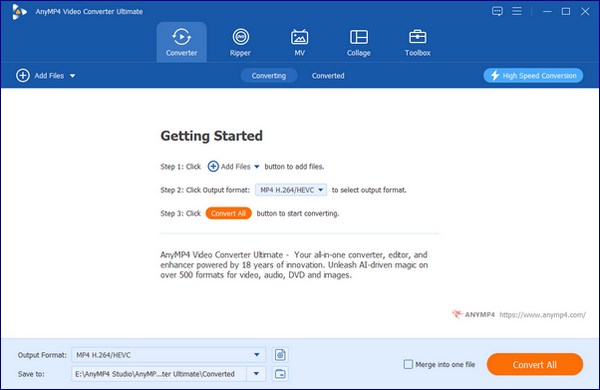
1. Add your MPEG video files
We drag our MPEG files directly from our desktop folder into the main grid on the screen. Personal tip: We always drag the whole folder into the window at once. The software reads all the video files together, so we can complete the batch MPEG conversion at one time.
2. Set the WAV output format
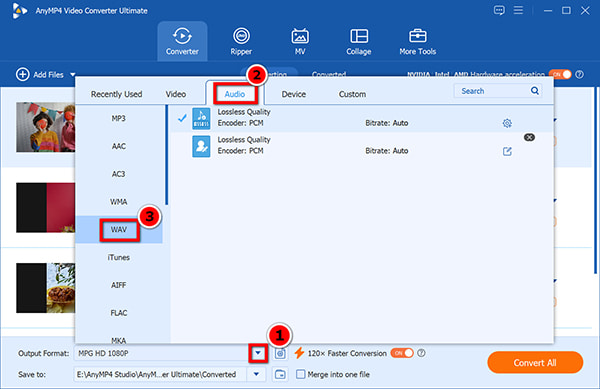
Click the Output Format drop-down menu on the left-bottom side, switch to the Audio tab, and select WAV.
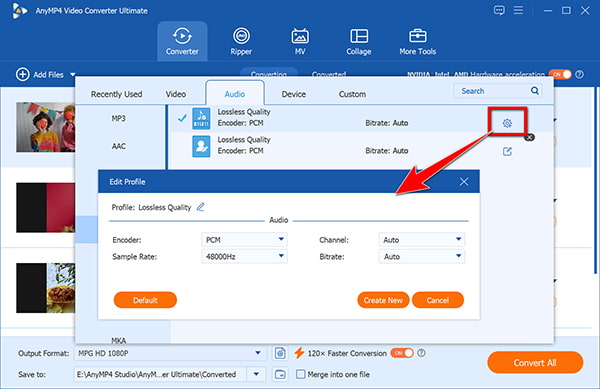
Change audio parameters optionally:
We click the small gear icon next to our WAV profile to open the settings window. Here, adjust the sample rate & bitrate to match our editing needs. You can set the sample rate to 48000 Hz if we plan to drop the audio into a video editor later. It keeps the sound perfectly in sync with video frames.
3. Convert MPEG to WAV
Set the save path at the bottom of the window, then click the big Convert All button. The software uses our computer GPU to finish the job quickly.
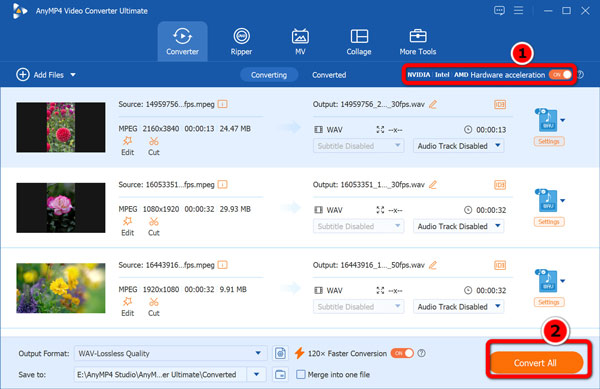
The key to speeding up the MEPG to WAV conversion is enable the GPU acceleration at the top-right corner.
The Good and The Bad: We love the fast processing speed. The local hardware processing turns long video folders into WAV files in seconds, and the interface is easy to read. However, we dislike that the free trial limits how many files we can export, forcing us to buy a license for larger projects.
Best For: Users with one small video file who do not want to install any software.
For quick one-off tasks, we often rely on FreeConvert. We like this online tool when we only need to convert MPEG to WAV for a single small clip. Just simply open the website, upload our file, and let the cloud server handle the audio extraction. It requires no software installation, making it very accessible on any computer. However, we quickly hit its limits when working with larger files. We have to sit through slow upload bars, and we must accept the data privacy risks that come with public cloud servers.
1. Upload MPEG videos
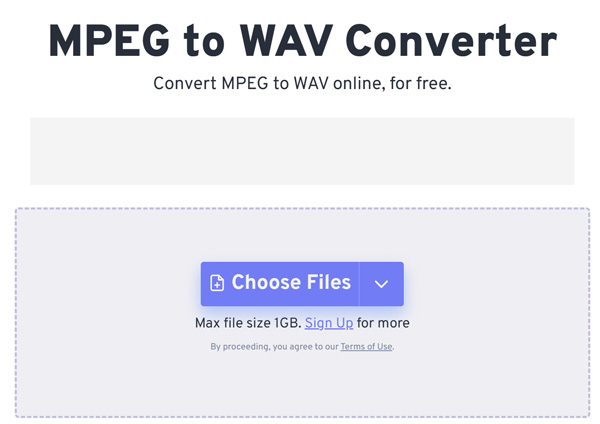
Open FreeConvert MPEG to WAV converter via your web browser. Then, we click the big Choose Files button in the middle of the screen.
Select our MPEG file from our drive and wait for the upload progress bar to finish.
Do not close or switch the browser tab while uploading. We made this mistake once, and the upload failed halfway through.
2. Custom the output WAV format
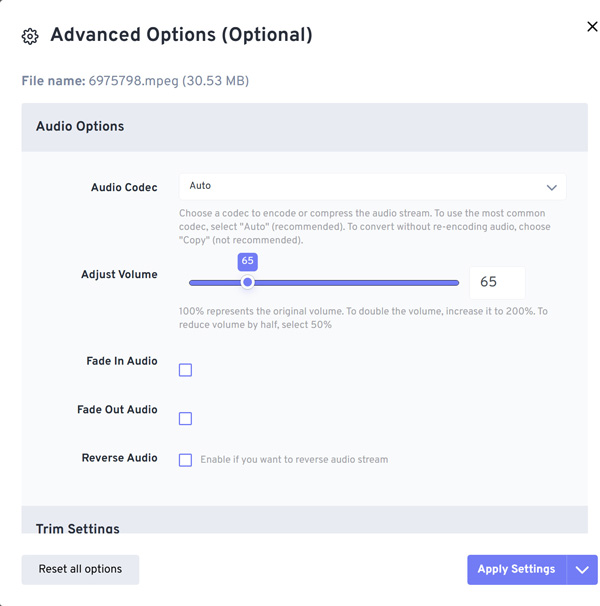
By default, WAV is selected from the Output menu drop-down. Click the gear icon next to the format drop-down before converting. If your video audio is too loud, you can lower the volume slider here first.
3. Convert and Download the WAV file
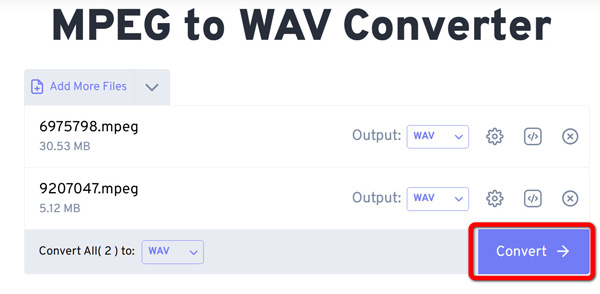
Once all the settings are ready, you can click the Convert button. Then, jsut wait for the cloud server to process the video, then click the green download button to save your WAV file.
The Good and The Bad: We appreciate that we can use this tool on any web browser without downloading software. It works fine if we just need to turn MPG to WAV for a short clip. However, we hate waiting for long uploads, and we do not like sending our private files to web servers when we want to convert MPEG to WAV. What’s worse, this web tool is full of ads in its main interface.
Best For: Advanced users who already use VLC and want a free, offline solution.
Many of us already keep VLC installed on our computers as a standard MPEG player. While you mostly use this tool to watch movies, you can also rely on its hidden internal converter. It gives you a completely free way to extract high-quality WAV from MPEG without losing quality. Because it runs on your local hardware, your files stay safe on our hard drives. The main downside is the clunky interface, which forces us to dig through several confusing settings menus.
1. Open the convert menu
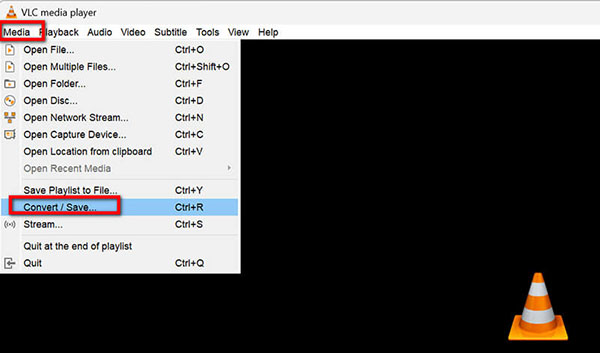
Launch VLC, click Media in the top menu bar, and select Convert / Save.
We prefer using the keyboard shortcut Ctrl+R on Windows. It opens the conversion window instantly and saves a menu click.
2. Add the MPEG videos
Just click the Add button in the pop-up window to pick and add your MPEG video file, and click Convert / Save at the bottom.
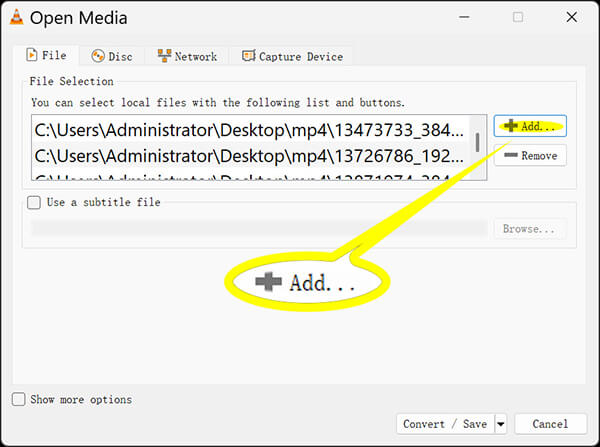
Avoid adding multiple files here at once. VLC claims it can batch-convert, but it often crashes when handling multiple videos simultaneously.
3. Make a new WAV profile
Generally speaking, from VLC’ s output format list, you cannot find WAV. So you need to create a new WAV output format. Just click the wrench icon to create a custom WAV profile. Set the profile name to WAV, choose WAV under encapsulation, and pick WAV in the audio codec tab before saving.
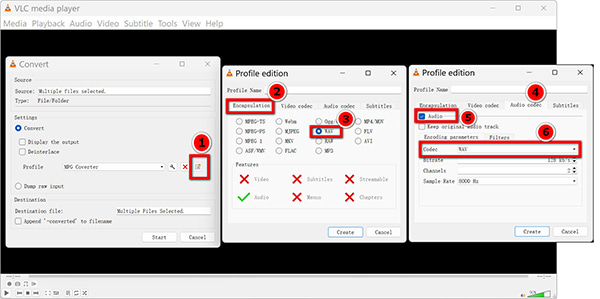
Remember to check the audio checkbox in the codec tab. If you forget this step, VLC exports a file with no sound track.
4. Save the WAV file
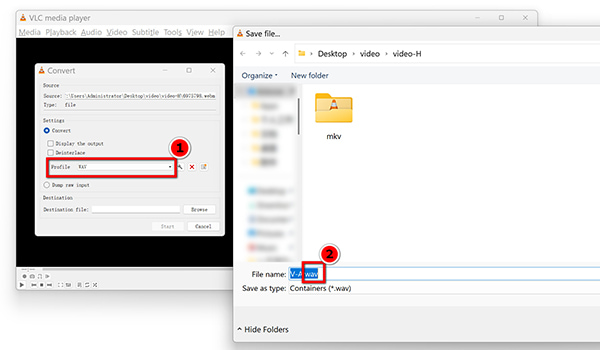
Click Browse to choose our destination folder, type .wav at the end of our file name manually, and click Start.
VLC does not display a standard progress bar. Instead, the timeline slider moves across the screen quickly. We just wait until it reaches the end.
The Good and The Bad: We love that VLC is free, open-source, and keeps our files safe on our computer. However, we find the setup process very annoying. Just like when we try to convert MKV to WAV, we have to click through too many confusing menus to do a simple job.
We need to understand the technical facts. An MPEG video holds compressed audio data. It drops small sound details to keep the video file size small. WAV is a lossless audio format. It holds pure, raw sound data. It never drops details.
When we edit audio in post-production, we need a clean slate. We must extract high-quality WAV from MPEG without losing quality. WAV files do not compress the sound a second time. WAV keeps the edit clean and safe. For a deeper look at how raw sound works, we can read about what is WAV. We choose WAV to get the best audio for mixing.
Does converting an MPEG to WAV improve the original audio quality?
No. Making MPEG to WAV conversion will not add lost data back. The new WAV file just copies the exact sound from the MPEG video. It stops the sound from getting worse during later edits.
Is it safe to upload personal MPEG videos to online converters for audio extraction?
No. We take a high data privacy risk when we do this. We send our private files to random web servers. The site owners can view or keep our data. We strongly suggest using an offline converter instead.
How can multiple MPEG files be converted to WAV simultaneously?
We need desktop software with a grid interface. We drop fifty files into the software, pick the output format once, and click one button. The local hardware processes all files in a batch automatically.
What is the best sample rate to choose when exporting a WAV file from an MPEG video?
We match the original source video. Usually, 44.1 kHz or 48 kHz is the right choice. This specific sample rate & bitrate rule keeps the sound speed normal. If you need visuals, you can convert MPEG to GIF, but for pure sound, the sample rate matters most.
Now, 3 methods of converting MPEG to WAV are done here. The steps are pretty easy to follow by yourself. If you need to process large folders, try AnyMP4 Video Converter Ultimate. It helps us batch-convert MPEG to WAV securely and extract high-quality WAV from MPEG without loss of quality. Free download it and keep your audio tracks perfectly clean.
Secure Download
Secure Download
 Updated by Alice Thorne to Convert Video, Convert Audio
More readings
 [Tutorial] MPEG Joiner - How to Merge Multiple MPEG Files into One
When you have some MPEG files from DVDs or camcorders, you can learn more about the 3 efficient methods to merge MPEG files into a single video here.
 How to Convert Video to WAV: 2026 Lossless Extraction Guide
Video to WAV conversion is the only way to preserve high-fidelity sound. Learn how to extract uncompressed PCM audio from MP4s without losing the source data.
 Top 10 WAV Players in 2026: Computer, Mobile, and Online
Are you looking for a good media player to watch high-quality WAV video files? Read this guide to know the top 10 WAV players.
 3 Ways to Convert MP3 to MPEG Format in 2026: A Full Guide
Are you looking for a tutorial on converting MP3 files to MPEG format? Read this article for a tutorial on three media conversion tools you can use.
 Add your comments to join the discussion here