
Summary
There are three ways to convert MPG to MP3, depending on your needs. If you want 100% offline privacy when converting large files, the best choice is AnyMP4 Video Converter Ultimate. If you are open to open-source options, VLC is the best choice. But if your files are under 1GB, FreeConvert is a convenient alternative.
Converting large MPG home videos online comes with several considerations. These include dealing with strict file size restrictions, long upload wait times, and annoying pop-up ads. Furthermore, uploading sensitive videos to the cloud poses risks to your privacy. That is why a 100% offline MPG converter is essential to protect your sensitive data. In this post, we will teach you how to convert MPG to MP3 using three proven methods. We will help you securely and safely extract audio from your MPG files. Our aim is to help you choose the best method based on speed, privacy, output quality, and most importantly, convenience.
Choosing the right software to convert MPG to MP3 is an important decision. An online converter requires you to upload your video clips to external servers. This might not suit your purpose, especially if your MPG files include personal recordings or other sensitive material. The audio quality is another consideration, and using a 320 kbps bitrate and a 48 kHz sample rate ensures that compression does not distort the sound. Batch processing can be a huge time-saver when dealing with multiple MPG videos.
How We Test:
| Best For | Processing | Max File Size | Hardware Acceleration | Custom Bitrate | |
|---|---|---|---|---|---|
| AnyMP4 Video Converter Ultimate | Batch and large files (100% privacy) | Local (Offline) |  No limit No limit |
NVIDIA NVENC, Intel QSV, and AMD | Up to 320 kbps |
| VLC | Basic conversion | Local (Offline) | No limit |
DirectX Video Acceleration |  |
| FreeConvert | Quick conversion of small files | Server (Online) | 1 GB |
|
|
When dealing with MPG home video, data privacy and processing are our priority. AnyMP4 Video Converter Ultimate is the choice of professionals for re-encoding MPG to MP3 format. It processes all files locally on your drive, so your sensitive data never leaves your computer. It uses NVIDIA NVENC, Intel QSV, and AMD hardware acceleration media processing to achieve 120× speed. And if you need to work with multiple MPG files, you can use batch conversion. With it, you can import hundreds of home videos and process them at once without lag or crashes. You can also adjust the sample rate and up to 320 kbps bitrate.
Secure Download
Secure Download
Here’s how to convert MPG to MP3 offline:
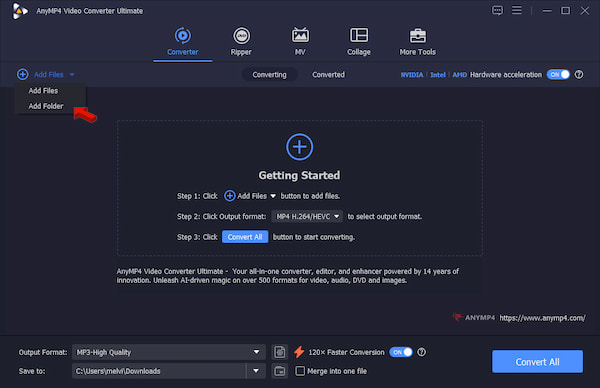
1.Download the audio extraction tool and finish the installation. After setup, head to the Converter tab and click +Add Files to load the source MPG(s). Remember, you can import one or more home video files at a time.
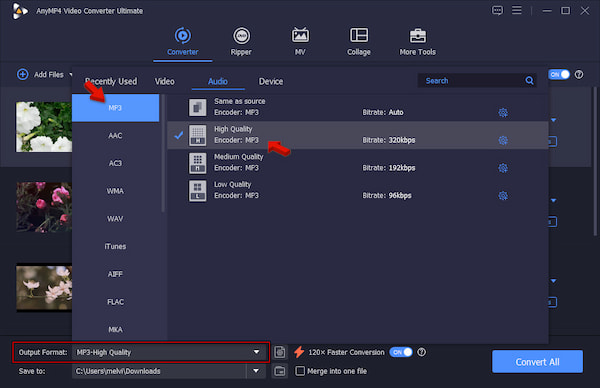
2.Go to the Output Format picker and select MP3 under the Audio Category. Next to it, select a quality preset that matches your intended use. For general listening, choose the High Quality or Same as Source preset to get a transparent audio.
3.Return to the main interface and turn on Hardware Acceleration. Also, activate the 120× Faster Conversion button to speed up conversions. Set the destination folder, then click Convert All to convert the MPG file to MP3.
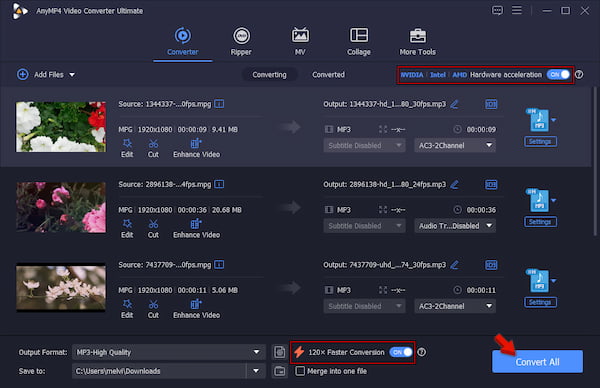
We conduct a hands-on test to evaluate AnyMP4's capabilities in terms of output quality, speed, and batch conversion. In our tests, we convert 50 1080p Full HD home videos, totaling 552.50 MB. It took only 39 seconds to extract the audio from the MPG files and convert it to MP3. In our audit, we found no distortion, quality degradation, or glitches in the final MP3s.
We only use VLC as an MPG player for playing camcorder and home videos. Without exploring it, you wouldn’t know that it has a surprising feature. VLC has a hidden Convert/Save tool that can extract lossless audio from an MPG video. But let’s be clear: you can only process non-protected MPG files, meaning you cannot convert videos with DRM protection.
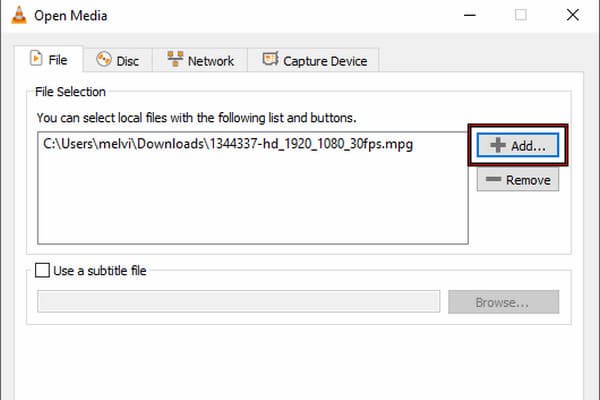
1.Launch VLC, go to Media, and click Convert/Save to access the Open Media window. Click +Add in the File tab to import the MPG source. Then, click Convert/Save to proceed.
2.Click Create a New Profile to manually create an MP3 profile. After creating the profile, select the MP3 profile you created, set the destination folder, and click Start.
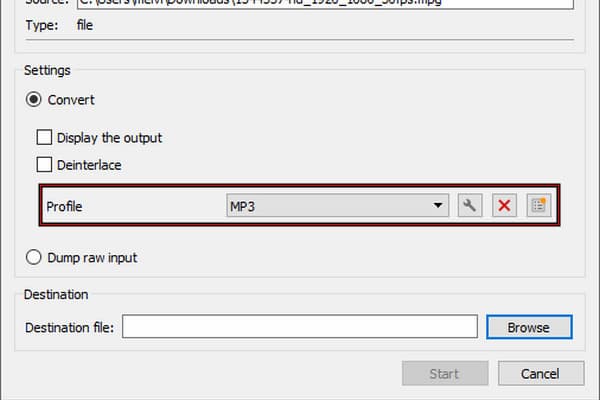
VLC can handle standard MPG files well through local processing and produces good-quality MP3 output. But it is important to remember this: Don't rely on the default Audio - MP3 profile because it uses the wrong preset. When you create a new profile, be sure to set the codec to MP3 and do not change the sample rate unless necessary.
For small MPG files conversion, below 1 GB, it is recommended to use online tools instead. FreeConvert provides a direct way to convert MPG to MP3 online. It means you don’t need to install anything because it operates entirely on a web browser.
To convert: Navigate to FreeConvert and click Choose Files to import the MPG source from your computer. Alternatively, click the arrow dropdown and select a service to upload a video from the cloud. Select MP3 in the Output picker, then click Convert to begin the conversion. Right after the conversion process, download the file to your computer.
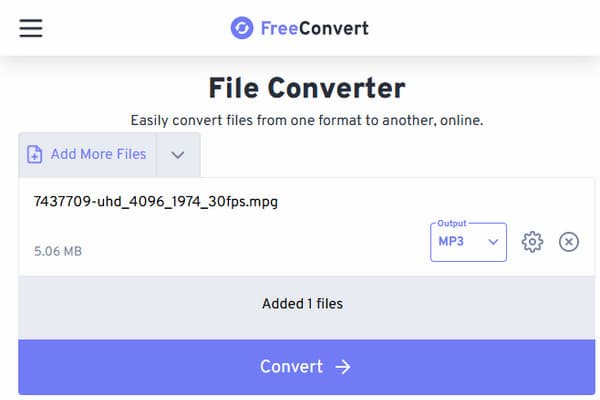
Opt for FreeConvert if you only convert files occasionally. But as a free tool, expect it to have its own limitations. Most importantly, you need to upload the MPG file to FreeConvert’s server before you can process it. So, if privacy is your priority, this is definitely not a choice.
Does converting an MPG video to MP3 reduce the audio quality?
Yes, converting an MPG file to an MP3 will degrade the MP3's sound quality. It is because MP3 employs lossy compression, which deletes some of the audio frequencies that cannot be heard.
How can I batch-convert multiple MPG files to MP3 without an internet connection?
If there is no internet connection, you could use AnyMP4 to help you with batch conversion. Another option is to use the Convert/Save tool in VLC. Both programs work offline without an internet connection.
What is the best bitrate for extracting MP3 from an MPG video?
The optimal bitrate for converting MPG video to MP3 audio depends on what you are more concerned about. 192 kbps is a good balance between size and quality; 320 kbps would be perfect for high-quality sound, and 128 kbps is good for spoken audio to save space.
Is it safe to use online converters for my personal MPG home videos?
Online converters are not always safe for personal MPG home video conversion. The problem is that such sites offer no confidentiality, so your private videos are publicly accessible. Besides, the FBI and cybersecurity experts repeatedly claim that online converters are sources of malware, ransomware, and pop-ups.
Choosing an optimal converter for MPG to MP3 conversion depends on your needs. If your file size is below 1 GB, FreeConvert would work well. However, if your requirements include home videos, large file sizes, or batch conversions, we recommend AnyMP4 Video Converter Ultimate. It provides offline conversion and better speed and quality when it comes to extracting the audio. Just a note: Please do not extract audio from any MPG file that you do not own.
 Posted by Alice Thorne to Convert Video, Convert Audio
More readings
 2 Reliable Ways to Convert MOV to MPEG/MPG (2026 Updated)
Learn from this article to get 2 methods of converting MOV to MPEG for DVD burning or old hardware in both free online and professional desktop tools.
 How to Rip Blu-ray Discs to MPG for Easy Playback
This post focuses on ripping Blu-ray discs to MPG format. So, if you have no idea how to perform it, don’t hesitate to click on this post.
 5 Best MOV to MP3 Converters (2026): Pro Quality & Speed Tested
Extract 320kbps MP3 from MOV files with our top 5 tested tools. Features detailed reviews, batch guides, and expert tips for lossless audio extraction.
 Top 6 AVI to MP3 Converter Applications Available to Windows and Mac
The best AVI to MP3 converters are simple to use, and can turn AVI videos into MP3 format without losing much quality. Here we identify and share a top list.
 Add your comments to join the discussion here