6 Best Ways to Convert MKV to AVI (2026 Updated Guide)
Quick Summary:
If you want to convert MKV to AVI, we have provided six of the most reliable options for converting MKVs to more compatible AVI videos. Among them, AnyMP4 Video Converter Ultimate is the best since it offers a balance in terms of ease of use and functionality.
When it comes to well-known video formats, both MKV and AVI are very popular and widely used on most devices. But there is one major restriction for MKV files due to their high quality: they are not compatible with some video platforms such as car infotainment, legacy editing software, and older media players. This is why you need to convert MKV to AVI; you can get a relatively small file size for a compatible device. This article introduces 8 frequently used methods for converting MKV to AVI. Just check out the detailed solutions from the article now.

Part 1. Information About MKV & AVI
Matroska file extensions are MKV for video (with subtitles and audio), MK3D for stereoscopic video, MKA for audio-only files, and MKS for subtitles only. The Matroska Multimedia Container is an open-standard, free container format. Like other containers such as MP4, AVI or ASF, the MKV format contains a large number of video, audio, picture or subtitle tracks in one file. But MKV is entirely open in specification. It serves as a universal format for storing common multimedia content like movies or TV shows. MKV files can be played on many media players like Zoom Player, PotPlayer, MPlayer, GOM Player, and ALLPlayer. But you cannot play it on car infotainment systems, so if you want to play movies for family travels, the first thing you should do is convert MKV to AVI.
AVI is a multimedia container format introduced by Microsoft, and it can hold both audio and video data in a file container that can synchronize to play audio and video. AVI is a derivative of the Resource Interchange File Format (RIFF), which divides a file's data into blocks, or "chunks." The AVI file takes the form of a single chunk in a RIFF-formatted file, which is then subdivided into two mandatory "chunks" and one optional "chunk." AVI is a video format supported by most portable devices and programs.
To learn more about the advanced reasons and advantages of converting MKV to AVI, make sure to read the difference in the codecs of each tool.
H.264 vs Xvid for AVIs
Both H.264 and Xvid are compression and codec options used for handling AVI formats. H.264 is the newer and more efficient video compression standard. Meanwhile, Xvid is the more dated option, but it has superior compatibility for legacy hardware such as DVD players. Because of its higher compression efficiency, H.264 has a much smaller file size.
What are Video Codecs
Video codecs are hardware or software options made for compressing video files. Depending on your codec of choice, your video will be compressed efficiently by removing redundant data, which will allow you to stream or store files much more efficiently. To make modern MKVs compatible with older hardware, you can re-encode or remux AVIs using Xvid codecs.
Way 1: The Ultimate Way to Convert MKV to AVI with High Quality (AnyMP4)
AnyMP4 Video Converter Ultimate is an excellent MKV to AVI converter because it can convert MKV to AVI with super high image quality. It converts other video formats (MOV, 3GP, FLV, SWF, WMV, DAT, etc.) to AVI, in addition to MKV, and converts AVI to other video formats.
After converting videos to AVI, you can play these files on different platforms and devices such as smart TVs, car infotainment systems, legacy editing software, and older media players.
Besides, the best MKV to AVI Converter provides powerful video editing functions, so you can trim the video length by cutting off any part of the video, crop the video frame, add a watermark, adjust the video effect, merge video clips into one file, etc.
All of these conversions and advanced features are all supported by a GPU-acceleration system that can process files up to 70x faster than the regular conversion speed.
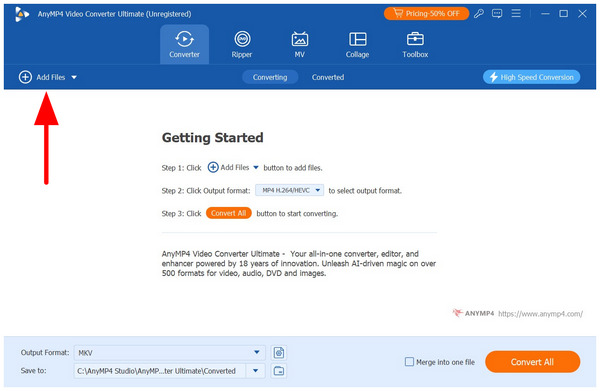
1. Add MKV file to the program
Firstly, you should install this program on your computer. Then click Add Files on the toolbar of the main interface to open a dialogue, where you can select the original MKV files and click the Open button to add them to this program.
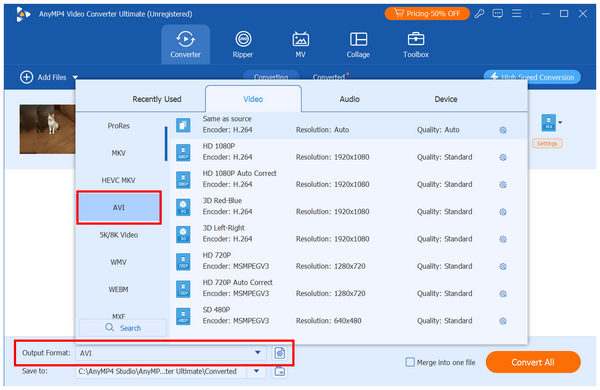
2. Set AVI as the Output Format
Next, select Output Format and choose the AVI option. Then, click on the Conversion Profile you want to use.
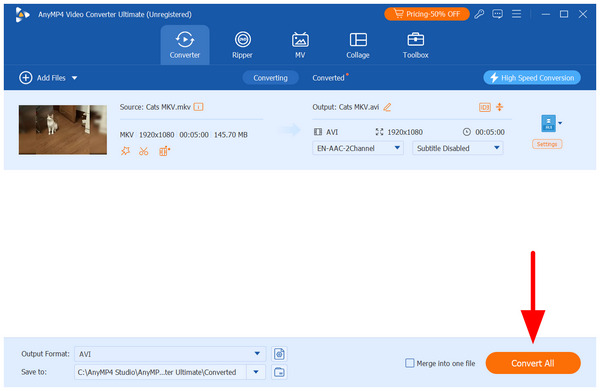
3. Convert Video
Once the output format is set to AVI, you will move back to the Converter tab. There, click on Convert All to begin converting your MKV to AVI video.
Among the options on this list, AnyMP4 Video Converter Ultimate offers the most options when it comes to output formats. This makes the tool a solid choice for handling file conversion for video files regardless of their formats.
Way 2: How to Convert MKV to AVI Free Using VLC Media Player
When it comes to media players, VLC is one of the most popular open-source options. Unknown to its users, the software is also equipped with an extra feature made for converting video files. As such, VLC can convert MKV to AVI and fix missing audio.
1. Select the Media tab in VLC Media Player's taskbar, then choose Convert/Save.
2. Next, select Add in the Open Media menu, and browse through your files to import the MKV you want to convert.
3. In the Convert menu, set the Profile to Video for DivX Compatible Player. This conversion profile saves videos to AVI format. Click on Start to begin conversion.
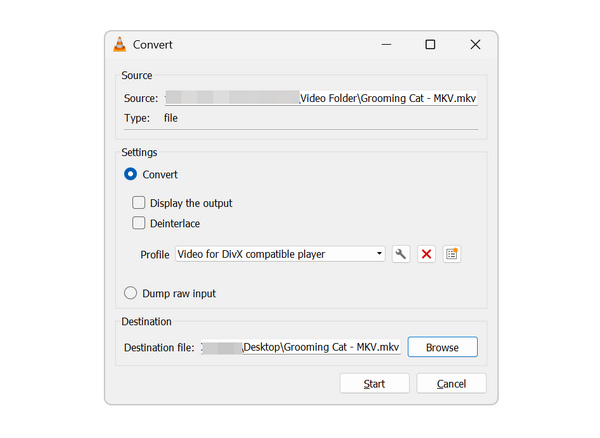
When using the program, keep in mind that incorrect audio codec settings may cause AVI files with no sound. This might occur when using VLC, since it lacks manual format conversion settings.
Way 3: Professional MKV to AVI Conversion with Movavi Video Converter
If you want an MKV to AVI converter for ease of use and features, you can download Movavi Video Converter to convert MKV to AVI. With this converter, you can enjoy a free, simple, and fast way powered by its SuperSpeed mode to convert MKV to AVI.
1. Download Movavi Video Converter to your computer and complete the installation. Next, launch it.
2. Click the Add Media button, then choose Add Video to open the MKV file you want to convert.
3. Click the Video button and choose AVI as your output format. Next, choose the destination folder where you want to save this converted file.
4. Click on the Convert button to begin converting MKV to AVI. And now you can get the video in AVI for other devices.
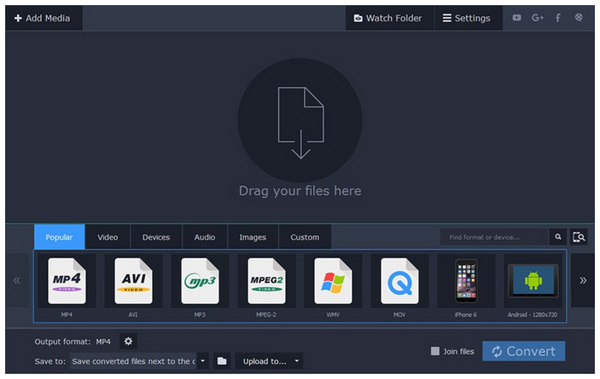
The third option in this article is Movavi Video Converter, our recommended option for users who want to enjoy balance.
Way 4: Lossless MKV to AVI Transformation via WinX HD Video Converter
To convert MKV to AVI without any loss, you can try WinX HD Video Converter Deluxe. It provides an easy yet professional way to convert MKV to AVI. You can get converted AVI files with similar or even better quality than the original file.
These conversion options are supported by the software's high-quality engine and de-interlacing features for old camera footage. It also has superior stability when handling large MKV files, even when larger than 10GB.
1. Download WinX HD Video Converter Deluxe from the official website and finish the installation. Then launch it on your computer.
2. Click the + Video button to load the MKV video you want to convert.
3. From the General Profiles or PC General Profile category, you can choose AVI Video as the output format profile. Or select AVI HD Video as the output from the HD Video category.
4. Click on the Browse button to choose the destination where you want to save. Then you can click the Run button to begin converting MKV to AVI.
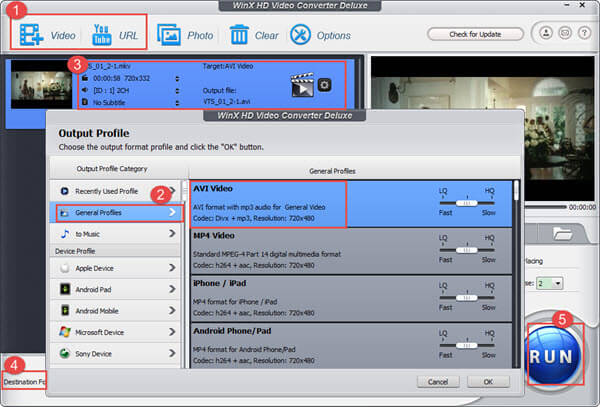
Due to the tool's superb handling of large video files, it has a specific advantage in this niche. We recommend using the program if you are managing a single large file or if you are having trouble with batch conversion exceeding 10GB.
Way 5: Convert MKV to AVI Online via Convertio (No Install)
If you don't want to download any software on your computer, you can choose to convert MKV to AVI online. Convertio is a great online converter you can use for this conversion. But you can only upload files no larger than 100 MB.
Convertio online tool also supports cloud-based import from online storage such as Google Drive and Dropbox. However, be aware that it has a 100MB upload limit for its free version.
1. Find this online converter with your computer browser.
2. Add the MKV file you want to convert from your computer, Dropbox, Google Drive, or URL. You can also simply drag and drop it on this page.
3. This online converter will automatically set MKV as your input format and AVI as your output format.
4. Now you can begin to convert MKV to AVI with this online converter. You can also save the converted files to your Dropbox or Google Drive.
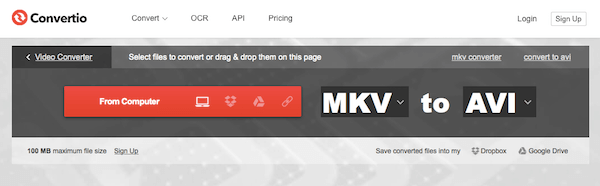
Convertio's niche in online file conversion is its big advantage. However, keep in mind that it has an upload limit of 100MB, which makes it unsuitable for large video files.
Way 6: Fast Cloud-Based MKV to AVI Conversion with Zamzar
To convert MKV to AVI online, Zamzar is a good choice you can't miss. You can easily convert MKV to AVI with this free online converter and get the converted files by email. But the file size you can convert is limited. If you want to decide whether it is trusted, its long history of being active since 2006 may help you decide.
1. Open the Zamzar MKV to AVI converter in your browser, then add your MKV file to the online converter from your computer or URL. You can also simply drag and drop the file to this page.
2. Now click the drop-down menu and choose AVI as your output format.
3. Enter your email address where you want to receive the converted file.
4. After you agree to the terms of this online converter, you can click the Convert button to begin converting MKV to AVI.
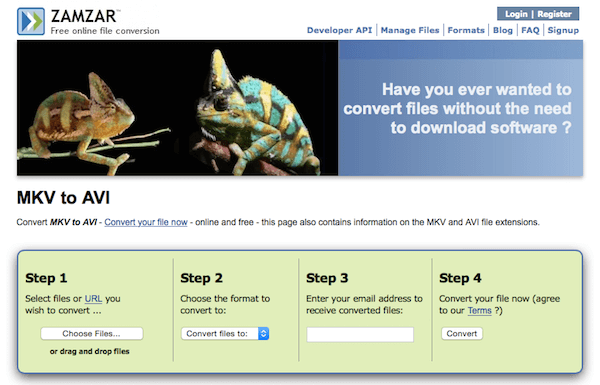
If you are using its paid version to process larger files, you can use its email notification feature to be reminded of large uploads once they are done uploading or converting.
Part 8. FAQs About Converting MKV to AVI
How do I convert MKV files to AVI on a Mac?
Try the AnyMP4 Video Converter Ultimate for Mac. Alternatively, use an online conversion tool, for example, Free Online Video Converter.
How do I convert multiple MKV videos to AVI?
AnyMP4 Video Converter Ultimate can help you process multiple videos at a time. This powerful software includes a batch conversion feature that lets you convert MKV to AVI in a few minutes.
How do I convert MKV to AVI using VLC?
Step 1. Click the Media item in the VLC window, then click Convert/Save.
Step 2. Click on the Add button and browse to the MKV video file location, then click Open.
Step 3. Click Settings, then Profile, and select AVI.
Step 4. Select the location to save the converted AVI file.
Step 5. Click Convert to convert the video from MKV to AVI.
Can VLC convert MKV to AVI, and how do I do it?
Yes, you can. VLC has a convert option. You can access it in the Media tab.
Which MKV-to-AVI converter doesn't add a watermark?
Most of the programs in this article do not leave a watermark. AnyMP4 Video Converter Ultimate is a good example. For open-source users, VLC also gets the job done.
Why can't I play MKV files on my TV, and will converting to AVI help?
Your TV may not support the codec used by your MKV file. Converting to AVI with a classic codec such as Xvid may fix this issue. This is a solid choice for most users.
How to convert MKV to AVI without losing 4K video quality?
You need a lossless format converter. A good example is AnyMP4 Video Converter Ultimate. Just make sure to use the same source conversion profile.
Is there a safe online MKV to AVI converter for files over 2GB?
No, online tools are unreliable for large files. They are fully dependent on internet quality. Uploading large files, 2GB or higher, may lead to upload and conversion errors.
Conclusion:
Now that the most recommended video format converters have been reviewed, we hope that we helped our readers decide which program best suits their needs. However, before converting MKVs to AVI, you have to ensure what you will do with your video file since both of these formats have their intended uses. Once you have ensured that you want to convert the video files, you may then download our recommended desktop-based multimedia converter in AnyMP4 Video Converter Ultimate.





 Add your comments to join the discussion here