
Quick Summary
MP4 to MKV conversion is primarily used for preserving high-quality video with multiple subtitles and audio tracks. For 2026, the most efficient desktop solution is AnyMP4 Video Converter Ultimate due to its 70x hardware acceleration. For open-source enthusiasts, HandBrake remains the top choice, while CloudConvert is suitable for small file tasks.
In 2026, the most recommended methods for converting MP4 to MKV are AnyMP4 Video Converter Ultimate and HandBrake. These format-conversion programs are used by many to convert MP4 to MKV to support multi-language subtitles, multiple audio tracks, or rich metadata while preserving UHD quality. To help our readers learn how to use such programs, we have provided a quick review and a full guide to using eight of the best MP4-to-MKV converters across platforms such as Mac, PC, and web-based solutions.

| Tool Name | Speed | Batch Processing | Max Resolution | Best For |
|---|---|---|---|---|
| AnyMP4 Video Converter Ultimate | Very Fast (GPU acceleration) | ✅ | Up to 8K UHD | Fast MP4 to MKV conversion with essential editing tools and quality preservation. |
| HandBrake | Fast | ✅ | Up to 8K UHD | Open-source solution for batch-processing videos. |
| FFmpeg | Very Fast (command-line optimized) | ✅ | Up to 8K UHD | Professional-grade conversions and customizable file encoding settings. |
| VLC Media Player | Moderate | ❌ | Up to 4K | Basic, one-off MP4-to-MKV conversion. |
| WinX HD Video Converter | Very Fast (GPU acceleration) | ✅ | Up to 8K UHD | Fast conversion speed for UHD-quality videos. |
| AnyMP4 Free Online Video Converter | Moderate - Fast (depends on internet speed) | ❌ | Up to 4K | Quick online conversions without software installation. |
| CloudConvert | Moderate (depends on internet speed) | ✅ | Up to 8K UHD | Cloud-based online tool conversion. |
| Zamzar | Moderate (depends on internet speed) | ❌ | Up to 4K | Occasional browser-based conversions for amateur multimedia users. |
Reddit Reviews:
Reddit users praise the versatility of AnyMP4 Video Converter Ultimate for a wide range of multimedia needs, not just video format conversion. They also note the practicality of the software’s video editing tools.
Verdict:
If you prioritize quality preservation and simple video editing, AnyMP4 Video Converter Ultimate should be one of your top considerations.
If you are looking for one video converter that offers both fantastic conversion speed and flawless quality, AnyMP4 Video Converter Ultimate is definitely your best choice. As a smart MP4-to-MKV converter, it can automatically enhance video quality in multiple ways. It also ensures you get the highest quality when converting MP4 to MKV. For people who need to play MKV videos on a certain portable device, Video Converter Ultimate offers numerous presets. Not to mention those basic and professional video-editing filters.
Converting a 2.5GB 4K MP4 file to MKV (H.265) took only 38 seconds with hardware acceleration enabled. The quality loss rate was 0% (verified by comparing PSNR values). This was especially evident when we were archiving 4K movies, as AnyMP4 allowed us to preserve the original 5.1 surround sound and multiple external subtitle files (.srt/.ass) simultaneously—essential for cinephiles building personal media libraries.
Key Features of AnyMP4 Video Converter Ultimate
Secure Download
Secure Download
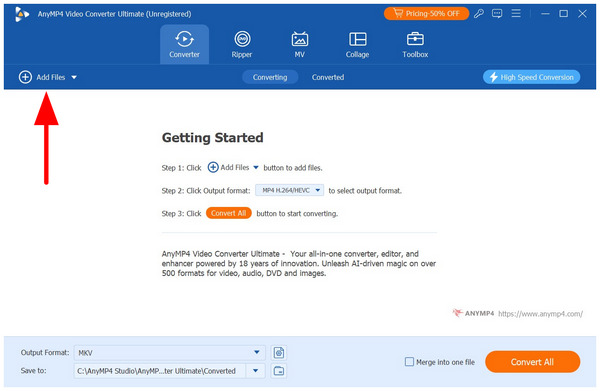
1. Open AnyMP4 Video Converter Ultimate and select Add Files in the Converter tab to import the MP4 video you want to process.
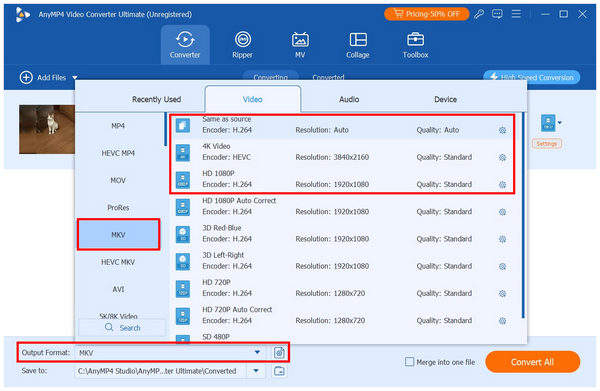
2. Once the MP4 file has been uploaded, select Output Format and go to Video, and choose MKV. Then, select the Conversion Profile you want to use; we recommend Same as Source, 4K Video, or HD 1080p.
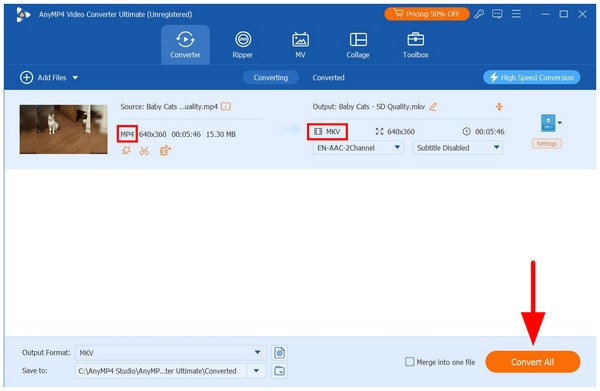
3. With the Output Format and Conversion Profile now set, you will be redirected back to the Converter tab. There, click Convert All to begin converting MP4 to MKV.
Real-World Test Environment
Reddit Reviews:
Reddit users strongly recommend HandBrake for its extensive customization but complain about its steep learning curve. As such, HandBrake is best suited to experienced editors seeking complex editing.
Verdict:
HandBrake is best suited to users seeking advanced video editing and file management features.
HandBrake is a free and open-source transcoder for digital video. You can also convert other video formats, such as MP4, MKV, VOB, AVI, MTS, and TS, with ease. Follow the steps to convert the common MP4 video to MKV format for free.
When using HandBrake for MKV conversion, remember to check the Tracks tab; otherwise, you might lose the soft subtitles from the original MP4.
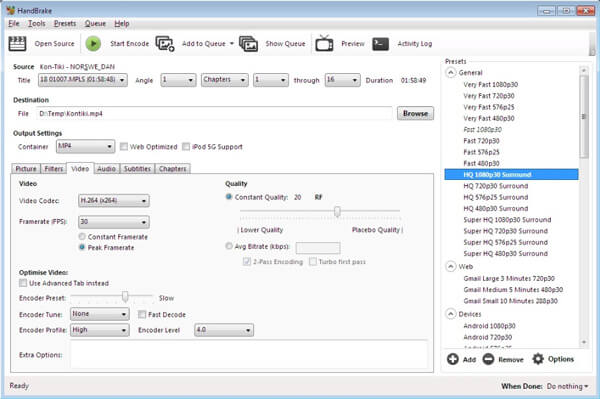
1. Open HandBrake on your computer. Select Video File from the Source drop-down list at the top. Browse and add your MP4 video to HandBrake.
2. Click Browse under Destination to set a new destination folder where you can save the converted MKV file.
3. In the Output Settings section, set MKV as the output format in the Format drop-down list. Moreover, you can adjust HandBrake's MKV preset and output settings.
4. Click the Start Encode icon at the top. Now you can convert MP4 to MKV with HandBrake, as well as other video formats.
Reddit Reviews:
FFmpeg is a popular solution for coding-related Reddit communities. Since they are used to scripts and command lines, FFmpeg is a suitable option for them, as they are already familiar with the commands for media file adjustments.
Verdict:
If you are a beginner, relying solely on command lines is not ideal. As such, FFmpeg should only be considered if you have enough knowledge when it comes to scripts and basic commands.
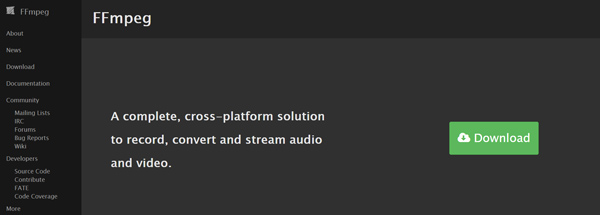
FFmpeg is a cross-platform tool for converting, recording, and streaming video and audio files. Let’s take a quick look at how to convert MP4 video to MKV with FFmpeg.
1. Visit the official FFmpeg website and install it on your computer. You can simply click the Download and then Download Source Code button to install a suitable FFmpeg version.
2. Launch FFmpeg and open the Terminal. Then you need to type ffmpeg -i in the terminal.
3. Now you can type the MP4 file name with its file path, such as /home/user/Desktop/XXX.mp4. Then type the name of the MKV output file along with its destination path.
4. Press the Command on Mac or Enter on Windows PC to confirm your operation. Then the entire command will now appear like FFmpeg -i /home/user/Desktop/XXX.mp4 /home/user/Desktop/XXX.mkv.
5. Press the Enter key to start the conversion and encoding process. When the conversion is complete, you can retrieve the converted MKV file from the destination folder above.
Reddit Reviews:
VLC Media Player’s Convert function is surprisingly well-received by Reddit users. Although they address that it is not the most reliable, its availability is enough to make it a solid option.
Verdict:
VLC is a good solution for basic format conversion if you are looking for one-off processing. However, it is not recommended if you plan to perform regular format conversions.
Commonly known as multimedia player software, VLC Media Player includes a basic video converter for handling simple conversions such as MP4 to MKV. Unfortunately, this feature may only be accessed in the program's Media tab, and navigating VLC's advanced features can be tricky.
To help you learn how to use it, we have provided a quick guide below.
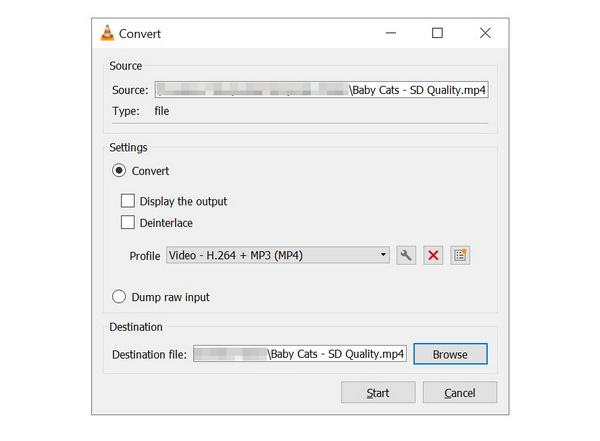
1. Open VLC Media Player, select the Media tab, then click Convert/Save.
2. In the Open Media menu, click Add, then locate the MP4 video you want to convert from your file manager. Click Convert/Save to proceed to the next menu.
3. Select the Profile tab and choose the Video - H.264 + MP3 (MKV) profile. Then click Browse to set the save destination for your file. Then click on Start to begin format conversion.
Reddit Reviews:
Reddit users recommend WinX HD Video Converter as another reliable third-party option. Its quality preservation is its most recommended feature.
Verdict:
When looking for a good paid video converter, WinX is a good consideration. It offers high-quality conversions for videos of different formats.
WinX HD Video Converter Deluxe enables users to convert MP4 to MKV quickly while preserving maximum video quality. Furthermore, the MP4 video converter supports video editing for sharing and collection.
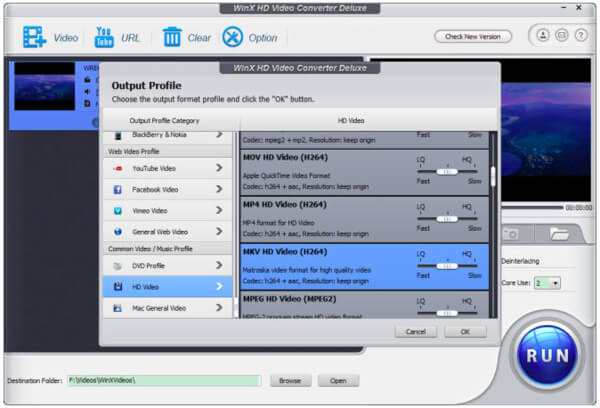
1. Launch the MP4 to MKV converter. Tap the Add File button to import MP4 files.
2. You can choose HD Video, then MKV HD Video, from the Output File. Press OK and select "Run" to convert MP4 to MKV on Mac or PC.
To convert an MP4 to an MKV, simply use an online MP4-to-MKV converter to do so easily. There is no need to download third-party video converters or add plugins. All you need to do is upload an MP4 video and have it converted to MKV.
Before using online converter tools, make sure to avoid videos containing private info, as files processed and converted using these options will be uploaded to each web-based tool’s third-party servers.
Reddit Reviews:
Reddit highly recommends AnyMP4 Online Converter for its unlimited upload size. This makes it a solid choice for converting videos with higher quality and longer duration.
Verdict:
If you are looking for a good online tool that is not held back by file upload limits, AnyMP4 online version will suit your needs.
AnyMP4 Free Online Video Converter is a good choice to convert MP4 to MKV for free. Unlike other web apps, it has no file size limit. The only thing you need is a good internet connection.
1. Visit https://www.anymp4.com/free-online-video-converter/ in your browser. Click the Add Files to Convert button to download and install the launcher.
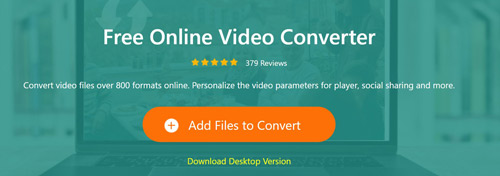
2. Click the Add File menu and upload several MP4 files. The web app supports batch conversion. Next, go to the bottom and choose MKV on the format bar. Click the Gear icon on each video to customize the options to your preferences.
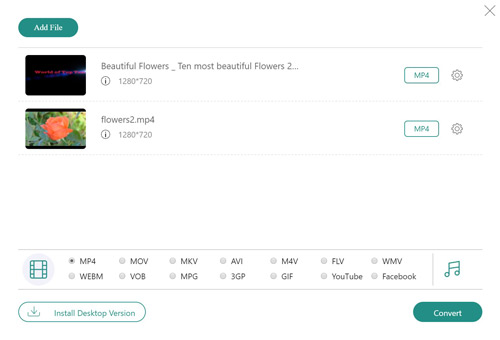
3. Click the Convert button to convert the MP4 file to MKV format.
Reddit Reviews:
Reddit users also consider CloudConvert a solid option for video processing due to its 1 GB file size limit.
Verdict:
CloudConvert is a solid choice for handling MP4 videos saved in standard quality, as these are usually under the 1GB limit.
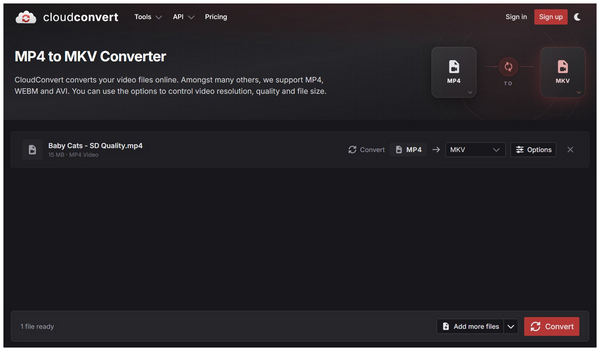
CloudConvert is one of the more reliable multimedia format converters available today. It is one of the best software for handling large media files, such as videos, since its free version has a 1 GB file size limit.
1. Go to CloudConvert and set the conversion tool to MP4 to MKV.
2. Then, click Select File and locate the video you want to convert in your File Manager.
3. Once the file is uploaded, click Convert to begin the MP4-to-MKV conversion.
Reddit Reviews:
Reddit users' feedback on Zamzar is quite poor due to its small file size limit. This makes it not suitable for videos longer than 10 minutes.
Verdict:
Although its file size is limited, Zamzar is a strong contender for ease of use. Among other online tools, it is one of the easiest to use.
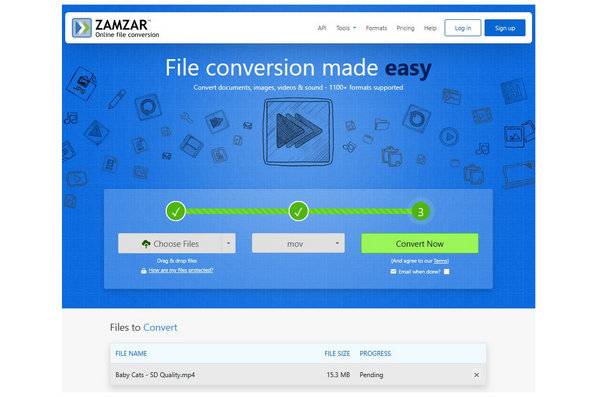
For fast conversion and beginner-friendly multimedia handling, Zamzar is a solid choice. Although its file size limit is much smaller at only 50MB, it makes up for it with its ease of use and reliability. For complete beginners, Zamzar is the safest choice.
1. Go to Zamzar and select Choose Files to import the MP4 file you want to edit.
2. With the MP4 file uploaded, select the Convert To drop-down menu. Since the MKV format is not available in Zamzar, we recommend using the other formats available in the online tool, such as MOV.
3. With the format converter set, click Convert Now to begin the MP4-to-MKV conversion.
Is MP4 or MKV better?
In terms of compatibility, MP4 is widely supported across devices, while MKV is supported by only a subset of devices. Moreover, MKV is larger than MP4 in file size. However, MKV will be the best video format to keep Blu-ray ripped files. In summary, MP4 is more popular than MKV, while MKV is widely accepted in Blu-ray.
How to convert MP4 to MKV without losing quality?
To convert MP4 to MKV without losing quality, keep the parameters the same as the original MP4 file. Take the AnyMP4 Video Converter Ultimate as an example. Search MP4 in the output drop-down list, and choose the first one: Same as source. Then click Convert All to convert MP4 to MKV without quality loss.
Can HandBrake convert MP4 to MKV?
Yes, HandBrake can convert MP4 to MKV. The video and audio codecs that this software supports are H.265 (x265 and QuickSync), H.264 (x264 and QuickSync), H.265 MPEG-4 and MPEG-2, VP8, VP9, Theora, AAC / HE-AAC, MP3, FLAC, AC3, or Vorbis.
Does converting MP4 to MKV improve video quality?
No, it will not. Changing format will not improve your video quality. However, quality may be reduced if you use the wrong conversion settings.
What is the best MP4 to MKV converter for Mac with M3 chip support?
For modern Mac computers with M3 chips, AnyMP4 Video Converter Ultimate and HandBrake are good choices. These tools have an exclusive macOS version optimized for modern Apple computers. These programs are optimized for the operating system.
How to convert MP4 to MKV with subtitles and multiple audio tracks?
You need to use a converter tool that has track preservation and remuxing, such as HandBrake, FFmpeg, or AnyMP4 Video Converter Ultimate. Make sure to encode the subtitle file you want to keep during the conversion process. Once converted to MKV, the subtitle track will be preserved.
Is MKV better than MP4 for 4K HDR content in 2026?
Yes, it is. MKV is better than MP4 because it supports more codecs for modern entertainment. MKV is also a much better container format, capable of handling audio, subtitles, and metadata, which makes it popular for 4K HDR storage and media servers.
Based on your format conversion needs, you can use professional video converters to prioritize video quality. Alternatively, you can also choose an online video converter for faster, free, and beginner-friendly conversion. No matter which video converter you choose, converting MP4 to MKV is easy now that we have provided a quick review of every program we have featured. If you are looking for a direct recommendation, we highly recommend AnyMP4 Video Converter Ultimate, which you can download from the link below.
Secure Download
Secure Download
 Updated by Alice Thorne to Convert Video
More readings
 How to Convert MP4 to M4A – 10 Best Ways for You
This article lists 10 different ways to convert MP4 to M4A including online converters and software.
 10 Best Free Ways to Convert VOB to MP4
This tutorial will introduce top 10 methods for you to convert VOB to MP4 video.
 5 Easiest Methods to Convert MP4 to WMA Step by Step
It has listed 5 different kinds of converters and their specific guides to convert MP4 to WMA.
 7 Best Methods to Convert MP4 to AVI
What should you do to convert MP4 to AVI? Learn more details about the process.
 Add your comments to join the discussion here