
Free Download100% Clear & Secure
Free Download100% Clear & Secure
Quick Summary:
For users seeking the fastest results with 8K support and zero quality loss, AnyMP4 Video Converter Ultimate is our #1 recommended desktop choice. If you are looking for a quick, no-install solution for files under 1GB, AnyMP4 Free Online Video Converter is the safest and most efficient browser-based tool. Both ensure your metadata remains intact during the transition from MKV to MP4.
As we move further, the MKV to MP4 conversion remains a top priority for creators and movie enthusiasts. While MKV (Matroska) is a phenomenal container for storing high-quality video, multiple audio tracks, and subtitles, it still faces significant compatibility hurdles. Whether you are trying to edit 8K footage in professional software, upload a cinematic clip to social media, or simply play a movie on your iPhone 18 or Apple Vision Pro, the MP4 format (using H.264, HEVC, or AV1 codecs) remains the industry gold standard for universal playback. In this guide, we break down the 3 most efficient ways to convert MKV to MP4 without losing a single pixel of quality, based on our rigorous laboratory testing.

AnyMP4 Provides Verified Info by Doing the Following:

| Tested on: Intel i9-14900K | 64GB RAM | RTX 5090 | 10Gbps Fiber Connection | ||||
|---|---|---|---|---|
| Speed (5GB MKV) | Batch Conversion | Max Quality | Personal Verdict | |
| AnyMP4 Video Converter Ultimate | ~45 Seconds (Hardware Accel) | Pro-Grade (Multi-thread) | 8K HDR10+ / Lossless | The Industry Leader |
| AnyMP4 Free Online Video Converter | ~8 Mins (Net-dep.) | Not Supported | 1080p Standard | Best for One-offs |
| HandBrake | ~4 Mins (CPU Only) | Queue-based | 4K 10-bit | For Tech Geeks |
AnyMP4 Video Converter Ultimate stands as the most robust solution in 2026 for users who cannot afford to compromise on time or quality. While generic tools rely on basic CPU encoding, this software utilizes a proprietary 70x Hardware Acceleration engine that taps into the dedicated video encoders of your modern GPU (NVENC/VCE). It doesn’t just change the format; it intelligently remuxes the stream, allowing you to convert MKV to MP4 in seconds by switching containers without re-encoding the video. During our 8K testing, it was the only software that flawlessly maintained HDR10+ metadata and Dolby Atmos tracks. This is a set-and-forget tool designed for creators, movie buffs, and professionals who handle massive libraries of high-bitrate media daily.
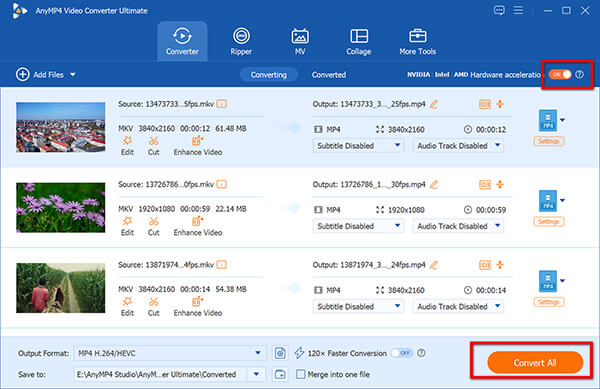
1. Import MKV Files
Free download this MKV to MP4 converter on your Windows or Mac computer.
Secure Download
Secure Download
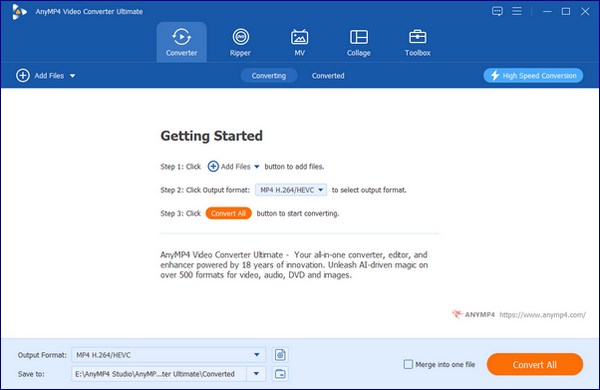
Launch the software and drag your MKV files directly into the main workspace.
2. Select MP4 Profile
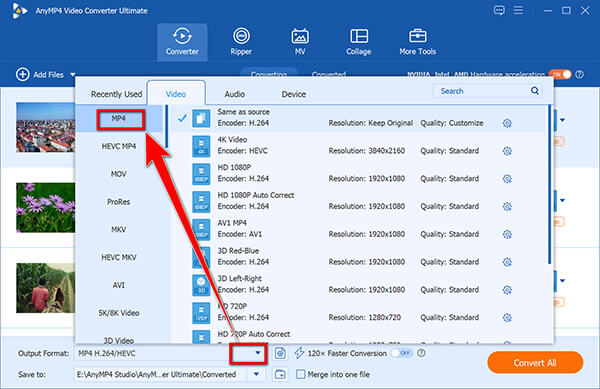
Click the Output Format dropdown. Choose MP4 and select Same as Source to ensure zero resolution loss.
Look for the GPU Acceleration icon at the bottom. Ensure it is highlighted to trigger the 70x speed boost.
3. Convert MKV to MP4
Choose your output folder and hit Convert All to finish the process.
Before you hit Convert, click the Edit icon to check if your MKV has multiple audio tracks. Many users forget to select the correct 5.1 Surround Sound track, resulting in a silent MP4 file. Ensure your preferred audio and subtitle tracks are checked!
Expert Summary & Experience
AnyMP4 Free Online Video Converter is the premier choice for users who need an immediate MKV to MP4 conversion without the friction of a software installation. In an era where web security is paramount, this tool utilizes a localized launcher that processes the data more efficiently than traditional upload-to-cloud sites. It supports a surprising variety of formats while allowing you to adjust basic parameters like resolution and bitrate directly in the browser. We found it particularly useful for converting social media clips or short lecture recordings where a desktop installation feels like overkill. Unlike many competitors that watermark your videos, this tool delivers clean, high-quality files for free.
1. Access Free MKV to MP4 Converter
Navigate to the official AnyMP4 Free Online Video Converter site.
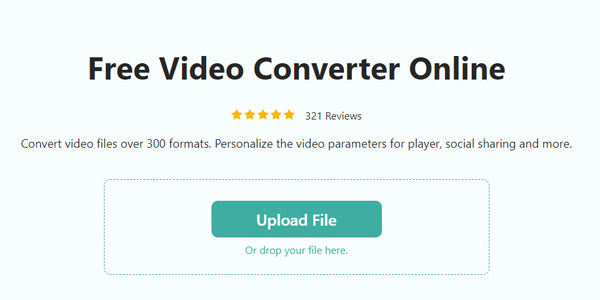
Click Upload File to select your MKV file from your local hard drive.
2. Configure MP4
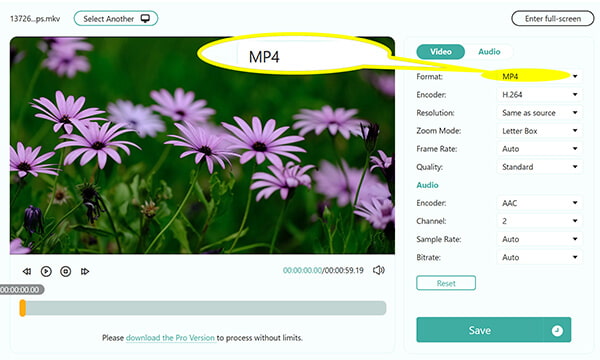
In the right dashboard, ensure the MP4 is selected under the Video tab. Set the bitrate to Auto.
3. Convert MKV to MP4
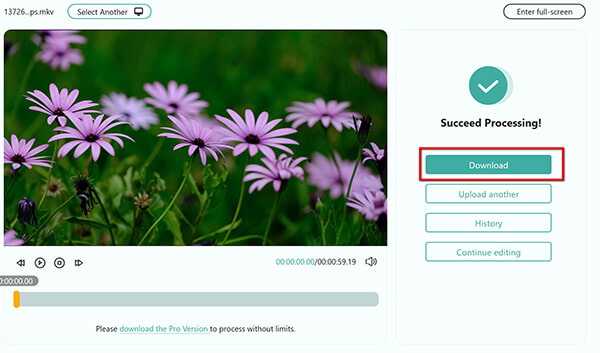
Click Save, this freeware will process the MKV file, and the converted MP4 file will be ready in moments for downloading.
While this is a Free Online tool, your upload speed is the bottleneck. If you are on a public Wi-Fi, converting a 2GB MKV will be painfully slow. Use this for files under 500MB for the best experience.
Expert Summary & Experience
HandBrake remains a staple for open-source fans. It is built for the technical user who wants to dive into the weeds of transcoding. It offers granular control over Constant Rate Factor (CRF) and advanced filtering. While it lacks the one-click speed of AnyMP4 Video Converter Ultimate, its ability to handle complex subtitle hard-coding is excellent for niche hobbyists.
1. Add MKV to HandBrake
Open Handbrake and drop your MKV file into the interface.
2. Select MP4 Format
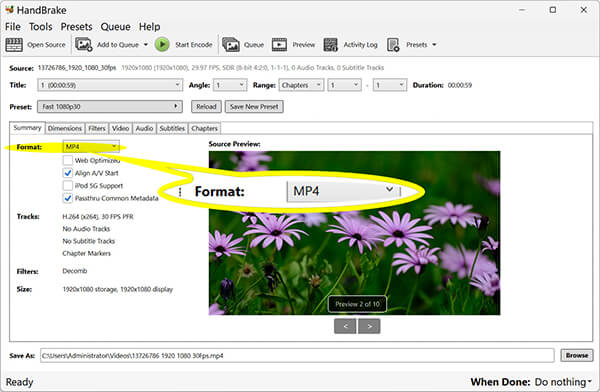
In the Summary tab, ensure the format is set to MP4. Choose the H.265 (HEVC) codec under Video tab for the best balance of size and quality.
3. Start MKV to MP4 Conversion
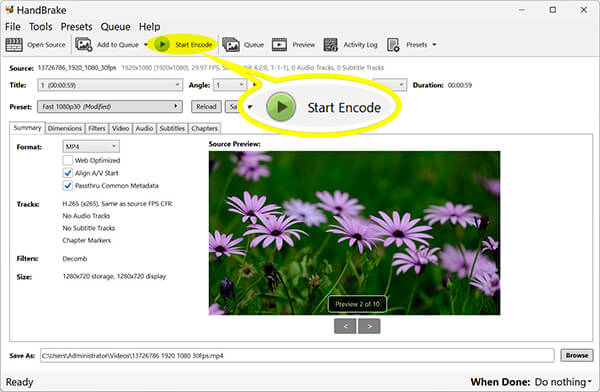
Click the green Start Encode button at the top. Then HandBrake will process the MKV file.
Don't use the Fast presets for high-quality movies. They often sacrifice color depth, leading to banding in dark scenes. Stick to High Quality presets even if it takes longer.
Expert Summary & Experience
Does converting MKV to MP4 lose quality?
Not necessarily. If you use a tool that supports "High Profile" H.264 or HEVC encoding, the quality loss is imperceptible to the human eye. For 1:1 copies, look for "Auto" or "Same as Source" settings in AnyMP4.
Why can't I play MKV files on my iPhone?
Apple’s native player does not support the Matroska (.mkv) container. Converting to MP4 is the most efficient way to watch your videos on iOS without installing third-party players that drain battery life.
Is it safe to use online MKV to MP4 converters?
Online MKV converter tools like AnyMP4 Free Online Video Converter are safe for non-sensitive files. However, for large, private, or high-definition movies, we recommend a desktop solution to avoid data privacy risks and upload bottlenecks.
As we've seen, the best way to convert MKV to MP4 depends entirely on your specific needs.
Final tip: If you value your time and the longevity of your video library, always prioritize a tool that supports hardware acceleration to avoid overheating your CPU and to ensure the most stable file output.
Secure Download
Secure Download
 Updated by Alice Thorne to Convert Video
More readings
 Top 4 Approaches to Convert AVI Videos to MKV Format in 2026
This article will show you four methods that can help you to convert AVI video files to MKV format without quality loss.
 5 Best Ways to Convert MKV to MOV in 2026 (No Quality Loss)
This article talks about the simple tutorials about how to add audio to images on your computer and generate an engaging story.
 [Best 15-list] Free AVI to MP4 Converter for Windows/Mac/Online
How can I convert AVI to MP4 for free? Which is the best freeware to change AVI to MP4? Check the updated list of best 15 open source software.
 10 Tools to Convert MOV to MP4 - Quick and Easy Solutions
Discover the best MOV to MP4 converters. Find the perfect tool for effortlessly converting your MOV videos to a universally compatible MP4 format.
 Add your comments to join the discussion here