
Free Download100% Clear & Secure
Free Download100% Clear & Secure

What is the best H.264 player?
Video codecs are often disregarded by media player users who love to watch videos on their computers. Among these video encoders, the H.264 or Advanced Video Coding (AVC) is the most widely used compression format since it was developed 20 years ago and has been very established since. Because of that, H.264 players should be the number one option for digital video enthusiasts since compatible media players are required to play files saved in the mentioned codec. In this article, we will explore five media player tools that can support H.264 codec files with no problem. We will focus on highlighting their best uses, supported format, pros, and cons. Please continue reading the article to learn more.


To help our readers decide which H.264 media player is best for them, we tested each software we reviewed based on these five specific measurements. These factors were selected because they are the most important considerations when looking for an H.264 codec media player.
The first consideration will be the accessibility and ease of use of each featured software. This is an important factor for most users, especially beginners. Interface design is also a major factor in ease of use.
Aside from being able to process H.264 videos, additional features are also important for the overall usage of the software. Some examples of these features are a sound system, subtitle downloader, audio and subtitle sync option, and more.
Before downloading your selected software, it is also important to check if the tool supports the platform your computer runs on. Fortunately, this element will be reviewed as well to help users of both Windows and macOS platforms.
Although the H.264 format is one of the most common codec systems used for video file compression, not all media player software can play all kinds of files encoded using AVC. Because of that, each software’s supported video formats will be listed in each highlighted section.
Perhaps the most important measurement for some users is the pricing of each software. This will help our readers decide whether to go for freeware or paid and more premium options.
AnyMP4 Provides Verified Info by Doing the Following

To get meaningful data, we test across three core dimensions using a control video file:
| H.264 4K Support | System Resource Usage (CPU/RAM) | GPU Acceleration (HW Decoding) | Subtitle Support (ASS/SRT/VobSub) | Best For | |
|---|---|---|---|---|---|
| AnyMP4 H.264 Player | Excellent (Native 4K/UHD) | Moderate | Supported (Strong stability) | Comprehensive | Premium disc & H.264 folder playback |
| VLC Media Player | Good (Versatile) | Moderate to High | Supported (via DXVA/VDPAU) | Excellent (Built-in) | Cross-platform compatibility |
| MPC-BE (LAV Filters) | Perfect (Ultra-smooth) | Very Low | Superior (Best DXVA2 / NVDEC integration) | Excellent | Windows users seeking maximum hardware performance |
| 5KPlayer | Good (Supports 8K) | High (due to background services) | Supported (DXVA/Qsv/Nvidia) | Good | AirPlay/DLNA streaming features |
| Elmedia Video Player | Excellent (macOS optimized) | Low (on Apple Silicon) | Supported (VideoToolbox) | Excellent | Mac users who need H.264 precision |
Best Used For:
Platforms: Windows, macOS
Pricing: Free - $15.60
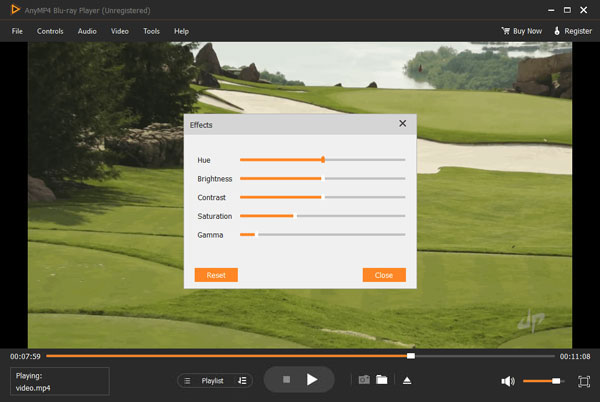
We will start this list by featuring the most versatile tool in this list, none other than AnyMP4 H.264 Player. Originally built as a Blu-ray player tool, this software was developed to be versatile enough to handle all forms of digital video format making it a solid option as an H.264 player. In fact, this media player is capable of running 1000+ file formats with no problem.
In addition to its top-notch versatility in playing H.264 videos, the software is supported by a high-performance surround sound system powered by Dolby 7.1 and DTS. Moreover, its support for videos up to 8K resolution makes this software an ideal home theater player. Running movies and TV shows on UHD video quality and surround sound makes for a solid viewing experience.
If you are looking for a good H.264 format player for either Windows or macOS, AnyMP4 H.264 Player should be one of the top options on your list. Download the software now to enjoy all these high-quality features ideal for your home theater setup.
Secure Download
Secure Download
Supported Video Formats:
PROS
CONS
So, how to play H. 264 files on PC? Let's see the detailed steps.
1. Download and Open the Tool
Click the download buttons below to install the AnyMP4 H.264 Player on your computer. Then, launch the tool.
Secure Download
Secure Download
2. Import and Play the H.264 Videos
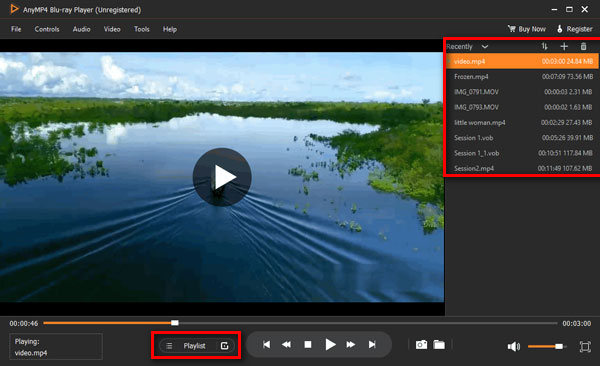
Click Open File to add one or several H.264 videos you want to watch. It will load and play the video files.
The Playlist function lets you manage multiple H.264 files easily by sorting, adding, and deleting.
3. Control the Video Playback
During playback, you can choose additional settings to enhance your video-watching experience.
The steps are easy and intuitive, right? Follow the steps to download the tool to have a high-quality video-watching experience.
Best Used For:
Supported Platforms: Windows, Mac, iOS, Android
Pricing: Free
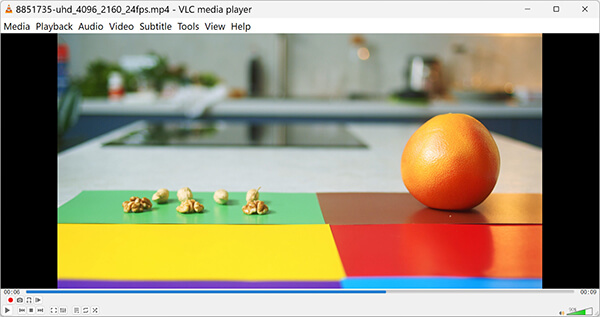
Perhaps the most popular software on this list, VLC Media Player, has cultivated its popularity due to its top-notch reliability. The main factor that makes this option reliable is that this H.264 player, VLC, is available on almost all platforms. This includes Windows and macOS for computers and iOS and Android options for mobile devices. All these features can also be enjoyed alongside the tool’s status as one of the best free H.264 players.
Supported Video Formats:
PROS
CONS
Best Used For:
Supported Platforms: Windows
Pricing: Free
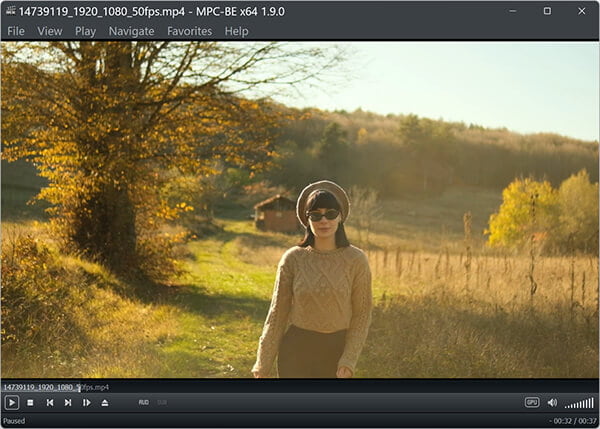
As the actively updated successor to the original Media Player Classic, MPC-BE (Media Player Classic - Black Edition) is a powerful open-source H.264 file player and viewer. Unlike legacy tools with security risks, MPC-BE receives regular developer updates to support modern hardware decoding. It remains extremely lightweight, fast, and efficient for decoding high-bitrate H.264 4K videos on PC.
For more tools like Media Player Classic, check the article here.
Supported Video Formats:
PROS
CONS
Best Used For:
Supported Platforms: Windows, Mac
Pricing: Free
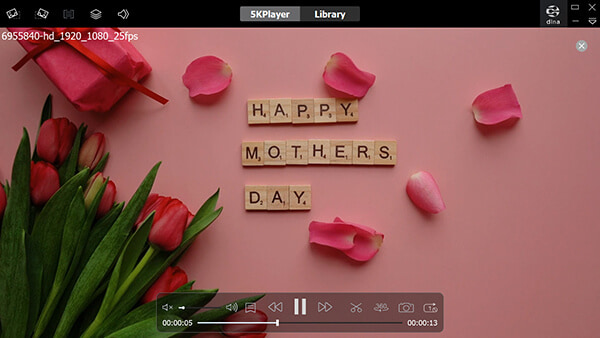
For users looking for an H.264 player that can be connected to wireless networks, 5KPlayer should be one of their options since this tool can be connected to the more generic DLNA wireless network and even to the more exclusive Apple AirPlay system. Once the software has been connected, its built-in YouTube video downloader makes for a practical option to play online videos even when offline.
Supported Video Formats:
PROS
CONS
Best Used For:
Supported Platforms: Mac
Pricing: Free - $19.99
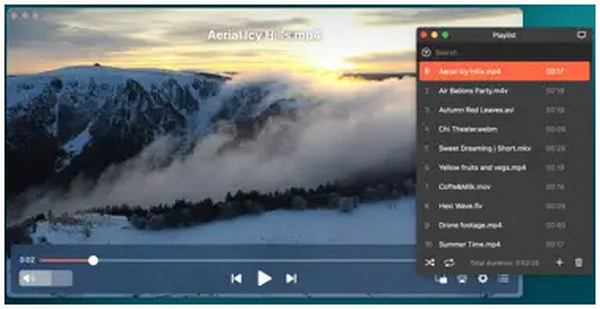
For Apple users who want to learn how to open H.264 files on Mac, Elmedia Video Player may be a good option. This tool is a safe H.264 player to use since it can be downloaded from the Apple App Store itself. In addition, the tool has high ratings on the mentioned downloading option. Unfortunately, it is notorious for slower updates, which is one of its users' major concerns.
Supported Video Formats:
PROS
CONS
H.264 is the most used video encoder format. These video encoders are used to make these files more compact due to file compression. Most video formats used today, such as MP4, MKV, and AVI, are compressed using the H.264 encoder. There is no shortage of H.264 players for Windows 10/11 or Mac computers.
Known as Advanced Video Coding (AVC), it is a block-oriented, motion-compensation-based video compression standard. It is the industry benchmark for recording, compressing, and distributing high-definition video content.
Comparison: Codec vs. Container
To clarify the relationship mentioned in your text, think of H.264 as the "language" and formats like MP4 or MKV as the "envelope."
| Component | Type | Function |
|---|---|---|
| H.264 (AVC) | Codec | Compresses and decompresses the actual video data. |
| MP4 / MKV / AVI | Container | Holds the compressed video, audio tracks, and metadata. |
If you export raw video clips from a CCTV, DVR, or NVR security camera system, you may get raw .264 or .h264 files. These files often fail to play or show a black screen because they lack a container format (like MP4) to guide the media player.
If your raw CCTV footage won't play in VLC Media Player, you can force VLC to decode the raw video stream by updating its demuxer settings:
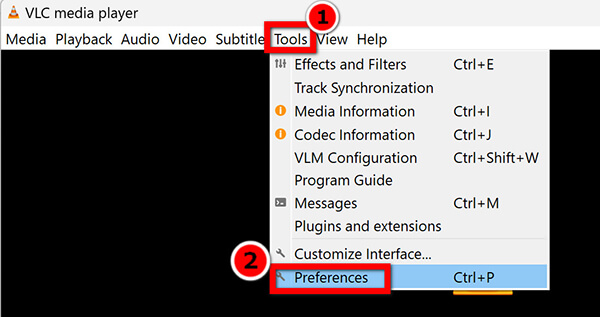
1. Open VLC Media Player and navigate to Tools > Preferences (or press Ctrl + P on Windows / Cmd + , on Mac).
2. At the bottom left under Show settings, switch from Simple to All.
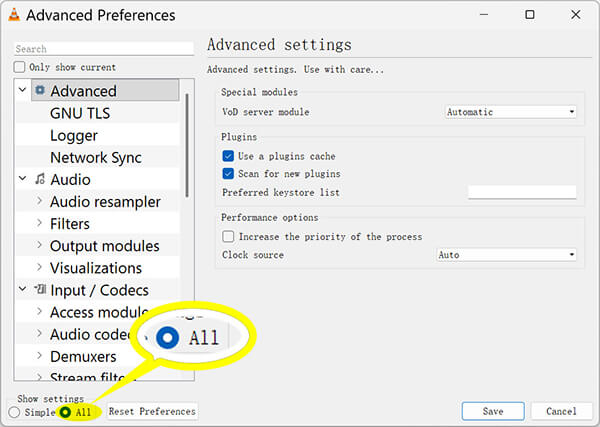
3. In the left menu, go to Input / Codecs > Demuxers.
4. Change the Demux module dropdown from Automatic to H264 video demuxer.
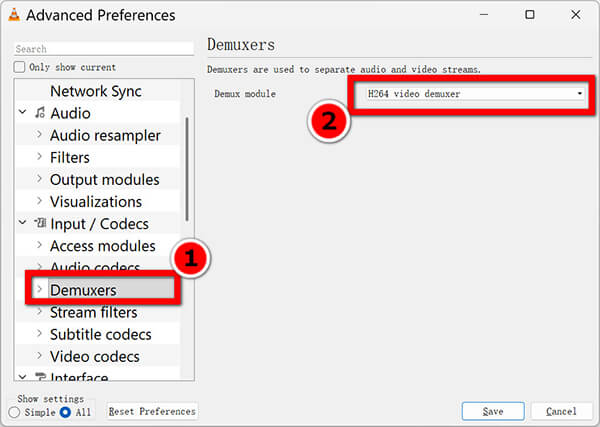
5. Click Save and restart VLC. Drag and drop your raw .264 video into the player.
Remember to change this setting back to "Automatic" when you finish, or standard MP4/MKV video files may not play correctly in VLC later.
Can Windows Media Player play H.264 files?
Yes, modern Windows Media Player on Windows 10 and 11 can play standard H.264 videos out of the box. However, it may fail if the video uses a rare container format, high bitrates, or custom codecs. If your video stutters or shows a black screen, using a flexible player like VLC or AnyMP4 H.264 Player will fix the issue without installing extra codec packs.
How do I open an H.264 file?
You need to use a video player that supports H.264 videos. Some of the most reliable options are AnyMP4 H.264 Player and VLC Media Player. These tools are some of the safe options. These media players can also be used if you want to learn how to open h.264 file on Mac.
What is the best free H.264 player?
VLC Media Player is the best free tool for most users because it runs on Windows, Mac, and Linux without any cost. It has all the needed codecs built right inside. If you want a lightweight choice for Windows, MPC-BE is another great free option that plays H.264 clips very smoothly.
How to watch H.264 videos?
If you want to learn how to play H.264 files. The answer is by using a video player that supports this encoder type. Some of the most popular options are AnyMP4 H.264 Player and VLC Media Player.
Why can't I play H.264 files in Windows Media Player?
Legacy versions of Windows Media Player (like those on Windows 7 or older) lack the native codecs required to decode H.264 video. While modern versions on Windows 10 and 11 usually support it, playback can still fail if the file is wrapped in an unsupported container or if your system's hardware acceleration settings are misconfigured.
Is H.264 the same as MP4?
No. H.264 is a video compression standard (codec)—the technology that shrinks the video data. MP4 is a container format—the digital "box" that holds the video, audio, and subtitles together. An MP4 file often contains H.264 video, but it could also contain other formats like H.265 or MPEG-4.
Does AnyMP4 support H.264 4K/8K?
Yes. AnyMP4 Video Converter Ultimate supports H.264 at 4K resolution. However, for 8K, H.264 is rarely used because it is inefficient at that scale; AnyMP4 typically handles 8K via the more advanced H.265 (HEVC) or AV1 codecs, which are the industry standards for ultra-high-definition video.
Now that we have discussed some of the best H.264 players available in the market today, we hope that we can help you decide which of these software is the best option for your needs. Finding the right H.264 player comes down to your primary use case.
Secure Download
Secure Download
We hope this guide helps you choose the ideal H.264 video player for your PC or Mac. Download your preferred software today to enjoy smooth, high-definition video playback.
 Posted by Riley Mitchell to Player
Related Articles
 Top 10 VOB Player Software on Windows 11/10/8/7 and Mac
This article lists the best 10 VOB players for Windows and Mac to help you watch high quality VOB video files without any trouble.
 Free Download Top 6 WebM Players Available to Windows and Mac
Here is a list of 6 best WebM player software for Windows 10/8/7/Vista/XP and Mac OS X/11/12. They can play WebM videos.
 Top 8 M3U8 Players Available to Windows 10/8.1/8/7 and Mac OS X/11/12
An M3U8 file is an audio playlist format. This article tells you everything you need to know about M3U8, including the best M3U8 player for Windows and Mac.
 Top 8 ISO Player Software Available to Windows and Mac
How to play Blu-ray or DVD ISO movies on Windows? Here is the top 8 list of ISO player software for PC and Mac users to watch ISO movies without mounting.
 Add your comments to join the discussion here