8 Best Free AVI to MP4 Converters (Fast & No Watermark)
Quick Summary of Top Free AVI to MP4 Converters:
- Best overall open-source desktop tool: HandBrake gives you zero watermarks, clean encodes, and full output control.
- Best no-install online tool: AnyMP4 Free Online Video Converter handles daily tasks directly in your browser with no watermarks and no sign-ups.
- Best for fast batch jobs on PC: Free HD Video Converter Factory lets you convert batches of files easily on Windows.
- Average test result: Turning a 1.2GB AVI into an MP4 cuts the file size down by about 35% to 45% without losing visible picture quality.
Have you ever tried playing an old AVI movie on your phone or smart TV, only to see a black screen with an error saying "Format not supported"? You are not alone.
AVI files were great back, but they take up huge amounts of hard drive space and refuse to open on modern phones. To fix the issue, you just need a free AVI to MP4 converter. Here, we gather the top 8 free list options without watermark. Read the review and find the best tool for your computer now.

Part 1. Why Convert AVI to MP4? 4 Real Reasons
Why should you bother to change AVI to MP4 free? Here are four practical reasons we saw during our tests:
Smaller file sizes: MP4 uses modern H.264 compression. It usually makes video files 30% to 50% smaller than old AVI containers while keeping the same picture sharpness.
Play on any device: Whether it’s an iPhone, an Android, an iPad, or your living room smart TV, MP4s just work natively without forcing you to download extra apps.
Smooth web uploads: Platforms like YouTube, TikTok, and Instagram practically run on MP4, meaning your uploads finish in a flash and avoid weird processing errors.
Better hardware playback: Modern streaming sticks and car media consoles read MP4 files right away without freezing or lagging.
Part 2. How We Tested These 8 Converters
We don't just guess or throw out random numbers. To keep things totally fair and accurate, we put every single tool through the exact same real-world test:
- • Test file: A 1.2GB, 1080p AVI video (running at 24 fps for 5 minutes and 30 seconds).
- • Test PC: A Windows 11 setup powered by an Intel Core i7-12700K, 16GB RAM, and an NVIDIA RTX 3060 GPU.
- • What we checked: How long it took, the final file size, the output quality, and any sneaky hidden limits.
If you are curious about deeper differences between these two file types, take a look at our side-by-side AVI vs MP4 comparison.
Part 3. Best Free AVI to MP4 Converters for Desktop
Desktop programs are great when you have large video clips, want full privacy, or do not want to wait on slow home internet uploads. If you want a dependable free AVI to MP4 converter for Windows or Mac, here are our 5 tested picks.
|
Platform |
Price |
Quality |
Speed |
Batch Jobs |
Watermark? |
Best For |
| HandBrake |
Windows / Mac / Linux |
100% Free |
Excellent |
Medium |
Yes (Queue) |
No |
Open-source control |
| VLC |
Windows / Mac / Linux |
100% Free |
Good |
Medium |
No |
No |
Built-in player tool |
| FFmpeg |
Windows / Mac / Linux |
100% Free |
Excellent |
Fast |
Yes (Scripts) |
No |
Advanced tech users |
| Aiseesoft Free Video Converter |
Windows / Mac |
Freeware |
Good |
Medium |
Yes |
No |
Clean, simple GUI |
| Free HD Video Converter Factory |
Windows |
Free Version |
Good |
Fast |
Yes |
No |
Fast batch processing |
3.1 HandBrake - Best Open-Source
- • Platform: Windows 10 / 11, macOS, Linux.
- • Price: 100% Free & Open Source.
- • Best for: Power users who want full control over their video quality and presets without dealing with annoying ads.
- • Test Result: Converted our 1.2GB AVI file to 742MB in 3 minutes 12 seconds.
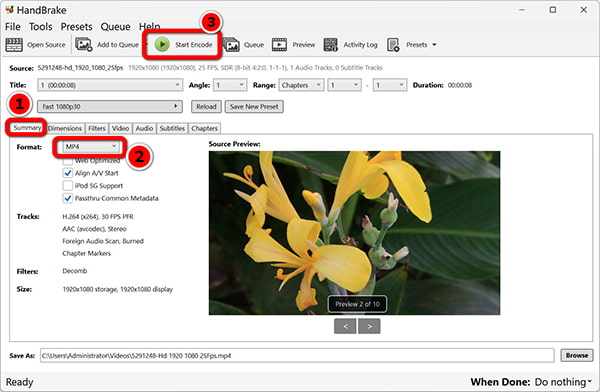
HandBrake remains my go-to choice whenever I need to encode video clips locally. It does not bombard you with upgrade ads or put timers on your files. During our test, I dragged in our 1.2GB AVI file, picked the "Fast 1080p30" preset, and let it run.
If you want a near-lossless AVI to MP4 setup, just drag the Constant Quality (RF) slider down to 18 or 20. The resulting MP4 looked super crisp, kept the exact same colors and contrast, and saved us over 400MB of storage space. The UI takes about five minutes to figure out, but it gives you total control over audio tracks and video dimensions.
PROS
- No hidden fees, no annoying watermarks.
- It supports exporting for iPhones, Androids, or web streaming.
- Lets you tweak audio codecs and burn in subtitles with no hassle.
CONS
- The main dashboard can look pretty overwhelming the very first time you open it.
Warm Tip: For a step-by-step breakdown on configuring presets, read our detailed walkthrough on how to use HandBrake to convert AVI.
3.2 VLC Media Player - Best for Existing Users
- • Platform: Windows, macOS, Linux.
- • Price: 100% Free & Open Source.
- • Best for: Anyone who needs a quick conversion and already has VLC installed on their PC.
- • Test Result: Converted our 1.2GB test clip to 880MB in 4 minutes 05 seconds.
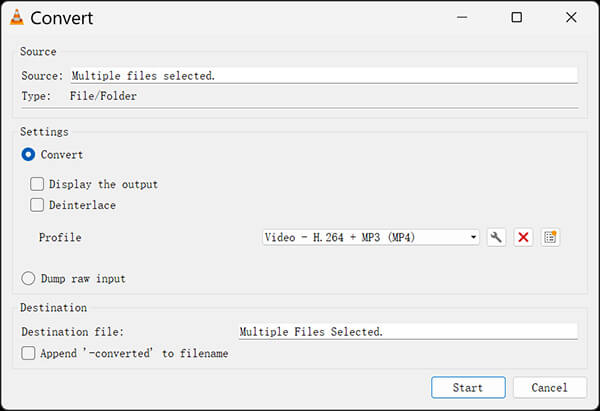
You probably already use VLC to play movies, but it actually doubles as a handy AVI to MP4 converter. Click Media > Convert / Save, select your AVI file, choose Video - H.264 + MP3 (MP4) from the profile menu, and hit Start to use VLC to convert AVI to MP4. That's it.
It finished our test video with decent picture quality. Just keep in mind that VLC doesn't show a clear progress bar while converting, so you just have to wait until the blue player slider reaches the end.
PROS
- If you already use it to play your videos, you're good to go right out of the box.
- Good for converting a single file on the fly without downloading extra junk.
CONS
- You can't easily queue up a bunch of folders to convert all at once.
- Very limited options like video bitrates or advanced controls.
3.3 FFmpeg - Best for Command Line
- • Platform: Windows 10 / 11, macOS, Linux.
- • Price: 100% Free & Open Source.
- • Best for: Developers and command-line fans who prefer typing terminal scripts over clicking buttons.
- • Test Result: Converted our 1.2GB test file to 710MB in 2 minutes 08 seconds.
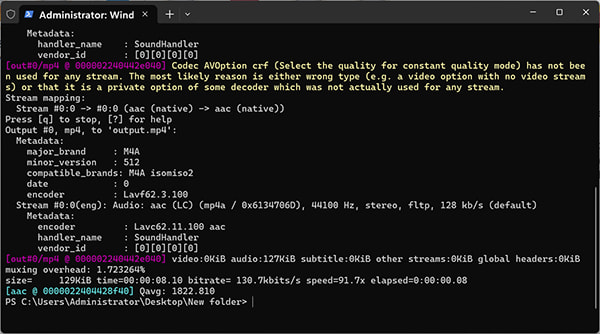
FFmpeg is pure speed. It has no graphical window or buttons, and you run it straight to convert AVI to MP4 from PowerShell or Terminal. I typed ffmpeg -i test.avi -c:v libx264 -crf 22 -c:a aac output.mp4, hit Enter, and watched it rip through the conversion in barely two minutes.
It actually squeezed out the smallest file size of all our desktop tests, dropping right down to 710MB, while keeping the original frame rate looking super crisp. If you’re the kind of person who likes automating workflows with batch scripts, honestly, nothing beats FFmpeg.
PROS
- Outperforms almost every GUI app in raw processing speed.
- Completely open-source with endless customization flags.
CONS
- Requires typing commands instead of clicking icons.
3.4 Aiseesoft Free Video Converter - Best Simple GUI
- • Platform: Windows, macOS.
- • Price: Freeware.
- • Best for: Absolute beginners who want big buttons and a clean, zero-stress layout.
- • Test Result: Shrink our 1.2GB test file down to 790MB in 3 minutes and 40 seconds.
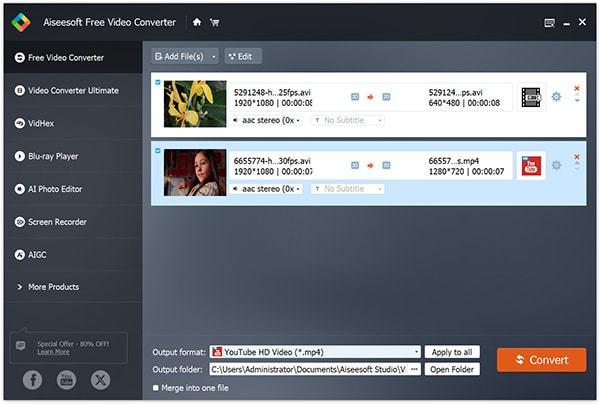
If HandBrake looks way too complicated and FFmpeg sounds like a nightmare, Aiseesoft Free Video Converter keeps things super simple. The main screen has huge icons and clear text that practically point you to where you need to click. Since it runs on both Mac and Windows, it’s a breeze if you need to convert AVI to MP4 on Mac.
I just dragged our test video right into the app, picked MP4 from the bottom format menu, and hit convert. It worked without a single hitch, giving us a solid 790MB MP4 file with great picture and crisp sound.
PROS
- Extremely easy to navigate even if you have zero video editing experience.
- Reads over 300 different audio and video containers natively.
CONS
- Lacks advanced GPU hardware acceleration on its free plan.
3.5 Free HD Video Converter Factory - Best Batch Freeware
- • Platform: Windows 10 / 11.
- • Price: Free Version.
- • Best for: Windows users sitting on large folders filled with multiple AVI clips.
- • Test Result: Converted our 1.2GB test file to 760MB in 2 minutes 45 seconds.
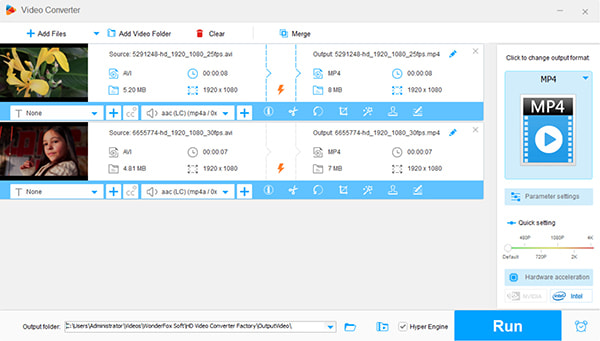
Got a whole folder of old home videos stuck as AVI files? Full HD Video Converter Factory Pro is perfect if you need to turn them all into MP4s on your PC at the same time. I tried it out by throwing five clips into the queue, picked MP4 as the format, and just let the app do the heavy lifting for me.
It finished our single 1.2GB benchmark clip in under three minutes while utilizing our graphics card to keep CPU usage low. The free edition caps output resolution at 1080p, which is plenty for standard AVI source files.
PROS
- The layout makes it really easy to drop in a whole bunch of files at once.
- It works nice and fast on pretty much any newer Windows PC.
CONS
- The free version won't let you go higher than 1080p.
- The interface is not friendly to navigate and access.
Tips
If you ever run into a situation where you need to reverse your steps for legacy DVD players, check out our guide on how to change MP4 to AVI free.
Part 4. Best Free Online AVI to MP4 Converters (No Install)
If you only have one small video clip to convert and do not want to install any software on your computer, a free online AVI to MP4 converter is your quickest route. Online converters work directly in Chrome, Safari, or Edge.
Keep in mind: Online tools are best for small, non-private clips. If you have sensitive home videos or 5GB movie files, stick with the desktop tools in Part 3.
|
Free Limit |
Watermark |
Registration |
File Security |
Best Scenario |
| AnyMP4 Free Online Video Converter |
Flexible standard tasks |
None |
Not Required |
Auto-deleted files |
Quick no-sign-up conversions |
| CloudConvert |
25 conversions / day |
None |
Optional |
SSL + 24h deletion |
Tweaking custom bitrates |
| FreeConvert |
Up to 1GB per file |
None |
Optional |
256-bit SSL |
Larger video files |
4.1 AnyMP4 Free Online Video Converter - No Watermark, No Sign-up
- • Limit: Standard daily conversions.
- • Watermark: None.
- • Registration: Not needed.
- • Best for: Quick, registration-free conversions directly inside your web browser.
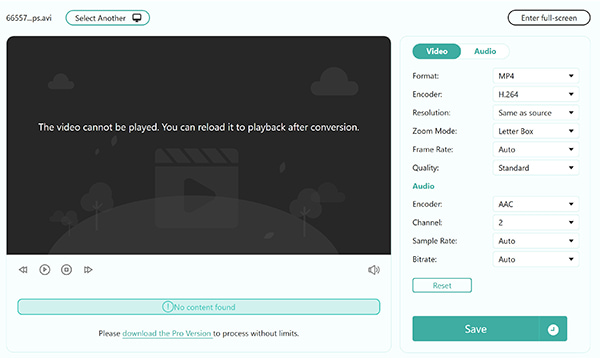
AnyMP4 Free Online Video Converter is a straightforward web app for converting video files on the fly. You do not need to sign up with an email address or worry about surprise watermarks stamped over your video.
During our browser test, uploading our AVI clip and turning it into an MP4 took only a couple of clicks. It lets you tweak basic resolution and audio settings right from the browser window before downloading your final MP4.
PROS
- No annoying watermarks on your final videos.
- It is free to use without creating an account to start.
- It provides the options to adjust the resolution and quality right there in your browser.
CONS
- It totally depends on how fast your Wi-Fi is.
- It doesn't have fancy stuff like cropping or filters.
4.2 CloudConvert - Most Format Options
- • Limit: 25 free conversion credits per day.
- • Watermark: None.
- • Registration: Optional.
- • Best for: Adjusting all the technical settings, like audio settings and video quality, right in your browser.
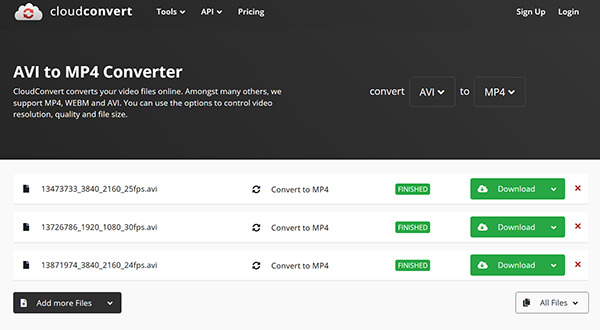
CloudConvert is like a Swiss Army knife in your web browser. When you upload an AVI file, you can click the small wrench icon to adjust your video codec, target bitrate, aspect ratio, and audio volume.
All uploaded files are protected by secure SSL connections and deleted from their servers automatically after processing.
PROS
- Offers granular control over codecs, bitrates, and aspect ratios.
- Automatically deletes your files from servers after 24 hours.
- Integrates smoothly with Google Drive and Dropbox accounts.
CONS
- Limits free accounts to 25 conversion credits per day.
- Interface can feel slightly complex if you just want a one-click convert.
4.3 FreeConvert - 1GB Free & Encrypted
- • Limit: Up to 1GB per file on the free tier.
- • Watermark: None.
- • Registration: Optional.
- • Best for: Converting larger video clips that exceed standard online upload caps.
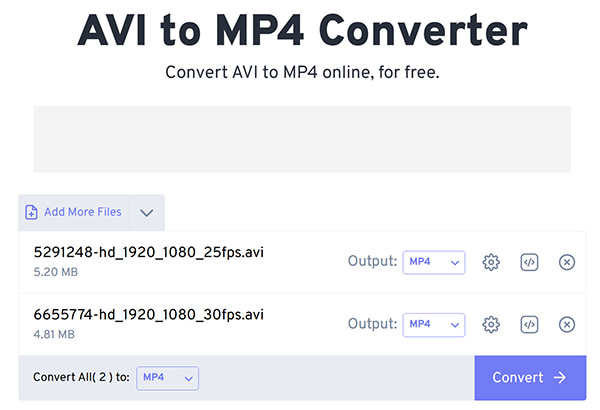
Most online tools lock their free tier at 100MB or 200MB. FreeConvert stands out by letting you upload files up to 1GB for free. It uses 256-bit SSL encryption for all file transfers, and your files are wiped from their server after a couple of hours. It handled our 1.2GB test file (when trimmed slightly under 1GB) without a hiccup.
PROS
- Supports large video uploads up to 1GB on the free plan.
- Protects uploads with 256-bit SSL encryption.
- Works on cross-platform on both mobile and desktop browsers.
CONS
- The free website contains several third-party display ads.
- Free queue processing can slow down during peak server hours.
Tips
If you only care about the background soundtrack or dialogue in your AVI movie, save storage space by converting AVI to MP3 directly instead of making another video file.
Part 5. How to Convert AVI to MP4 for Free (3 Steps)
Here is how you can free convert AVI to MP4 using both the online and desktop methods. Pick whichever works best for your setup!
Method A: Convert in Your Browser (No Software Needed)
1. Open AnyMP4 Free Online Video Converter in your web browser.
2. Click Upload File and select the AVI video from your computer.
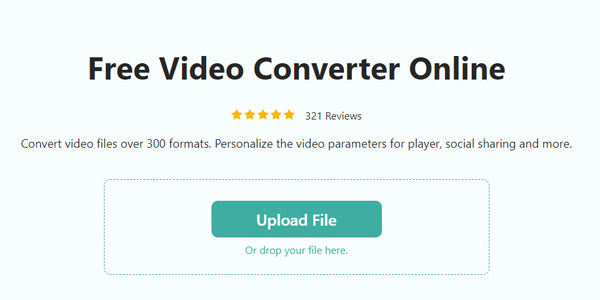
3. Pick MP4 from the format list at the bottom, hit Save, and start converting AVI, and download the converted MP4 file to your computer.
Method B: Convert on Desktop with HandBrake (Best for Big Files)
1. Open HandBrake and just drag your AVI file right into the window.
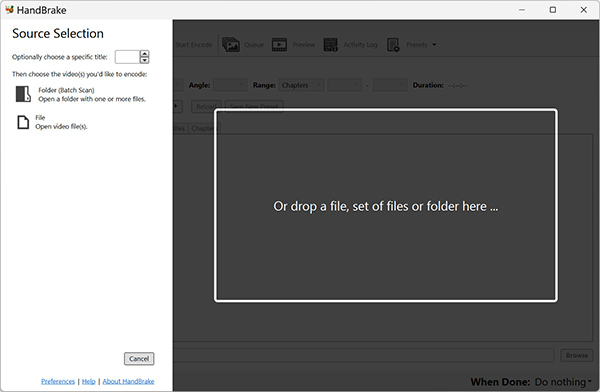
2. Go to the "Summary" tab and make sure the Format is set to "MP4."
3. Choose your destination folder at the bottom and click the green Start Encode button at the top.
Part 6. Desktop vs Online: How to Choose + Upgrade Pick
Still wondering which route to take? Here is a quick breakdown to help you decide:
|
Desktop Tools (HandBrake / VLC) |
Online Converters (AnyMP4 / FreeConvert) |
| Installation |
Required |
None (Browser-based) |
| File Size Limit |
Unlimited (Depends on hard drive) |
Usually 100MB – 1GB |
| Conversion Speed |
Fast (Uses your GPU / CPU) |
Relies on internet upload speeds |
| File Privacy |
100% Local (Never leaves your PC) |
Uploaded to remote servers |
| Batch Queuing |
Yes, handles full folders |
Limited on free tiers |
| Works Offline? |
Yes |
No |
Which one should you pick?
- Pick online converters if: You have 1 or 2 small clips under 500MB, you are on a school/work computer where you cannot install software, or you just need a fast conversion in 30 seconds.
- Pick free desktop tools if: You have several large files over 1GB, you have a slow internet connection, or your videos contain private family footage.
Need Even More Speed? The Upgrade Pick
While the free tools above handle standard daily conversions nicely, they can struggle with huge 4K movie libraries, damaged files, or multi-track audio.
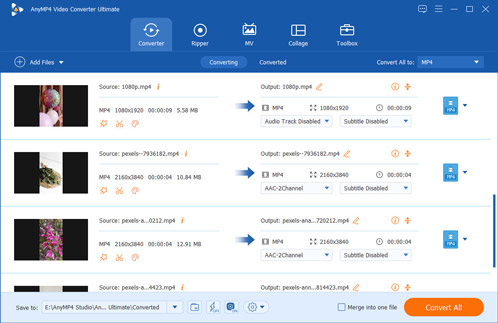
If you regularly convert large batches of 4K/8K media and want top-tier processing speeds, take a look at AnyMP4 Video Converter Ultimate (Paid software with free trial).
It uses hardware acceleration (NVIDIA NVENC, AMD, and Intel QSV) to convert files up to 70x faster than standard freeware. It also includes an AI Video Enhancer to upscale old standard-definition AVI clips to clear 1080p and 4K, built-in video trimming, and simple subtitle merging.
FAQs
Is AVI better than MP4?
Honestly, not really, at least not for most people. Sure, AVI can hold a lot of raw data, but the files are huge and most phones, tablets, or websites won't even open them. MP4 is way better; you get pretty much the same picture quality, but the file size is much smaller, and it plays on just about anything. If you want to know the nitty-gritty, check out detailed differences between AVI vs MP4.
Can I extract audio from AVI videos with VLC?
Yes. Open VLC, go to Media > Convert / Save, add your AVI file, and choose Audio - MP3 from the profile list. VLC will save just the audio track.
Is there a 100% free AVI to MP4 converter without watermark?
Yes. HandBrake, VLC, and FFmpeg are 100% free, open-source software with zero watermarks. For browser use, AnyMP4 Free Online Video Converter provides clean conversions without adding watermarks.
Does converting AVI to MP4 lose quality?
Not noticeably if you use proper settings. MP4 uses high-efficiency H.264 compression. In HandBrake, setting the Constant Quality slider to RF 20-22 creates an MP4 file that looks identical to the original AVI file to the human eye.
Why won't my AVI file convert to MP4?
This usually happens for a few simple reasons: either the AVI file is using a really old format that modern tools don't recognize (like old DivX or XviD), or the file itself is just a bit glitchy. Also, if your file is super huge, some online websites just won't be able to handle it. If the file won't open in any app at all, it might be corrupted. You can check out our other guide on how to fix broken AVI files if you're stuck!
Conclusion
Turning old AVI videos into modern, stream-ready MP4 files does not have to cost you a single penny.
- If you want a quick fix without installing anything, head over to AnyMP4 Free Online Video Converter to change your files right in your browser.
- If you have large files, want full privacy, or want to convert your entire movie collection, download HandBrake for complete control.
Try one of the free AVI to MP4 converter tools and enjoy watching your favorite videos on any phone, tablet, or TV without annoying playback errors.





 Add your comments to join the discussion here