
Quick Answer
When selecting the best program for converting AVI to SWF, you have to consider your priorities regarding format conversion. In this case, we recommended these tools based on which one is the fastest, the most professional option, and the best online solution.
While Flash has largely been replaced by HTML5 when it comes to small animation on web browsers, some legacy systems, industrial interfaces, and classic game archiving still rely on SWF files. Moreover, these files are also superior to other video formats in terms of web optimization. Especially when designing interactive banners, web tutorials, and classic browser-based games. To help our readers learn how to convert modern AVI videos to SWF, this guide walks you through the safest and most reliable ways to convert AVI to SWF.

| Feature | AnyMP4 (Desktop) | Convertio (Online) | CloudConvert (Online) |
|---|---|---|---|
| Best For | Heavy users / Large files | Quick, mobile users | Cloud users / Tech-savvy |
| File Limit | No Limit | 100 MB (Free) | 1 GB (Free with sign-up) |
| Speed | 70x Faster (GPU Accel) | Depends on Internet | Stable Cloud Speed |
| Security | 100% Local (Most Secure) | 24-hour deletion | ISO 27001 Certified |
Before moving on to the tutorial on three methods for converting AVI to SWF, let us first discuss why converting from one format to another is necessary. With that in mind, AVI and SWF are two different video formats.
On the one hand, AVI is a standard video container that contains both video and audio frames. This makes it a conventional video format, much like MP4, MKV, or MOV videos. Meanwhile, SWF is an interactive multimedia and animation file that originated from the Adobe Flash format.
With their main difference now discussed, it should be clear that AVI and SWF have different uses. If you want to use a regular video for basic animation, you have to convert your AVI clips to SWF.
Although Adobe officially ended Flash Player support in 2020, SWF remains useful for:
If you are looking for an AVI-to-SWF batch converter, you should not miss AnyMP4 Video Converter Ultimate. This all-in-one desktop solution for format compatibility issues operates 70x faster, allowing users to quickly convert large AVI files to SWF. If the converted SWF video is still large, you can use the built-in video compressor to reduce its size. Moreover, you can crop, clip, merge, rotate, flip, add a watermark, and apply other video effects before converting your media files.
For better format conversion, AnyMP4 helps users fine-tune encoding parameters so that the exported SWF works in older browsers or Flash emulators like Ruffle. These advanced settings can also be used to adjust resolution, bitrate, and advanced codecs for a more efficient workflow.
These features are very practical, as they can be applied during batch conversion when handling 100+ AVI files, since they have no file size limits and do not rely on internet bandwidth, unlike online tools.
Recommendation
Secure Download
Secure Download
1. Run AnyMP4 Video Converter Ultimate. Click Add Files at the top. Then browse and import your AVI files.
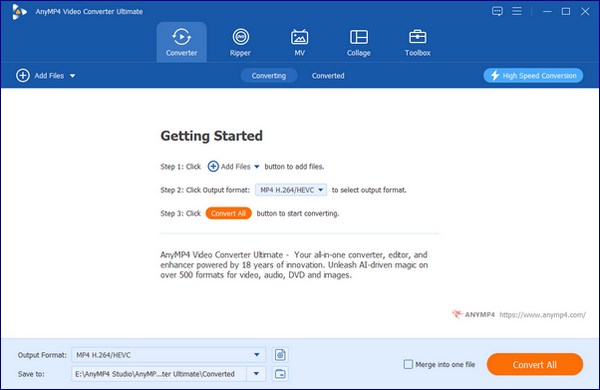
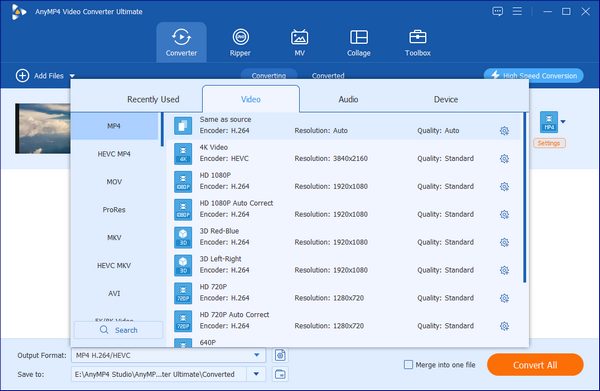
2. To convert AVI to SWF, expand the Convert All list in the top-right corner. Set SWF as the output format.
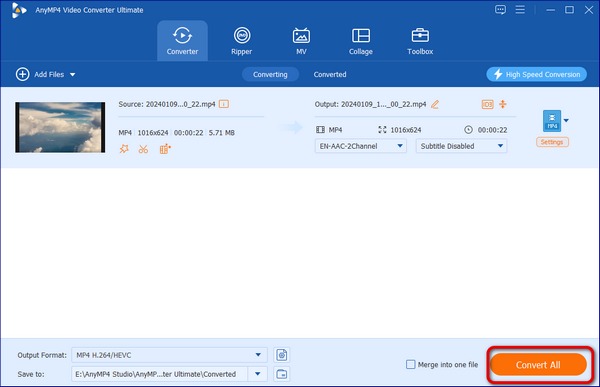
3. Select a path in the Save to section. At last, click Convert All to convert all AVI files to SWF in bulk.
Among the options on this list, AnyMP4 Video Converter Ultimate offers the best balance in terms of features and ease of use. It is also the best option for professional and casual conversions, as it offers efficient batch conversion.
If you want to convert AVI to SWF online for free, tools like Convertio should be among your top options. Among the options on this list, this program offers cloud convenience by converting AVI to SWF and 37 other formats from cloud sources, including Dropbox, Google Drive, and URLs.
Since it is an online tool, it also offers multi-device access, allowing use directly in browsers, including on mobile devices. This makes the program perfect for mobile users or anyone who needs a quick conversion without installing software.
Unlike other online tools with subpar security, files in Convertio are protected with 256-bit SSL encryption and automatically deleted after 24 hours. Unfortunately, the free version has a 100MB upload limit. If your AVI file is larger, refer to Method 1.
PROS
CONS
1. Go to the Convertio website and select the Choose Files button.
2. Once the file has been uploaded, set the output to SWF.
3. With the output format set to SWF, select Convert to convert your conventional AVI video to an SWF animation.
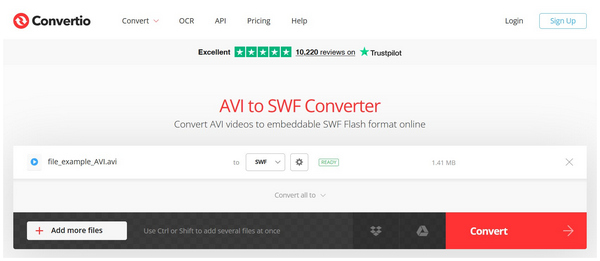
Based on our performance testing, Convertio converted a 30-second AVI clip in about 15 seconds. This is good enough for a file that is this short. However, this performance may be considered subpar compared to the efficiency of online tools.
Moving forward to the next online tool, we have CloudConvert. Compared to other web-based options, this software offers greater precision and more customization. It also excels in technical depth, has a strong reputation among advanced users, offers customizable video codecs, and has direct cloud storage integration with Google Drive, Dropbox, and OneDrive.
When using CloudConvert, it is recommended to lower the frame rate, which can significantly reduce SWF file size without affecting animation clarity. As a baseline, most SWF animations work best at 24-30 FPS.
PROS
CONS
1. Go to CloudConvert, then click Select File to upload your AVI.
2. Once your file has been uploaded, click on Select Format and choose SWF.
3. With the output format now set, click on Convert to begin the process.
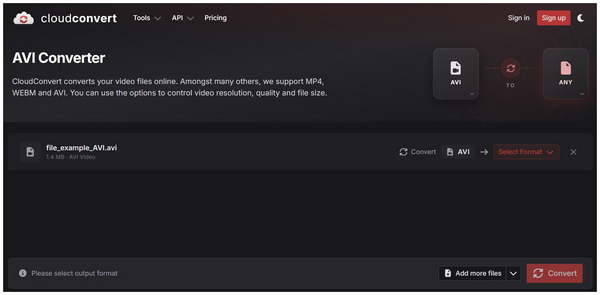
Unlike the previous versions of CloudConvert, uploading your AVI file will remove the SWF format from the available outputs. This gives CloudConvert a suboptimal option if you really want to use the SWF format.
Since Flash Player has been discontinued, double-clicking SWF files usually won’t work to play them. However, the easiest solution to preview these files may already be available on your computer. You can simply use VLC Media Player as an alternative for watching SWF files.
Right-click your SWF media, select Open With, and choose VLC Media Player. However, VLC cannot access interactive SWF content and will only play the file as a flat, regular video.
VLC cannot run interactive SWF content (e.g., ActionScript-based Flash games).
Is it still safe to convert AVI videos to SWF format?
Yes, it is. Converting AVI to SWF can still be done safely. However, SWF now has limited uses, although it still has specific niches.
What is the best AVI-to-SWF converter that doesn’t require Flash Player?
Desktop-based multimedia software and online tools are your best bets. Good options include AnyMP4 Video Converter Ultimate for desktop. On browsers, Convertio is a good solution.
Can I convert AVI to SWF for an old Flash-based website?
Yes, you can. Old Flash websites can open such files. SWF is the best option for this, since it was optimised to do so.
How do I batch convert AVI to SWF on Windows 11?
You have to use a multimedia conversion program. A good option is AnyMP4 Video Converter Ultimate. This is the fastest solution for batch conversion, as it is hardware-accelerated.
Why would someone still need to convert video to SWF today?
SWF still has its niche uses. Although limited, it is a good option for legacy hardware, flash game archiving, and industrial control screens. However, for modern websites, it is no longer popular.
Now that the best AVI-to-SWF conversion tools have been reviewed, we recommend AnyMP4 Video Converter Ultimate, as it is the most stable, high-quality, and future-proof solution for converting AVI to SWF—especially for large files and batch workflows. It is way more stable and equipped with more practical tools than browser-based options. You may download the program using the link below.
Secure Download
Secure Download
 Updated by Alice Thorne to Convert Video
More readings
 Top 6 Best Ways to Convert SWF to MOV With Ease
This post shows you multiple best approaches to convert SWF to MOV on Windows and Mac computers and enjoy your favorite videos with the original quality.
 Convert SWF to AVI Video – Here Are 5 Easy Ways You Can Follow
Get 5 easy ways to convert SWF to AVI step by step. Here are both online and offline video converters that you can change the video format. Wanna know detailed steps? Just read and check.
 SWF Player – Play SWF Files with Smooth and Impressive Visual Effects
Have no idea which SWF player to choose? Here you can get the detailed information about 5 popular SWF players. Just read and get your best SWF player for Windows or Mac.
 Top 7 SWF Editors to Efficiently Modify and Edit Flash Videos
SWF Editor as the name suggests is the editing software which can process flash files. Here are top 7 SWF editing software for you to efficient edit flash animated files.
 Add your comments to join the discussion here