
Free Download100% Clear & Secure
Free Download100% Clear & Secure
What is the best Blu-ray player software for PC and Mac?
Gone are those days when Blu-ray player hardware was the only way to watch Blu-ray discs. Compared to Blu-ray player hardware, Blu-ray player software can play more types of discs, including DVD, CD, and Blu-ray. It also has better flexibility that you can watch Blu-rays on any computer. Moreover, player software provides additional tools for people to adjust playback, and edit subtitles, and audio tracks.
Today, tons of software exist to help you enjoy high-definition visuals and immersive audio offered by Blu-ray. Thus, you don’t need to go anywhere to look for portable players for your discs. Before you make a decision or install any PC Blu-ray disc player software, it is vital to get to know them first. Here, we’ll review them one by one, highlighting their features, pros, cons, and so on.

| Best For | 4K/8K Support | AI Upscaling | Region-Free | Price | Testing Environment | |
|---|---|---|---|---|---|---|
| AnyMP4 Blu-ray Player | Overall & AI Quality | 4K UHD |  (SuperRes) (SuperRes) |
Automatic | $15.60 | Win 11 + NVIDIA RTX 5090 + Pioneer BDR-212DBK |
| Blu-ray Master Free Blu-ray Player | Budget 1080p | 1080p HD |  |
|
Free | Windows 11 + LG External Slim Drive |
| PowerDVD | Home Theater 8K | 8K / 4K | (TrueTheater) |
Limited | $79.99 | Windows 11 Pro + 8K HDR Monitor |
| VLC Media Player | Customization | 4K UHD | (TrueTheater) |
Via Plugin | Free | macOS Sonoma + AACS Library v2026 |
| Aurora Blu-ray Player | Social Sharing | 4K UHD | (TrueTheater) |
|
$49.95 | Windows 11 + USB 3.0 External Drive |
| Macgo Blu-ray Player | M1-M4 Macs | 4K UHD | (TrueTheater) |
|
$29.95 | MacBook Pro M4 Max + ProRes Acceleration |
The gap between hardware and software players has widened thanks to AI integration. Modern PCs now use GPU-accelerated AI Super Resolution to upscale standard 1080p Blu-rays to 4K in real-time, providing clarity that old physical players cannot match. With the release of the Apple M4 chip and Windows 11 25H2 update, dedicated software is essential to bypass complex AACS 2.0 encryption and enjoy lossless audio formats like Dolby Atmos without system lag.
To deliver real-world recommendations, our media lab conducted a rigorous 30-day testing process evaluating 7 leading media players across modern Windows and macOS environments.
Our Testing Methodology & Environment:
| Top Winner | Key Strength | |
|---|---|---|
| Best Overall & AI Quality | AnyMP4 Blu‑ray Player | 4K AI Super Resolution + Auto Region‑Free Decryption |
| Best Home Theater (8K) | CyberLink PowerDVD | Native 8K Support + TrueTheater AI Enhancements |
| Best Free Freeware | VLC Media Player | Open‑source + Multi‑codec support (Requires manual AACS setup) |
• Best For: AI-driven 4K upscaling, automatic AACS 2.0 decryption, and lossless audio support.
• Video Playback Quality:
• User Interface:
• Price: Free Trial / $15.60
• Platform: Windows 11/10/8/7, macOS
• Supported Formats: Blu-ray Disc/ISO/Folder, DVD, 4K UHD, HEVC, AV1
• Watermark: No
• Region-Free Decryption: Fully Automatic (AACS 2.0 & BD+ supported).
• Expert Tip: Bypasses newly updated 2026 AACS keys automatically with zero manual setup.
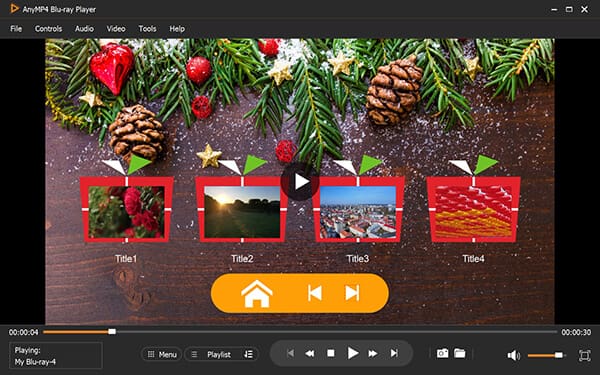
The first computer Blu-ray software we’d like to introduce is AnyMP4 Blu-ray Player. It is one of the best 4K Blu-ray player tools for PC that allows you to play DVDs and Blu-rays with region codes. In 2026, it stands out with its AI Super Resolution technology, which leverages GPU acceleration to upscale standard 1080p Blu-rays to near-4K clarity in real-time. With Dolby, DTS, DTS-HD, AAC, TrueHD, and surround sound 5.1, and 7.1 channels, you can enjoy super studio-quality sound effects like cinema.
One excellent thing about it is that you can select any title or chapter during Blu-ray playback. Not only that, it allowed us to choose subtitles and audio tracks. Its playback controls will allow you to pause, stop, fast forward, or backward into your playback.
Verdict: Most users of this good Blu-ray player give a decent review for its performance. They think this tool is easy to use and supports playing back most DVDs and Blu-rays with copy protection, as well as multiple video formats.
Secure Download
Secure Download
Features
PROS
CONS
Verdict: Most users of this good Blu-ray player give a decent review for its performance. They think this tool is easy to use and supports playing back most DVDs and Blu-rays with copy protection, as well as multiple video formats.
• Best For: Lightweight, energy-efficient 1080p Blu-ray playback on Windows 11.
• Video Playback Quality:
• User Interface:
• Price: 100% Free
• Platform: Windows 11/10/8/7
• Supported Formats: Commercial/Homemade Blu-rays, DVDs, ISO, MP4, AVI.
• Watermark: No
• Expert Tip: Clean and ad-free freeware option for laptops with low CPU overhead.
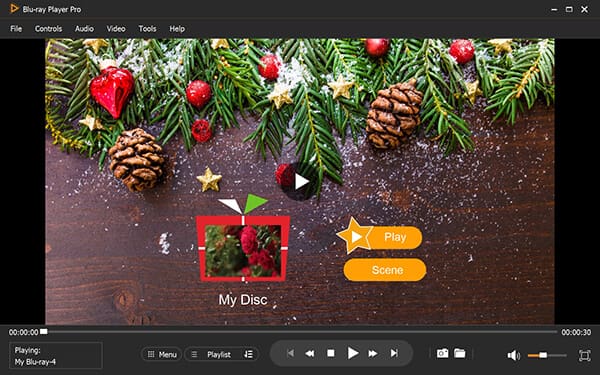
If you want a free Blu-ray movie player, Free Blu-ray Player from Blu-ray Master will help you. It can be a good companion if you want a basic solution for Blu-ray playback. It allows you to play 2D/3D Blu-rays in any region. In 2026, this tool remains a favorite for its low CPU consumption, making it ideal for laptops. With just a few clicks, you’ve got to enjoy playing our Blu-ray disc. Moreover, it provides you with various editing tools, like playback modes, movie effects, etc., which can optimize your Blu-ray playback.
Although it is free, it still offers high-quality playback and sound. Not only that, we found out that it can also play many popular video formats as well. That’s why it’s our second-best Blu-ray player software for Windows and Mac users.
Verdict: Some people praise that it is easy to use and shows good video and audio quality. Some people reflect that there are ads in its main interface, which brings a bad user experience.
Features
PROS
CONS
• Best For: High-end 8K Ultra-HD home theater experiences and multi-device cloud streaming.
• Video Playback Quality:
• User Interface:
• Price: $79.99 (30-Day Free Trial)
• Platform: Windows Only
• Supported Formats: Native 8K / 4K UHD, Blu-ray 3D, DVD, HDR10+, DTS-HD.
• Watermark: No
• Expert Tip: Stream physical Blu-ray collections directly to Smart TVs using CyberLink Cloud.
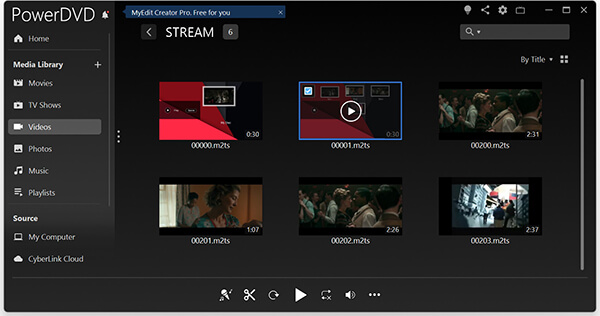
Another popular option that offers playback for Blu-ray discs is PowerDVD. If you want a premium Blu-ray experience, this one's for you. This player boats flawless playback of both 4K and standard Blu-ray discs, which we find commendable. For 2026, it remains the industry standard for 8K Ultra-HD support. It also lets you have full control over your viewing experience. But note that this tool is for Windows OS only.
This Blu-ray disk player for PC adopts DTS-HD, Dolby Audio, and Hi-Res 7.1 surround to provide you with super audio quality. What's more, it enables you to use customizable thumbnails to manage your playback list, which is clear at a glance.
Verdict: Many people commend its TrueTheater enhancement function, like HD upscaling, lighting, noise reduction, and stabilization. Some people complain that it has too many functions to figure out them respectively.
Features
PROS
CONS
• Best For: Cross-platform playback, advanced customization, and broad codec compatibility.
• Video Playback Quality:
• User Interface:
• Price: 100% Free (Open Source)
• Platform: Windows, macOS, Linux
• Supported Formats: Unencrypted Blu-rays, DVDs, HEVC, AV1, VP9, MP4, MKV.
• Important Tip: VLC lacks native AACS decryption. Playing commercial Blu-rays requires manual configuration of dynamic libraries (libaacs.dll and KEYDB.cfg).

One more Blu-ray player you should not miss is the VLC Media Player. It is known for its versatility, which allows you to play Blu-ray discs. It allows you to use hotkeys to flexibly control the Blu-ray playback, like skipping some clips, enhancing the volume, and exiting the playback. This free Blu-ray player can play DVDs on MacBook Pro, Windows 11, and many other computers.
But here’s a catch: in 2026, VLC still lacks native support for encrypted Blu-ray. Thus, you must install additional software or plugins. But still, it’s an ideal option if you want a free tool and are willing to spend time on the additional configuration.
Verdict: Most people are fond of VLC Media Player because it is free software and supports playing multiple video formats, including Blu-rays. The shortcoming is that it can only play homemade, burned, and unprotected Blu-rays natively.
Features
PROS
CONS
• Best For: Intuitive chapter navigation, scene bookmarking, and direct social media sharing.
• Video Playback Quality:
• User Interface:
• Price: $49.95 (Free Trial)
• Platform: Windows, macOS
• Supported Formats: 4K Blu-ray, DVD, ISO files, HD Media Formats.
• Watermark: Yes
• Expert Tip: Use the built-in bookmarking tool to cache high-action scenes for faster reloading.
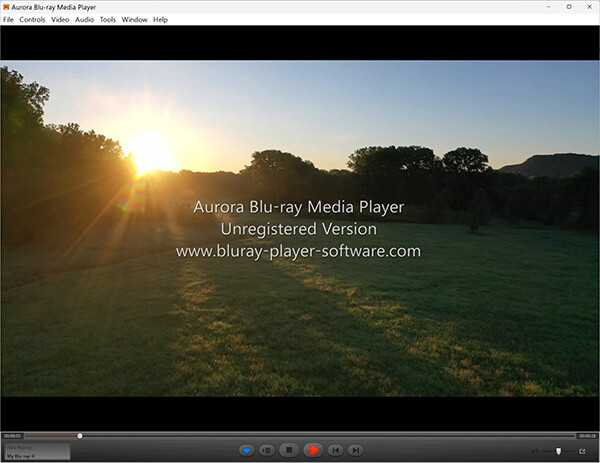
Aurora Blu-ray Player is designed to be a user-friendly tool. As for its Blu-ray playback, this Blu-ray player program provides a smooth and high-quality experience. It supports various disc formats, including 4K Blu-ray. What makes it unique is its Social Sharing feature, allowing you to share movie reviews or highlights directly to your best friends while watching. It provides a seamless experience for users on both Mac and Windows, so that you can play DVDs on MacBook Pro and Windows 11. One drawback that we identified is that it lacks advanced settings, like 3D playback.
Verdict: Many people like its function that they can add subtitles to Blu-ray movies, and share the movie's information or their review with their best friends. Sometimes, it appears that the video and audio are out of sync during the playback.
Features
PROS
CONS
• Best For: Native performance and hardware acceleration on Apple Silicon (M1, M2, M3, M4) Macs.
• Video Playback Quality:
• User Interface:
• Price: $29.95
• Platform: macOS Only
• Supported Formats: Commercial Blu-ray, DVD, 4K UHD, ProRes
• Trial Limitation: Watermark on free version.
• Expert Tip: Fully optimized for Apple M-series chips to reduce CPU heat and fan noise during 4K playback.
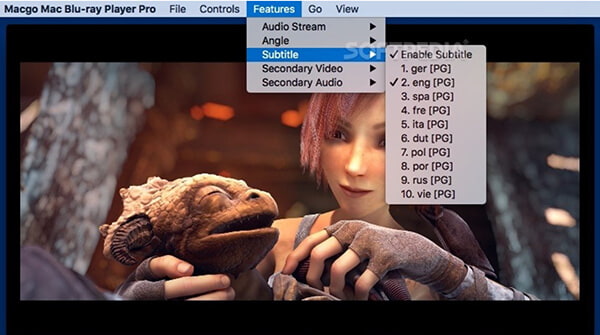
Macgo Blu-ray Player is a tailored Blu-ray player software for laptops. In 2026, it has been fully optimized for Apple Silicon (M1, M2, M3, and M4 chips), ensuring zero fan noise and low heat during playback. It can also deliver smooth playback for Blu-ray discs, even in 4K UHD. What’s more, we found some essential features, like bookmarking and menu navigation. Thus, it can be your basic yet reliable Blu-ray playback solution for your Mac.
Verdict: Macgo Blu-ray Player was favored by its ability to play BD-Live content. And it can play commercial Blu-ray discs. However, one problem is that the added watermark in the free version is in the center of the picture, which greatly affects the viewing experience.
Features
PROS
CONS
Encountering playback lag, region code blocks, or missing library errors? Here is how to resolve the most common issues when playing Blu‑ray discs on PC and Mac.
If you are wondering how to play Blu‑ray on Mac without standalone hardware player setup or fix lagging on PC, follow these simple steps using AnyMP4 Blu‑ray Player:
1. Download and install AnyMP4 Blu‑ray Player on Windows 11/10 or macOS.
Secure Download
Secure Download
2. Connect your optical drive and click Open Disc. The software automatically bypasses AACS 2.0, BD+, and Region Codes (A/B/C).
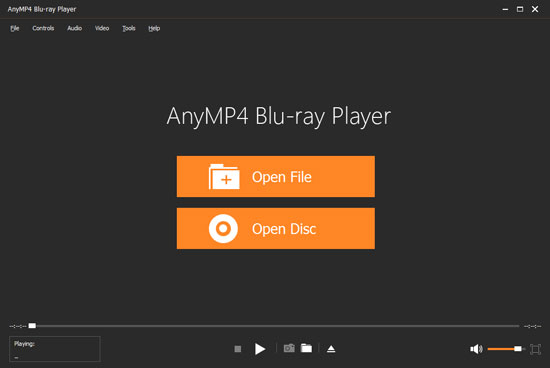
3. Then, the Blu‑ray movies can be played on this software. You can create a playlist to manage the playback of Blu‑rays. The camera‑shaped icon allows you to take snapshots of the highlights of movies. Moreover, you can adjust the playback speed and add external subtitles to enjoy smooth 4K AI Super Resolution playback with zero frame drops.
Trying to play encrypted Blu‑ray on PC VLC often triggers the error: "This Blu‑ray Disc needs a library for AACS decoding." To fix this on Windows 11/10 and Mac, perform the following step‑by‑step configuration:
1. Get the Key Database (KEYDB.cfg)
Download the latest 2026 KEYDB.cfg file.
2. Install the AACS Dynamic Library
Download libaacs.dll (Windows 64‑bit) or libaacs.dylib (Mac).
3. Restart VLC
Re‑insert your commercial Blu‑ray disc. VLC will now use these dynamic keys to bypass disc encryption seamlessly.
Does the VLC player play Blu-ray?
Unfortunately, no. VLC player does not natively support Blu-ray playback. Additional software or plugins may be required for Blu-ray functionality.
How can I play Blu-ray discs on my computer?
You can use specialized Blu-ray player software like the tools mentioned above. But before that, ensure your computer has a Blu-ray drive. Using AnyMP4 Blu-ray Player software, click the Open Disc button. Wait until the tool loads the disc for a few seconds. Then, your Blu-ray will play immediately.
Are Blu-rays being phased out?
Not necessarily. However, Blu-rays' popularity has decreased with the rise of streaming services. Yet, Blu-ray discs still offer advantages like higher video and audio quality. Aside from that, there are bonus features and physical ownership of the media.
What is Blu-ray software?
Blu-ray software refers to applications designed to play Blu-ray discs on computers. These programs often provide additional features. These include HD support, customizable playback settings, and library management.
Which Blu-ray player is best for Windows 11?
AnyMP4 is highly recommended for Windows 11 as it leverages hardware acceleration and AI to deliver 4K quality without lag.
Can I play 4K UHD Blu-rays for free on a PC?
Yes, VLC can play them but requires manual installation of decryption libraries. For a hassle-free experience, a dedicated player is advised.
How do I fix "AACS Decoding" errors?
This usually happens when a player lacks the decryption key. Such tools as AnyMP4 Blu-ray Player bypass this automatically, whereas VLC needs external KeyDB.cfg files.
What is the best free Blu-ray player software for Windows 10 & 11?
While VLC Media Player is popular, Blu-ray Master Free Blu-ray Player is considered the best hassle-free free software for Windows 10/11. It plays unprotected 1080p discs smoothly without requiring complex manual setup or dynamic library configuration.
Is there a free Blu-ray player for Mac M4/M3 chips?
Yes, VLC and Macgo Blu-ray Player both support Apple Silicon (M1-M4) via native ARM acceleration. Macgo provides an intuitive native macOS interface, though the free trial version includes a center watermark.
Is AnyMP4 Blu-ray Player software worth it compared to PowerDVD?
In our comparison, AnyMP4 Blu-ray Player offers better value ($15.60) with real-time AI Super Resolution upscaling and universal region-free decoding, whereas PowerDVD ($79.99) is tailored mainly for high-end 8K home theaters.
Selecting the ideal Blu-ray player software depends on your target display, hardware setup, and budget:
Secure Download
Secure Download
 Updated by Ted Klarso to Play Blu-ray&DVD
More readings
 Review: 10 Best 3D Blu-ray/DVD Player on PC & Mac
We will introduce the best 3D Blu-ray player software for PC and Mac to you. You can enjoy your 3D Blu-ray movies at home just like in the cinema.
 10 Best Blu-ray DVD Player Software & Hardware for Sale
Upon opening this post, you will discover notable DVD Blu-ray players of 2026 that can give you the most excellent viewing experience you could ever have.
 A Reliable Review of 5 Best 4K HEVC Players
If you want to watch H.265 videos without hassles, choose an HEVC player. This article lists 5 Players to help you gain a better audiovisual experience.
 4 Best MPEG Players to Open MPEG on Desktop and Mobile
This article shares 4 popular MPEG players across platforms and devices. Meanwhile, you can get the detailed steps to watch your .mpeg files now.
 Add your comments to join the discussion here