CapCut vs YouTube Create: The Secret Tools Pro Creators Use
Quick Verdict:
Choose CapCut if you need viral TikTok templates, advanced AI Voice Cloning, and cross-platform flexibility.
Choose YouTube Create for a completely free, mobile-first experience with seamless YouTube Studio integration and direct access to Google’s Veo 3 Fast video generation.
In the ever-intensifying Shorts vs. TikTok battle, creators are constantly searching for the tools that maximize workflow efficiency while boosting viral potential. Two mobile-first giants dominate this space: CapCut vs. YouTube Create. Cut offers AI-powered editing, trend-driven templates, and a no-watermark free export option. It is perfect for creators chasing fast, social-ready content. YouTube Create, on the other hand, leverages the YouTube ecosystem and Creator Studio for seamless integration. It lets you edit, publish, and track performance all within one app. This post is a comprehensive guide for mobile-first content creators who are deciding between CapCut and YouTube Create for editing short-form videos. We will break down the strengths, weaknesses, and unique features of both apps.
At a Glance: Key Differences Between CapCut and YouTube Create
| CapCut |
VS |
YouTube Create |
| Short-form, high-engagement content for TikTok, YouTube Shorts, and Reels. |
Best For |
YouTube Shorts and long-form videos. |
| Automatic captioning, AI background remover, text-to-speech, AI image-to-video generation, and
filler word removal. |
AI Tools |
AI video generation, dream screen, automatic captioning, speech-to-song, and audio enhancement. |
| Digital audio, pre-licensed audio, Commercial Library, and AI-generated music. |
Music |
Royalty-free library, Creator Music, digital audio, and AI-generated music. |
| 4K resolution at 60fps |
Export |
4K resolution at 60fps |
| Moderate |
Learning Curve |
Easy |
CapCut Deep Dive: The King of Creative Trends
For mobile-first creators on Shorts, TikTok, and Reels, CapCut remains the trend powerhouse. It’s fast, template-driven, and deeply integrated into short-form content culture. If your goal is to ride viral waves quickly, it still leads in creative speed and social-ready polish.
AI Features: Script-to-Video and Voice Cloning.
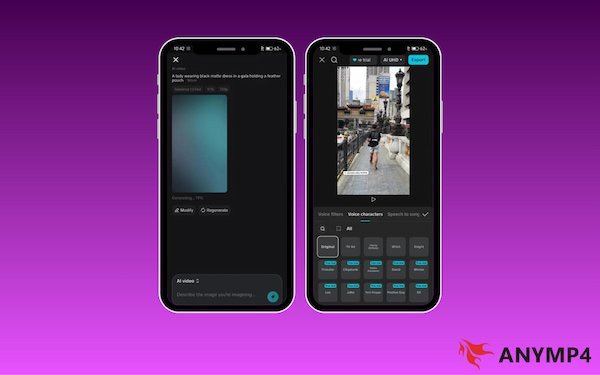
Script-to-Video: CapCut’s biggest advantage in 2026 is its AI video generator. It turns text prompts or scripts into finished videos in minutes, complete with visuals, captions, and music. This is ideal for faceless content, tutorials, and quick social posts.
Voice Cloning: This feature lets you replicate your own voice (or select from premium AI voices) for narration. Instead of recording every time, you generate consistent narration instantly. For creators scaling content volume, this feature alone can justify using CapCut.
The Pro Problem: Is the Subscription Worth it in 2026?
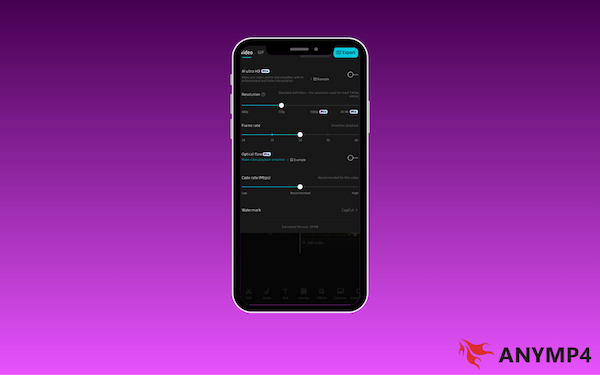
Many of the most attractive features, including premium templates, advanced effects, 4K export settings, and specific AI tools, are locked behind CapCut Pro. What once felt free and generous now feels increasingly gated. So, is it worth the investment?
It’s worth it if:
- You post daily or multiple times per week.
- You rely heavily on trending templates.
- You monetize your content.
- You use AI tools regularly.
It may not be worth it if:
- You need advanced desktop-level controls.
- You’re frustrated by recurring costs.
- You edit casually.
In 2026, CapCut remains the king of creative trends, but it is no longer the undisputed free champion. If speed, automation, and trend integration matter most, Pro can be justified. If control, flexibility, and ownership matter more, you may start looking elsewhere.
Final Take:
CapCut wins on creativity and AI innovation. The real decision comes down to whether convenience is worth the subscription price for your specific content goals.
YouTube Create Deep Dive: The Ecosystem Advantage
Built for creators who live inside the YouTube workflow, YouTube Create focuses less on flashy trends and more on publishing efficiency. Instead of juggling multiple apps, it combines your editing, metadata, and upload processes into a single streamlined pipeline.
Direct-to-Studio: Why YouTube Loyalists are Switching
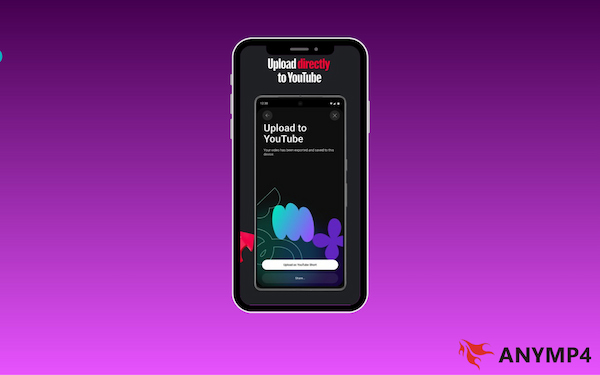
One of YouTube Create’s biggest strengths is its seamless YouTube Studio integration. You can export directly to your channel, manage metadata, and even schedule posts. This eliminates the traditional process of exporting, re-uploading, and manually re-entering metadata.
Creators switching from third-party editors often cite smoother content management, faster publishing, and fewer upload errors. If your content strategy revolves around YouTube growth, this ecosystem advantage is hard to ignore.
Copyright-Free Bliss: Accessing the YouTube Audio Library
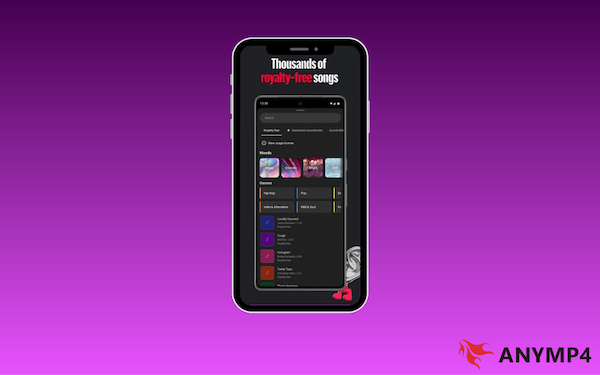
Music licensing can be stressful, but YouTube Create simplifies it by integrating access to the YouTube Audio Library. This royalty-free music library provides copyright-safe music and sound effects that are immune to monetization claims. Additionally, it offers intuitive filters to help you find tracks by mood, genre, duration, or attribution requirements.
Final Take:
YouTube Create might not match CapCut’s trend-heavy features, but its integration with the platform is unbeatable. It offers an easy workflow and built-in copyright-safe music, making it the most efficient, stress-free choice for dedicated YouTube creators.
The Pro Secret: Enhancing Your Mobile Edits with AnyMP4 Video Converter Ultimate
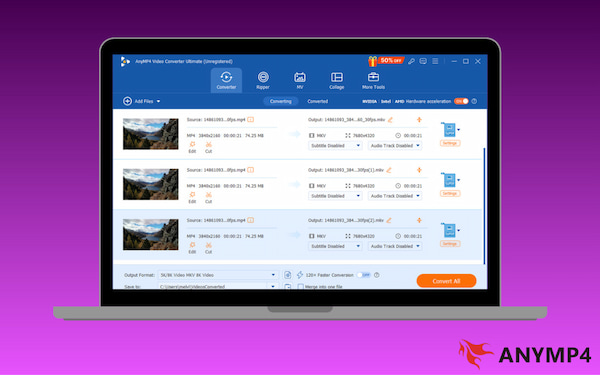
For mobile-first creators who have reached the limits of smartphone apps, AnyMP4 Video Converter Ultimate is the ideal mobile-to-pro bridge. Apps like CapCut and YouTube Create are great for quick edits. However, they struggle with high-bitrate footage, complex file formats, and heavy batch processing. Fortunately, AnyMP4 Video Converter Ultimate solves these challenges.
This powerful software can convert video files to optimized 4K or even 8K formats. It preserves every detail while making them easier to handle in desktop software. Its lossless compression shrinks large files without compromising clarity, keeping your content viral-ready while speeding up transfers and exports. When YouTube Create and CapCut reject certain formats, AnyMP4 Video Converter Ultimate instantly converts them to more than 500+ media formats. Beyond single files, it supports batch processing. You can edit 10 videos in CapCut, then upscale, compress, or add watermarks to all of them at once.
How to Choose: Which Tool Fits Your Creator Style?
Choosing between CapCut vs YouTube Create comes down to what you value most in your creative workflow. Both tools are powerful, but they serve different needs depending on your goals, audience, and publishing habits.
If you prioritize speed, trends, and creative flair, CapCut is your best fit. It’s designed for creators who want to leverage viral formats and advanced AI features. Conversely, if your focus is on YouTube growth and efficiency, YouTube Create shines. It replaces complexity with a streamlined workflow integrated directly into YouTube Studio. It offers a built-in library of copyright-safe music to keep your channel strike-free.
FAQs about CapCut vs. YouTube Create
Q: Is YouTube Create better than CapCut for beginners?
A: YouTube Create is designed to be simple and beginner-friendly. However, CapCut is considered superior for most beginners. It balances ease of use with a more comprehensive suite of tools.
Q: Does CapCut still have a watermark in 2026?
A: As of 2026, you can export videos without a watermark using CapCut’s free version. You just need to remove the default ending clip or avoid certain watermark-heavy templates. Many standard templates, transitions, and effects are fully free to use without leaving a visible mark.
Q: Can I use YouTube Create for TikTok?
A: Yes, YouTube Create can be used to edit videos for TikTok, though it is designed for YouTube Shorts. The app supports vertical 9:16 video formats, trimming, effects, text overlays, and music. This makes it compatible with TikTok, Reels, and other short-form platforms.
Conclusion
The bottom line in the CapCut vs. YouTube Create debate ultimately comes down to workflow preference and content goals. CapCut excels in creative freedom, trend-driven templates, and AI-powered editing. YouTube Create offers seamless integration with the YouTube ecosystem, direct access to Creator Studio, and an algorithmic advantage.
Final recommendation: Choose CapCut for flexibility and trend-focused editing, or YouTube Create for streamlined, YouTube-centric content. For creators who want to take their mobile edits to the next level, pairing either app with AnyMP4 Video Converter Ultimate is a game-changer. It lets you convert, compress, batch-process, and optimize your clips for professional-grade output.
The bottom line? If you want to ride TikTok trends, stick with CapCut. If you want a distraction-free path to YouTube growth, YouTube Create is your new best friend.







 Add your comments to join the discussion here