Pro Editors Verdict: DaVinci Resolve iPad vs. YouTube Create
Quick Verdict:
Choose DaVinci Resolve iPad if you need Hollywood-grade node-based color grading and utilize the M5 chip’s Neural Accelerators for 2.3x faster AI upscaling and magic masking.
Choose YouTube Create for ultra-fast publishing using Google Veo 3 Fast to generate AI B-roll and SynthID-labeled metadata directly on your mobile device.
The rise of mobile post-production has transformed how creators produce and publish content. In 2026, the conversation around DaVinci Resolve iPad vs. YouTube Create centers on workflow efficiency, creative control, and publishing speed. On one side, DaVinci Resolve for iPad delivers professional-grade, high-fidelity, and cinematic editing powered by the performance of the iPad Pro M4/M5. On the other hand, YouTube Create prioritizes speed and seamless publishing for YouTube Shorts and social-first workflows. However, creators often face challenges such as file compatibility issues, codec limitations, and playback lag. This post explores how these two mobile editing tools compare in real-world workflows and where each excels. We will also highlight how optimizing media before editing can improve performance and prevent technical issues. The aim of this post is to help solo YouTubers, professional mobile editors, and beginner Shorts creators choose the right tool.

DaVinci Resolve iPad vs. YouTube Create: The 2026 Battle for Mobile Editing Supremacy
Quick Verdict:
In 2026, the choice is clear: DaVinci Resolve for iPad is the powerhouse for cinematic, high-fidelity color grading and professional multi-track editing. YouTube Create is the ultimate speed-to-market tool for Shorts and social-first creators. For editors facing Media Offline errors, unsupported codecs, or laggy playback, AnyMP4 Video Converter Ultimate serves as the essential bridge to optimize footage for both platforms.
| DaVinci Resolve (iPadOS 27 beta, 26) |
VS |
YouTube Create (Android/iOS) |
| M5 Neural Accelerator (3.5× AI Speed) |
Hardware Opt. |
Cloud-based Processing |
| Liquid Glass Windowing (Tiled view) |
Multitasking |
Single-App Focus |
| Background Tasks (No app freeze) |
Exporting |
Direct to Studio |
| AI Video Gen. |
AI Video Masking & Tracking |
Veo 3.1 (Ingredients to Video) |
The Professional Powerhouse: Why Choose DaVinci Resolve iPad?
Many apps claim to be professional, but DaVinci Resolve for iPad is a literal 1:1 port of the software. In 2026, with the arrival of the M5 chip and iPadOS 27 beta, 26, it evolved from a companion app into a standalone workstation that rivals high-end laptops.
Hollywood-Grade Color Grading on a Tablet
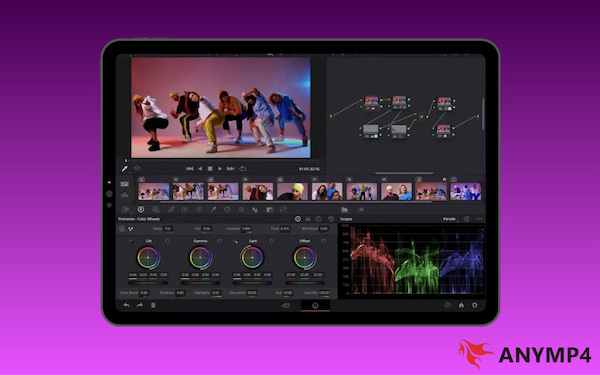
The Color Page is where Resolve leaves all other mobile editors in the dust. Using the Ultra Retina XDR display, you can grade in true HDR10+ and Dolby Vision. Unlike simple layers, nodes support complex, non-destructive corrections such as skin retouching and sky swaps.
Pro Fix: To avoid the dreaded Media Offline error on iPad, pros use AnyMP4 Video Converter Ultimate. This ProRes editing tool transcodes high-bitrate mobile clips into Apple ProRes to remain Color Page lag-free.
Precision Tools: Fairlight Audio & Magic Mask
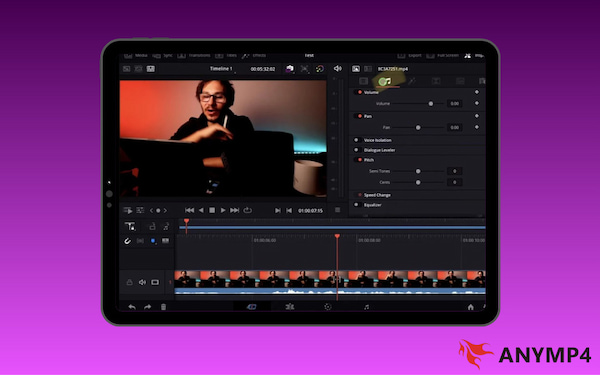
The 2026 update fully integrated the Fairlight and Fusion pages, bringing desktop-only AI tools to the touch interface. Fairlight Audio includes AI Voice Isolation to instantly kill background noise and a Dialogue Leveler that balances audio levels across your entire timeline automatically. This makes it one of the best mobile vlogging tools.
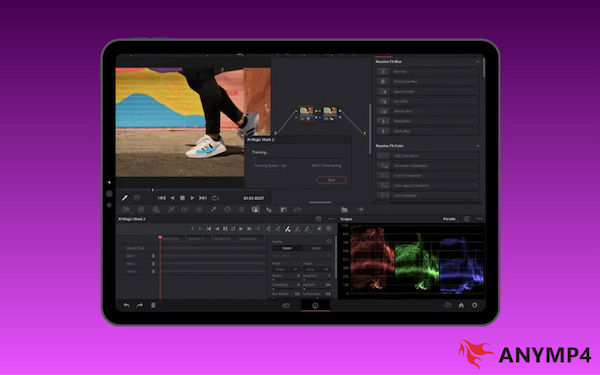
With the Magic Mask, you simply stroke over a subject, and the DaVinci Neural Engine tracks it automatically. This is 2.5× faster on M-series chips, allowing you to apply color grades or effects while keeping the background untouched.
| DaVinci Resolve (iPadOS 27 beta, 26) |
VS |
YouTube Create (Android/iOS) |
| M5 Neural Accelerator (3.5× AI Speed) |
Hardware Opt. |
Cloud-based Processing |
| Liquid Glass Windowing (Tiled view) |
Multitasking |
Single-App Focus |
| Background Tasks (No app freeze) |
Exporting |
Direct to Studio |
| AI Video Gen. |
AI Video Masking & Tracking |
Veo 3.1 (Ingredients to Video) |
Author Note on iPadOS 27 beta, 26: The new Liquid Glass Menu Bar finally brings the desktop File/Edit/View hierarchy to the iPad. This allows Resolve users to access deep settings like Project Settings and Reference Mode without digging through touch menus, bridging the gap between tablet and MacBook.
The Social Speedster: Why Choose YouTube Create?
For publishing quickly and staying consistent, YouTube Create is the ultimate point-and-shoot tool. It removes technical barriers so creators can move from recording to uploading in minutes. This makes it ideal for Shorts, daily vlogs, and social-first content strategies.
Seamless Integration with the YouTube Ecosystem
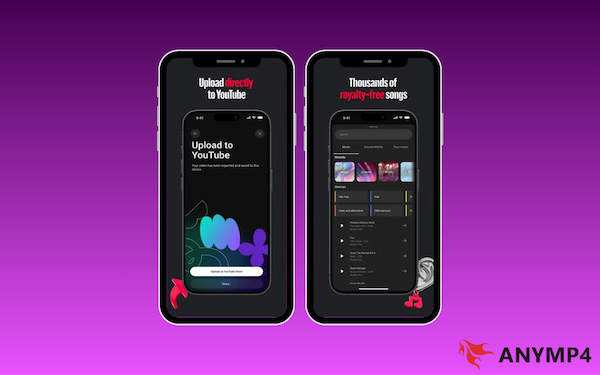
The biggest advantage of YouTube Create is that it lives inside the platform. In 2026, this integration has deepened, giving creators a direct competitive edge. You get unrestricted access to the YouTube Audio Library for copyright-safe music. It also features one-tap publishing that syncs directly with your YouTube Studio metadata.
YouTube Create now utilizes Veo 3.1 Ingredients to Video, allowing you to generate 9:16 vertical B-roll from up to three reference images. Crucially, all AI content is automatically tagged with SynthID watermarks, ensuring your channel remains compliant with 2026 transparency regulations while still cutting your editing time in half.
AI-Driven Efficiency for Daily Vloggers
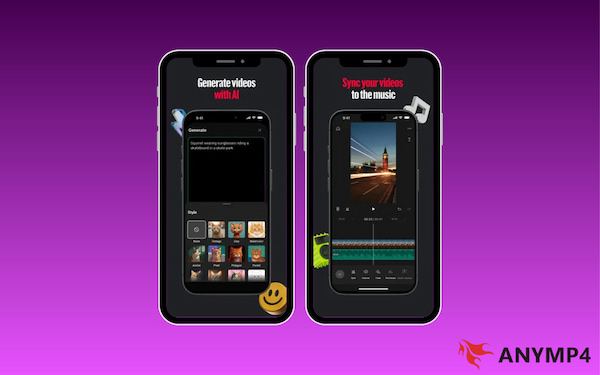
For a solo YouTuber, time is the most expensive resource. YouTube Create uses Google’s latest AI to automate the tedious parts of editing. With Google Veo 3 integrated directly into the timeline, you can generate high-quality B-roll using simple text prompts to fill gaps in your footage. Meanwhile, tools like Smart Sync automatically align your cuts to the beat of any track, while AI Audio Cleanup strips away background noise with a single tap.
Tips
Large 4K files or high-bitrate footage can cause YouTube Create to crash. Use AnyMP4 Video Converter Ultimate for H.265 compression before importing to prevent the app from crashing. This keeps your speed-to-market workflow moving smoothly.
The Technical Bridge: Solving Compatibility with AnyMP4 Video Converter Ultimate
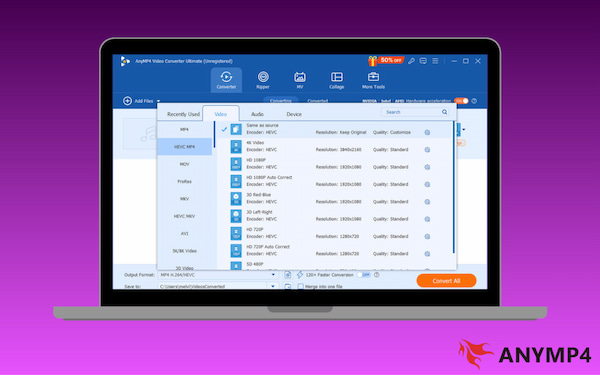
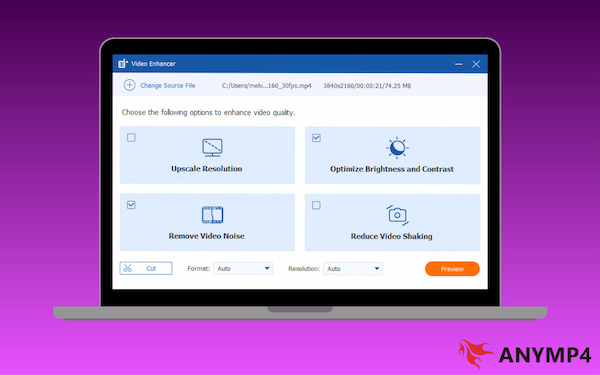
AnyMP4 Video Converter Ultimate is a full-featured media software bundle that serves as a crucial preprocessing tool. It ensures footage works flawlessly across editing platforms. It uses full GPU acceleration to deliver 70× faster conversion speed. It allows you to transcode problematic HEVC to MP4 or professional ProRes in seconds. Additionally, it supports HEVC/H.265 to ProRes 422 conversion. This mastery over 500+ formats effectively eliminates the Media Offline errors and codec lag that often stall professional iPad workflows.
In addition to media conversion, its AI enhancement suite provides high-end video upscaling. It enables you to transform older 1080p clips into 4K before importing it into your pro timeline. Furthermore, its lossless compression tools allow you to shrink large 4K files without visible quality loss. This optimization step creates a seamless workflow: capture footage, enhance and convert for compatibility, then edit and publish without performance bottlenecks.
Head-to-Head Comparison: Features & Performance
When comparing DaVinci Resolve for iPad vs YouTube Create, the difference isn’t about which is better. It is about workflow priorities. One prioritizes cinematic precision; the other prioritizes publishing speed.
| DaVinci Resolve iPad |
VS |
YouTube Create |
| Professional color grading, multicam edits, and high-fidelity cinema projects. |
Best For |
Shorts, social-first vlogs, and trending content creation. |
| Steep |
Learning Curve |
Beginner-friendly |
| Precision AI: Magic Mask tracking, AI Voice Isolation, and AI Set Extender. |
AI Capabilities |
Creative AI: Veo 3 generative B-roll, auto-captions, and Smart Sync to beats. |
| ProRes, H.264/265, and Blackmagic RAW with HDR10+ support. |
Export Options |
Direct upload to YouTube with automatic metadata and title syncing. |
| Can trigger Media Offline errors with Variable Frame Rate or unsupported codecs. |
File Sensitivity |
May lag or crash when handling high-bitrate 4K files or raw footage. |
| AnyMP4 Video Converter Ultimate: Essential for transcoding clips to ProRes for lag-free grading.
|
Pre-Edit Solution |
AnyMP4 Video Converter Ultimate: Best for downscaling/compressing files to MP4 for speed. |
How to Choose Your Tool?
Choose DaVinci Resolve if: You are shooting in Log/RAW to maximize dynamic range, require multi-cam support, or want to create a high-end film look with professional nodes. It is the best choice for those building a brand around high production value.
Choose YouTube Create if: You are a solo creator who needs to post 3-5 Shorts a week and doesn't want to deal with complex timelines. If your priority is leveraging trending audio, using AI, and publishing directly to the feed with zero friction, this is your primary tool.
FAQs about DaVinci Resolve iPad vs. YouTube Create
Q: Is DaVinci Resolve for iPad free?
A: Yes, DaVinci Resolve for iPad is available as a free download. However, for creators who need the full Hollywood experience, a one-time $95 Studio upgrade is available as an in-app purchase. This unlocks high-end capabilities, such as the Magic Mask and advanced noise reduction.
Q: Can I use third-party music in YouTube Create?
A: Yes, you can import your own audio files. However, the real power of YouTube Create lies in its built-in library of thousands of royalty-free tracks. These songs are natively cleared for use on the platform, meaning you can monetize your videos without copyright or Content ID claims.
Q: Why can't Resolve open my screen recording?
A: DaVinci Resolve fails to open screen recordings because most recording software uses a Variable Frame Rate. Since Resolve is designed for Constant Frame Rate footage, it fails to import files when it encounters VFR footage.
Conclusion
The DaVinci Resolve iPad vs. YouTube Create debate ultimately comes down to your creative intent. If your goal is high-fidelity production, DaVinci Resolve on the iPad Pro remains the undisputed professional champion. Conversely, if your priority is rapid social engagement, YouTube Create offers the most optimized workflow for modern creators.
Regardless of which path you choose, technical hurdles shouldn't slow you down. To ensure maximum technical versatility and avoid codec errors or timeline lag, AnyMP4 Video Converter Ultimate is an essential addition to your toolkit.




 Add your comments to join the discussion here