
Quick Verdict:
Official Status: As of February 2026, there is no official YouTube Create desktop app.
Best Workaround: Use BlueStacks 2026 with VT-x enabled for the most stable emulator experience.
Platform Update: Microsoft has officially ended support for Windows Subsystem for Android (WSA), making third-party emulators the only viable method for PC.
Pro Recommendation: For 4K/8K professional channel growth, transition to a native desktop editor like AnyMP4 Video Converter Ultimate to avoid emulator-induced lag and export limitations.
Many creators are looking to streamline their production by moving from mobile screens to a full desktop setup. However, there is often confusion about whether an official desktop version of YouTube Create exists. Currently, Google has kept this powerful tool exclusive to mobile devices, leaving desktop users searching for ways to integrate its unique features into their creative workflow.
While a native app is still missing, the demand for high-quality video editing on PC remains high. Savvy creators have found a way forward: by using Android emulators, you can successfully bring mobile-only features to your Windows or Mac workstation. In this post, we’ll cover the current status of YouTube Create for PC. Our aim is to provide a clear, actionable roadmap for getting the app running on your computer. We will also explore whether a dedicated desktop editor might be a better long-term investment for your channel's growth.

As of today, there is no official YouTube Create app for Windows or Mac. YouTube Create is built exclusively for Android and iOS devices. Google made it only for mobile devices so creators can easily edit vertical videos on their phones. If you are determined to use YouTube Create on a computer, you can use an emulator. To download YouTube Create for PC or Mac, you can use BlueStacks or LDPlayer. These programs act like a virtual phone on your screen, letting you download and use mobile apps from the Google Play Store on your PC or Mac.
Note on Windows Subsystem for Android (WSA):
While many older guides suggest using Microsoft's native WSA to run Android apps, this feature has been formally sunsetted by Microsoft. Users attempting to use WSA in 2026 will find it lacks the security updates and GPU acceleration needed for modern AI video tools like YouTube Create. Stick to a dedicated emulator for a reliable workflow.
Since YouTube Create is a mobile-only app, you must use an emulator to access it on a computer. By running the mobile version on your desktop, you gain the advantage of a bigger display and the precision of a mouse, making complex timeline edits much easier.
To run YouTube Create on your computer, you need a trusted Android emulator. Two of the most popular options are BlueStacks and LDPlayer. Both are widely used and support Google Play Store access, high-performance mode, and GPU acceleration for smoother editing.
1. Get started by navigating to the official BlueStacks or LDPlayer site. Download the most recent version compatible with your operating system.
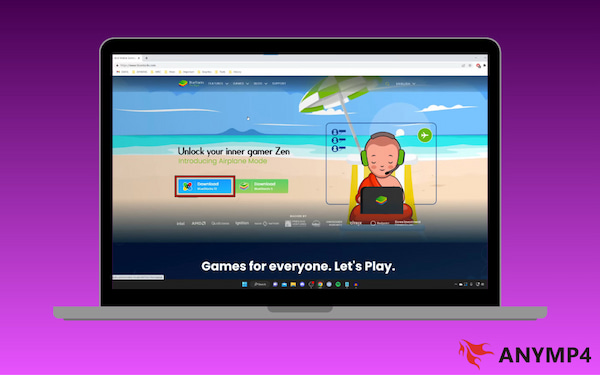
2. Run the installer and be sure to finish the setup process to avoid errors. Launch the emulator and sign in with your Google account to access the Play Store.
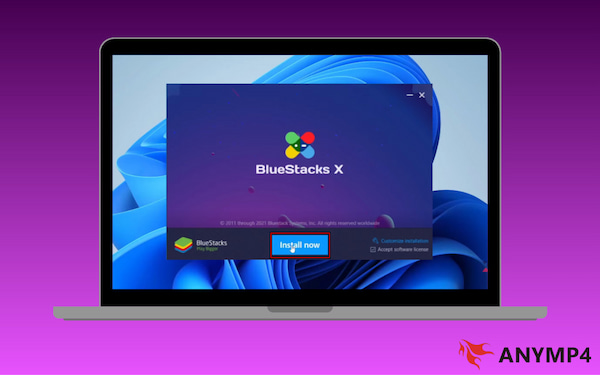
For the best experience, ensure GPU acceleration and Virtualization Technology are enabled in your computer's BIOS settings. This boosts the emulator's speed and prevents lag during video rendering.
Once your emulator is up and running, you have two primary ways to get the YouTube Create app for PC: via the Google Play Store and APK.
Via the Google Play Store: Open the Play Store in the emulator, search for YouTube Create, and tap Install.
Via APK (Manual Install): If the app isn't showing in your region's Play Store, download the YouTube Create APK for PC from a reputable source. Drag and drop the downloaded .apk file directly into the emulator window. It will install automatically.
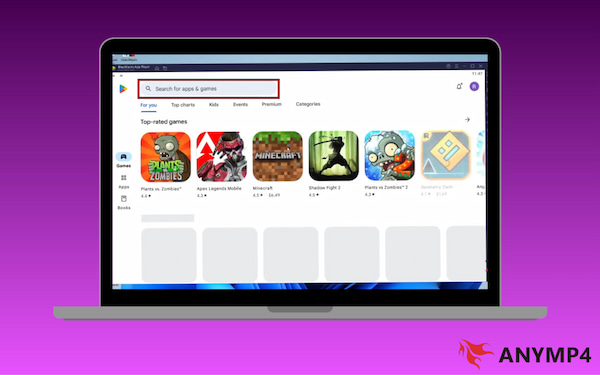
By running YouTube Create through an emulator, you gain access to its unique mobile-first toolkit:
Auto-captions: Transcribe your dialogue into text overlays with a single click.
Royalty-free music library: Browse thousands of tracks without copyright worries.
YouTube Shorts editor: Use the editor to trim YouTube videos, add effects, and more.
YouTube Studio Integration: Upload edits directly to the channel, where it will appear in your YouTube Studio dashboard.
Hardware Alert for Features:
If you intend to use the newly released Veo 3.1 Ingredients to Video feature in the app, your emulator must have at least 8GB of RAM and a dedicated GPU. On newer hardware, such as Apple M4/M5 or Snapdragon X Elite laptops, ensure GPU Passthrough is active. This allows the emulator to handle the heavy generative AI processing required to turn static images into dynamic B-roll without crashing.
Emulators are a great workaround for accessing mobile-exclusive tools. However, they aren't always the most efficient choice for a long-term desktop workflow. If you frequently edit on a computer, switching to a dedicated PC video editor can improve your results and save you time.
Is YouTube Create available for PC? Yes, but it is too slow or cumbersome for your workflow.
AnyMP4 Video Converter Ultimate is the best video editing software for YouTubers. It lets you rotate, crop, and apply filters to 4K/8K footage without lag. Beyond that, you get access to More Tools, boasting more than 20 editing tools. It includes a Video Compressor, Watermark Remover, GIF Maker, and more.
To fine-tune your uploads, this software features a specialized YouTube-specific module with built-in profiles to convert and optimize videos specifically for YouTube's strict upload requirements. This ensures your quality remains crisp after the platform's compression. By leveraging full GPU acceleration, it renders and exports videos up to 70× faster.
1. Start by securing a free download of AnyMP4 Video Converter Ultimate. Install the software on your system and complete the installation process. Once the setup process is finished, run it to access the main dashboard.
Secure Download
Secure Download
2. Move to the MV tab to edit vertical videos for your Shorts. Click the Big Plus button to add the video you want to edit. Select a template with transition and built-in sound effects under the Theme section. To further edit your footage, click the Edit button. Here, you can:
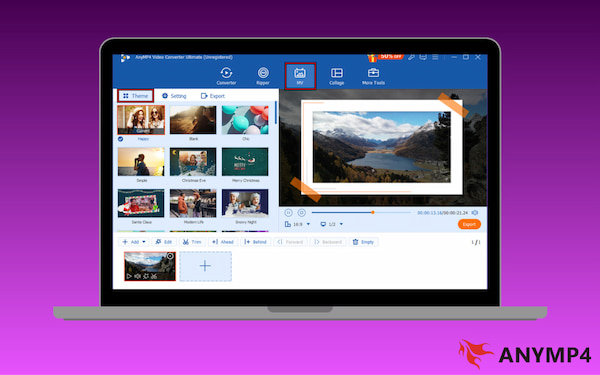
Rotate & Crop: This tab helps you fix orientation issues and adjust framing for different platforms.
Effect & Filter: This section enhances the visual quality and mood of your video.
Watermark: This tab allows you to add branding or protection overlays.
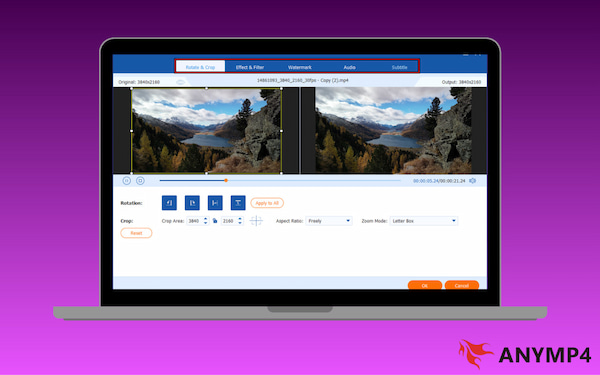
3. If you need additional enhancements beyond basic editing, switch to the More Tools tab. Here, you can choose from specialized creator tools, including Video Compressor, Video Watermark Remover, GIF Maker, Video Enhancer, and more.
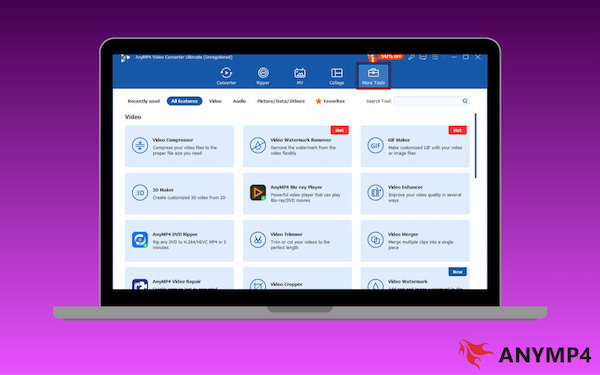
se these tools when preparing videos for YouTube uploads, social media sharing, or storage optimization. Please be informed that there’s a YouTube video length limit and size. Check the guide to avoid upload errors.
| YouTube Create (via Emulator) | VS | AnyMP4 Video Converter Ultimate |
| Running through an emulator adds setup complexity. | Ease of Use | Clean desktop interface with clearly labeled tools. |
| Dependent on emulator performance and system resources. | Rendering Speed | Uses full GPU acceleration to render 4K and 8K footage at 70× faster speed. |
| Built-in royalty-free music library and Audio Cleanup | Audio Tools | Audio compressor, noise remover, volume booster, and audio sync. |
| Up to 1080p | Output Quality | Supports 4K/5K/8K output & advanced codecs |
Q: Can I download YouTube Create for PC without an emulator?
A: No, there is no standalone desktop version or web-based version of YouTube Create for Windows or Mac. The app is available exclusively on Android and iOS.
Q: Is YouTube Create free to use?
A: Yes, it is 100% free. Unlike many other mobile editors that lock premium features behind a Pro subscription, YouTube Create provides all its tools at no cost.
Q: What is the YouTube Create app used for?
A: The app is a streamlined video production tool designed to turn raw footage into high-quality content quickly. Once your video is finished, you can upload it directly to your channel.
Ultimately, choosing how to access YouTube Create for PC depends on your priorities. Whether you opt for an emulator to use mobile-exclusive features or move to a native desktop environment, the goal remains the same: streamlining your creative process to produce high-quality content without technical friction. Though emulators provide a helpful bridge, they lack the raw power required for heavy editing tasks. By choosing the right tool for your specific needs, you can ensure your hardware works for you, not against you. If you are looking to future-proof your workflow and achieve a truly professional finish on every upload, we recommend AnyMP4 Video Converter Ultimate. It offers the speed and precision that mobile apps simply cannot match on a desktop.
Secure Download
Secure Download
 Updated by Mark Cristobal to Edit Video
More readings
 Full Guide on Using AI Audio Cleanup on YouTube Create
Are you looking for a solution to clean up background audio on your YouTube Create videos? Read this guide to learn how to use it for background audio removal.
 How to Use YouTube Auto-Generated Captions: A Full Guide
Are you looking for a solution to create auto captions with AI? Read this article to discover how to use YouTube Create for auto-caption generation.
 How to Use YouTube Create for Beat-Matching Audio and Video
Are you looking for a solution to sync the beat of your audio with the video you are editing? Read this article to learn how to do this on YouTube Create.
 How to Use YouTube Create’s Filter and Effects (2026 Guide)
Are you looking for a solution to apply effects and filters to your mobile edit videos? Read this article to learn how to use YouTube Create as an editing tool.
 Add your comments to join the discussion here