- Convert video, audio, and DVD over 500 formats.
- GPU acceleration to speed up the conversion process at 70X faster.
- More than 16 editor tools in the toolbox (Updating).
- Create videos for TikTok, YouTube, Facebook, etc.

Free Download100% Clear & Secure
Free Download100% Clear & Secure
MP3 to M4B
Back to main page
Setting
Custom resolution:
| Core Features | Web Version | Pro Desktop |
| Max File Size | 50MB (Login: 100MB) | No Limit |
| Daily Limit | 2 Files (Login: 10 Files) | Unlimited |
| AI Video Upscaling | No | Yes (Up to 4K/8K) |
| GPU Acceleration | No | Yes (70X Faster) |
| Batch Processing | No | Yes |
Failed to upload media file! Please try again, or use AnyMP4 Video Converter Ultimate for Desktop.(Error code: 20015)

The original video resolution is higher than 1080p. If you want to output the original high resolution, you need to download the Pro Version. Or would you like to output the default 1080p resolution?

At a Glance: Quick MP3 to M4B Fixes
You download a massive 30-hour audiobook, only to find it split into 120 scattered MP3 tracks. You load them onto your phone, go out for a run, and halfway through chapter 5, your player glitches. You accidentally skip a track, and your playback position disappears. Standard MP3 files are great for music, but they suck for spoken-word content. They do not remember where you paused, they lack native chapter index structures, and they clutter your media player interface like loose puzzle pieces.
If you are struggling to keep your audiobook chapters organized, you need to convert MP3 to M4B. Unlike standard audio files, the M4B format supports bookmarking and chapter markers, making it the industry standard for Apple Books and iTunes. In this guide, we will show you exactly how to combine MP3 files into one M4B, run massive batch conversions offline, and keep your metadata perfectly intact.
| Best For | Batch Merge Feature | Max File Size | Privacy Security | Speed Score | |
|---|---|---|---|---|---|
| AnyMP4 Video Converter Ultimate | Heavy users & massive multi-part books | Yes (One-click merge) | Unlimited | High (100% Offline) | 9.8 / 10 |
| AnyMP4 Free Online Audio Converter | Quick, single-file conversions | No (Individual files only) | 200 MB | Medium (Cloud delete) | 7.5 / 10 |
| VLC Media Player | Open-source tech lovers | Yes (Via command line) | Unlimited | High (100% Offline) | 6.0 / 10 |
| iTunes | Windows, Mac | No (Requires renaming workaround) | Unlimited | High (100% Offline) | 5.5 / 10 |
The biggest difference between an MP3 and an M4B file is the container technology. MP3 is a raw, single-layer audio stream. It uses basic ID3 tags for things like artist and title, but it has no structural awareness of time layout.
M4B, on the other hand, is a specialized MPEG-4 container wrapper running AAC (Advanced Audio Coding) compression. Because it uses the .m4b extension, smart operating systems and media players instantly apply the bookmarking feature. This flags the player to write a tiny timestamp marker into your app's cache every single time you press pause or close the app. When you return, the player references that cache pointer and boots up exactly where you left off.
Furthermore, M4B containers encapsulate complex chapter metadata. This allows an author or editor to embed an explicit index map directly inside a single file. Instead of looking at 50 separate tracks in a folder, your phone sees just one clean audiobook file, but when you open the menu, you can see all your distinct chapter markers with custom titles, timings, and custom cover arts.
If you are dealing with hundreds of files or gigabyte-sized folders, you need a heavy-duty local processor. Our top pick for a comprehensive batch convert MP3 to M4B offline solution is AnyMP4 Video Converter Ultimate. It handles massive file queues, preserves your metadata, and lets you merge loose tracks into a single, structured audiobook with a single click.
Secure Download
Secure Download
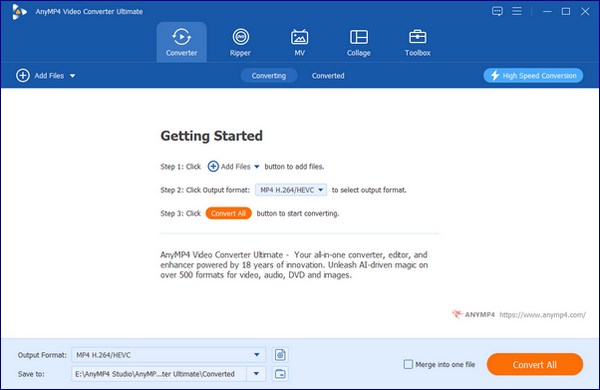
1. Free download and open AnyMP4 Video Converter Ultimate on your Windows PC or Mac. Drag and drop your entire folder of loose MP3 chapters straight into the main conversion window.
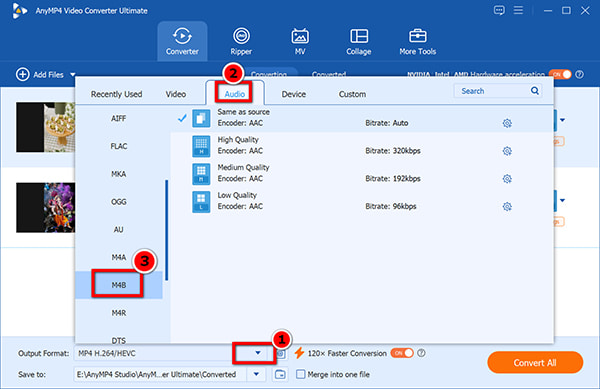
2. Click the Output Format dropdown in the upper right corner. Go to the Audio tab, scroll down to find M4B, and select your desired audio quality profile (matching the original bitrate is best to keep a lossless audio quality feel).
3. Look down at the bottom right corner of the window. Check the Merge into one file box. This tells the software to combine your MP3 parts in chronological order. Click the Convert All button to start converting MP3 to M4B for the offline render.
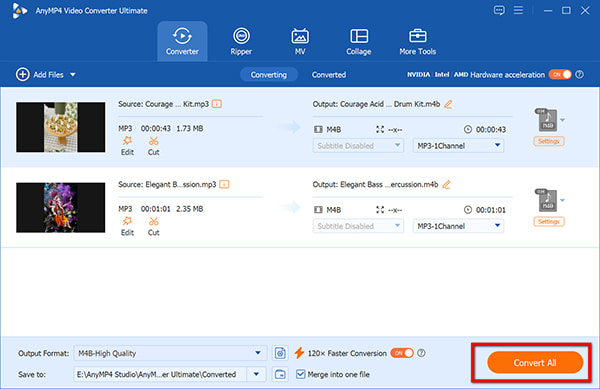
This tool handles alphabetical and chronological sorting automatically, but for the love of sanity, please double-check your file names before hitting convert. If your files are labeled Chapter 1, Chapter 10, Chapter 2 instead of 01, 02, 10, any software will merge them out of order. Fix your filenames first!
If you just have a single short lecture or a tiny podcast file under 200MB that you want to turn into an audiobook format, downloading software might feel like overkill. For these quick jobs, we recommend using AnyMP4 Free Online Audio Converter.
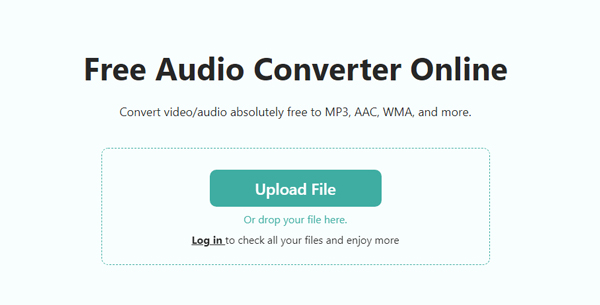
1. Open your web browser and navigate to the AnyMP4 Free Online Audio Converter page. Click the Upload File button to upload the specific MP3 track you need to update from your hard drive.
2. In the drop-down list of Format, select M4B.
3. Hit the Save button to process the MP3 file, and download your converted M4B file once the conversion process is done.
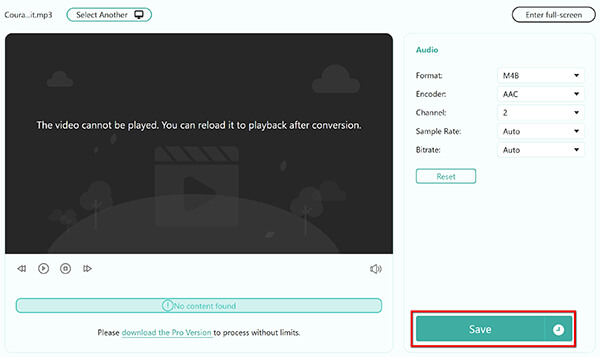
Online tools are super convenient, but let's be real about cloud limitations. If your home internet connection drops or stutters even for a fraction of a second during a huge upload, the web browser will time out, fail, and leave you staring at a broken progress bar. Besides, it handles files one by one. Save yourself the headache and keep online tools reserved strictly for small, single-file conversions.
For developers, open-source enthusiasts, or anyone operating completely within the standard Apple ecosystem, you can actually convert your files using tools you probably already have installed: VLC Media Player or iTunes.
VLC Media Player is famous for playing everything, but it also packs a hidden, highly functional conversion tool under its hood. Although you cannot find the M4B output format from its list, VLC absolutely supports M4B. Since M4B is essentially an AAC audio stream wrapped inside an MPEG-4 container, VLC can encode it flawlessly.
1. Open VLC, click Media in the top bar, and select Convert / Save.
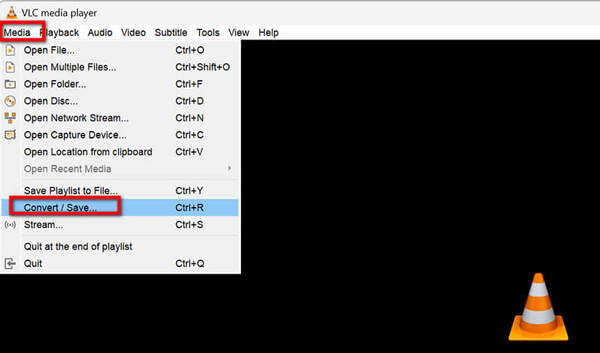
2. Click the Add button to load your source MP3 files. Click the Convert / Save button at the bottom.
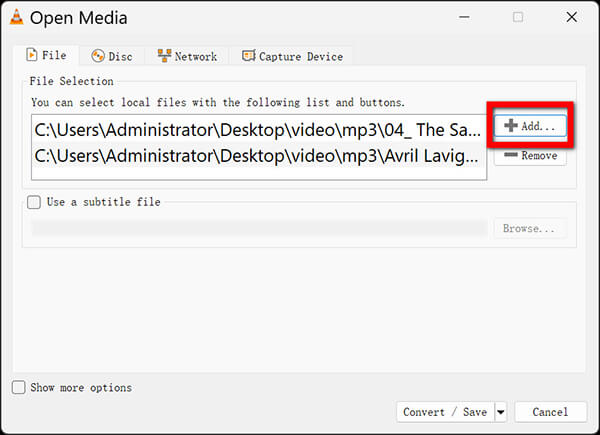
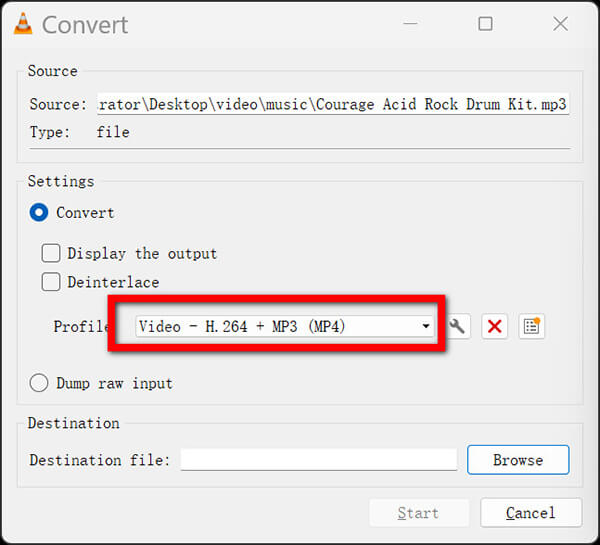
3. Look at the Profile dropdown menu. You won’t see M4B listed here (classic VLC quirk). Instead, select Video - H.264 + MP3 (MP4).
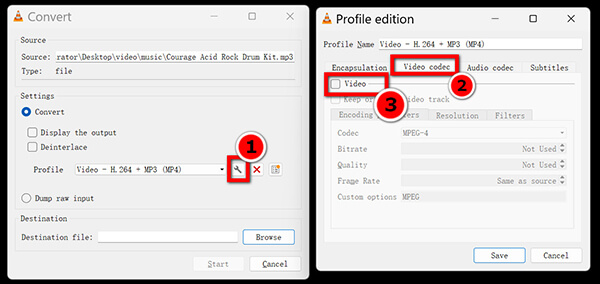
Then click the gear icon next to the profile, go to the Video codec tab, uncheck the Video tab.
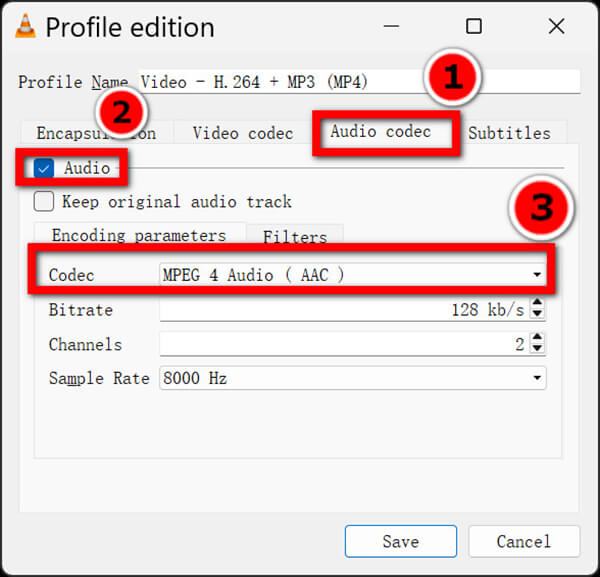
Switch to the Audio Codec tab, check the Audio option, and select MPEG 4 Audio AAC.
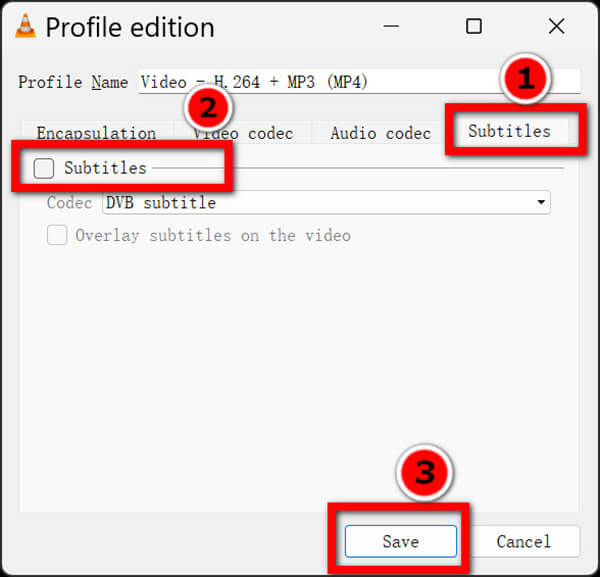
Navigate the Subtitle tabs, disable the Subtitles option. Finally, hit Save.
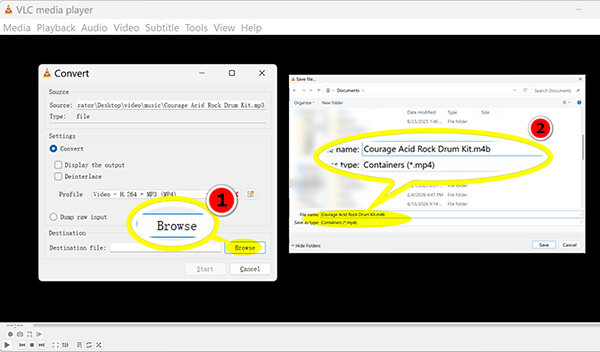
4. Click Browse to set your destination folder. Here is the golden rule: VLC will try to save your file as a .m4a or .mp4. You need to manually delete that extension in the file name box and type .m4b right at the end of your filename.
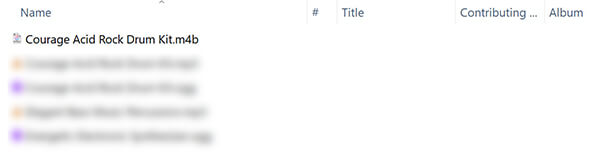
Click Start to run the local transcode. Then, you will get the converted M4B file.
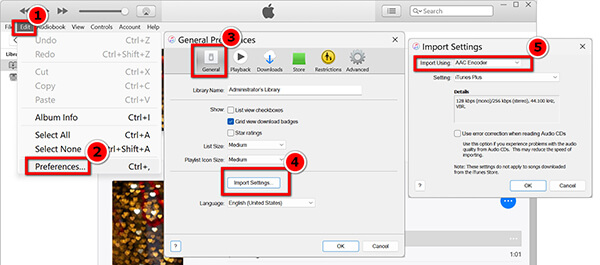
If you are on an older Windows setup running iTunes or a modern Mac using Apple Music, you can use a clever format-renaming loop. Here, we will use iTunes on Windows 11 as an example to show you the steps to convert MP3 to M4B.
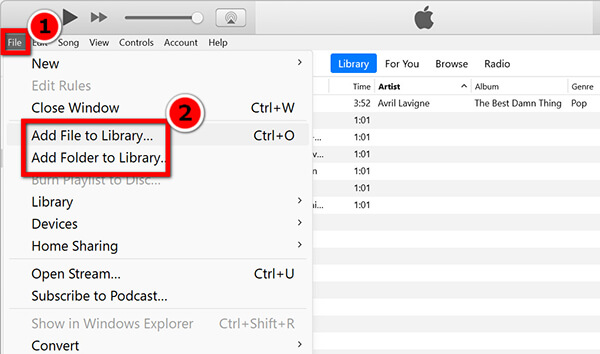
1. Drag your MP3 files straight into your iTunes Library.
2. Open your software Preferences, navigate to the General tab, click Import Settings, and change your encoder option to AAC Encoder.
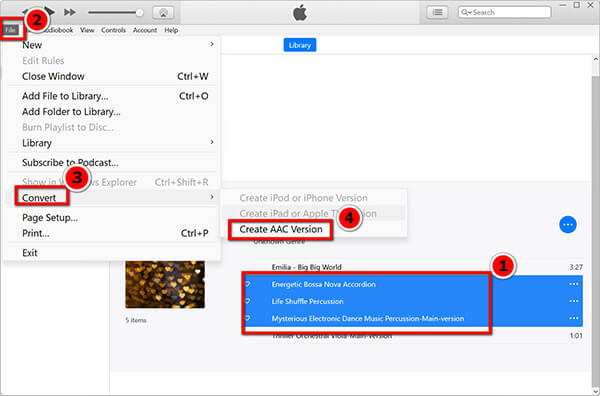
3. Select your MP3 track in your library, go to the top menu, click File > Convert > Create AAC Version.
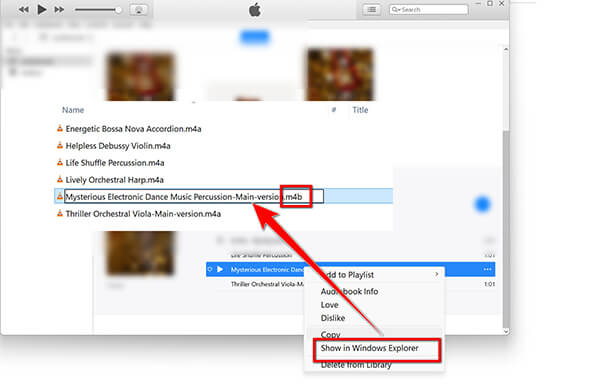
4. Right-click the newly generated duplicate track and select Show in Windows Explorer.
5. You will see a file ending in .m4a. Click to edit the name, and change that extension to .m4b. Drag that new file right back into your Apple Books app, and it will register as a native audiobook with saving states.
The iTunes method is a massive, clunky pain in the neck. If you only have one file, this manual file extension swapping trick works fine. But if you have to do this every week for large collections, it will absolutely drive you crazy.
This step-by-step tutorial is designed strictly for creating personal archives or backups of legally obtained, DRM-free (Digital Rights Management) audio files that you already own. We do not support, encourage, or condone the unauthorized bypass of copyright protection systems or downloading copyrighted material for commercial re-use. Always check the terms of service of your content platforms before modifying audio tracks.
Does converting an MP3 to M4B reduce the original audio quality?
Yes, technically speaking, there is a minor digital shift, but your ears will never notice it. Because MP3 and AAC (the core format of M4B) are both lossy audio formats, transcoding a file from one to the other causes a tiny loss of fidelity. However, because audiobooks are almost entirely spoken-word voice tracks rather than complex symphonic music, a standard 128kbps or 64kbps conversion will sound completely identical to the source file while gaining all the benefits of chapter sorting.
How can I keep or add chapter markers when merging MP3s into an M4B file?
To maintain individual chapter markers during a merge, you need a dedicated media processing tool with a built-in ID3 tags editor. While basic web tools just smash files together into a giant audio block, premium desktop suites like AnyMP4 Video Converter Ultimate use the timestamps of your individual source MP3 filenames to write an internal metadata index track. This ensures your player can easily identify chapter transitions.
Why is my converted M4B file not showing up in the Apple Books app?
If your new M4B file is missing, it is usually because the app cache still thinks it is a standard music file. On modern macOS environments, the Music app and the Books app are completely separate. If your file was built inside Apple Music, you must right-click the track, open Get Info / Media Kind, and change the categorization tag from Music to Audiobook. Alternatively, drag the file directly into the desktop Apple Books window to force a library update.
Can I play M4B audiobook files on Android devices without iTunes?
Absolutely! While M4B was originally popularized by Apple, it is an open standard format now. Excellent third-party Android apps like Smart AudioBook Player or Voice Audiobook Player read M4B metadata perfectly, rendering your custom cover art and chapter points flawlessly without needing an Apple ID.
Is there a file size limit when converting MP3 to M4B using online tools?
Yes, almost every web-based audio converter implements a file threshold—usually capped between 50MB and 200MB. This limit exists because processing multi-gigabyte audiobooks in a cloud server requires significant server resources. For large directories, use a desktop program to avoid processing caps or compress MP3 before uploading them to the online tools.
Fixing a fragmented audiobook library doesn't have to be an afternoon-long project. It all comes down to choosing the right MP3 to M4B tool for your specific volume of media files.
Secure Download
Secure Download
Free download the desktop converter today to test the batch-merging speed yourself, organize your files, and never lose your reading position again.
 Updated by Alice Thorne to Convert Audio
Related Articles
 Convert Video to MP3 with The Ultimate Way and Top 10 Online Ways
This article gives you the ideal ways of converting videos to MP3 with the best video to MP3 converter applications for Windows 10/8/7/XP and Mac OS.
 5 Best Ways to Convert FLV to MP3 Without Quality Loss
How to extract audio from FLV? Get the top 5 FLV to MP3 converters (free, online, and desktop) for batch processing and 320kbps high-quality extraction.
 How to Convert MP3 to FLAC Safely (2026 Batch Processing Guide)
How to convert MP3 to FLAC without losing your ID3 tags or album art? Learn from the top 4 offline and online methods for batch conversion.
 How to Convert MP3 to MP4 with Images (7 Best Ways for 2026)
Need to upload MP3 to YouTube? Learn how to convert MP3 to MP4 using 7 proven tools. Free online converters and pro desktop software are included.
 Add your comments to join the discussion here