
Creating YouTube content is one of the more popular opportunities in the creative market. Since YouTube is the top website for sharing videos, people who are curious about using it to share their own work might be interested in knowing the limits on how long a YouTube video can be. In this article, we will provide an answer to this question based on the factors that affect the video length limitation on the website. We will provide a duration limit for new creators with unverified Google accounts, as well as the top limit for verified channels, both in terms of video lengths and file size.
By default, a newly created Google account has a YouTube maximum video length of only 15 minutes. This was implemented to prevent spamming and stop the uploading of illegal content on YouTube, such as pirated movies.
Fortunately, removing the duration limit may be fixed by verifying your YouTube channel. To learn how, read our quick guide below.
1. Click your Google profile on YouTube. Then, select the Settings option.

2. In the Account Settings window, select Channel Status and Features, and wait for the tab to load.

3. In the Channel Settings, select the Intermediate features tab, then click on Verify Phone Number to connect your contact number to YouTube.
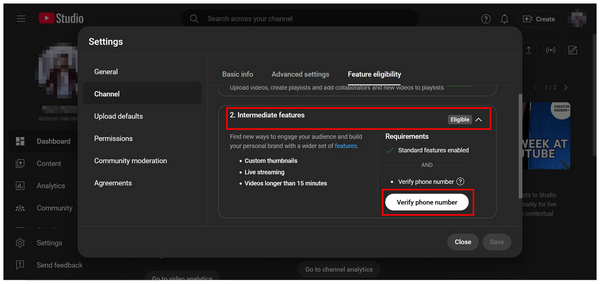
Once your number has been registered, wait for the code to be sent and follow the verification process on YouTube. Afterward, you will now be able to upload videos with much more lax YouTube video length restrictions.
With the 15-minute limitation now broken, let us proceed to learning the absolute maximum limit for verified YouTube channels. In this case, the limitations of YouTube videos, both in duration and file size, are 12 hours and 256 GB.
Despite the extremely long upper limit, a 15-minute video duration may be sufficient, as it is well above the minimum video length for YouTube monetization, which is around 8 minutes for supporting mid-roll ads. This makes using video trimming software much more useful in producing YouTube content.
With that in mind, the limited videos exceeding the 12-hour limit are most likely to have been uploaded before the duration and size limitations were implemented. For larger channels, special arrangements with YouTube itself may be made to allow uploading videos that exceed the absolute limit.
Now that we have discussed the video length limits of YouTube, channels with unverified Google accounts that are having trouble with posting content longer than 15 minutes should look for an editing tool that can trim videos. In this case, AnyMP4 Video Converter Ultimate should be one of your top options.
Available for both Windows and Mac operating systems, AnyMP4 Video Converter Ultimate features a professional-grade Video Trimmer tool among the numerous tools in the Toolbox section.
Using the Video Trimmer, you can easily cut videos with trimming sliders and a start and end point tab for specific points in the video. Using these trimming options, deleting video segments, and fast splitting may be done within the tool. This is supported by the fade-in and fade-out effect, available in the program, which greatly provides a smoother cut transition.
In addition to the video trimming tools and adjustment options in the program, it also features advanced, highly customizable parameters, including a format converter, encoder, and audio channel.
These features can be applied to over 500 media formats supported by the tool, including common video types such as MP4, MOV, WMV, AVI, MKV, and GIFs.
To provide additional practicality for its users, AnyMP4 Video Converter Ultimate also offers other notable multimedia editing tools, which include Video Cropper, Video Rotator, Video Reverser, Converter, MV Maker & Collage, Video Compressor, Video Watermark Remover, 3D Maker, Video Enhancer, Video Reverser, Video Speed Controller, and more.
To learn more about AnyMP4 Video Converter Ultimate as a video trimming program, make sure to read its main features below. To make learning how to use the tool easier, please read our three-step guide and download the program using the provided link.
Secure Download
Secure Download
Main Features:
1. Open AnyMP4 Video Converter Ultimate, and select the Toolbox tab in the main menu. Next, find the Video Trimmer option and click it. In the add file pop-up, select the Add button to import the media you want to cut.
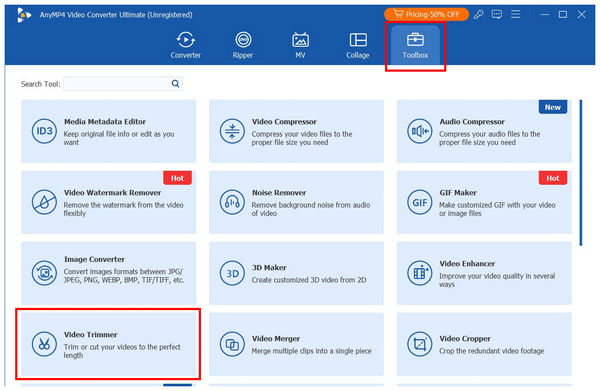
2. With the file now imported into the Video Trimmer, you have two trimming options. For quicker editing, use the Trimming Bar sliders at the start and end of the video. For more accurate cutting, you can set a duration value in the Set Start and Set End tab to indicate the part of the video that will remain; the portion outside the set time will be trimmed. For a more seamless transition, you can add Fade In and Fade Out effects for a smoother video cut.

3. After editing the video to the YouTube length, click Export to produce the video, now ready for YouTube upload.

With your video now trimmed to the optimal YouTube video length of less than 15 minutes, uploading it will become easier, as you will be able to add content to your channel even if your Google account has not yet been verified.
Since uploading long videos requires a stable internet connection, it is advisable to upload them via a wired connection for optimal performance. If your video is longer than the average YouTube video length of 7-15 minutes, consider avoiding a wireless connection, as interruptions may occur.
Another practical option for uploading videos with the optimal length for YouTube is to compress them for YouTube. This is because file size is much more significant in affecting the upload speed than the length of the video itself.
Once you have determined the ideal YouTube video length and established a reliable connection, all you need to do is use the proper format supported by YouTube. Fortunately, the website supports common video formats, including MP4, MOV, and AVI.
Why can't I upload videos longer than 15 minutes on YouTube?
The 15-minute limit of YouTube videos occurs when your Google account is not yet verified. Fortunately, this is easy to fix since you only need to add your phone number. Once done, your video length limit will now be 12 hours.
What is the maximum video length on YouTube?
The maximum video length on YouTube differs based on your account. An unverified account has a shorter limit of only 15 minutes. For verified accounts, the limit is 12 hours.
What is the file size limit for a YouTube video?
The size limit is also rooted in the verification of the YouTube account. An unverified account has an undefined size limit but only a duration limit of 15 minutes. Meanwhile, verified Google accounts have a huge size limit of 256 GB.
Does YouTube's algorithm promote longer videos?
Yes, YouTube generally recommends videos on the longer side. Usually, 10 minutes or longer. Monetization also encourages longer videos, typically around the 10-minute mark.
Can I make shorter clips from longer YouTube videos?
Yes, you can. YouTube has a built-in clip selector for your longer videos. This is available to both the channel uploader and viewers.
If you plan to cut video content to meet YouTube's length limit, we hope this article has finally provided you with the much-needed answer. Fortunately, using video trimmer tools has been made very accessible and straightforward with our featured software, AnyMP4 Video Converter Ultimate. To bypass the 15-minute limit of your video and adjust its length to the optimal duration, use the Video Trimmer tool in AnyMP4 Video Converter Ultimate, which can be downloaded using the link below.
Secure Download
Secure Download
 Updated by Mark Cristobal to Edit Video
Related Articles
 Does YouTube Reduce Audio Files Before Uploading It?
YouTube compression audio is expected to be part of the YouTube algorithm. However, it can increase the audio quality. See what thing we can do about it.
 How Long Can a YouTube Short Be? Discover it Now
What is the maximum length for YouTube Shorts? This question will be answered in this article to help you discover the limit of YouTube Shorts length.
 Best Time to Post YouTube Shorts for Maximum Views
Optimize your YouTube Shorts strategy with precision timing! Explore our complete guide to finding the best time to post YouTube Shorts from Monday to Sunday.
 YouTube Videos Blurry After Upload? Causes and Fixes Here
Discover why YouTube videos turn blurry after uploading and how to fix them fast. Includes expert tips, tool comparisons, and upload best practices.
 Add
your comments to join the discussion here
Add
your comments to join the discussion here