
Summary
If you have copied a Blu-ray disc or transferred video from an AVCHD camcorder, you may have encountered an .m2ts file. But what is M2TS? It is a video container format based on MPEG-2 Transport Stream and is used to store HD Blu-ray video. It can contain different video and audio codecs. These files can preserve high-quality video and multiple media streams. However, their large file sizes and limited compatibility can make them inconvenient for everyday playback, sharing, or editing. This guide explains what M2TS means, how it compares to modern formats, and when to convert it.

An M2TS file is an HD video container format based on the MPEG-2 Transport Stream. It originated for use on Blu-rays and AVCHD camcorders to store multiplexed audio and video tracks. It supports MPEG-2 and H.264 video compression codecs and Dolby Digital and Linear PCM audio streams. It can deliver HD quality while efficiently multiplexing multiple streams into a single file. However, it has a massive file size and limited playback compatibility.
| File | Containers | Codecs | File Size (3-minute HD 1080p video) | Best Use |
|---|---|---|---|---|
| M2TS | MPEG-2 Transport Stream | H.264, VC-1, and MPEG-2 | 270 to 540 MB | Blu-ray archiving |
| MP4 | MPEG-4 Part 14 | H.264, H.265, and AV1 | 150 to 400 MB | Streaming and sharing |
| MTS | AVCHD Video File | H.264 (AVCHD) | 350 to 450 MB | Camcorder recording |
| MKV | Matroska Multimedia | H.264, H.265, VP9, and AV1 | 100 to 300 MB | Local media libraries |
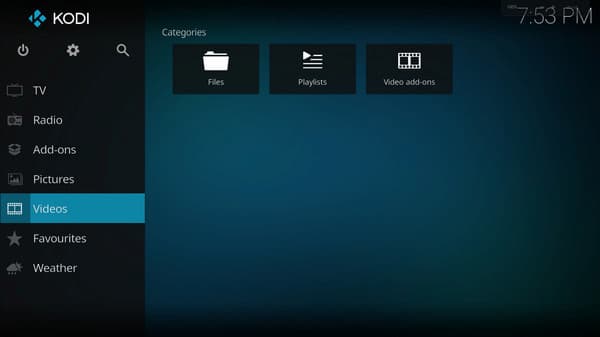
Kodi is a time-tested open-source media player software for streaming and playing videos and music. You can use it as an MTS/M2TS player to play M2TS on PC without server transcoding. You can also watch, pause, and record live TV broadcasts using an electronic program guide.
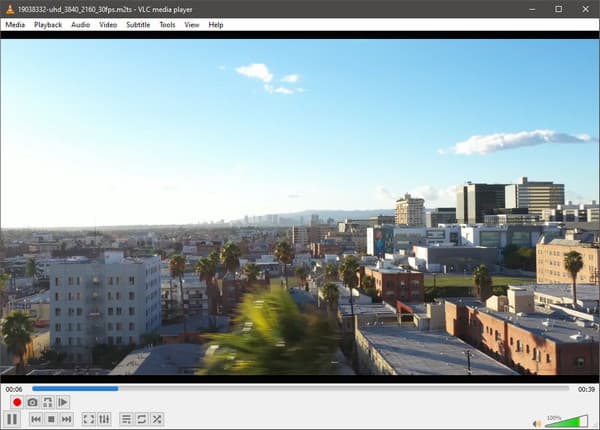
VLC is a long-running media player that natively supports M2TS playback. This tool can play almost any video file you can name without installing plugins or codec packs. Aside from digital media files, it can also handle physical media such as Blu-rays, DVDs, CDs, and VCDs.
AnyMP4 Blu-ray Player is an established media player that can open M2TS files natively. It is a handy tool, particularly when your files originate from Blu-rays or AVCHD recordings. Also, it supports Blu-ray-oriented playback functions, audio-track selection, and snapshot features.
1. Download AnyMP4 Blu-ray Player, install it, and complete the setup.
Secure Download
Secure Download
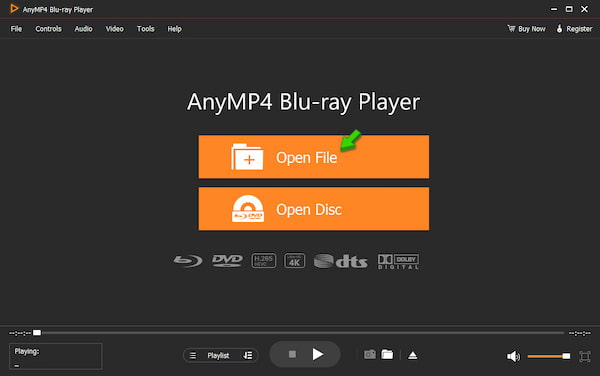
After installation, open the software and click Open File to import M2TS from your computer.
2. As soon as it loads, it will automatically play the M2TS video. You can use the built-in playback controls to adjust volume, pause, resume, or stop playback.
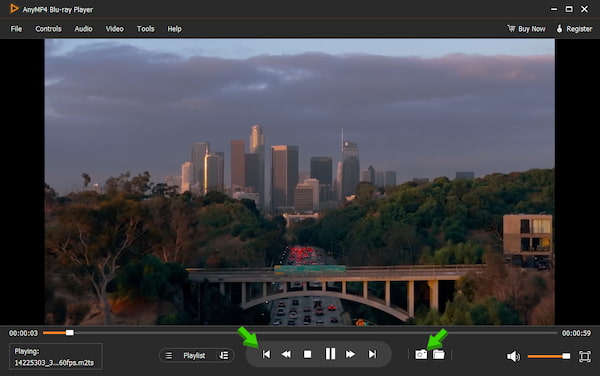
AnyMP4 Blu-ray Player isn't just a media player for Blu-rays. It can also play nearly all digital files you can name. It delivers smooth, high-quality playback and supports various video formats and physical media.
AnyMP4 Video Converter Ultimate is a multifunction conversion software that can remux or re-encode video files. With it, you can convert multiple M2TS formats to MKV, MP4, and 500+ other formats simultaneously without lag or crashes. Better yet, it uses the most advanced hardware-accelerating media processing to achieve a 120× conversion speed.
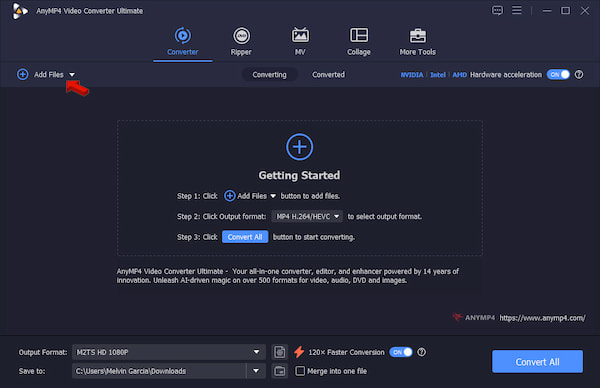
1. Download AnyMP4 Video Converter Ultimate and complete the installation. After setup, it will open to the Converter tab.
Secure Download
Secure Download
Click +Add Files to import the M2TS files from your computer. AnyMP4 does not limit the number of files or the file size you can upload, so you can import multiple files.
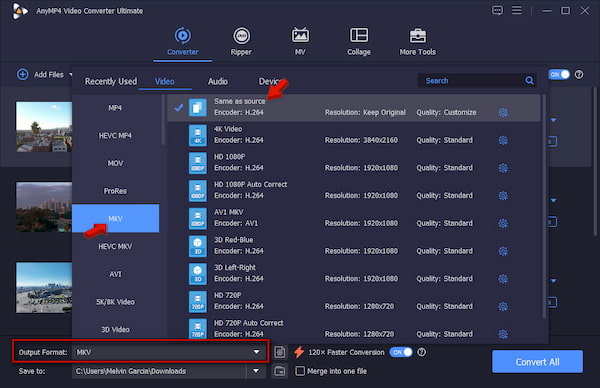
2. Head to Output Format and select MKV under the Video category. Select Same as Source as your quality preset to enable a 1:1 lossless remux.
3. Back to the main interface and toggle on Hardware Acceleration to speed up the conversion. Set the output destination, then click Convert All to batch-convert the M2TS to MKV.
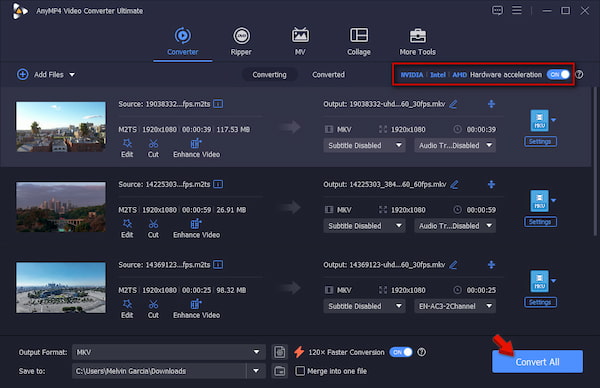
AnyMP4 Video Converter Ultimate can remux an M2TS to MKV while retaining the H.264 video and audio streams. You can use the Same as Source profile preset to allow a 1:1 lossless remux. Also, it can decode the original video data and re-encode it into a brand-new format.
Plex can read M2TS containers, but it struggles to play them. It is because the format is intended for Blu-rays and broadcast streams, not network streaming. When Plex encounters an M2TS file, it triggers either Direct Streaming or full video transcoding, which crushes the server's CPU. In such a case, it is highly recommended to remux MTS/M2TS to MKV.
Sonarr can automate the media library, but M2TS files can disrupt the import process. To automate this, you can use a post-processing script inside the download client to trigger the FFmpeg remux before it scans the folder.
If you want to play M2TS natively, skip Plex and use a local media player. Kodi has a built-in demuxer that can read the Blu-ray transport stream. It uses the local hardware decoding of the host device to manage audio layers and high bitrates.
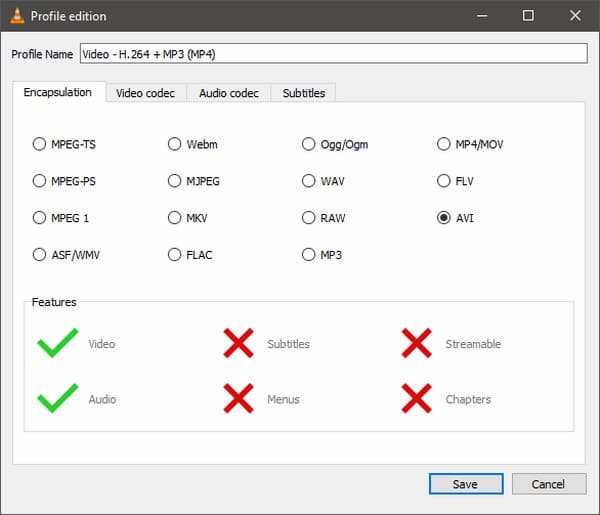
If an M2TS file won't play, its index is broken or unreadable by your player. You can use VLC to rebuild the file structure without losing quality. Go to VLC's Convert/Save tool and import the unplayable M2TS file. Select Video - H.264 + MP3 (MP4) as your profile, then click Edit selected profile. Under the Encapsulation tab, select AVI, and check the box for Keep original video track and Keep original audio track.
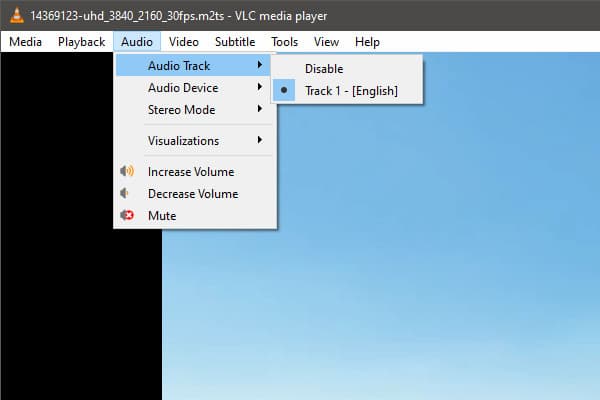
M2TS from Blu-rays carry HD audio formats. Many TV speakers, soundbars, and older receivers cannot decode these heavy bitrates. Use VLC, go to Audio, and select Audio Track. Then switch from the primary track to a secondary AC3/Dolby Digital 5.1 or Stereo track.
If VLC completely rejects the file with a corruption error, the container headers are damaged. In this case, you can use a video repair software to fix the corrupted video. Such tools can help repair the damage and bring the video back from playing again.
Is M2TS the same as MP4?
No, M2TS and MP4 aren't the same thing. M2TS is based on the MPEG-2 transport stream, while MP4 is a modern container built for internet streaming, sharing, and general playback.
What's the difference between AVCHD and M2TS?
AVCHD is a high-definition video format used by camcorders. On the other hand, M2TS is a specific container file format used to store MPEG-2 transport stream video.
Is M2TS higher quality than MP4?
No, both formats can hold the exact same video and audio codecs at identical bitrates. In other words, neither the M2TS file nor the MP4 has the highest quality.
Knowing what M2TS is can keep the file for Blu-ray-quality storage, remuxing it to MKV, or converting it to MP4. When you need to convert M2TS files in batches, use AnyMP4 Video Converter Ultimate. It offers a convenient solution while giving you control over output quality and format.
 Updated by Alice Thorne to Glossary
More readings
 What Is CAF File Format and How Do You Open It
Learn what a CAF file is, how Apple uses Core Audio Format, and why it may cause playback issues outside Apple devices. All you need to know about CAF is here.
 What is a DAT File? Types, Uses, and Opening Methods
Come across an unfamiliar format and don't know how to open it? Discover what is a DAT file, why it appears, and the safest way to open it without confusion.
 What Is a QCP File & How to Open It? (2026 Guide & Converter)
Wondering what a QCP file is? Discover the history of this legacy audio format, why it won't open on modern devices, and the best tools to convert QCP to MP3.
 What Is an MXF File & How to Open It? (The Ultimate Guide)
What is an MXF file? Discover everything about the MXF file format, why pros use it, how to easily open .mxf files, and how to convert them.
 Add your comments to join the discussion here