
Creators today are constantly looking for ways to remove background noise from video. Such noise, including hum, traffic sounds, or room echo, can distract audiences and reduce content quality. Fortunately, advancements in modern technology, particularly professional video editing and AI noise reduction tools, are on the rise. These tools can help you eliminate unwanted noise more effectively. This technique is commonly used by YouTubers, vloggers, and other social media content creators to enhance video quality and deliver a polished viewing experience. Clean video not only improves viewer engagement but also helps retain audience attention. This post will cover the best background video noise removal tools available. We will guide you in choosing the right software to boost your content and make your videos look professional. By the end of this post, you will know which tools are most effective for removing background noise.

Audio Noise:
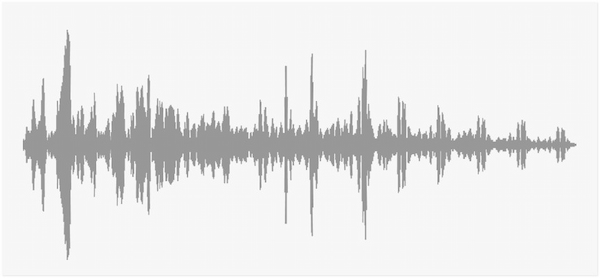
Audio noise refers to any unwanted sound that gets mixed into your recording or live audio. It often occurs due to low-quality microphones, poor recording environments, or electrical issues. Audio noise reduces clarity and makes speech or music hard to understand. This is why noise suppression tools are essential for streamers, content creators, and remote workers.
Video Noise:

Video noise is a visual distortion that appears as random speckles, colored pixels, or flickering patterns on a video. Cameras struggle to capture enough light, so they boost the image signal. This boosting introduces sensor noise, resulting in messy, uneven textures in dark areas of the frame. Video noise can make footage look soft, unprofessional, and low quality.
Digital Grain:

Digital grain refers to a stylistic or natural-looking texture that resembles film grain but is created digitally. While many clean up background noise in video, digital grain is intentionally added. Editors often use it to recreate the organic look of film grain found in traditional cinema. Simply put, digital grain is not a defect, but a creative tool used to achieve visual aesthetics.
Hiss (White Noise)
Hiss is a high-frequency noise that sounds like a constant ‘ssss’ in the background. It often comes from microphone self-noise, cheap audio equipment, boosted gain, or old analog recordings. Hiss becomes more noticeable in quiet moments or when the speaker pauses.
Hum (Electrical Interference)
Hum is a low-frequency buzzing, typically around 50 or 60 Hz, caused by electrical interference. It can originate from unshielded cables, faulty power supplies, and many more. Hum often sounds like a low, steady drone or vibration in the background and is hard to ignore.
Electrical interference can also cause a squealing noise in audio recordings. Check the guidelines here for how to fix squealing noise coming from the audio file.
Wind Noise
Wind noise occurs when moving air hits the microphone diaphragm, producing a loud rumble. It is common during outdoor recordings, smartphone shoots, or vlogging. Wind noise easily overwhelms the actual vocals and creates a chaotic low-frequency roar that makes speech unintelligible.
Traffic Sounds
Traffic noise includes car engines, honking, tire friction, sirens, motorcycles, and other urban background sounds. These noises often vary in pitch and volume, making them harder to remove cleanly with automated filters. Traffic noise can mask important frequencies in the human voice, especially in environments near roads or busy intersections.
ISO Noise
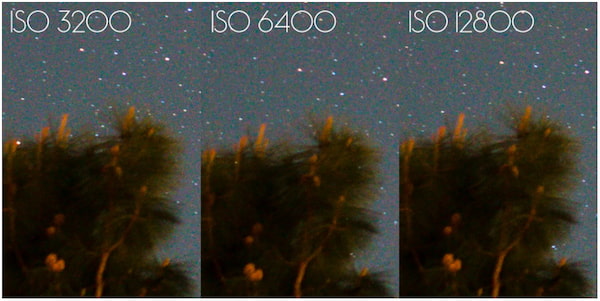
ISO noise occurs when a camera sensor struggles to capture sufficient light, forcing the device to electronically boost the signal. While this boost increases brightness, it also amplifies unwanted pixel variations, resulting in a grainy or speckled texture. Crucially, higher ISO settings make the camera more light-sensitive but simultaneously introduce more digital noise.
Visual Static
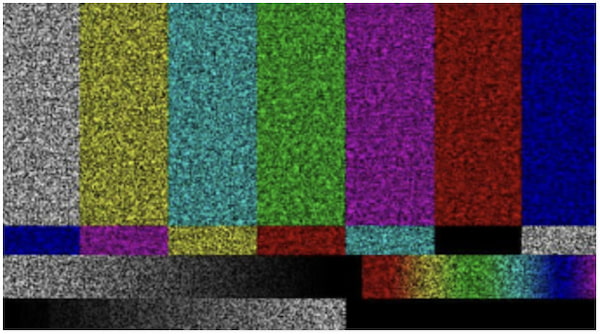
Visual static refers to random, moving specks, colored dots, or flickering patterns visible in video or still images. It’s a sign of underlying issues such as electronic interference (within the camera or HDMI connection), compression artifacts, or sensor problems. It can also manifest when the sensor overheats, struggles to process data, or encounters corrupted digital signals.
Low-Light Conditions

Low-light environments are a contributor to digital grain, as camera sensors require sufficient light to produce clear images. When light is insufficient, the sensor amplifies its output to compensate, which increases both brightness and unwanted noise. The consequence is that shadows and dark areas become blotchy, details are lost, and colors appear muddy.
Best For: All-in-one solution for cleaning background noise from video and audio.
Platform: Windows and Mac
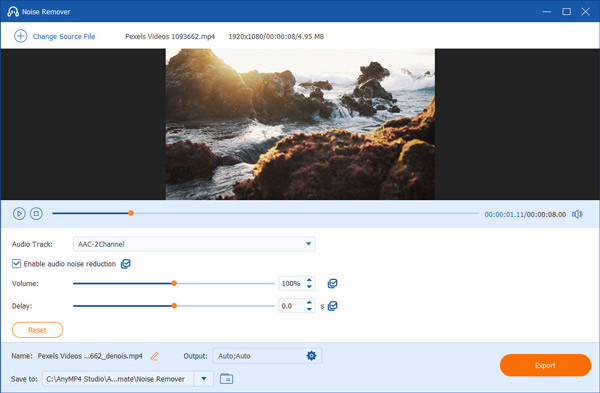
AnyMP4 Video Converter Ultimate is an all-in-one multimedia powerhouse designed for video and audio enhancements. It is equipped with a Toolbox that includes more than 20 essential tools, such as background noise removal features. The Noise Remover is designed to clean background audio from any video. It intelligently analyzes the audio track to reduce wind noise in outdoor videos and other audio interference.
Secure Download
Secure Download
In addition to the Noise Remover, it offers an AI-powered Video Enhancer suite. This suite includes a video denoiser to fix grainy video footage. It also comes with a stabilizer for shaky footage, an upscaler to improve video quality, and a color optimizer to enhance video effects. For comprehensive compatibility, it accepts MP4, MP3, AVI, FLV, AAC, and 500 others. Its fast processing speed makes noise reduction and enhancement tasks quick and efficient.
PROS
CONS
My Experience:
The Noise Remover instantly removed distracting ambient sounds without overprocessing my voice. What impressed me most was how easy the entire process was. I didn’t need complex settings to get clean audio. On the video side, the AI-powered Video Enhancer helped reduce visual noise in low-light footage. It makes my video look clearer and more professional.
Best For: Restoring dialogue and removing unwanted background sounds.
Platform: Windows and Mac
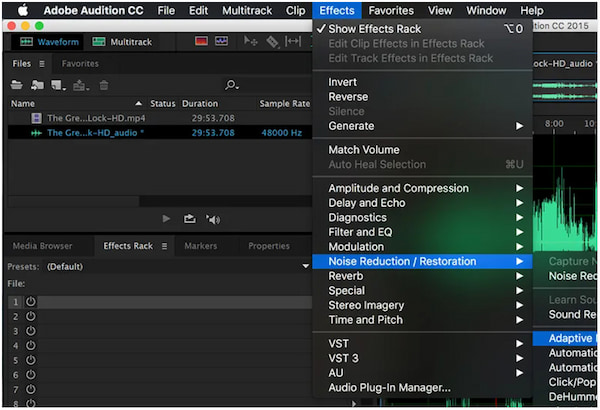
Adobe Audition is a specialized software for professional audio editing and restoration. This software excels at removing background noise from audio. It offers several audio background noise removal features to remove unwanted sounds. This includes the Noise Reduction/Restoration Effect, Adaptive Noise Reduction, Specialized Effects, and more. It gives you the tools to restore clean, intelligible audio with precision.
PROS
CONS
My Experience:
My experience with Adobe Audition has been a mix of impressive results and a few challenges. I was able to remove background noises with a level of precision I didn’t expect. However, it requires careful tuning, and a single wrong adjustment can easily make the audio sound overprocessed.
Best For: Dialogue cleanup and EQ/dynamics processing.
Platform: Windows, Mac, and Linux
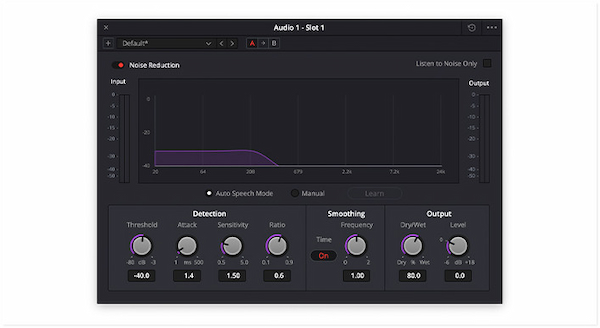
DaVinci Resolve features a Fairlight audio page that can professionally reduce background noise from videos. Using the Noise Reduction plugin, you can apply either Auto Speech Mode or Manual Mode. In addition to noise reduction, the Dynamics feature helps remove low-level hiss or hum during quiet parts by suppressing sounds below a chosen threshold. You can also pair this with EQ to cut specific frequencies and use De-Hummer to clean up power-line hums.
PROS
CONS
My Experience:
I found the Fairlight audio tools surprisingly powerful, considering that many features are available even in the free version. However, adjusting parameters can be overwhelming when you’re just trying to clean a clip quickly.
Best For: Removing unwanted audio noise with precision.
Platform: Windows, Mac, and Linux
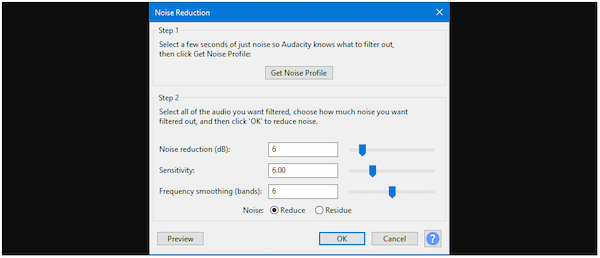
Audacity is a free background noise remover accessible on various platforms. Although it doesn’t edit video directly, you can extract the audio and import it into Audacity. By then, you can apply powerful noise‑reduction tools, then sync them back with your video. Its Noise Reduction effect can remove constant background sounds, such as fan hum, hiss, or electrical buzz. It works without requiring video editing tools; you focus purely on audio.
Learn here the full guide to remove background noise in Audacity.
PROS
CONS
My Experience:
I appreciate Audacity for cleaning up consistent background sounds. This software made it easy to quickly edit clips without investing in expensive software. However, it requires extracting audio from video, which adds an extra step to the workflow.
Best For: Reducing visual noise, such as grain, compression artifacts, and other degradations.
Platform: Online

Topaz Video AI is a powerful video enhancement and AI background noise removal from video. The Nyx model was introduced as a specialized enhancement model focused on denoising. It’s designed for high-resolution footage, particularly shot in challenging conditions. It runs in 1× mode by default, meaning it doesn’t upscale, preserving the original resolution while removing noise.
PROS
CONS
My Experience:
In my experience with Topaz Video AI, it reduced grain, speckles, and compression artifacts in my footage. Even after removing noise, the software retained important details. However, it focuses on visual enhancement, so it wasn’t able to effectively clean up audio noise.
How do I remove background noise from a video for free?
You can remove background noise from a video for free by using the tools in DaVinci Resolve. You can use Fairlight’s EQ, Gate/Expander, and DeHummer effects to reduce background noise.
Can AI tools completely eliminate noise?
No, AI cannot always completely eliminate noise in every scenario. This is particularly noticeable if it overlaps with voice frequencies or fluctuates unpredictably.
Is background noise removal possible without losing voice quality?
Yes, background noise removal can preserve voice quality if you use the right tools and settings. However, removing too much noise can make the voice sound hollow or metallic.
Background video noise removal is no longer optional. It’s essential for delivering professional-quality content and keeping your audience fully engaged. With the rise of AI noise reduction and advanced video editing tools, achieving professional quality has never been easier. For creators who want a reliable, all-in-one solution, AnyMP4 Video Converter Ultimate is the perfect choice. It features a Noise Remover tool and an AI-powered Video Enhancer suite. These tools allow you to clean both audio and video seamlessly, boosting your content quality with minimal effort.
Secure Download
Secure Download
 Updated by Mark Cristobal to Edit Video
Related Articles
 10 Best Background Noise Reduction Software for All Platforms
Does your audio recording contain annoying background noises? Worry not. Check the ten noise reduction software programs we have listed here to eliminate them.
 6 Fixes to Reduce Background Noise on Microphone
Are you wondering how to get rid of background noise on mic? If yes, you are certainly in the exact place! Find out the solution you can apply here.
 Ultimate Guide to Denoise Video in 2 Ways
Click here to see the two greatest-enhancing tools to denoise video with ease. You may also see how we can make denoising more manageable and effective.
 What is and How to Use it in Photo Editing
What is image noise? How to remove noise from a picture? Can I add image noise? Get the full information about image noise here.
 Add your comments to join the discussion here