
Free Download100% Clear & Secure
Free Download100% Clear & Secure
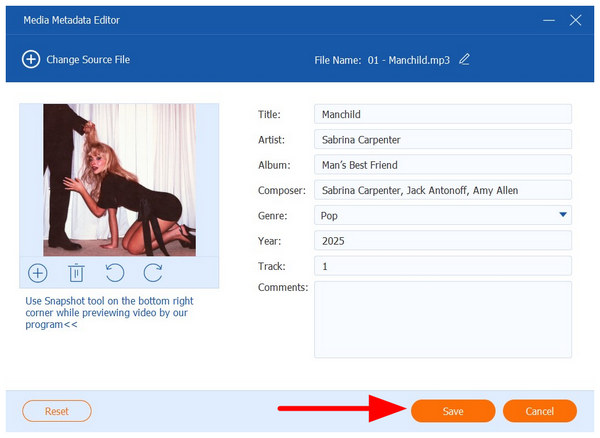
Learning how to manage music files efficiently is a valuable skill for most audio enthusiasts, as an organized digital audio library is easier to use, listen to, and enjoy. As such, discovering the best MP3 tag editor software is a crucial step for most audiophiles. In this article, we will simplify the process by providing five of the most reliable MP3 tag editors that are compatible with various operating systems, including Windows, macOS, and Linux. We will review each program based on its best uses, main strengths, and limitations.
Before proceeding to our software review, let us first discuss what exactly MP3 tag editing software is.
As their name suggests, MP3 tag editors are file management software designed to edit the metadata containers of digital audio files, which carry information such as artist, title, album, genre, and other details that make them very easy to manage on music players.
When properly applied, MP3 tags are essential for ensuring the correct play order of an album you have downloaded. It also helps in organizing the files by artists, genre, year of release, and other sorting filters.
For a quick overview of the best MP3 tag editors on the market, we have provided a concise table summary based on key factors to consider when choosing an MP3 tag software for Mac, Windows, or Linux.
With the help of the information below, we hope will give you an idea of what to look for when choosing a metadata editor for MP3 files. For a more detailed overview of these tag editor programs, please proceed to our comprehensive review of each program below.
| MP3 Tag Editors | Supported Platform | Batch Editing | Auto Tag Lookup | Cover Art Support | Lyrics Integration | Supported Tag Standards | Tag Accuracy |
|---|---|---|---|---|---|---|---|
| AnyMP4 Video Converter Ultimate | Windows, macOS |  |
 |
|
|
ID3 | Manual Tagging for Accuracy |
| MP3Tag | Windows, macOS | |
|
|
|
ID3v1, ID3v2.3, ID3v2.4 | Source Dependent |
| MusicBrainz Picard | Windows, macOS, Linux | |
|
|
|
ID3 | Accurate Tagging |
| TigoTago | Windows | |
|
|
|
ID3v1, ID3v2 | Manual Tagging for Accuracy |
| TagScanner | Windows | |
|
|
|
ID3v1, ID3v2 | Accurate Tagging |
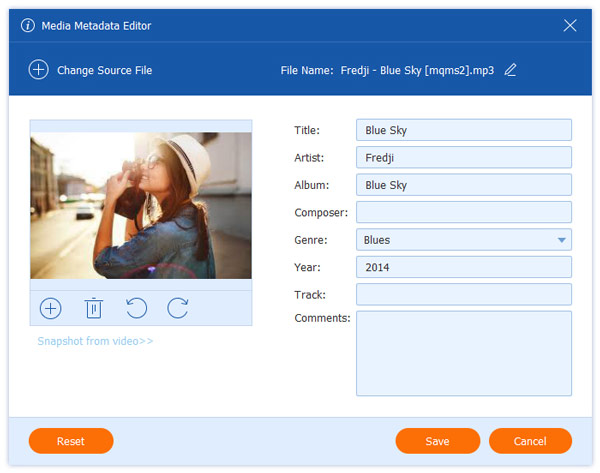
Best Used For: Manually editing audio and music metadata for accurate info on ID3 tags.
When searching for a reliable MP3 tagging software, multimedia editing tools are often overlooked, as dedicated tag editors are often seen as more reliable. However, AnyMP4 Video Converter Ultimate’s Media Metadata Editor breaks this trend, as the tool offers more advanced metadata editing options than its exclusive counterparts.
In addition to the manually adjustable ID3 tag information in the program, the Media Metadata Editor tool also offers a built-in AI-powered audio enhancement feature, which significantly improves sound clarity. This is supported by the impressive audio quality preservation, which prevents files with edited metadata from suffering quality loss.
To improve the accuracy of MP3 tag information in the program, you can manually add album art, artist, genre, year of release, and other ID3 tags within the software. Although it requires more setup, manually writing metadata is generally worth it, as you will have full control over the information you input.
If you are looking for a jack-of-all-trades option that does not suffer from subpar MP3 tagging performance, make sure to consider AnyMP4 Video Converter Ultimate as your tag editor of choice.
You can download the tool using the link and discover its pros and cons below.
Secure Download
Secure Download
PROS
CONS
Best Used For: As an exclusive music metadata software for all forms of audio formats.
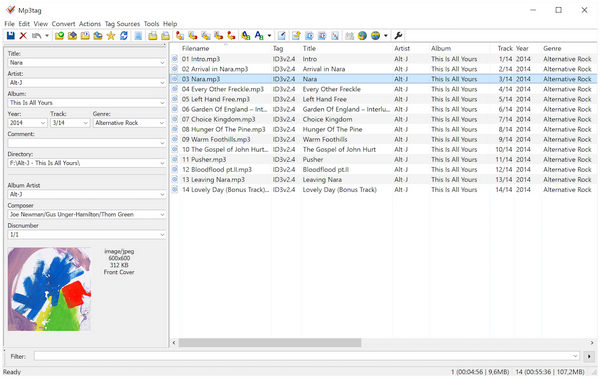
To significantly enhance the quality of your MP3 files, choose the best MP3 tag editor that automatically adds album art, such as MP3Tag. As its name suggests, this metadata writer app is exclusively optimized for MP3 files, making it very reliable for automatic information tagging. However, it can also be used as a video metadata editor, albeit not as reliable.
Unfortunately, the program is not the most beginner-friendly tool, and this was made more difficult by its dated interface design.
PROS
CONS
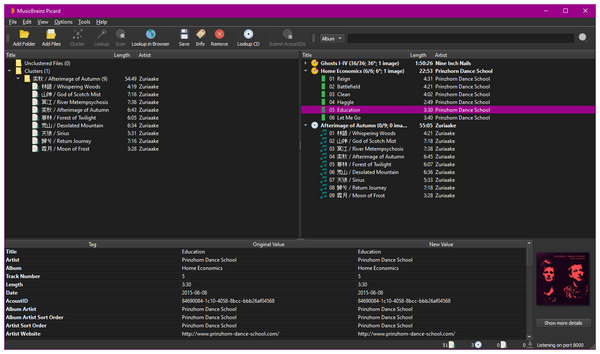
Best Used For: Tagging music files with community-curated information.
When looking for a reliable MP3 metadata editor for Mac, MusicBrainz Picard is a good option, as it compiles reliable community-curated information for all its users. Think of the program as a public library where all users can share metadata information from their own files and use it as a metadata viewer option.
Despite that, this system is not the perfect solution for data sharing, as community-shared information may be easily tampered with. It is also not the best solution if you want to make quick one-off metadata edits, as it highly prioritizes batch editing.
PROS
CONS
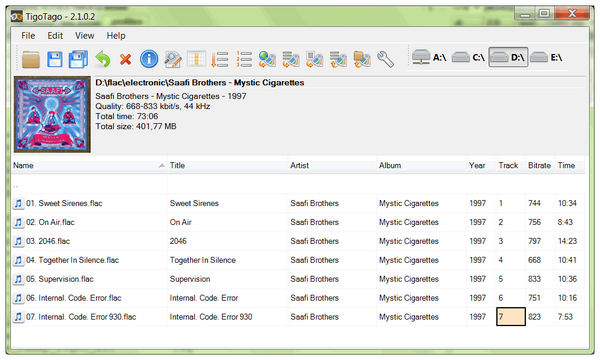
Best Used For: Old-school metadata editing using a spreadsheet-like system.
If you're looking for an old-school MP3 ID3 tag editor that utilizes a tried-and-true spreadsheet system, TigoTago should be one of your top picks. Since it uses a spreadsheet-centered interface, manually editing information in the program was made very easy.
Since it relies on manual ID3 tag inputs, it also lacks an auto-tagging feature, which could impact the file management process. The program's old-school nature also made it less powerful than the modern music MP3 tag editors listed here.
PROS
CONS
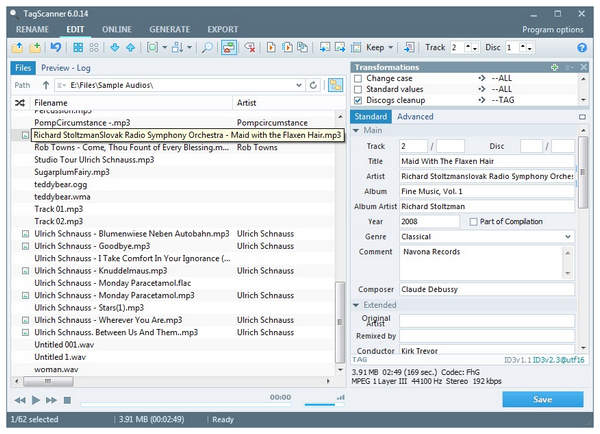
Best Used For: Advanced users who are knowledgeable with advanced batch processing and flexible scripting.
Finally, an advanced metadata music editor may be more applicable for you if you are already experienced with advanced file management programs. In this case, TagScanner could be a good option. Among the programs on this list, this tool offers the most advanced batch processing and flexible scripting needs.
However, the same nature that makes it a good option for experienced users is also the reason why it is not suitable for beginners. It is highly recommended to avoid this tool if you are still getting familiar with metadata editing, as you can accidentally remove metadata from audio or video if you make a mistake in the software.
PROS
CONS
With five of the most reliable MP3 tag editors now discussed, let us now move forward to the quick tutorial on learning how to use song metadata editors. Among the tools in this article guide, we selected AnyMP4 Video Converter Ultimate as it provides the perfect balanced between performance, features, and general ease of use.
In fact, you can easily edit the MP3 tag of your audio file by following three simple steps when using the program. To learn how to use it, download the software and follow our three-step guide below.
Secure Download
Secure Download
1. Open AnyMP4 Video Converter Ultimate and go to the Toolbox tab. Then, click on the Media Metadata Editor. Add the MP3 file you want to edit in the Add File pop-up that will appear.
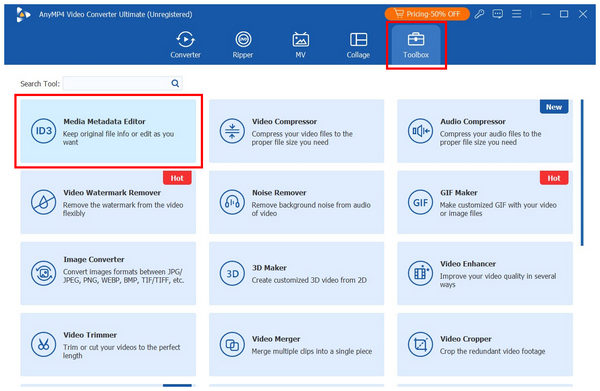
2. Once the MP3 audio file you want to edit has been imported into the tool, you can manually edit the ID3 tags, including Album Art, Title, Artist, Album, Composer, Genre, Year, and Track Number.
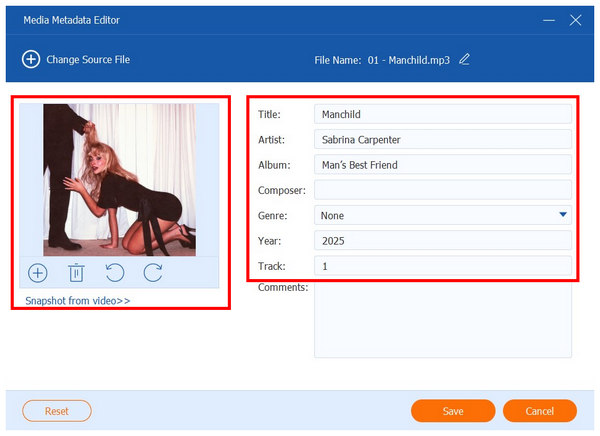
3. With the audio tag adjustments applied, simply click on Save, and the source file you have edited will now have its metadata information edited.
By simply editing the essential ID3 tags accessible in AnyMP4 Video Converter Ultimate, you can greatly enhance the file management properties of your local audio files. This step will significantly help determine how efficiently you consume your time when it comes to audio file management.
What is an MP3 tag?
MP3 tags are pieces of information embedded in MP3 audio files that contain important metadata. These include title, artist, album, and more. Editing this information is greatly valuable when it comes to file management.
Can I edit tags without changing the audio quality?
es, you can. However, most MP3 tagging tools usually affect the audio quality and clarity of their media files. Fortunately, there are multimedia options that not only preserve the quality of metadata-edited files but also enhance them, such as AnyMP4 Video Converter Ultimate.
What’s the best free MP3 tag editor?
There are numerous free MP3 tag editors on the market. However, the most notable good options are MP3Tag and AnyMP4 Video Converter Ultimate. On the one hand, MP3Tag is the simplest option for editing ID3 tags directly and efficiently. Meanwhile, AnyMP4 Video Converter Ultimate is the most ideal for ease of use and audio quality preservation.
How do I automatically download album art?
You have to use an ID3 tag editor that offers this service. Among the programs on this list, AnyMP4 Video Converter Ultimate, Mp3Tag, MusicBrainz Picard, and TagScanner automatically add album art to MP3. You can also manually add an image of your choice to these programs.
What is the difference between ID3v1 and ID3v2?
ID3v1 is the more commonly used ID3 tag, as it allows the program to change its key metadata information. However, ID3v2 is more adjustable but requires more experience to be set properly. For managing MP3 files, ID3v1 is more than sufficient.
Now that we have provided our readers with the best MP3 tag editors on the market, all you have to do is select the most suitable option based on your needs, technical skills, and intended use. For the perfect balance of ID3 tag editing options, ease of use, and practicality, consider AnyMP4 Video Converter Ultimate as one of your top picks. Download the program with the link below.
Secure Download
Secure Download
 Updated by Mark Cristobal to Editor , Edit Audio
 More readings
 3 Editors to Add and Change MKV Metadata
Looking for software to use as an MKV tag editor? Then, this article is made for you since we will present three tools that you can use for this purpose.
 5 Tools to Change File Creation Date for Online Protection
Looking for a way on how to change the date created on a file? This article is made for you since we will discuss five software that can do this on your files.
 10 Best MP3 cutters to Trim and Split MP3 Online/Offline
It always makes us excited that we can cut and split MP3 files into tracks using the paid or free MP3 trimmers we share here.
 How to Speed up MP3 Audio Without Affecting Quality
Do you want to learn how to edit audio speed and pitch with no quality loss? Read this article for a full guide using online tools and conversion software.
 Add your comments to join the discussion here