
If you are looking for a way to organize music files and make your audio library easy to navigate, using dedicated audio metadata editors is one of your top options. When used properly, these tools can drastically enhance the quality of life for their users, as properly tagged audio files can now be organized by artist, genre, album, year of release, and other similar information. To learn five of the best tools for metadata editing, make sure to read our review for the best options on Windows, Mac, and Linux.
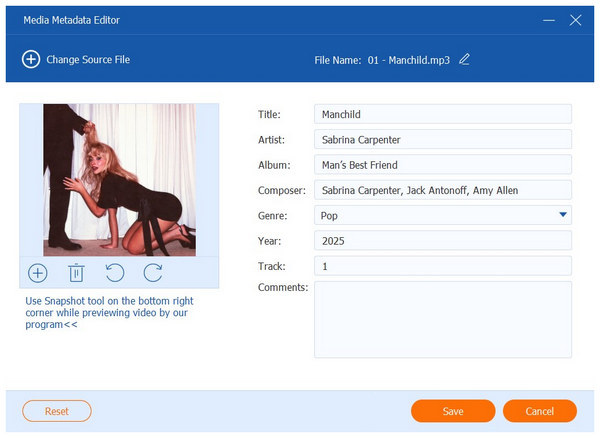
Before proceeding to reviewing our featured metadata editors, let us first discuss what metadata are. To start, metadata is information embedded in media files that adds key information for file management purposes.
When applied to audio files, metadata editing typically includes adjusting the title, artist, album, genre, year of release, track number, and other audio-related details. When used on videos, you can edit the title, release year, cast, director, and other details.
With the main uses and practicality of song metadata editors now discussed, let's move forward to reviewing five of the best metadata editing tools for Windows, macOS, and Linux computers.
For a quick introduction to the programs we will review, please refer to our simple comparison table below, which highlights the most important factors to consider when selecting MP3 metadata editors.
| Audio Metadata Editor | Supported Platforms | Batch Tagging | Format Support | Covert Art Editor | Best Used For | Preserves Output Quality | Limitations |
|---|---|---|---|---|---|---|---|
| AnyMP4 Video Converter Ultimate | Windows Mac |
 |
MP3, WAV, FLAC, ALAC, AIFF, M4A, MP4, MOV, WMV, AVI | |
Batch processing audio files for music player management. | |
The free version has slight feature limitations. |
| Kid3 | Linux, Windows, macOS, Android | |
MP3 OGG, FLAC, MP4, AAC, M4A, WMA, WMV, WAV, AIFF | |
Command-line scripting for metadata editing of large audio collections. | |
It has an intimidating and technical interface design. |
| Yate | macOS | |
MP3, FLAC, AIFF, AIFC, APE, DFF, DSF, OGG, MP4, M4A, WAV | |
Professional metadata tagging for macOS computers. | |
Paid option and high learning curve due to script-based editing. |
| MetatOGGer | Windows | |
MP3, FLAC, Ogg Vorbis, Speex, Musepack, WMA, WavPack | |
Simple metadata editing and automatic tagging. | |
Dated UI and interface design. |
| Puddletag | Linux | |
MP3, FLAC, M4A, OGG, MP4 AAC, WMA | |
Linux users who are familiar with spreadsheet-based tag editors. | |
Development and update releases are not consistent. |
Best Used For: Beginner-friendly metadata editing via easy-to-navigate interface design.
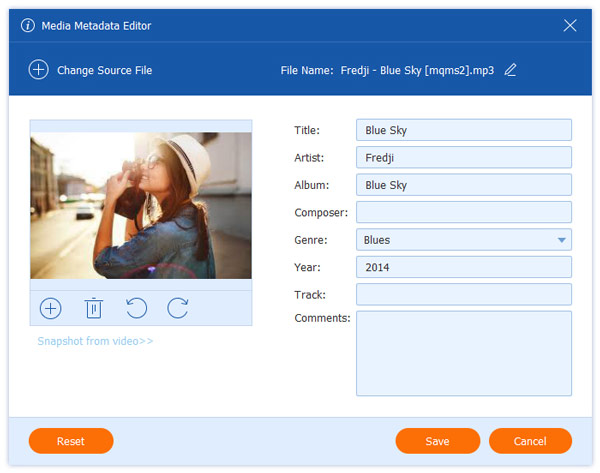
We will begin this review by highlighting the best option for both Windows and macOS, featuring AnyMP4 Video Converter Ultimate’s dedicated Media Metadata Editor tool. Capable of supporting both audio and video metadata, this program not only offers beginner-friendly adjustment but is also versatile enough to support multiple file types.
Moreover, it also offers batch processing for large libraries of media files. These files can also be converted to a different format, which adds practicality for their users. This makes the program a versatile tool since you have the option to edit both format and metadata while preserving audio quality.
For an added touch, the Media Metadata Editor in the program allows you to add album art from your local storage, enabling you to personalize your music player collection.
To make organizing your music player and library easier, download AnyMP4 Video Converter Ultimate.
Secure Download
Secure Download
PROS
CONS
When using AnyMP4 Video Converter Ultimate, the program's fully customizable metadata options make it easy to use. This makes using the software ideal for beginners, as both its interface and functions are very simplified.
Best Used For: Users with command-line editing experience for efficient batch processing.
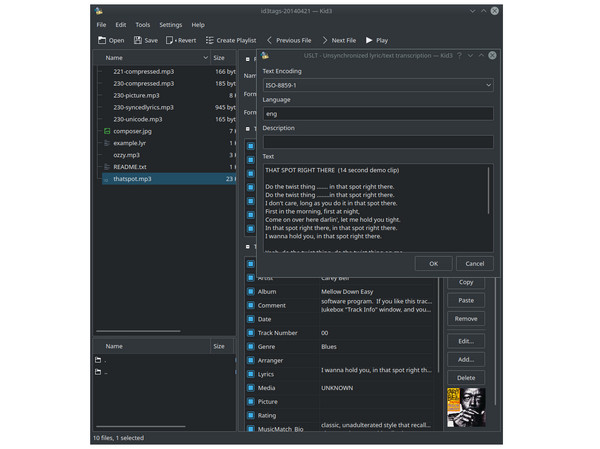
If you have basic command-line skills, Kid3 is the best option for you, as it is designed to edit metadata and add album art to MP3 and other audio files.
As such, this software is one of the best options for using as a metadata editor for FLAC/ALAC and various audio files, utilizing command-line-based editing tools without the restrictions of platform-exclusive options.
PROS
CONS
Due to the software's reliance on command lines, it is not the best option for beginners. As such, it is recommended to use alternative options, such as those with a functional graphical user interface.
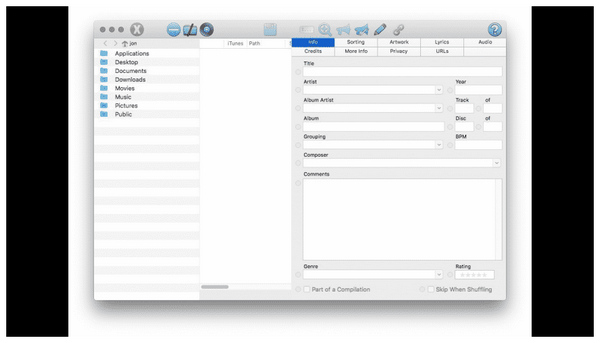
Best Used For: macOS users looking to professionally edit metadata of audio files.
In addition to regular file management, editing and viewing metadata is more important if you plan to use it for professional purposes. If that is the case, Yate should be your top pick if you plan to tag your audio files for professional audio editing use.
Unfortunately, this option has a slight limitation, as the program is only available as paid software. There is no free version of Yate.
PROS
CONS
When you plan to use a metadata editor for WAV and other high-quality audio, Yate will definitely get the job done. Unfortunately, its paid nature makes it less suitable for casual use, as there are more affordable and free options available for metadata editing.
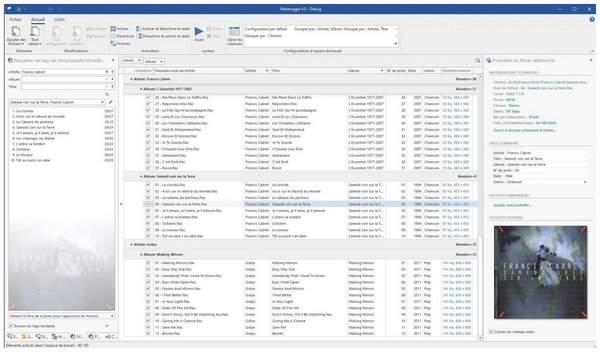
Best Used For: Simple and easy metadata adjustment with automatic tagging.
For maximum convenience, MetatOGGer should be your top option for automatic metadata tagging. Due to its automated nature, it also works well as a cleanup option to ensure that your metadata is accurate and up-to-date. This makes the software a good metadata editor for AIFF, WAV, FLAC, ALAC, and other more advanced audio file types.
PROS
CONS
When using automated options, be sure to double-check the information on these tools. They may be convenient, but automated scanning may be prone to input mistakes.
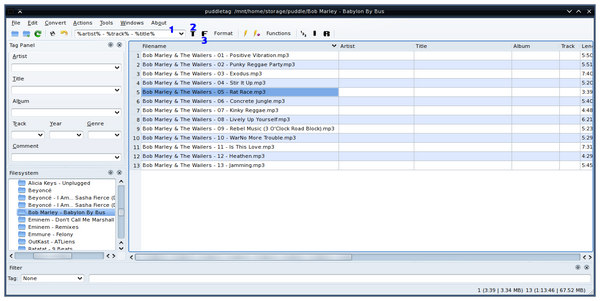
Best Used For: Linux-based metadata editing via spreadsheet-style interface.
Finally, Linux users can enjoy an exclusive audio metadata editor, Puddletag, at their disposal. Although its operating system is technically oriented, the software was designed to be user-friendly. This was made possible by the spreadsheet editing interface when editing metadata with the tool.
PROS
CONS
When editing with Puddletag, you can easily edit audio metadata without any issues. Unfortunately, it is exclusive to Linux computers, making it inherently less accessible than software available for Windows and Mac.
With the review of the metadata editor tools now complete, let's proceed to our quick tutorial on how to edit the metadata of your audio file. Since AnyMP4 Video Converter Ultimate offers the best balance of function and ease of use, it was selected as the program we will use for this tutorial.
Download the software using the link below to easily follow our three-step guide.
Secure Download
Secure Download
1. Open AnyMP4 Video Converter Ultimate, and proceed to the Toolbox section of the software. Then, select the Media Metadata Editor.
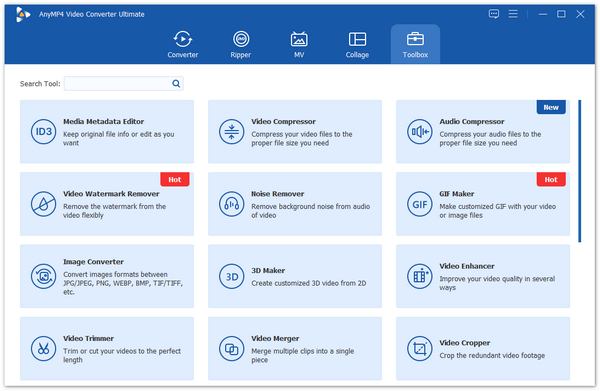
2. After selecting the tool, click the Add File button that appears to import the audio you want to edit.
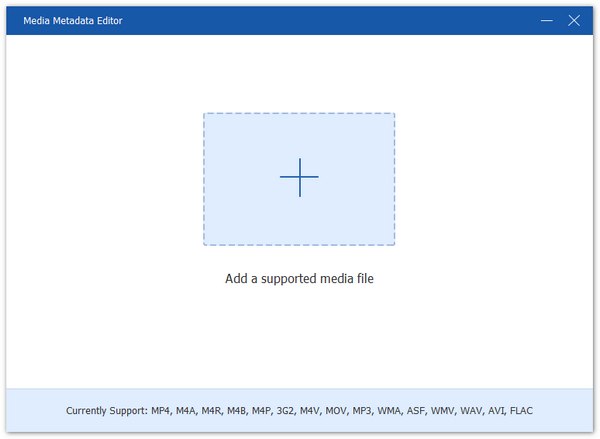
3. With the file now added, you can now edit its metadata, including the Title, Artist, Album, Composer, Genre, Year of Release, and Track Number. To change the album art, click the Plus button on the art section. Finally, click on Save to confirm your metadata adjustments.
With the graphical user interface of AnyMP4 Video Converter Ultimate, you can ensure that your audio file’s metadata will be edited easily. This made the software the number one option for users, finding the balance between function and accessibility.
Is an audio metadata editor the same as an audio editor?
No, it is not. Metadata editors only edit the file information of your music file. Meanwhile, audio editors apply the editing to the audio itself.
Why is my album art not showing up?
Your audio may not have an album art to begin with. To check if it is or to add an image to your media, you can use metadata editing tools. These options can easily add album art.
Is batch editing supported?
Yes, metadata editors typically have batch editing capabilities. This makes adding metadata information to multiple videos easier to apply. All the tools in this article offer batch editing.
Will editing metadata affect audio quality?
No, it will not. Metadata editing only adjusts the file info of your file. The audio quality will be left untouched.
Is editing metadata illegal?
No, it is not. Metadata adjustments are legal to apply. This makes editing this information easy and beneficial.
With the best audio metadata editors now reviewed, we hope this article has provided you with valuable information on which software will best suit your needs. If you are still unsure which software is the safest option, we highly recommend using AnyMP4 Video Converter Ultimate for its balance of ease of use and functionality. You may download the tool using the link below.
Secure Download
Secure Download
 Updated by Mark Cristobal to Edit Audio
More readings
 3 Editors to Add and Change MKV Metadata
Looking for software to use as an MKV tag editor? Then, this article is made for you since we will present three tools that you can use for this purpose.
 Best 5 Video Metadata Editors for Windows and Mac
Changing the video metadata information can be done easily with the help of third-party programs. Learn the best five Metadata editors we included in our list.
 5 Tools to Change File Creation Date for Online Protection
Looking for a way on how to change the date created on a file? This article is made for you since we will discuss five software that can do this on your files.
 3 Proven Methods to Use Snapchat on PC [Discussed Here!]
This post will teach you how to use Snapchat on a PC in three effective ways. Access it on your PC using an emulator, screen mirroring, and the web version.
 Add your comments to join the discussion here