
Free Download100% Clear & Secure
Free Download100% Clear & Secure
Streaming services are the best option if you want to ensure that your media files are organized, easy to access, and can be watched at any time. Unfortunately, most of these services solely operate online and only offer content available on them. Fortunately, there are streaming options that support local media import, such as Plex. In this article, we will provide a detailed guide to help our readers learn how to find metadata in Plex to ensure that local files uploaded to the streaming app are well-organized.

Metadata is the embedded information in media files that provides information about the source file. For videos, it is usually the title, year, and genre. For music files, these include the title, artist, album, and track number for the album.
When it comes to the source for the metadata information, you can use trusted sources online, such as iMDB for videos, or Spotify for music tracks.
Since Plex uses its own server to store media files, there is no local storage for the program. However, it supports uploading local files, which can then be accessed through the streaming app and saved to your account.
After adding media files to Plex, you can view the Metadata or even edit it easily using a few simple steps. Although simple, setting these up is highly useful since properly applied metadata is essential for file management.
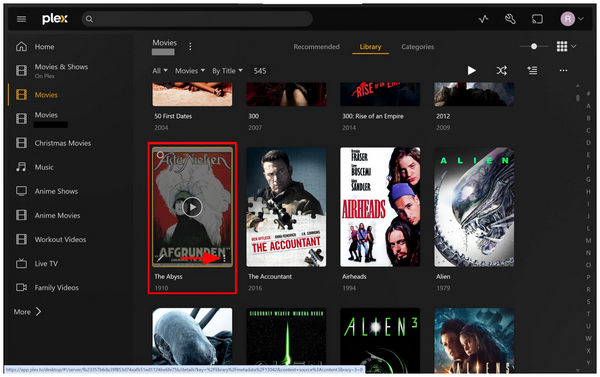
1. Open Plex and select the movie you want to check the metadata of. Then, click on the Three Dots menu on the lower right corner of the media cover.
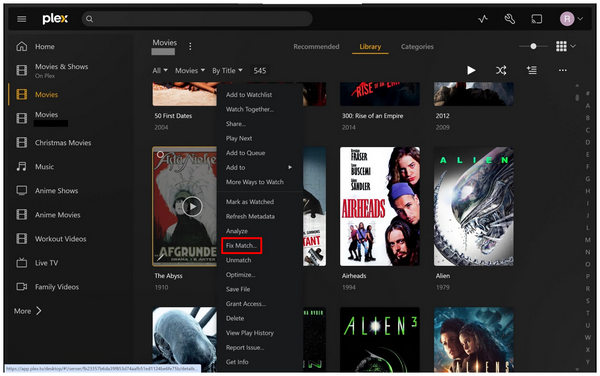
In the menu that will open, select Fix Match.
2. In the Fix Match menu, select Search Options.
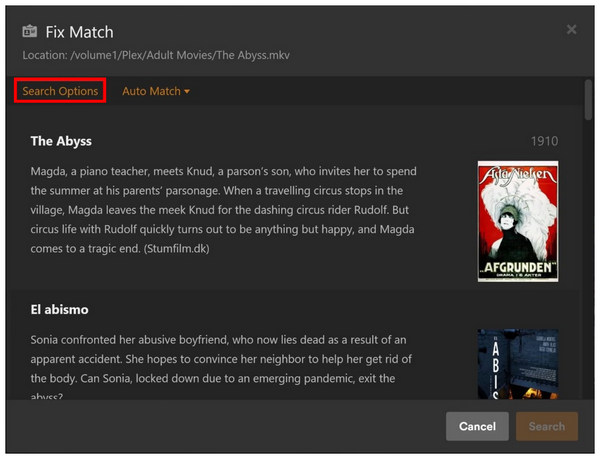
3. Clicking on Search Options will open the basic metadata of the Plex media you have selected. However, you can edit the Title, Year, and Language of the media, and then press Search to look for the data in Plex servers.
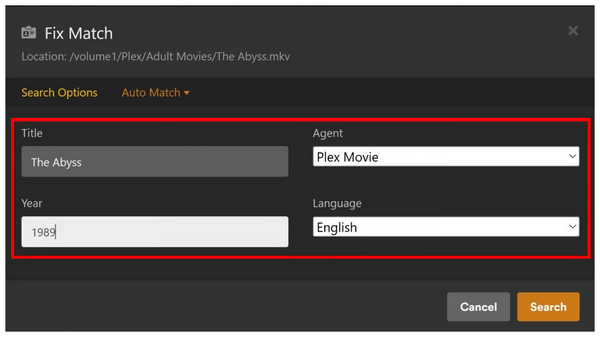
After clicking on Search, the metadata you have entered will be searched among the servers of Plex. Simply click on the source you want to use for your media to apply the metadata to it once you are editing.
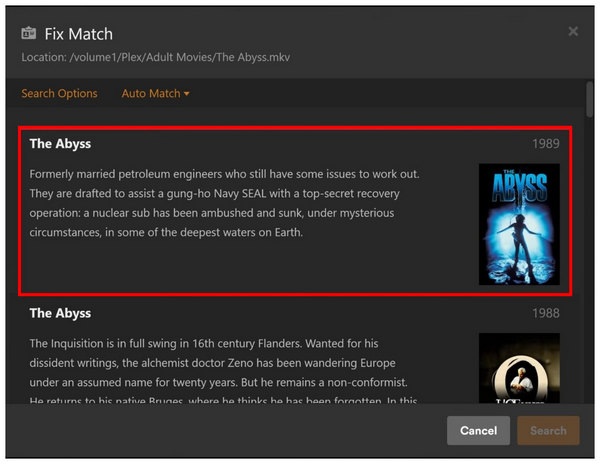
By following these three simple steps, you have now learned how to view your video's metadata or even edit your video’s Title, Year, and indicate the language it uses.
If your Plex media’s video cover is missing, you may fix this issue using the Fix Match option previously highlighted above. To add an image, simply click on Search in the Search Option part and choose the art you want to use based on sources from Plex servers.
To change wrong title markings, simply change the text box on your Plex media. Then, select the Search tab to browse the servers of Plex. Then click the one saved source you want to use for your media file.
If your media file’s language was edited incorrectly, you face issues such as misleading other Plex users. To fix this, follow the Search Options again and then select the language to the one appropriate for your media file.
Since metadata editing in Plex is limited only to media files imported into it, learning how to edit the metadata of local files is a distinct skill itself. As such, using tools like AnyMP4 Video Converter Ultimate for Windows and Mac will allow you to edit the metadata of local files directly.
With the help of the Media Metadata Editor tool of the program, adding embedded metadata in local files from MP4, MOV, AVI, MP3, WAV, FLAC, etc, was made very easy. The metadata information adjustable for these files ranges from Title, Genre, Year, Artist, Album, and Track Number; all of which are highly useful for both video and music files.
To learn more about what makes the Media Metadata Editor of AnyMP4 Video Converter Ultimate a good option, make sure to read our three-step guide below.
Do not forget to download it as well for an easier time following each step.
Secure Download
Secure Download
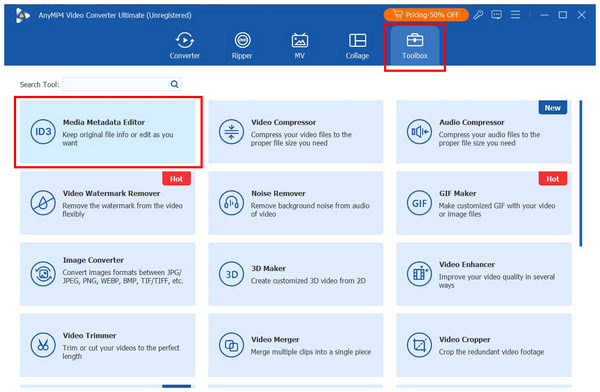
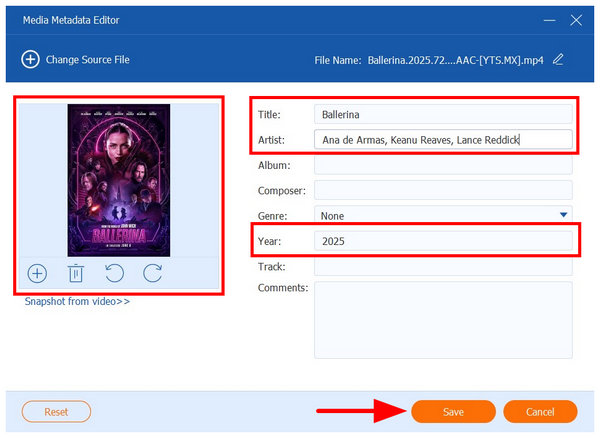
1. Open AnyMP4 Video Converter Ultimate and go to the Toolbox tab. Then, select the Media Metadata Editor tool. In the pop-up menu that opens, select the "Add" button to import the media for which you want to edit its metadata.
2. Once the media has been imported to the tool, you may now add an Image Cover, Title, Artist, Year, or other metadata information to the imported file.
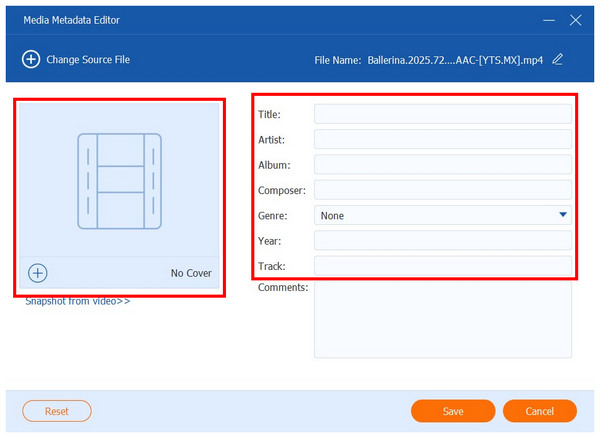
3. In this tutorial, we used an MP4 media of a movie. As such, the added metadata are Image Cover, Title, Artist, and Year. To save these adjustments, simply click on Save, and the metadata of the source file will be edited.
With the best tool to edit metadata locally now discussed, this should highly improve your media management on Plex since local files with edited metadata can be directly imported into Plex without adding separate metadata to the streaming app.
What’s the difference between Plex’s scanner and agent?
Plex’s scanner and agent work by scanning your local file for information, but they do it differently. The scanner only reads media that can be imported to Plex. Meanwhile, agent works by adding embedded metadata to their servers.
Can I use third-party tools to manage Plex metadata?
No, you cannot. However, you can edit local files before they are scanned by Plex. This eliminates the need to edit such files in Plex since they are edited directly before being scanned.
Does Plex use local or online metadata sources?
It uses both. Local files were processed during local storage scanning. Meanwhile, Search Option uses online metadata sources.
Where does Plex store metadata files?
They are saved on Plex servers. These services are shared by the users of the streaming app. This makes all metadata information available for everyone using Plex.
How to find metadata in the Plex server?
Simply use the Fix Match and Search Options highlighted in our tutorial. These options will provide you with information regarding the key metadata for videos in Plex. You will be able to see the video’s title, year, and genre.
Now that the best options to find metadata in Plex have been discussed, we hope that your file management solution will be much easier to do. To make it even more seamless, using a video metadata editor on local files could also be helpful, since it will add metadata immediately to your file. For an easier time editing local metadata, make sure to use AnyMP4 Video Converter Ultimate, which you can download using the link below.
Secure Download
Secure Download
 Updated by Mark Cristobal to Edit Video
More readings
 5 Simple Ways to Remove Metadata from Media Files
Do you want the information of your files not to be spread before sharing it? Find out how to accomplish it using the Metadata Removal tools listed below.
 3 Editors to Add and Change MKV Metadata
Looking for software to use as an MKV tag editor? Then, this article is made for you since we will present three tools that you can use for this purpose.
 Can Plex Play MKV Files? 2026 Answer Is Here
Can Plex play or stream MKV? Find the answer here to know the details from the ultimate guide in this article.
 Solution of Playing MP4 on PS4/Xbox One/Plex
Can't play MP4 on PS4, Xbox One or Plex? This article introduces the best solutions to help you solve this problem.
 Add your comments to join the discussion here