
Losing a loved one, family member, or friend is one of life's profound and heavy challenges, and funeral slides are particularly important at this time. It is a carefully curated photo and video montage with music played at a funeral, memorial service, or life celebration ceremony. This form of memorial often serves a practical purpose during the service: the process of arranging photos and creating the slideshow allows people to relive memories, providing an emotional outlet for mourners. Even after the memorial service, it can become an eternal tribute for people to revisit anytime. So, how to make it? This article will provide you with the three best funeral slideshow makers and compare them from various aspects. You can choose the one that best suits your needs.
The funeral slideshow maker is a tool for making commemorative films that combine photos, videos, and music, and is used to remember the dead at the memorial service or farewell ceremony. These tools provide pre-designed templates, transition effects, and simple editing functions, allowing users to create emotional tributes without requiring advanced technical skills.
So, how to choose a good one? You can look for based on the following five key features:
1. Music integration.
Music sets the emotional tone of the entire video. A good maker should allow users to upload their own music or choose from a library.
The library should feature a wide selection of high-quality, royalty-free music. Additionally, it should include tools that automatically synchronize photo transitions with the beat or rhythm of the music.
2. Template variety.
Templates designed for memorial services should also be included. These templates should typically feature soft colors and gentle transitions to help mourners focus on the remembrance process rather than being distracted.
3. Text customization.
Text customization is also essential. Creators can thus edit the full names, birth and death dates of departed ones, or quote meaningful poems, scriptures, and more to add to images and videos.
4. Real-time preview and collaboration.
It is also a good way to cope with grief with other family members around you. Slideshow creation with real-time preview and collaborative features allows family members to relive memories together.
5. High-quality export for service playback.
The final product must work reliably on the day of the service, so ensure it supports high-quality export with at least 1080 resolution, so that the memorial slides can look clear enough on large projectors or other players.
| System Requirements | Ease of Use | Templates | Music Support | Output Quality | |
|---|---|---|---|---|---|
| AnyMP4 Video Converter Ultimate | Windows 11/10/8.1/8/7 (32-bit/64-bit), macOS 10.12 to 15. | The MV feature is simple and easy to use, requiring no complicated operations. | A variety of built-in and well-designed templates in various styles. | Supports various audio formats; basic looping and fading; best for local files. | Up to 4K UHD or 1080p HD. |
| iMovie | Mac/iOS only. Requires macOS 14.6+ or iOS 17.6+. | Beginner-Friendly. Drag-and-drop with an intuitive timeline. | Limited themes. | Excellent iTunes integration and manual fading features. | Up to 4K resolution. |
| FlexClip | Web-based. Runs on any OS (Windows/Mac/Chrome) via browser. | Very Easy (AI-Assisted). | 6,000+ templates. Dedicated categories for Memorial and In Memoriam. | Massive library of licensed tracks. | Up to 4K resolution. (Free version limited to 720p). |
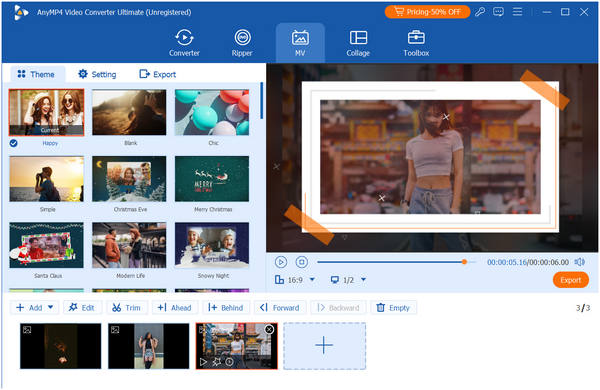
AnyMP4 Video Converter Ultimate is an all-in-one video editing and conversion software compatible with both Windows and Mac. While primarily known for file conversion, it also includes a dedicated MV Maker feature, making it one of the best funeral slideshow makers. Simply import videos and photos, then use pre-designed templates to create slideshows. It also provides users with numerous themes, music, transitions, and filters to suit the solemn atmosphere of funeral slideshows. As a professional video editor, it offers editing tools for adjusting video effects such as rotation, cropping, editing audio tracks, and more.
Main Features:
Summary:
It not only has a simple and intuitive interface, but also has a professional video slideshow editing function, which has achieved a good balance between the two and is very suitable for users who are not particularly experienced in editing videos.
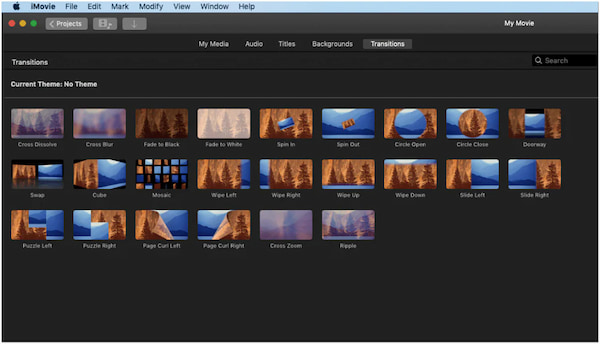
iMovie is a free video editing program developed by Apple for Mac, iPhone, and iPad. It comes pre-installed on most Macs, iPhones, and iPads, so you do not need to worry about new subscriptions. Featuring a range of video effects and tools, it is easy to use even for those with little to no video editing experience, making it the best program for Apple users to create memorable funeral slideshows.
Main Features:
Summary:
For Apple users, iMovie is one of the most reliable and accessible options. It provides professional templates and interfaces to make your presentations look more polished. And due to its straightforward and intuitive user interface, even beginners can get started with ease.
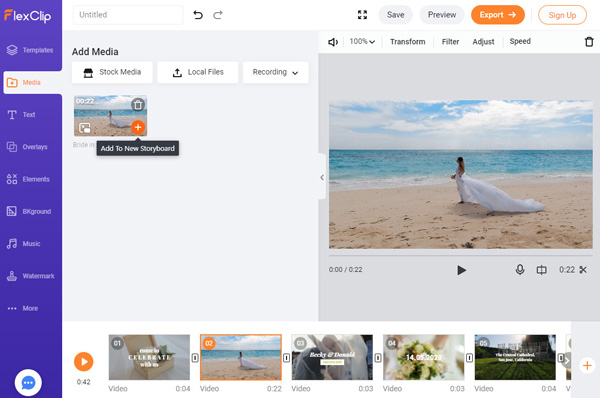
FlexClip is a cloud-based online video editor and production tool that lets you create slideshows with text, music, animations, and more special effects. Its online feature makes it ideal for memorial services, so if you are short on time or want to collaborate with family members on a tribute slideshow, it combines user-friendly AI tools with a rich library of respectful templates, which is perfect for family members.
Main Features:
Summary:
FlexClip is an easy-to-use online video production tool. It integrates video editing, film production, and slide production. You can customize videos, such as cutting, adjusting, and transforming, adding filters, videos, and background music, and immediately publish and share them.
In this section, we will use the MV Maker feature of AnyMP4 Video Converter Ultimate to show you how to create a funeral slideshow.
1. Upload video/photo files.
Download and install AnyMP4 Video Converter Ultimate on your computer. After installation, it will automatically launch.
Secure Download
Secure Download
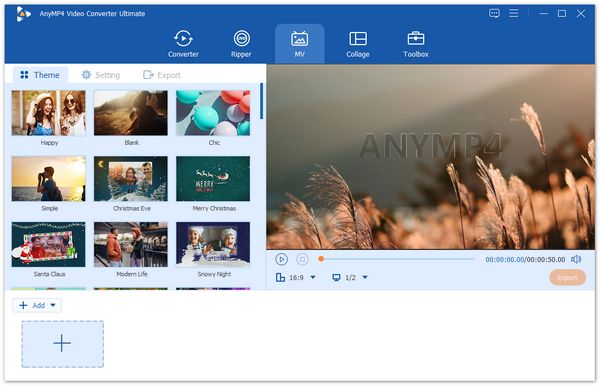
Choose the MV tab and click the Add button in the lower-left corner to import video clips and photos from your computer.
2. Make the funeral slide video.
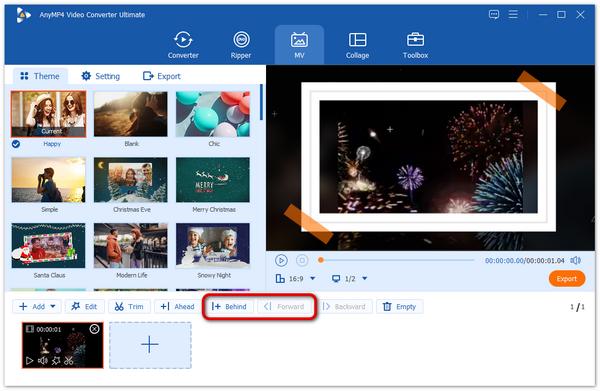
After uploading your files, you can rearrange the order of the videos and photos by hitting the Behind or Forward button, or just drag and drop them to the desired place.
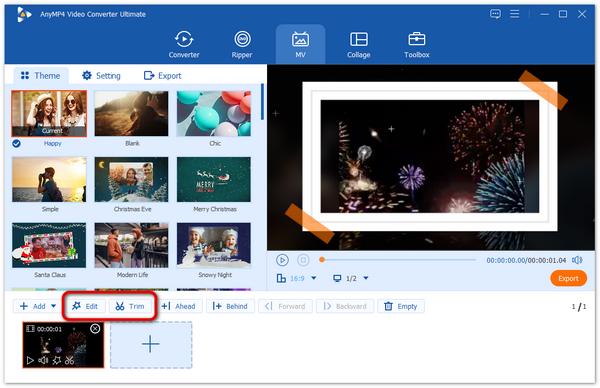
If you need to trim or edit your video clips, select the video you want to trim and click the Trim or Edit button to make adjustments.
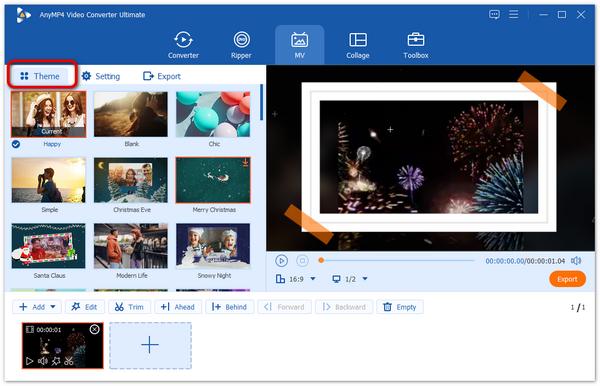
Then, choose a theme for your funeral slideshow project by going to the Theme section.
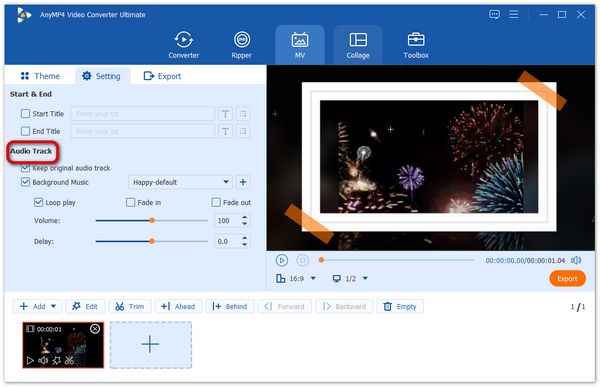
If you want to add an audio track to your music, head to the Settings section, where you are provided the options to keep the original audio track, add the default music of the theme, or choose to add new background music.
3. Export the funeral slideshow.
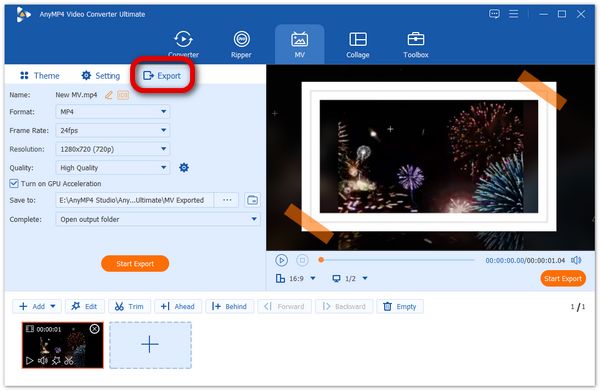
Finally, go to the Export section. Here you can name the file, choose the location to store it, and select the output format. Once the configuration is over, click Export to produce your movie.
This article first introduces key characteristics that a good funeral slideshow maker should have. Then lists the top 3 funeral slideshow makers and their main features, comparing them in terms of system requirements, ease of use, templates, music support, and output quality. Finally, we show the specific steps for creating a funeral slideshow using AnyMP4 Video Converter Ultimate. Hope this can help you!
 Updated by Mark Cristobal to Edit Video
More readings
 2026’s Best Offline and Offline Photo Slideshow Maker
Do you want to make a photo-to-video slideshow? But don’t have any idea which tool to use? Well, you can check the ten slideshow tools we have listed here.
 AI Photo Slideshow Makers to Create Presentations Easily
Check this article to discover five AI that makes slideshows to create your ideal presentation and one software that you can use with no AI assistance needed.
 Windows Movie Maker and Its Best Alternatives to Edit Video For Free
Windows Movie Maker was a free video editing software. But it has been discontinued. So what's its best alternatives? Check this article to find answer.
 Top 10 Free Online Video Editors: Instant Edit of Clips
Make your IG stories or Myday interesting by creating clips using these ten free online video editors. See here as we review their features and performances.
 Add your comments to join the discussion here