
If you are looking for a way to make professional slideshows without complicated learning curves, you have probably heard of Movavi Slideshow Maker. It boasts the fastest way to make a photo folder into a complete movie with music and transition effects. But how does it actually perform? In this review, we will explore the software in-depth from all aspects to help you decide whether it is worth starting with. Continue reading if you are interested.

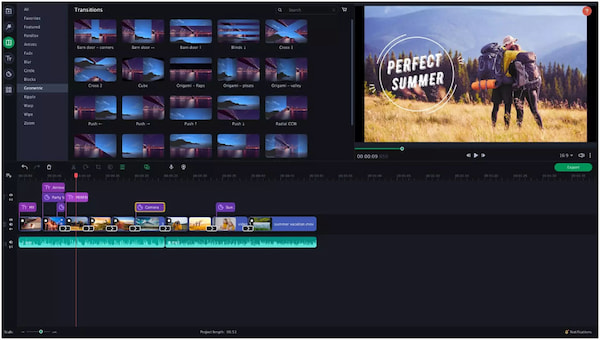
Movavi Slideshow Maker is an intuitive, user-friendly video slideshow maker for Windows and Mac, ideal for beginners who want to create and edit slideshows with ease. It can turn static photos and short video clips into dynamic movies. This software features Slideshow Wizard for automatic creation, 150+ transitions, built-in music, and basic editing tools. It is specifically designed for users who want professional-looking results without the steep learning curve of high-end editors.
Key Features:
In this section, we will review Movavi Slideshow Maker's performance based on its ease of use, system requirements, safety and stability, and pricing plans.
The interface is intuitive, with clearly labeled buttons and drag-and-drop functionality. Moreover, built-in tools like Hover Preview and AI Silence Removal can enhance workflow efficiency.
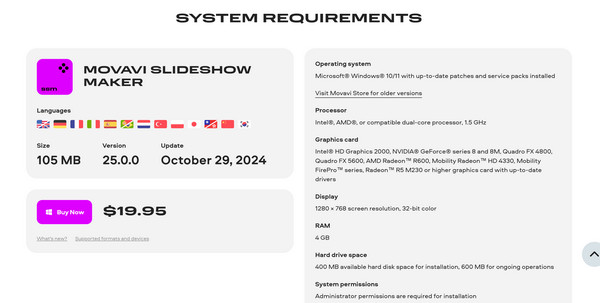
Movavi is known for being lightweight, meaning it runs well on older laptops and does not require a high-end gaming PC. Here is the summary of some system requirements for Movavi Slideshow Maker (Version 25.0.0):
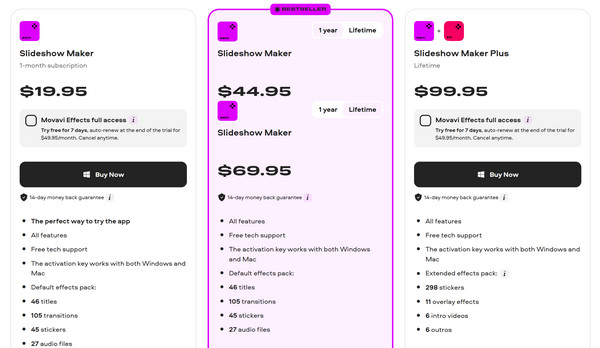
1. All plans include a 14-day money-back guarantee, support for both Windows and Mac, and free technical support.
2. The first three plans all provide the core features with a default effects pack (46 titles, 105 transitions, 45 stickers, and 27 audio files).
3. The last plan includes everything in the standard plan plus an extended effects pack (298 stickers, 11 overlay effects, 6 intro videos, and 6 outros).
1. Click the Add button to import the video clips. You can also drag and drop files directly into the timeline and change their order.
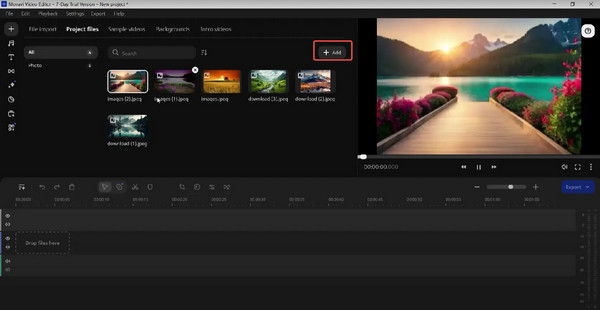
2. Select the pre-made themes to automatically sync music and transitions. Select No Theme if you want to choose your own music later. Then, you can add built-in background music or your own and automatically sync slide duration to the music length.
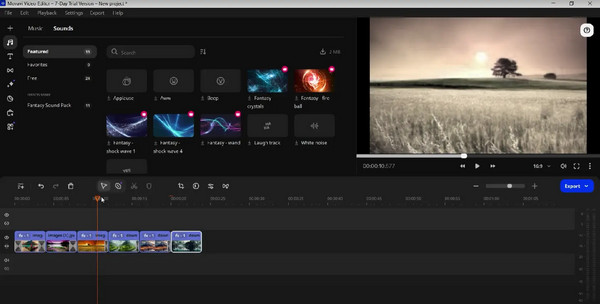
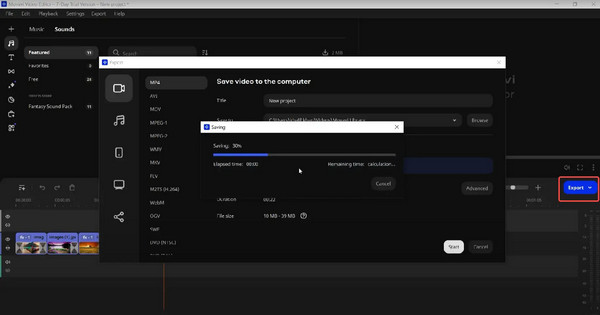
3. Preview the slides to ensure they are correct, select the desired resolution and position, then export the slides in your preferred format (MP4 is recommended).
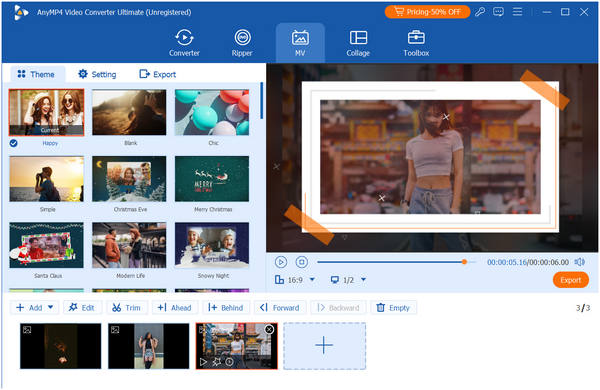
AnyMP4 Video Converter Ultimate is an all-in-one video editing software compatible with both Windows and Mac computers. Its MV creation feature allows you to import videos and photos, then use pre-designed templates to create stunning slideshows. It also offers numerous presets with themes, music, filters, and transitions, along with basic editing tools to make your video slideshows more attractive. Click the download button below to experience an effortless and fast slideshow creation process now!
Secure Download
Secure Download
Main features:
| System Compatibility | Movavi Slidesdow Maker | AnyMP4 Video Converter Ultimate |
| System Compatibility | Windows (7/8/10/11); macOS (10.15+). | Windows (XP SP2 to 11); macOS (10.15+). Supports older legacy systems. |
| Output Quality | Up to 4K Ultra HD. | Up to 8K/4K/1080p. |
| Editing Tools | Timeline editing, AI Background Removal, Motion Tracking, Beat Detection, and Pan/Zoom. | Trimming, Cropping, Rotating, Watermarking, Subtitle adding, and AI Video Enhancement. |
| Other Features | Integrated Effect Store, Voiceover recording, and Transitions with built-in sound. | 70x Fast Conversion, DVD Ripper, GIF Maker, 3D Maker, and Video Compressor. |
| Best for | Beginners who want to quickly turn photos into cinematic movies. | Users who need high-speed conversion, DVD ripping, and basic clip editing. |
Is Movavi Slideshow Maker free?
No, Movavi Slideshow Maker is not free to use. While it offers a free download, it is actually a paid software with a 7-day limited trial.
Can I add music and transitions in Movavi Slideshow Maker?
Yes, you can absolutely add both music and transitions in Movavi Slideshow Maker. In fact, these are two of its core features.
What formats does Movavi export to?
Movavi supports exporting to over 180 media formats, including popular video formats such as MP4, AVI, MOV, WMV, MKV, FLV, and WebM, as well as audio formats like MP3, FLAC, and AAC.
After reading this comprehensive review of Movavi Slideshow Maker, we believe you have learned that it is a user-friendly tool for creating slideshows. However, its free trial version adds a watermark and limits output length, as well as lacking some advanced audio and video editing features. Therefore, we highly recommend AnyMP4 Video Converter Ultimate to help you create higher-quality slideshows.
Secure Download
Secure Download
 Updated by Mark Cristobal to Edit Video
More readings
 Updated Review of Movavi Video Editor [2026]
In this post, you will get the Movavi Video Editor review and its best alternatives. Read this article to learn more and better choose the best video editor.
 AI Photo Slideshow Makers to Create Presentations Easily
Check this article to discover five AI that makes slideshows to create your ideal presentation and one software that you can use with no AI assistance needed.
 A Comprehensive Windows Movie Maker Review in 2026
Find out if you can still use or download Windows Movie Maker. Read our complete Windows Movie Maker review on safety, functionality, and modern options.
 Top 7 Photo Video Collage Makers – Latest Review You Should Not Miss
What is the best photo and video collage maker for Android, iOS, PC, or Mac? You can look through this unbiased picture video collage maker review here.
 Add your comments to join the discussion here