
Free Download100% Clear & Secure
Free Download100% Clear & Secure
In daily life, people often need to use slideshow creation tools for various reasons, such as preserving memories or meeting professional marketing needs. After all, slideshows have distinct functions and characteristics compared to photos or videos. There are numerous slideshow makers available on the market, so users need to assess whether these tools are reliable through relevant reviews. This article will make a comprehensive and in-depth review of Icecream Slideshow Maker to help you determine if it suits the project you want to create. Then, let us move on!

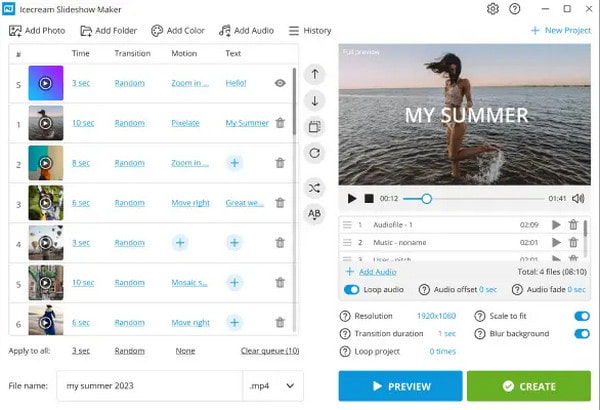
Icecream Slideshow Maker is a Windows-based slideshow creation tool for creating, editing, and exporting photo and video slideshows with music and transition effects. Users typically use it to create video presentations, then share them directly on platforms like YouTube and Google Drive. This software is highly praised for its simplicity and ease of use, so it is also suitable for beginners who find traditional video editors too complex.
Recommendation
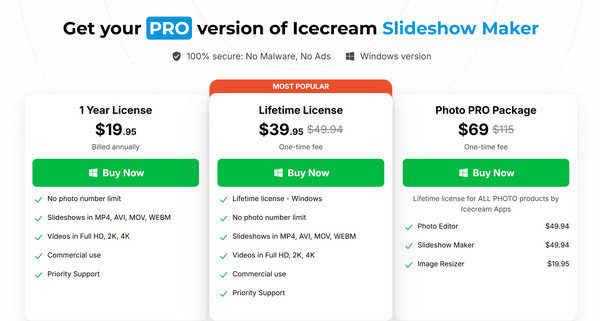
Icecream Slideshow Maker has both a free version and a professional version. The free version allows users to create slideshows for free, but it is strictly limited to 10 slides per project. If you want to make video slides more freely and without restriction, or use more advanced functions, you need to pay to upgrade to the PRO version.
Note: The Photo PRO Package includes Icecream Slideshow Maker, Photo Editor, and Image Resizer.
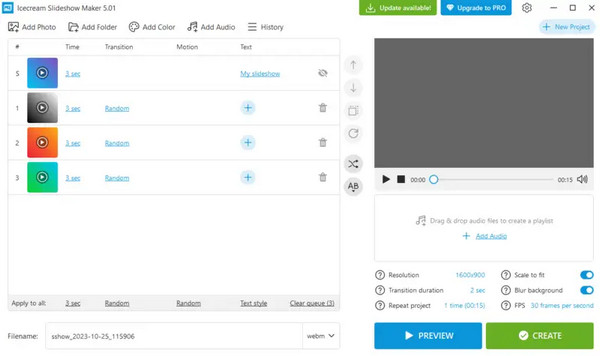
Icecream Slideshow Maker has a simple and intuitive interface, and it also supports the drag-and-drop function. offering virtually no learning curve for new users. There is almost no learning curve for new users, allowing anyone to create, edit, and export slideshows without experience.
However, despite its clean interface, some users have reported that the preview thumbnails are too small, making the process of rearranging photos somewhat tedious.
This video slideshow maker contains no malware or adware, making it relatively safe.
User reports also indicate its performance is reliable and bug-free, along with responsive technical support. However, stability may decrease when processing ultra-high-resolution 4K images or very long slide queues.
Based on our review and real user feedback, the answer to ‘Is Icecream Slideshow Maker good?’ is not absolute. If you are a beginner using a Windows PC and just want to create a simple slideshow with fewer than 10 slides (its free version can only export 10 slides), then yes. But if you are a Mac user who wants to create more than 10 slides with advanced custom edits, it is not the right choice for you.
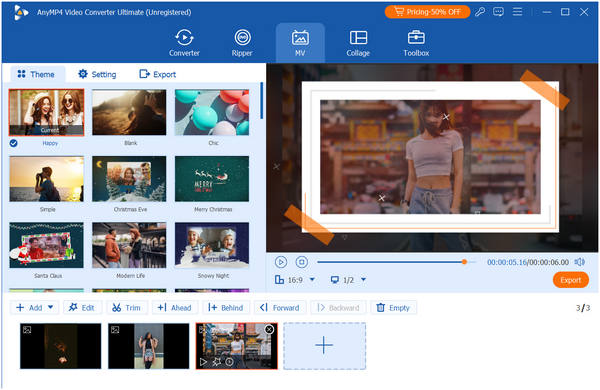
AnyMP4 Video Converter Ultimate is the best alternative to Icecream Slideshow Maker. It is a slideshow creation tool compatible with both Windows and Mac operating systems. Its MV maker feature allows you to import videos and photos, then quickly create impressive video slideshows with its wide variety of pre-designed templates. This professional video editor also comes with powerful editing capabilities, including video merging, trimming, applying effects and filters, and adding background music.
Additionally, it supports numerous output formats, including MP4, MOV, WMV, AVI, MKV, and GIF, along with customizable output parameters. All these can compensate for the shortcomings of Icecream Slideshow Maker mentioned in our previous review, such as Windows-only compatibility, limitations on the number of slides in the free version, and the lack of advanced editing options.
Secure Download
Secure Download
What export formats does Icecream Slideshow Maker support?
The export formats supported by Icecream Slideshow Maker include MP4, AVI, MOV, MKV, WebM, and more.
Does Icecream Slideshow Maker leave a watermark?
The quick answer to this question is no! Actually, one of the best things about Icecream Slideshow Maker is that it does not leave a watermark, even in the free version.
Is Icecream Slideshow Maker good for beginners?
Yes, Icecream Slideshow Maker is widely considered one of the best options for beginners, specifically because it avoids the complexity of traditional video slideshow editing.
Is Icecream Slideshow Maker Good? After reading this far, we believe you have your own ideas on this question. If you are hesitant about whether to create slideshows using it due to some limitations, its best alternative, AnyMP4 Video Converter Ultimate, might be a better choice! We hope this article has been helpful to you, and we welcome you to share your thoughts in the comments section.
Secure Download
Secure Download
 Updated by Mark Cristobal to Edit Video
More readings
 A Comprehensive Windows Movie Maker Review in 2026
Find out if you can still use or download Windows Movie Maker. Read our complete Windows Movie Maker review on safety, functionality, and modern options.
 Top 10 GIF Makers Online and Offline
Do you want to make GIFs but don't know which tool to use? If yes, find out the ten GIF tools we have listed here.
 Top 5 Social Media Video Creators Online and Offline
Are you looking for the best tool to help you create videos for social media? Well, you are lucky indeed! Check the five tools we have listed here.
 Top 7 Photo Video Collage Makers – Latest Review You Should Not Miss
What is the best photo and video collage maker for Android, iOS, PC, or Mac? You can look through this unbiased picture video collage maker review here.
 Add your comments to join the discussion here