
In 2026, people's demand for video slideshows has far exceeded that for static projects. Whether the students are finishing semester projects or the office workers are presenting work proposals, slideshows are frequently used. After all, slideshows that combine static text, images, and dynamic video can bring people a stronger visual impact, effectively capturing people's attention. Microsoft provides tools like PowerPoint and Slideshow Photos to help users create slides. This article will review two Microsoft Slideshow creators, along with two other tools, and compare them to determine which is best. If you are interested in this topic, keep reading.
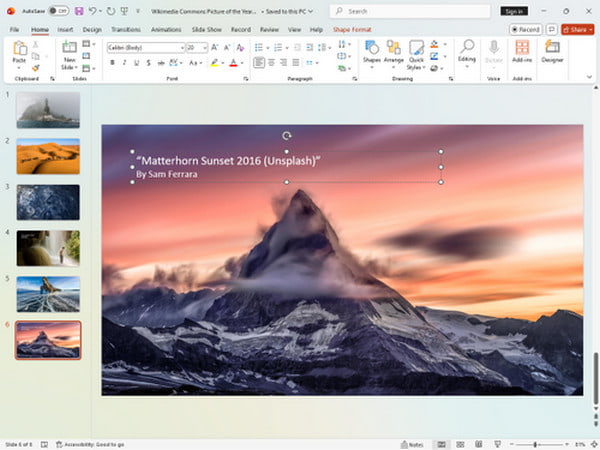
Microsoft PowerPoint is a widely used, AI-powered presentation software developed by Microsoft, designed to create, edit, and share professional-looking slideshows containing text, graphics, videos, and animations. As part of the Microsoft 365 suite, it works across desktop, mobile, and web browsers, enabling real-time collaboration.
Key Features of Microsoft PowerPoint
PROS
CONS
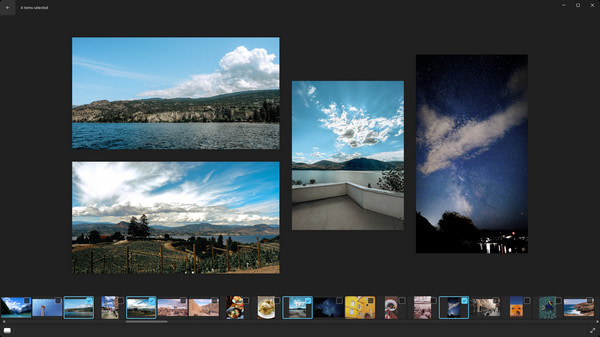
Microsoft Photos is an image viewer and photo manager developed by Microsoft that integrates seamlessly with the Windows operating system. It provides a rich media experience, enabling you to more easily and quickly manage photos and videos from your computer, OneDrive, iCloud Photos, and other devices. While creating slideshows isn't its primary function compared to PowerPoint, it can still be used to create them with ease.
Key Features of Microsoft Photos
PROS
CONS
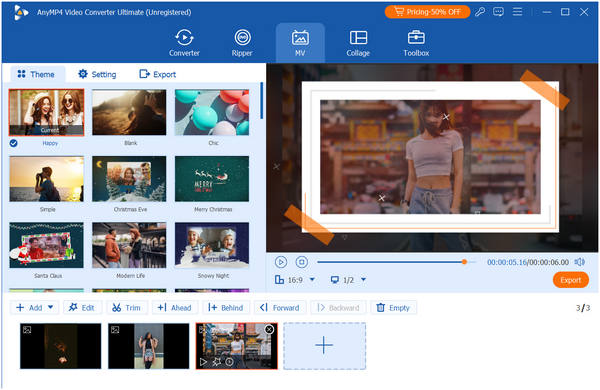
AnyMP4 Video Converter Ultimate is a professional video editor compatible with both Windows and Mac computers, offering numerous features. Its movie-making function allows you to create slideshows using video clips, photos, music, and pre-designed templates. It also provides presets for themes, filters, transitions, and music to make your video slideshows more attractive. Additionally, you can customize output formats, quality, and other parameters when exporting. Overall, it serves as an all-in-one video editing software and slideshow maker. If your slideshow includes files like MKV videos that are not supported by PowerPoint or Microsoft Photos, this program is an ideal solution.
Key Features of AnyMP4 Video Converter Ultimate
PROS
CONS
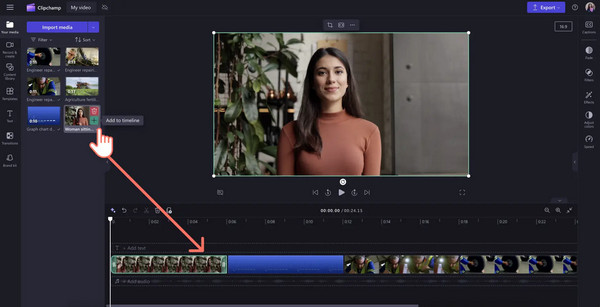
Clipchamp is an online and desktop video editor for Windows 11 by Microsoft, designed to bridge the gap between a static slideshow and a professional-grade video. It is ideal for creating slideshows by importing photos/videos, arranging them on a timeline, and adding music, transitions, and text. Its various features make it well-suited for creating and editing video slides and presentations.
Key Features of Clipchamp
PROS
CONS
Below we list a table to compare the four slideshow creators in terms of overall rating, ease of use, templates and themes, transitions and animations, editing capabilities, export formats, price, and best for:
| Overall Rating | Ease of Use | Templates and Themes | Transitions and Animations | Editing Capabilities | Export Formats | Price | Best for | |
|---|---|---|---|---|---|---|---|---|
| Microsoft PowerPoint | Moderate | Extensive | Professional (Morph, Zoom) | Basic (text, data, shapes) | .PPTX, .PDF, .MP4 | Microsoft 365 Personal $99.99 / year | Business/school presentations | |
| Microsoft Photos | Extremely easy | Basic Auto-Themes | Simple Auto-fades | Very basic (filters, crop) | .MP4 (via Clipchamp) | Free (included with Win 11) | Quick photo memories | |
| AnyMP4 Video Converter Ultimate | Moderate | Pre-designed MV Themes | Standard Video Transitions | Professional | 500+ Formats (MKV, AVI, etc.) | 1 Month License $18.75, Lifetime License $59.96 |
Format conversion, editing & High-res MV maker | |
| Clipchamp | Easy | High-quality Video Templates | Cinematic (Glitch, Spin, Blur) | Advanced (multi-layer video) | .MP4 (up to 4K) | Free (Premium via Microsoft365) | Social media/cinematic video |
This article introduces four slide creators, including two Microsoft Slideshow creators — Microsoft PowerPoint and Microsoft Photos—along with two additional video slide maker tools. Their key features, pros, and cons are summarized in the form of text and table formats for your reference. Hope this helps! If you know of any other useful tools, feel free to share them in the comments section.
 Updated by Mark Cristobal to Edit Video
More readings
 AI Photo Slideshow Makers to Create Presentations Easily
Check this article to discover five AI that makes slideshows to create your ideal presentation and one software that you can use with no AI assistance needed.
 ClipChamp Video Editor Reviews and Alternatives
The best online video editor you'll ever find is here. Check out the ClipChamp Video Editing tool and discover its amazing advanced features.
 Top 10 Free Online Video Editors: Instant Edit of Clips
Make your IG stories or Myday interesting by creating clips using these ten free online video editors. See here as we review their features and performances.
 Top 15 Free Photo Editing Software Available to Windows and Mac
We share a list of the best free photo editing software and apps for Windows and Mac that you can use to make your shots really shine.
 Add your comments to join the discussion here