
AMR File: Compatibility Snapshot
Aha! You found an old voice memo, but your iPhone or Windows Media Player says No. That's the AMR format at work; efficient for 2005, a headache for 2026. AMR, short for Adaptive Multi-Rate, is a speech compression format. Legacy mobile devices widely use this format to store voice memos and other audio recordings. Its design prioritizes small file sizes and clarity for human speech, but it comes with compatibility challenges on modern computers and media players. In this post, we'll explain what AMR is and why it behaves differently from other formats. Additionally, we will provide steps to efficiently access and preserve your old recordings. This way, you can listen to your recordings anytime.

Have you ever opened a file from a phone recording or messaging app and found it wouldn't play? It's in the AMR format. Many users search for what does AMR stands for when they first encounter it. It stands for Adaptive Multi-Rate, a compressed audio format built for mobile communication systems. Older feature phones and early smartphones used this format to store voice recording files. This format keeps audio small while maintaining understandable speech quality. However, modern media players and editing tools often do not support it by default. That is why the file refuses to play unless converted or opened with an AMR player.
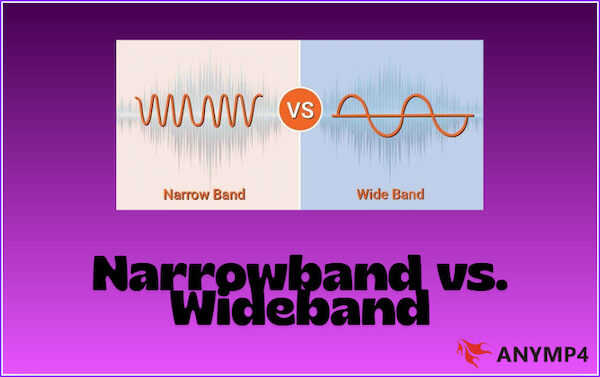
The 3GPP standardized the format for efficiently transmitting speech across mobile networks. It uses adaptive encoding that changes compression levels depending on the audio signal and network conditions. Two main versions exist: AMR-NB (Narrowband) and AMR-WB (Wideband). AMR-NB focuses on efficiency and uses a lower bitrate (4.75-12.2 kbps). Meanwhile, AMR-WB captures a broader frequency range for clearer speech quality.
AMR comes in two primary versions: Narrowband (AMR-NB) and Wideband (AMR-WB). The narrowband version is designed for traditional phone calls and uses strong audio compression to reduce file size. Meanwhile, the wideband version improves voice clarity by capturing a broader frequency range, making speech sound more natural. Both versions rely on advanced encoding techniques such as ACELP (Algebraic Code Excited Linear Prediction), which helps maintain understandable speech even at low bitrates. For users wondering what an AMR audio file is, think of AMR-NB as phone call quality and AMR-WB as enhanced mobile voice quality.
| AMR-NB (Narrowband) | AMR-WB (Wideband) | |
|---|---|---|
| Frequency Range | 300-3400 Hz | 50-7000 Hz |
| Bitrate Range | 4.75-12.2 kbps | 6.60-23.85 kbps |
| Common Use | GSM and 2G Voice Memos | LTE, 4G, 5G, and HD Voice |
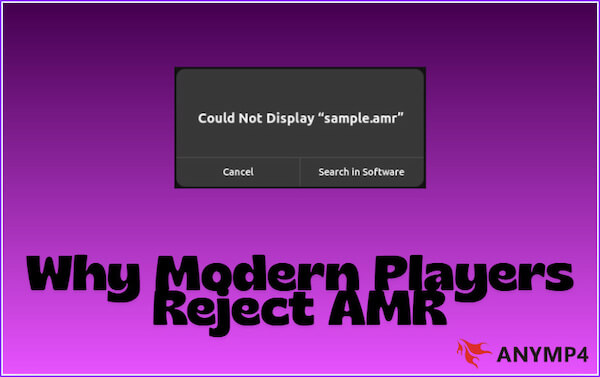
Mobile communication systems once widely used the Adaptive Multi-Rate file format. However, many modern media players struggle to open them today. The developers created the format primarily for telecom systems and mobile devices. It uses a specialized speech codec optimized for voice transmission, which many modern audio players do not prioritize.
| Platform | Direct AMR Support | Additional Codec Needed | Extra Features | Ease of Use | Best For | |
|---|---|---|---|---|---|---|
| AnyMP4 Blu-ray Player | Windows and Mac |  |
 |
High-quality playback, advanced audio control, and wide format support | Very Easy | High-quality media playback with premium features |
| VLC Media Player | Windows, Mac, Linux, and smartphones | |
|
Open-source player and supports hundreds of formats | Easy | Universal media playback |
| Clementine | Windows, Mac, and Linux | |
|
Music library management, playlist tools, and streaming integration | Easy | Music-focused player |
| Windows Media Player | Windows | No, by default |
|
Built-in player and basic playback tools | Moderate | Playing common media formats on Windows |
| QuickTime Player | Mac | |
|
Apple native player with simple editing tools | Easy | Native media playback and quick editing on macOS |
If you want to play .amr files without dealing with codec errors, AnyMP4 Blu-ray Player is a reliable option. Although it is primarily known for playing Blu-ray discs and high-definition videos, it also supports AMR playback. It is a convenient tool for listening to mobile voice recordings or other Adaptive Multi-Rate files without installing additional codecs. In addition, it supports thousands of video and audio formats, including MP3, AAC, WAV, and FLAC. It also delivers high-quality audio performance with Dolby and DTS surround sound support.
1. First, download the free AnyMP4 Blu-ray Player. Install the universal media player software and complete the installation. After finishing the setup process, open the software from your desktop.
Secure Download
Secure Download
2. Click Open File, browse your local folders, and select the AMR audio file you want to play. The program will automatically load the file and prepare it for playback.
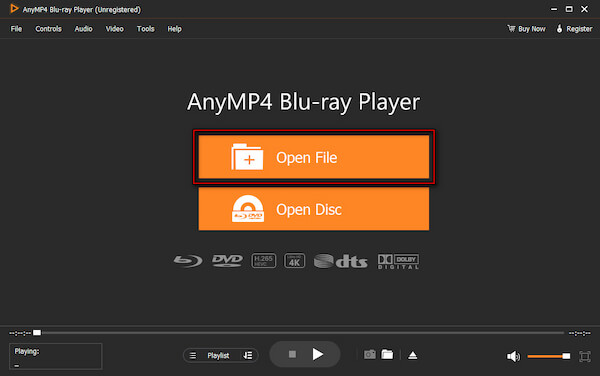
3. Once the file loads, the AMR audio will begin playing. You can use the playback controls to pause, resume, adjust volume, or navigate through the audio track.
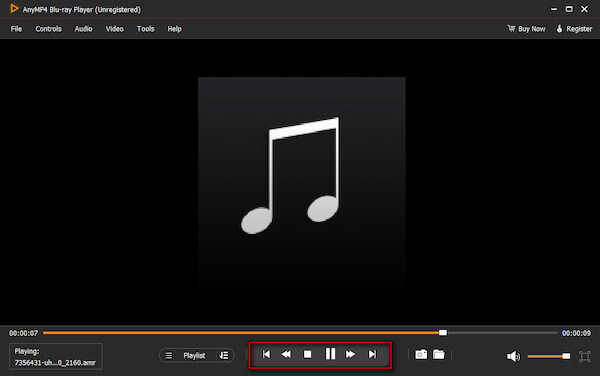
Using AnyMP4 Blu-ray Player makes playing AMR files simple and hassle-free. It opens AMR files directly, bypassing compatibility issues common with other players. You can enjoy clear audio, control playback easily, and handle multiple media formats in one program.
If you've ever asked what AMR is, you know it's a mobile-focused audio format that many media players cannot open directly. AnyMP4 Video Converter Ultimate offers a fast, reliable way to convert AMR to MP3. It supports batch processing, allowing you to convert 50+ voice memos in seconds. Additionally, it maintains lossless quality, so your recordings remain clear with no robotic artifacts. You can also trim silence at the start or end of each recording and use device presets to make your MP3 files ready for iPhones, Android devices, or other media players.
1. Secure a free download of AnyMP4 Video Converter Ultimate. Install the professional AMR-to-MP3 converter, then allow the installation to finish. After completing the setup process, run the software to access the main dashboard.
Secure Download
Secure Download
2. Upon launching, the software defaults to the Converter tab. Click + Add Files to import the AMR recordings into the program. You can select multiple files at once for batch conversion, saving time when processing large numbers of voice memos.
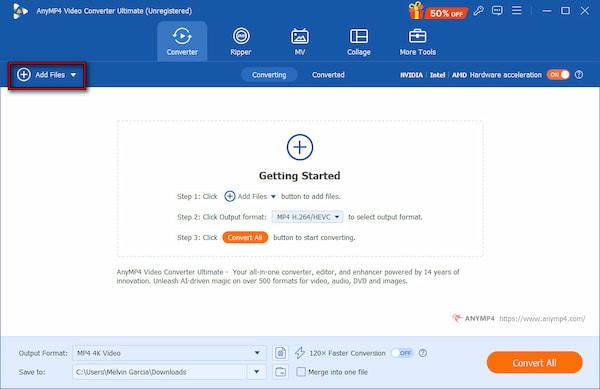
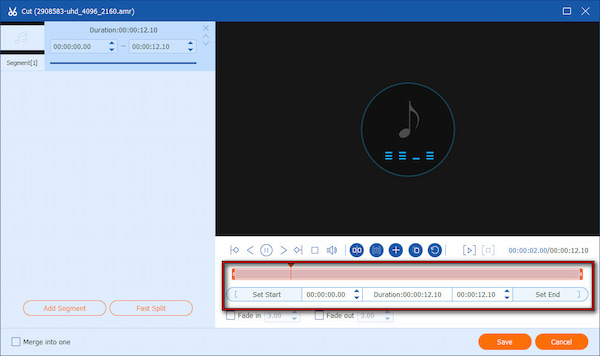
Click the Cut button (represented by a pair of scissors) to remove silence at the beginning or end. It ensures your MP3 files contain only the essential parts of your recordings.
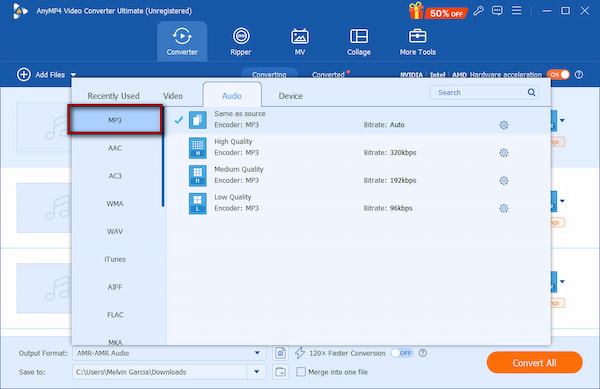
3. Move to the Output Format selector, then choose the Audio category. Choose MP3 from the list of audio formats and select your preferred quality. For advanced users, adjust Settings to configure the encoder, sample rate, channel, and bitrate.
4. Navigate to the Save To selector to set the file destination. Turn on the 120× Faster Conversion button to speed up the process and complete your task quickly. Finally, click Convert All to process your files while preserving audio clarity quickly.
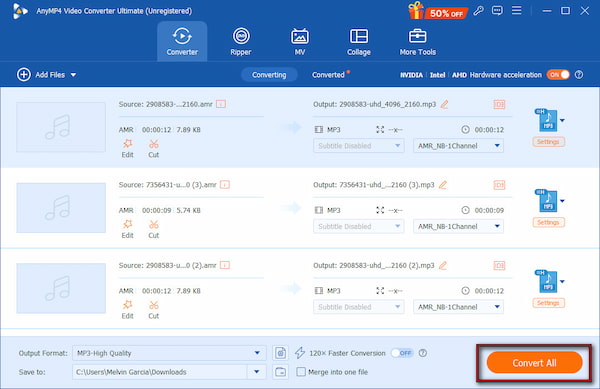
AnyMP4 Video Converter Ultimate offers a fast, high-quality solution for converting AMR to MP3. If you've ever wondered what an AMR file format is, this software simplifies the process by allowing batch conversion of multiple voice recordings. Additionally, it trims unnecessary silence and preserves quality for clear, natural-sounding audio.
Our Lab Test Note: During our testing, we processed 30 legacy .amr files from a 2008 Nokia device. Using AnyMP4 Video Converter Ultimate, we successfully batch-converted them to MP3 in under 15 seconds with zero robotic artifacts or sync drift.
AMR files are lightweight and efficient for mobile voice recording. However, they can cause playback or conversion issues on computers and modern devices. These errors result from codec incompatibility, file corruption, or unsupported software. Knowing the typical problems and their fixes helps you manage files smoothly without losing audio quality.
| Common AMR Errors | Cause | Solution |
|---|---|---|
| Cannot Open AMR File | The media player does not support AMR. | Use a compatible player, such as AnyMP4 Blu-ray Player. |
| Distorted or Robotic Audio | Corrupted file or improper codec handling. | Re-export the file from the original device and ensure the player supports the correct speech codec. |
| Missing Codec Error | The player lacks AMR decoding capability. | Install a codec pack or switch to a player that supports native AMR. |
| Output Is Silent | File corruption or incompatible converter settings. | Use AnyMP4 Video Converter Ultimate and enable lossless quality for accurate conversion. |
| Batch Conversion Errors | Some files in the batch are damaged or incorrectly formatted. | Check all files for integrity, ensure sufficient storage space, and retry batch processing. |
If your converted file is silent, it is often due to a Sample Rate mismatch. AMR files are typically 8kHz or 16kHz. When converting, ensure your output settings match these original rates to prevent the decoder from failing.
Is AMR better than MP3?
AMR is not better than MP3 because it serves a different purpose. AMR is optimized for voice recording and telecommunication, using very low bitrates to reduce file size while maintaining intelligible speech. Meanwhile, MP3 is designed for general audio playback, supporting music, full-range sound, and higher bitrates.
Can I play AMR on my iPhone?
By default, iPhones do not support AMR playback. If you try to open an AMR file in the Files or Music app, it will likely fail. To play AMR recordings on an iPhone, you can use AnyMP4 Video Converter Ultimate to convert the AMR file to iPhone-compatible formats, like MP3.
Why is my AMR file silent?
An AMR file may play silently for several reasons. It could be corrupted, incomplete, or exported incorrectly from the source device. Silent AMR files can also result from codec issues, where the media player cannot decode the embedded speech codec.
Is it safe to convert AMR online?
Online AMR converters can work, but they come with risks. Uploading sensitive recordings exposes your files to potential privacy breaches or data leaks. Additionally, most online converters reduce audio quality and introduce artifacts.
How do I record in AMR today?
Most modern smartphones no longer offer AMR as a native recording option. However, you can still record in AMR using specialized voice memo apps that let you choose AMR as the output format. On Android, apps such as Easy Voice Recorder allow direct AMR recording. Meanwhile, on Windows or macOS, you can record in MP3 and then convert the file to AMR using AnyMP4 Video Converter Ultimate.
AMR files may seem like a relic from the early days of mobile voice memos. However, understanding what AMR is helps you unlock its content and preserve your recordings. With the right tools, you can easily open AMR files or convert them to contemporary formats without losing quality. For seamless playback, AnyMP4 Blu-ray Player ensures you can listen to your AMR recordings. To convert AMR files for universal use, AnyMP4 Video Converter Ultimate provides fast, lossless quality conversion with batch processing and device-ready presets.
Secure Download
Secure Download
 Updated by Alice Thorne to Convert Audio, Glossary
More readings
 What is M4A | A Comprehensive Review of MPEG-4 Audio File
This informative post will focus on what M4A is. Besides discussing its aspects, we will also present viable tools for playing and converting these files.
 What is M4R and How to Make the Most of iPhone Ringtones
This informative post will discuss what M4R is. But wait, there’s more! We’ll present various tools you can use to play, convert, and transfer these files.
 FLAC: Full Knowledge of Lossless Audio Format
Want to experience the smoothest listening sessions today? Check this article out, where we will answer what is the best FLAC player and FLAC converter to use.
 WAV: What Is It, and How to Play This Audio Format
Discover the best software that you can use to listen to or convert your large WAV audio files into a more portable format friendly for your device storage.
 Add your comments to join the discussion here