
Quick Summary:
AIFC (Compressed Audio Interchange File Format) is an extension of the AIFF format originally developed by Apple. While it was common on older Macs and in certain professional audio circles, it is not a standard mobile format, such as MP3 or AAC. If you want to convert it to a more compatible format with a tool, AnyMP4 Video Converter Ultimate is the best choice.
You have probably seen the .aifc extension and wondered why your standard media player is giving you the cold shoulder. While it is an Apple staple, it is not always the most 'social' format on Windows or mobile devices. Technically known as Compressed AIFF, this legacy Apple audio format was designed to provide high-fidelity sound while saving disk space. Although it can support lossless data, its unique audio codec often creates compatibility hurdles outside of the macOS ecosystem. Whether you are a professional editor or a casual listener, understanding how to navigate this container is essential for seamless playback and conversion. In this guide, we will introduce what the AIFC file format is and show you exactly how to handle it.
AIFF (Audio Interchange File Format) is a standard, uncompressed audio format developed by Apple. AIFC (AIFF-C) is its Compressed counterpart. While AIFF is always uncompressed, AIFC acts as a container that can hold various audio codecs. Also, you can check how to compress AIFF here.
It can be both. AIFC supports lossless compression (like ALAC) to maintain perfect quality, but it was also designed to work with legacy lossy codecs (like MACE or ULAW) to save space. Today, it is mostly used for high-fidelity audio within the macOS ecosystem.
Because the Apple audio format uses a unique compression method, not all default players handle it well. Here are the top-rated tools for seamless playback:
If you need to move your audio to a mobile device or a non-Apple environment, converting to a universal format like MP3 or lossless WAV is the best move.
AnyMP4 Video Converter Ultimate is the best AIFC-to-MP3/WAV converter for those managing a large library of Compressed AIFF files. This software allows you to convert multiple AIFC files simultaneously, simplifying the process and saving time. It ensures Zero Quality Loss by maintaining the original high-fidelity audio profile of the original AIFC file. Besides, its advanced hardware acceleration uses the GPU to convert files 70x faster.
Secure Download
Secure Download
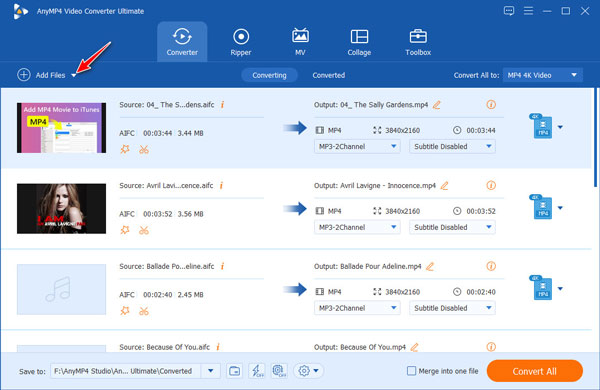
1. Download and install it on your Windows/Mac computer. After opening, click Add Files to import the AIFC files that you want to convert.
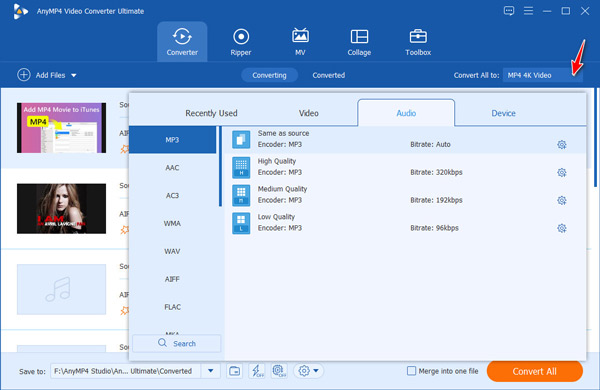
2. Click the Output Format option, select the Audio tab, and pick MP3/WAV as the output format. Then, choose a folder for the converted files.
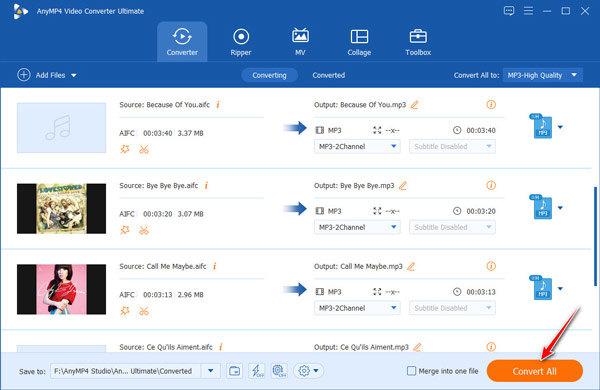
3. Use the built-in editor to trim the audio or boost the gain if needed. Next, click Convert All to convert AIFC audio files to MP3.
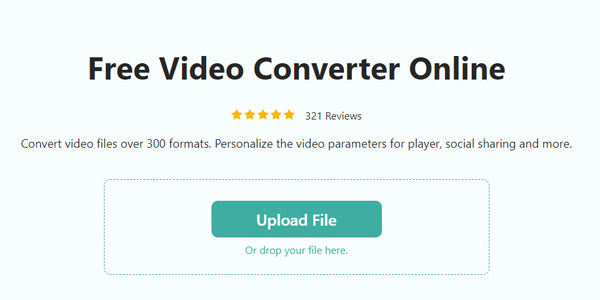
For users who want to process audio files quickly without installing software, AnyMP4 Free Online Video Converter is a convenient choice. This web-based online tool supports converting AIFC to MP3 or WAV with a simple click. Most importantly, it is 100% free with no watermark, and automatically deletes uploaded files within 24 hours to ensure user privacy.
1. Visit the website, then click Add File or drag and drop to import the AIFC audio you want to convert.
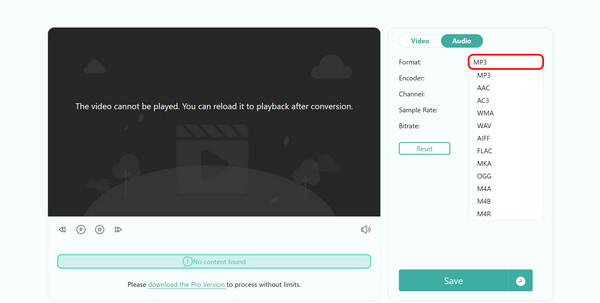
2. Click the Audio > Format option to select MP3/WAV from the dropdown menu. You can also set the encoder, quality, and more according to your needs.
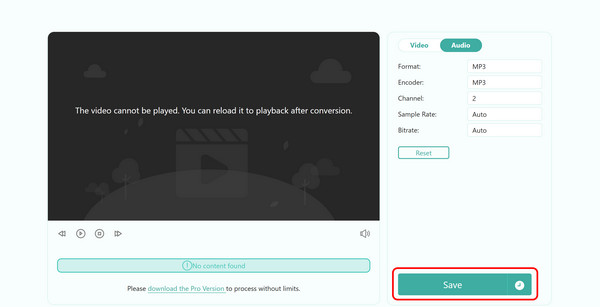
3. Choose your destination, click Save to start converting the AIFC audio file. You can download the new file onto the computer when it is ready.
Even with the right software, you might encounter technical issues when dealing with this legacy Apple audio format. Here is how to fix the most frequent problems:
1. No sound during playback.
This usually indicates an unsupported audio codec inside the AIFC container. Convert the file to WAV to resolve this.
2. File not supported.
Ensure the extension is actually .aifc. If the player still fails, the file might have macOS-specific metadata that needs to be converted.
3. Static/Distortion.
This can happen if a player tries to read a Compressed AIFF file as an uncompressed file. Re-converting the file with AnyMP4 or other converters will fix it.
Can I play AIFC files on Android?
The short answer is yes, but it usually requires a third-party app because most Android music players do not natively support the format.
Is AIFC better than MP3?
Whether AIFC is better than MP3 depends entirely on whether you prioritize audio fidelity or storage efficiency. Technically, they serve different purposes within a production workflow.
Why does my AIFC file have no sound?
If you are seeing the file progress bar moving but hearing nothing, it is usually a codec mismatch or a container error.
Can I rename .aifc to .aiff?
The short answer is yes, you can rename it, but whether it actually works depends on how the file was compressed.
Is AIFC a virus?
No, AIFC is not a virus. It is a legitimate audio file format.
This article introduces what the AIFC file format is, the difference between it and AIFF, and whether it is lossy or lossless. Furthermore, we recommend the best native software to open AIFC files on Windows and Mac. To resolve playback issues, we provided step-by-step instructions for converting AIFC to MP3 or WAV using AnyMP4 Video Converter Ultimate for high-speed, lossless results, and AnyMP4 Free Online Video Converter for quick fixes. Hope our recommendations and step-by-step guides are helpful to you!
Secure Download
Secure Download
 Updated by Alice Thorne to Glossary
More readings
 WMA: The Windows Media Audio Format Explained
Find out the ins and outs of WMA files. Learn about its features and compatibility to make informed decisions about using it in your digital audio journey.
 What is MP3 | A Complete Guide to the Popular Audio Format
Learn everything about MP3 files, including how they work, how to play them, and how to convert other audio formats to MP3 easily.
 FLAC: Full Knowledge of Lossless Audio Format
Want to experience the smoothest listening sessions today? Check this article out, where we will answer what is the best FLAC player and FLAC converter to use.
 WAV: What Is It, and How to Play This Audio Format
Discover the best software that you can use to listen to or convert your large WAV audio files into a more portable format friendly for your device storage.
 Add your comments to join the discussion here