
Quick Summary:
AAC and AC3 differ in many technical aspects. AnyMP4 Video Converter Ultimate is a good solution if you want to convert them. It features lossless transcoding, batch processing for entire libraries, audio enhancement tools, and supports multi-track handling for universal compatibility.
AC3 (Dolby Digital) remains the global standardization titan of Dolby Laboratories for home theaters, while AAC (Advanced Audio Codec) was engineered by ISO/MPEG as the superior codec successor to MP3. When navigating the complexities of digital media, the debate between AAC vs. AC3 is more than just a technicality: it is a choice between modern efficiency and hardware reliability. This guide will discuss these core differences to help you choose the perfect format for your specific playback environment.
| AAC (Advanced Audio Codec) | VS | AC3 (Dolby Digital) |
| High. Superior compression; sounds better at lower bitrates. | Efficiency | Lower. Requires higher bitrates to maintain similar fidelity. |
| Up to 48 discrete channels (common in 5.1 and 7.1). | Max Channels | Strictly up to 5.1 discrete channels. |
| Universal for mobile, web browsers, and PCs. | Compatibility | Standard for home theater receivers, DVD, and Blu-ray. |
| ISO/MPEG (The successor to MP3). | Standard | Dolby Laboratories (The cinema/DVD titan). |
| Mobile streaming, YouTube, and personal media (Plex/MKV). | Best for | Home Theater setups, Passthrough to AVRs, and Soundbars. |
The primary divide between AAC and AC3 lies in bitrate efficiency. As the ISO/MPEG-certified successor to MP3, AAC achieves high fidelity at lower data rates, whereas AC3 requires higher bit rates to maintain detail.
AC3 is limited to 5.1 discrete channels, while AAC supports up to 48, including 7.1 setups.
Device compatibility favors AC3 in the living room, as it is the Dolby Laboratories standard for home theater passthrough. AAC is the native choice for mobile devices and web browsers, offering better performance for portable streaming.
Choosing the right format depends on your playback environment. The Golden Rule is simple:
AnyMP4 Video Converter Ultimate is the premier choice in balancing high-fidelity audio with seamless device compatibility. It supports lossless transcoding, allowing you to swap containers (like MKV to MP4) while preserving the original audio fidelity. Thanks to full hardware acceleration, the software excels at batch processing, enabling you to convert entire TV seasons or large libraries in minutes. Beyond simple conversion, it also features advanced multi-track handling, allowing you to embed both an AAC track (for mobile) and an AC3 track (for home theater) in one file.
Secure Download
Secure Download
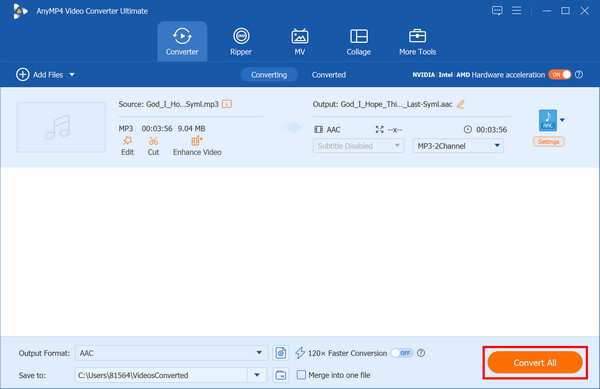
1. Launch the program. Click Add Files, or drag your audio file directly into the interface.
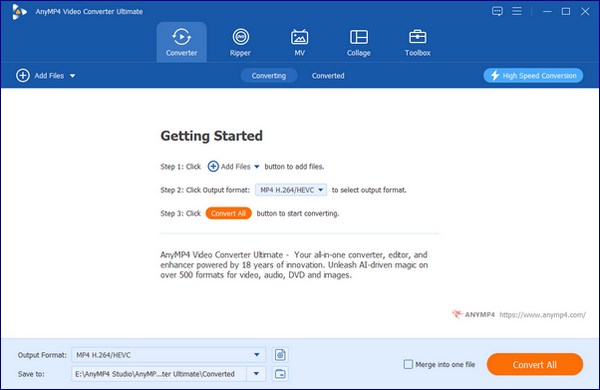
2. Click the Output Format option at the bottom, go to the Audio tab, and select AC3 or AAC from the drop-down list.
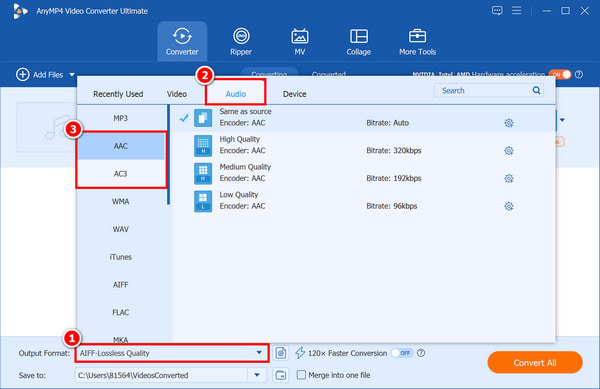
Besides, you can customize the profile settings by clicking the gear-shaped Custom Profile button. Then you can adjust the parameters, such as encoder, channel, sample rate, and bitrate, as you like.
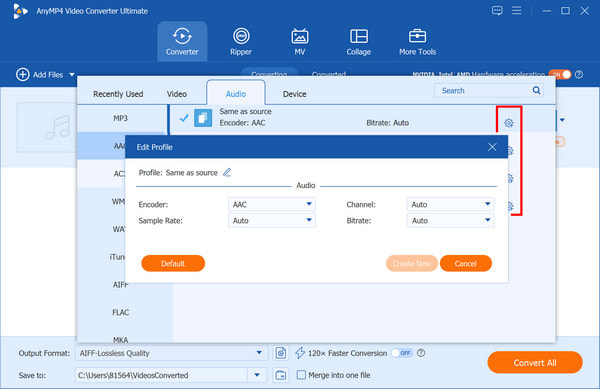
3. Select a path for the converted files. And then click Convert All in the lower-right corner to start converting audio files on your computer.
Is AAC better than AC3 for 5.1 surround sound?
The answer depends on whether you value technical efficiency or system compatibility. In short, AAC is a better codec in terms of audio quality, but AC3 is much more reliable for home theater hardware.
Does converting AC3 to AAC lose quality?
Yes, converting AC3 to AAC always results in a loss of quality, even with a higher bitrate. This is because both AC3 and AAC are lossy formats.
Why does my TV play video but have no sound with AC3?
The reason your TV is silent while the video plays usually comes down to a licensing or hardware decoding issue.
What is the best bitrate for AAC 5.1?
For AAC 5.1 surround sound, the best bitrate depends on whether you want a tiny file or a movie-theater experience.
Should I use AAC or AC3 for Plex?
The best choice for Plex depends entirely on your primary playback device:
This article provides a technical deep dive into AAC vs. AC3 and explains when to use each. While AAC offers superior bitrate efficiency for mobile devices, AC3 ensures reliable 5.1 passthrough for A/V receivers. To handle both formats, AnyMP4 Video Converter Ultimate offers a powerful solution. It can losslessly convert between these two formats for wider compatibility. If you need to convert AAC to AC3, or vice versa, it is a really good choice.
Secure Download
Secure Download
 Updated by Alice Thorne to Glossary
More readings
 WAV: What Is It, and How to Play This Audio Format
Discover the best software that you can use to listen to or convert your large WAV audio files into a more portable format friendly for your device storage.
 What is M4A | A Comprehensive Review of MPEG-4 Audio File
This informative post will focus on what M4A is. Besides discussing its aspects, we will also present viable tools for playing and converting these files.
 What is M4R and How to Make the Most of iPhone Ringtones
This informative post will discuss what M4R is. But wait, there’s more! We’ll present various tools you can use to play, convert, and transfer these files.
 WMA: The Windows Media Audio Format Explained
Find out the ins and outs of WMA files. Learn about its features and compatibility to make informed decisions about using it in your digital audio journey.
 Add your comments to join the discussion here