
Secure Download
Secure Download
Most social media platforms today have a 24-hour temporary posting system that is available on them. On Instagram, they call it Stories, while they are called MyDay on Facebook, while X, formerly Twitter, calls it Fleets. However, this temporary video or image-sharing option was first pioneered by another social media platform, Snapchat, way back in the mid-2010s and reached its peak from 2016 - 2017. Since then, all the previously mentioned platforms have developed their system similar to Snapchat Stories. In this article, we will come back to the social media site that started it all to learn how to save Snapchat videos directly on your device discreetly and easily.
Yes, you can save videos uploaded on Snapchat directly on your phone’s gallery within the app itself. However, unfamiliar users may find it confusing since a button labeled Download or Save is not present in their app. Instead, they called their video saving button Export. To make their application user-friendly, the Export button has an icon that closely resembles the download button commonly used on other apps.
Apart from saving videos using their export tool, Spotlights, which is what they call the uploaded stories from 24 hours, can also be shared via multiple online messaging platforms directly. Some of these messaging platforms are Facebook Messenger, Discord, Linktree, or other messaging apps installed on your device. For more convenient sharing, Spotlight links may also be copied on your device’s clipboard.
As previously mentioned in the first part of this article, videos uploaded or shared on Snapchat can be saved on your devices by accessing their dedicated Export button. Using this function, Spotlights or Snapchat stories of your friends and other users may be saved on your smartphone’s gallery whether you are using Android or iOS.
1. Open Snapchat and Navigate to the Video
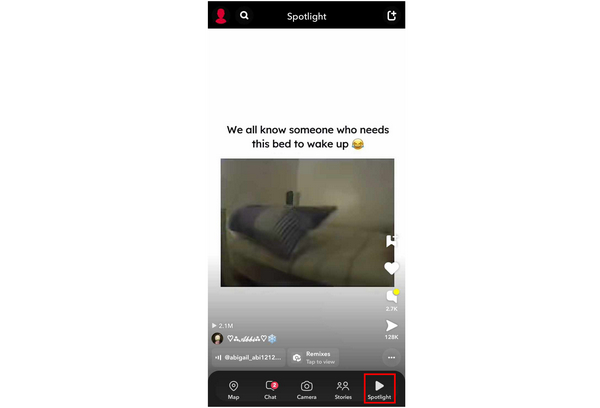
Open your Snapchat app and move to the Spotlight tab or go to your friend to access their Story.
2. Tap the Share Button
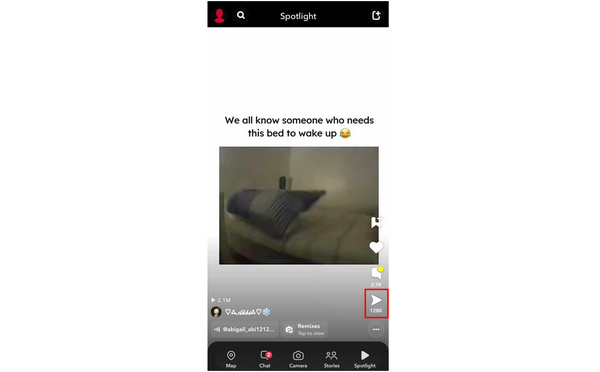
In the main Spotlight or Story window, click the Share button on the bottom right corner of the screen.
3. Select the Export Option
Selecting the share button will move you to the sharing interface, where the Export button is accessible. Simply click on it to Save the Snapchat video on your phone.
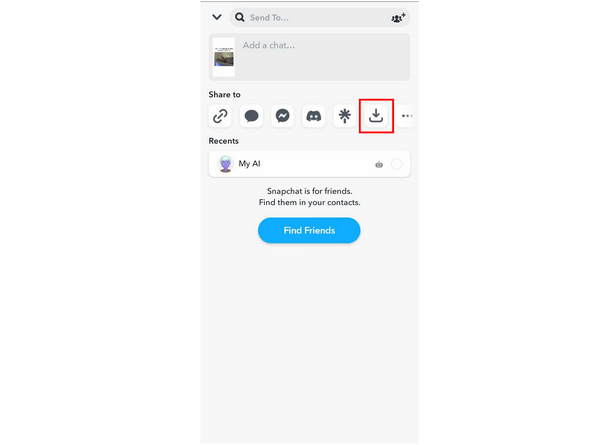
Once the video has been saved, the user will be notified that you took a screenshot or you saved their video on your device. The video that will be saved on your gallery will also be labeled with a Snapchat watermark on the upper left side of it. This is an added measure by Snapchat to help the privacy of their users. If you want to remove a watermark from a video, check it here.
As previously mentioned, saving or taking a screenshot or screen recording of a Spotlight or Story on Snapchat will notify the user who created the video. For some users, this may not feel very pleasant since it will reveal to the creator of the video that there are users who are interested in their stories. This would feel extremely awkward if you were saving the Snapchat Story of your crush or someone that you feel attracted to.
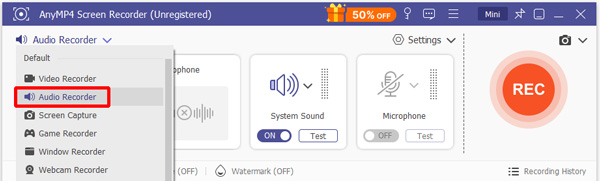
With that, Snapchat users need to find a way to capture Snapchat stories without notifying their friends that their Stories are being downloaded. Perhaps the best way to do it is by using a third-party screen recorder software on a separate device, such as AnyMP4 Screen Recorder, available for Windows and Mac.
Although built as a screen recorder for computer screens, one of the many convenient features that are present in AnyMP4 Screen Recorder is their Phone Recorder feature. This tool allows their users to capture footage on their phone screens via connection with their PC. With that, Snapchat will not be able to detect that the phone screen is being recorded since the software that does it is completely third-party and is running on a completely separate device.
Recommendation
Secure Download
Secure Download
Here’s how to save Snapchat videos without them knowing:
1. Select Phone Recorder
First, open the installed AnyMP4 Screen Recorder program on your computer and select the Phone Recorder option in its interface. Choose Android Recorder or iOS Recorder, depending on your device.
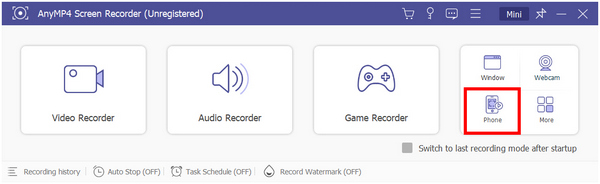
2. Connect Phone to Computer
In the Phone Recorder interface, follow the steps by installing FoneLab Mirror on your phone, connect to the same WIFI connection as your computer, and then tap the Detect icon on the FoneLab Mirror app on your device.
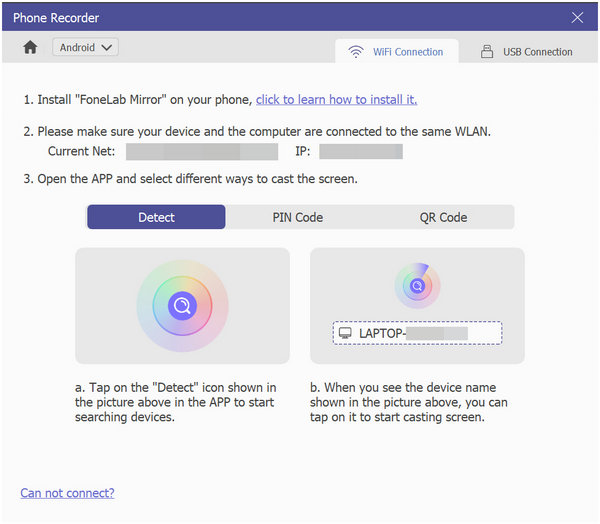
3. Record the Snapchat Story Without Detection
Afterwards, your phone’s screen will be cast on your computer via AnyMP4 Screen Recorder. Simply click on Record to capture the Snapchat Story that you want to save. Videos that are captured this way will not notify Snapchat and its users.
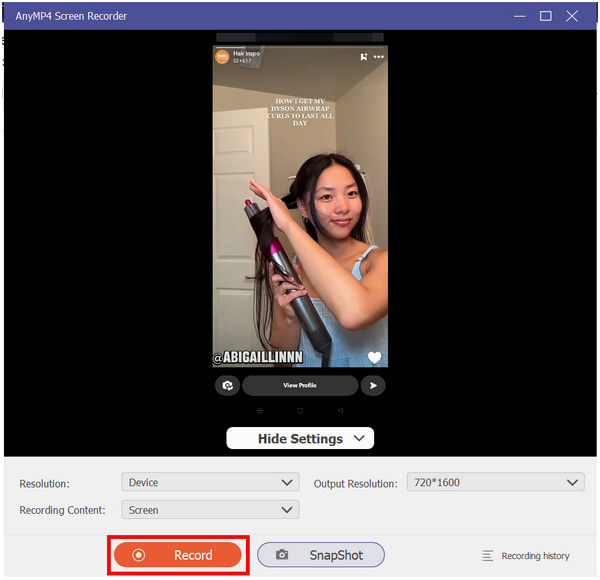
If you are looking for a way to save Snapchat stories without notifying the app, look no further than AnyMP4 Screen Recorder. This Snapchat video recorder is also capable of doing multiple recording modes that will surely benefit its users however they want to use it. With that, all you need to do to start enjoying the convenience of AnyMP4 Screen Recorder is to download it now!
Why can’t I save videos on Snapchat?
Users may customize their stories to be inaccessible for downloading. This option will turn off the export tool that users can use to download Snapchat videos on their phones. However, you can bypass this by using a third-party recorder such as AnyMP4 Screen Recorder on your PC or Mac.
Can Snapchat tell if you screen Record?
Yes, Snapchat notifies its users if other users capture their Stories. This is developed as a privacy measure. But these stories can still be saved by using a third-party recorder like AnyMP4 Screen Recorder.
Can you screenshot Snapchat stories without them knowing?
Yes, you can avoid the Snapchat notification when capturing stories. Simply use a third-party screen recorder outside your phone. The best one available is the AnyMP4 Screen Recorder. We hope that this answered your inquiry about how you save a video from Snapchat.
How do I save a Snapchat video?
You can save a Snapchat video in multiple ways. Using the Export tool inside the app is the easiest one. Another method is by using a third-party screen capture software such as AnyMP4 Screen Recorder on a different device such as a laptop, computer, or Mac. This can also be used to solve problems such as how to save a Snapchat video someone sends you.
How to save videos off Snapchat?
Save videos on Snapchat by Exporting them. This function is accessible via the share button on Snapchat. Simply click the button that looks like a download icon to save the video.
Will the sender be notified?
Yes, the sender will receive a notification if you take a screenshot or use your device’s screen recorder. However, using AnyMP4 Screen Recorder won’t trigger any alerts since Snapchat cannot detect external recording.
Can I trim the video?
Yes, you can trim the recording afterward using AnyMP4 Screen Recorder’s Advanced Trimmer. This allows you to keep only the exact part of the Story or Spotlight you want.
Is it illegal to record someone else's Snapchat video?
In most cases, saving or recording content for personal use only is allowed. However, redistributing or posting someone’s private content without permission may violate privacy laws.
Can Snapchat detect third-party screen recorders?
Snapchat cannot detect external screen recorders that run on a separate device. It can only detect screen captures made directly on your phone. This is why using a third-party tool is the most discreet method.
Snapchat pioneered the fleeting 24-hour stories that since then have become a norm for other social media platforms. However, they are also the first that add a notification system when a user’s Story is being screen captured by another. Because of that, this may also be a reason why this platform has been on a decline since its peak in the late 2010s. In addition to the development of other short-form platforms such as Tiktok and YouTube Shorts.
Want to learn how to save Snapchat videos privately and in high quality? Download AnyMP4 Screen Recorder now to capture Stories without triggering notifications.
Secure Download
Secure Download
 Posted by Angelica Liwanag to Recorder
More readings
 2 Ultimate Methods to Compress a Video for Snapchat for Free
Do you find the videos you made for Snapchat are too large and too long? Read this article to learn something about how to reduce video size for Snapchat.
 100% Working Ways to Crop Video on Snapchat without Quality Loss
Sometimes you might need to crop a video on Snapchat to let followers focus on main subject. This is just the guide you need.
 Actionable Tutorial to Add Music to Snapchat Videos Properly
Snapchatters can add music before and after recording video with the built-in feature. This tutorial shows you how to add music to your Snapchat videos easily.
 3 Proven Methods to Use Snapchat on PC [Discussed Here!]
This post will teach you how to use Snapchat on a PC in three effective ways. Access it on your PC using an emulator, screen mirroring, and the web version.
 Add your comments to join the discussion here