
Executive Summary:
Choosing between M4A and FLAC is strongly influenced by how you plan to consume the audio. For general listening, M4A offers a balance between quality and size efficiency. However, if you want pure quality for high-end equipment, FLAC should be your go-to.
Due to the need for digital storage, a common dilemma for most audiophiles is finding a balance between enjoying lossless-quality audio and preserving the number of media files they can store. With that in mind, we will discuss why M4A and FLAC are among the most common audio file formats for file converters. In this article, we will provide a detailed guide to help you solve audio formatting issues when your mobile or stereo player cannot play audio files. We will also highlight the best solution for preserving album art and ID3 tags to ensure your music library stays organized.
Free Lossless Audio Codec (FLAC), as its acronym suggests, is an open-source audio format designed to compress audio files without removing essential sound data. This results in lossless audio quality, preserving the integrity of the original recording.
For Apple users, ALAC (Apple Lossless) is the lossless audio counterpart for the Apple ecosystem. Due to this exclusivity, using M4A is preferable to FLAC on iPhone, since the operating system itself prioritizes its own lossless audio format.
Its strengths in quality preservation make it a popular choice among audiophiles and music producers. Unfortunately, it has a larger file size due to its raw quality and the amount of metadata it preserves.
Moving forward to M4A audio, this file type is preferred on most modern devices because it is compressed with the AAC codec, a direct successor to MP3. Due to its origin, M4A is designed to have lossy quality in exchange for a more compressed file size.
It also has superior compatibility and is commonly used for streaming, mobile listening, and general listening across different devices. Although not on par with lossless formats like FLAC or ALAC, M4A still has better quality than MP3, making it a balanced format overall.
In terms of quality and bitrate, FLAC is way better because it uses lossless compression to preserve audio data and ID3 tags, which is a huge advantage when clarity and storage management are significant factors. This is also why FLAC files are so large. Moving forward to AAC, its ability to preserve a 320 kbps bitrate is not only serviceable but also good enough for users who want a high-quality listening experience.
AAC gets on top if you want efficient storage and better file size. Due to its lossy audio quality, it is much more compact than lossless audio files like FLAC. On top of being compact, M4A also offers better quality than standard MP3s because it retains a higher sample rate, making it a good, balanced choice for casual listeners.
Fortunately, device compatibility is not an issue for either format, as both are playable on most modern devices. With that in mind, choosing between M4A and FLAC should be based only on whether you want hi-res audio or efficient storage.
When converting audio to lossless or high-quality formats, both M4A and FLAC are excellent choices. These file types generally have better quality than standard MP3 audio, making them a solid choice for audiophiles as long as you use the right equipment and FLAC audio players optimized for the best listening experience.
However, you need media format converters to save audio files as M4A, FLAC, ALAC, or any lossless audio format of your choice. Moreover, these files excel at preserving your audio’s metadata, making file management and library storage seamless.
To learn the best multimedia management tool in the market for M4A or FLAC conversion, make sure to read our top pick below.
Don't let the word "Video" in the name fool you. AnyMP4 Video Converter Ultimate is a powerhouse media suite that audiophiles and everyday users alike rely on for flawless audio conversion. When moving large libraries between FLAC and M4A, the two biggest headaches are time and lost metadata (album art, track names). AnyMP4 solves both issues in 2026.
When converting large libraries of media files, you can set AnyMP4’s output to FLAC, M4A, or even ALAC to ensure that you will retain 100% of the original sound quality while making it fully compatible with your iPhone or Apple Watch.
Regarding concerns about data loss, AnyMP4 Video Converter Ultimate can flawlessly transfer your album covers, artist info, and track numbers during FLAC or M4A file conversion, saving you hours of manual tagging.
To learn more about the program, make sure to read its strengths and limitations below and proceed with the step-by-step guide on how to use the software:
PROS
CONS
Secure Download
Secure Download
1. Open AnyMP4 Video Converter Ultimate and select the Add Files button in the main Converter tab to import M4A or FLAC files.
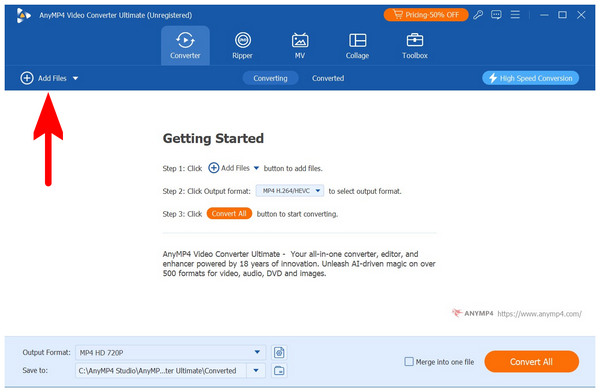
2. Next, select Output Formats and choose FLAC or M4A, depending on what you want to use.
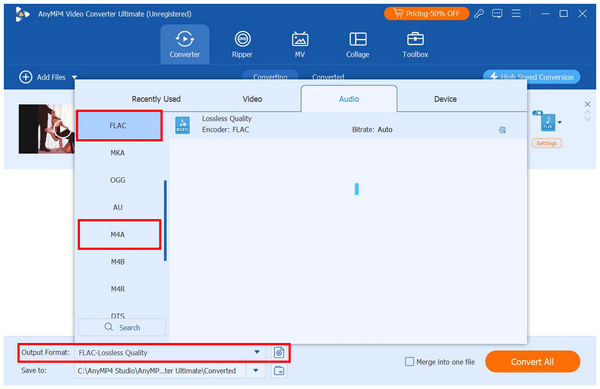
3. Once you have selected the format you want to convert to, click the Convert All button in the software's main menu.
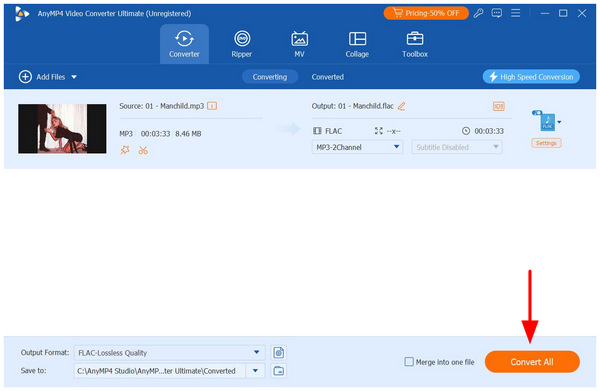
To start using the best audio and multimedia converter software in the market, make sure to download AnyMP4 Video Converter Ultimate using the download link below.
Secure Download
Secure Download
Does converting M4A to FLAC improve sound quality?
No, it will not. Since M4A cannot preserve lossless quality, converting it to FLAC will not improve sound quality. You can enjoy the benefits of FLAC if you use the format to save raw audio from physical media.
Can the human ear hear the difference between a 320kbps M4A and FLAC?
No, it cannot. For general audio consumption, the difference between 320 kbps and lossless quality is not distinguishable. However, high-end audiophile equipment makes listening to FLAC worth it.
Which format does Apple Music use?
Apple Music uses the balanced M4A format. Its wide range of bitrate options from 128-320kpbs is a significant factor. There is also an M4A player designed exclusively for handling it.
Is FLAC too big for smartphones?
No, it is not. Although FLAC is significantly larger than regular audio files, they are still not that large compared to videos or applications. However, since audio is stored in bulk, large FLAC files will consume significant space.
Now that we have discussed the differences, advantages, and individual strengths of M4A and FLAC, we hope you can decide which high-quality audio format is best for you. If you plan to use format converters to preserve the quality of your physical media or high-quality recordings, consider downloading AnyMP4 Video Converter Ultimate to convert your media files to M4A or FLAC.
Secure Download
Secure Download
 Updated by Alice Thorne to Glossary
More readings
 How to Convert MP4 to M4A – 10 Best Ways for You
Are you finding a useful converter to switch MP4 to M4A? In this article, it lists 10 different ways including online converters and software.
 How to Convert MP3 to M4A: 4 Fast & Free Ways (2026 Guide)
Need to change MP3 to M4A? Discover 4 easy ways to convert MP3 to M4A on Windows, Mac, and online for high-quality, fast, and free audio conversion.
 FLAC Vs. MP3 Vs. WAV: What Are Differences
Discover the major differences among FLAC, WAV, and MP3, and everything in between to know their pros and cons and what they should be used for.
 Top 7 Methods to Convert MP4 to MPEG
This guide shows you the best MP4 to MPEG converter and other free online solutions to convert MP4 to MPEG easily and quickly on Windows and Mac.
 Add your comments to join the discussion here