
Free Download100% Clear & Secure
Free Download100% Clear & Secure
When it comes to audio media files, the MP3 format is the most popular option due to its superb compression rate and its preserved audio quality. Unfortunately, it suffers from common issues facing digital audio files, such as inconsistent or low volume issues. In this article, we aim to address this issue by providing a detailed tutorial that utilizes the best audio enhancement tools to increase the volume of MP3 files on desktop computers and in online browsers. We will review the programs based on their best uses, as well as common user reviews, to gauge the opinion of their users.
Before learning how to increase the audio volume of an MP3 file, it is essential to understand why enhancing its audio quality is beneficial. As such, we have provided three of the most common reasons why improving MP3 volume is worth your time.
The most obvious reason for improving your audio volume control is to enhance your listening experience. If your music has a louder volume, it will be easier to listen to, especially when used on speakers. However, be sure not to overdo it with volume boosting, as excessive use can damage your hearing.
Finally, MP3 files with enhanced audio make them more compatible with various devices as well. This is particularly significant for home theater or house-wide sound systems. Fortunately, you can increase the volume of an MP3 file using the programs that we will highlight and provide a tutorial on below.
Aside from music, audio files are also used for podcast consumption and for playing audiobooks. In this case, increasing the volume of your file is particularly important, as these audio files are narration-heavy and listening to them clearly is essential.
System Compatibility: Windows, macOS
Best Used For: Easily increasing the volume of MP3 files up to 200%.
We will begin this guide by highlighting the best option for increasing MP3 volume on both Windows and macOS computers, utilizing AnyMP4 Video Converter Ultimate’s Volume Booster tool.
Equipped with an exclusive Volume Booster feature, AnyMP4 Video Converter Ultimate is the most convenient option to increase the volume of MP3 files by up to 200%, effectively doubling the media file’s original volume limit.
Together with its volume-boosting feature, the software may also adjust the media file’s output parameters, such as encoder type, audio channel, and sample rate. In addition to MP3, it can also enhance the volume of over 500 audio and video formats.
To learn more about the software, please download it and refer to our step-by-step guide below.
Secure Download
Secure Download
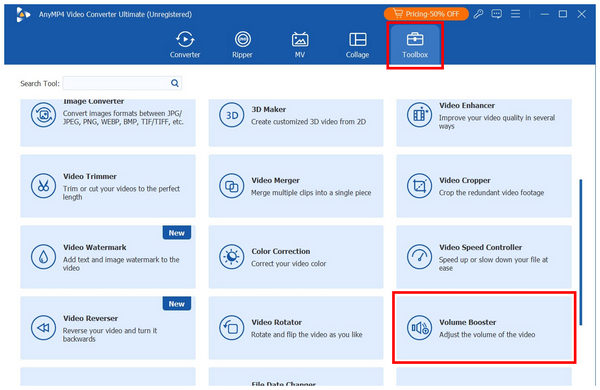
1. Open AnyMP4 Video Converter Ultimate and proceed to the Toolbox tab. Then, scroll down among the available tools to find Volume Booster. Select it and import the MP3 file for which you want to boost the audio.
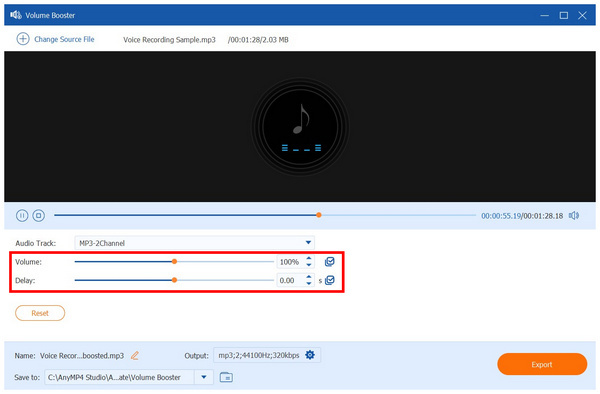
2. Once the MP3 file you want to boost has been added to the tool, you may now increase its volume by using the Volume slider bar. Simply slide it to the right to increase the volume or to the left to reduce it. Alternatively, you can adjust the Delay slider to synchronize your video and audio.
3. Finally, when you are satisfied with the volume adjustment of your media file, listen to it to check if the boosted audio is sufficient. Then, click on Export to produce the MP3 file with boosted audio.
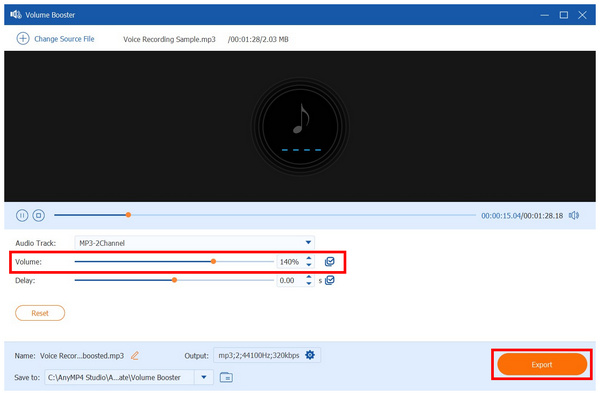
Among the options on this list, AnyMP4 Video Converter Ultimate’s Volume Booster tool is the best choice in terms of adjustment options and ease of use. This made the software the smartest choice if you are concerned about technical requirements for running audio editors.
What Users Say:
Most users of AnyMP4 Video Converter Ultimate highly praise its practicality and versatility. This is not limited to its beginner-friendly Volume Booster software, but also to all its features, including the format converter, video editor, DVD ripper, and the 20+ tools available in its toolbox.
System Compatibility: Windows, macOS, Linux
Best Used For: Boosting the volume of audio files to the specified decibels.
If you are experienced with audio engineering tools, learning how to increase the volume of an MP3 file using Audacity should be your best choice. Since Audacity is a traditional music audio editor, audio mixing skills are directly transferable to the software. In fact, its audio amplifying feature uses specific decibel values to apply volume enhancement changes.
Unfortunately, Audacity’s technical requirements to run it may be overwhelming for beginners. It is not recommended for users with limited knowledge of audio editing.
1. Import the MP3 file you want to edit in Audacity. Then click on it to select the Audio file.
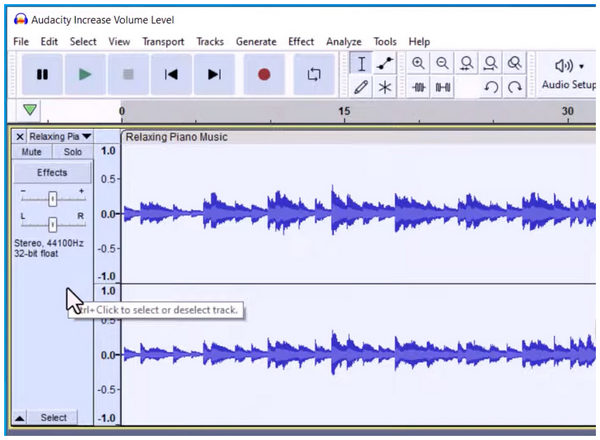
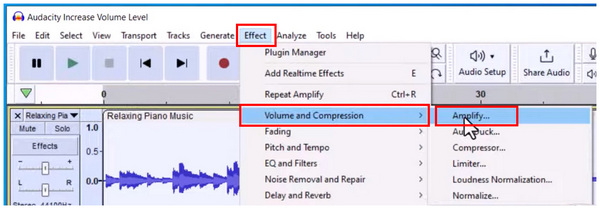
2. Next, click on the Effect tab in Audacity's toolbar. Then, hover your cursor over Volume and Compression and select Amplify.
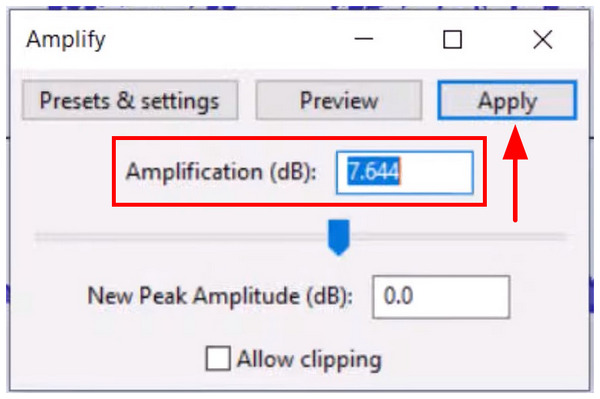
3. Clicking Amplify will open the audio adjustment options for volume boosting. By default, the Amplification value will be set to the limit where the audio will not be distorted. However, you can still adjust the volume boosting by changing the value or using the Amplification Slider. Finally, click on Apply to save the volume boost you have set.
Due to the technical requirements of Audacity, it is highly advisable for users with enough technical skills and experience. Unfortunately, this is also the same reason why the program is not advisable for beginners.
What Users Say:
Audacity has a huge following due to its freeware and open-source background. This made the tool the go-to option for users with advanced audio editing experience and who are skilled enough to use Audacity instead of paid audio editing tools.
System Compatibility: Chrome, Firefox, Safari, other browsers.
Best Used For: Boosting audio loudness by selecting the exact number of decibels (dB).
If you want to increase the volume of an MP3 online, several tools are available, but Audioalter Online should be one of your top options. As its name suggests, it is an online tool that specializes in handling audio files, including a Volume Changer option.
Although the Volume Changer tool in Audioalter works well for boosting MP3 volume, it suffers from the common problems associated with online tools. Files downloaded from the program have reduced quality and are not recommended for formal use.
1. Search for Audioalter Volume Changer online to find its website. Then, click Browse Computer or drag-and-drop the MP3 file you want to edit into the upload dropbox.
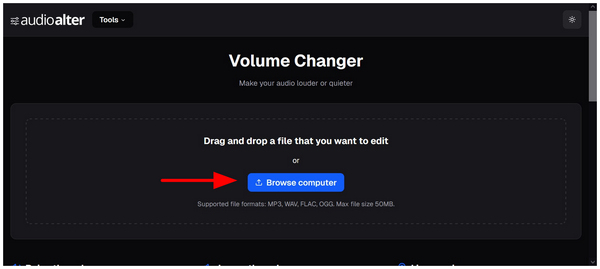
2. After importing the file, you can now edit the Volume Change slider in the online tool. Slide it to the right to increase volume, or to the left to decrease volume.
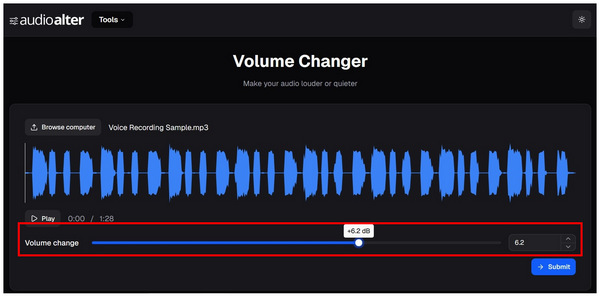
3. Once you are satisfied with the volume adjustments, click on Submit to proceed to the download page of the online tool. The file that the software produces will have boosted audio, but expect its quality to be slightly reduced.
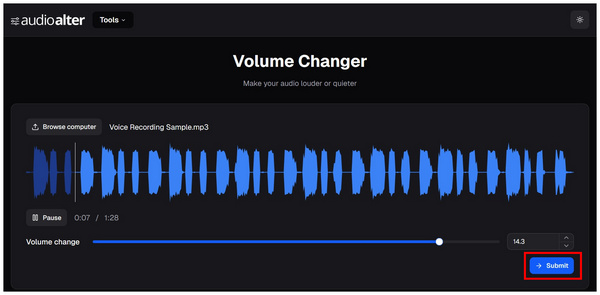
Among the programs in this list, using Audioalter Online Tool is the easiest option. However, this was made possible by the significant decline in the quality of audio files processed in it.
What Users Say:
Audioalter is a good option if you are lacking in time and lack preparation. Moreover, it is the most beginner-friendly option, which makes it a good choice for one-time audio adjustments.
To learn how to increase the volume of an MP3 without losing quality, ensure that you set the amplification or percentage adjustment to the correct level. For easier recognition, ensure you use high-quality earphones and check for audio clipping or distortion. Set the volume before these errors occur.
To make recognizing the audio decline much easier, ensure that you use the preview features of your program. These quality reductions will also be easier to notice if you use good-quality headphones.
Good quality volume boosting works better when it is normalized instead of over-amplified; as such, using volume boosters as an MP3 volume normalizer is more ideal. This means that finding the right balance of boosted audio works better than too much volume boosting. The right amount of audio boosting is just below the point of audio disruption.
What’s the easiest way to increase MP3 volume online?
The easiest tool to use online is Audioalter. It provides an easy volume boosting slider as well as a built-in preview tool. However, beware of reduced audio quality for edited media files.
Can increasing MP3 volume damage sound quality?
Yes, it can. That is why finding the right MP3 volume boost is very important. Setting the volume adjustment just below the point of distortion is best.
Are MP3 volume booster tools safe to use?
Yes, they are. There are multiple options to boost volume, and they are mostly safe. You can use multimedia tools, audio editors, and even online programs.
Is it possible to increase MP3 volume for free?
Yes, it is. In fact, all the options presented in this article are available for free use. Simply find the one you think works best for your skills and needs.
Is it hard to increase the volume of MP3 files?
No, it is not. Increasing the volume of MP3 files is a straightforward process. You only need to find the right tools, such as AnyMP4 Video Converter Ultimate.
With the best volume booster tools now discussed, we hope that this article will help you learn which program is the best option for your needs and devices. As such, be sure to select the best one that suits your taste. For desktop-based options, AnyMP4 Video Converter Ultimate is a great choice. You may download it using the link below.
Secure Download
Secure Download
 Updated by Mark Cristobal to Edit Audio
More readings
 4 Best Method on How to Cut MP3 Without Quality Loss
Want to trim MP3 files and remove unwanted parts? Here are 4 efficient methods about how to cut an MP3 file on your computer, smartphone, and online.
 Best 5 Methods to Compress MP3 Files to Free up Space
See this article and learn how to compress MP3 files with ease using the 6 MP3 compression tools. We will show you each guideline to do the process.
 3 Ways to Increase Video Resolution for 720p/1080p/4K/5K/8K by AI
Can you increase the resolution of a video? Yes. Here are the best 3 ways to improve the video resolution from 240p to 1080p HD, 4K, 5K, even 8K by AI.
 How to Improve Zoom Video Quality in 2 Ways
Do you want to upscale the quality of your video on Zoom? Find out and learn the best ways to increase Zoom video quality with AI-powered software.
 Add your comments to join the discussion here