
Free Download100% Clear & Secure
Free Download100% Clear & Secure
Consuming videos and music has become a popular entertainment option in the current market. Due to the increased accessibility of these types of media, enhancing the user experience has also become a common upgrade path for users who enjoy digital media as their form of leisure. Perhaps the most common upgrade path is using volume boosters. In this article, we will provide a detailed review of the most popular apps that can be used to increase the volume of your media file, whether it’s a video or music file.
| Volume Booster App | System Compatibility | Ease of Use | Supported Video and Audio File | Audio Track Selection | Output Quality |
|---|---|---|---|---|---|
| AnyMP4 Video Converter Ultimate | Windows, Mac | Easy | MP4, MKV, MOV, AVI, MP3, WAV, FLAC, ALAC, more | Videos and music from local files | Lossless Quality for both videos and music |
| Equalizer APO | Windows, Mac | Advanced | Boost the volume of system audio, not just individual files | System audio | Standard audio boosting quality |
| Boom 3D | Windows, Mac | Intermediate | MP3, WAV, FLAC, M4A, more | Music files, streaming apps, video games, and other software | Preserves audio clarity but may cause audio disruption on poor-quality hardware |
| Poweramp Equalizer | Android | Advanced | MP3, WAV, FLAC, M4A, OGG, AIFF, more | Boost the quality of files on Poweramp Music Player | High-fidelity audio up to the limit of the source file |
| Volume Booster GOODEV | Android | Easy | MP3, WAV, FLAC, M4A | Local audio files | Standard audio boosting quality |
| Louder Volume Booster | iOS | Intermediate | MP3, WAV, ALAC, M4A | Local audio files | Standard audio boosting quality |
| Volume Master (Chrome) | Chrome | Easy | Boost the audio of videos and music in opened tabs | Audio from browser tabs | Boosts audio up to 600% |
| Vidimote (Safari) | Safari | Easy | Boost the audio of videos and music in opened tabs | Audio from browser tabs | Boosts audio up to 600% |
| Volume Booster (Firefox) | Firefox | Easy | Boost the audio of videos and music in opened tabs | Audio from browser tabs | Standard audio boosting quality |
Since media files have become a lucrative industry in modern entertainment, using an audio volume booster has gained significant importance, as they are useful for enhancing the volume of media files with poor sound quality or for watching videos on modern home theater setups.
As such, these tools are crucial to ensure that your viewing or listening experience is good and enjoyable. With that in mind, learning about the best volume-boosting programs for desktops, mobile devices, and browser extensions is crucial.
To learn nine of the best audio and video volume boosters across different platforms, make sure to read our review below.
System Requirements: Windows 8, 10, 11, macOS 10.12 or higher versions.
Best Used For: Enhancing the volume of local video and audio files.
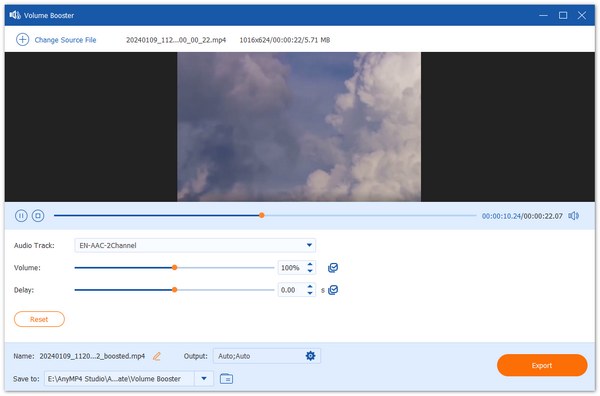
When it comes to volume boosting, AnyMP4 Video Converter Ultimate offers such a service with the help of its Volume Booster tool. Using the program, you can easily enhance the volume of your media file by up to 200% and apply the change permanently to your video or audio file.
Permanently increasing the volume of files is notable since most apps reviewed in this article only apply volume adjustments temporarily. The accurate volume boosting option also allows users to edit commonly used media formats, including MP4, MKV, AVI, MP3, AAC, AC3, and more.
With these features and adjustment options discussed, AnyMP4 Video Converter Ultimate safely secured the position as one of the best volume boosters for PC. To enjoy using it, you may download it using the link below.
Secure Download
Secure Download
Recommendation
PROS
CONS
System Requirements: Windows 7, 8, 10, 11
Best Used For: Boosting the volume of system sound playing from your computer.
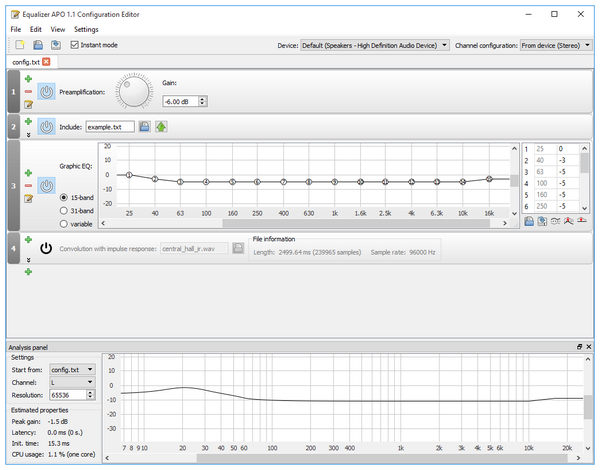
If you want to streamline your volume-boosting needs, you can also get a free audio enhancer for Windows that runs as a background app on your computer. In this case, Equalizer APO should be one of your top choices. It functions as a background plug-in, making video and audio louder on your computer.
Recommendation
PROS
CONS
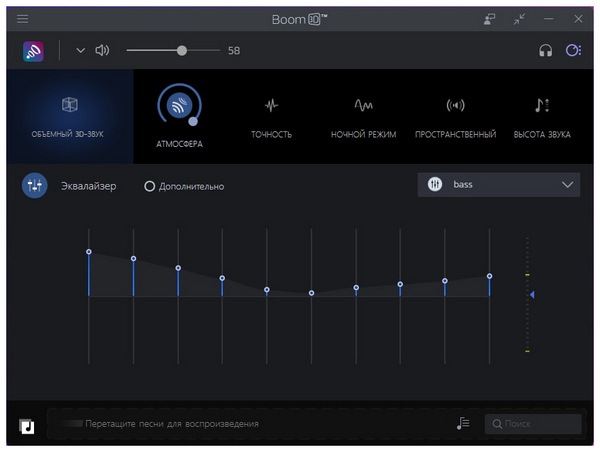
System Requirements: Windows 8, 10, 11, macOS 10.12 or higher versions.
Best Used For: Adding 3D audio adjustments to the system audio on your computer.
Similar to the previous option, Boom 3D also adjusts the entire system audio of your devices, making it a good volume booster for Windows 11 and older versions. However, it adds richer adjustment since it can apply a 3D audio effect. This is ideal for home theater systems where 3D audio is a practical addition.
Recommendation
PROS
CONS
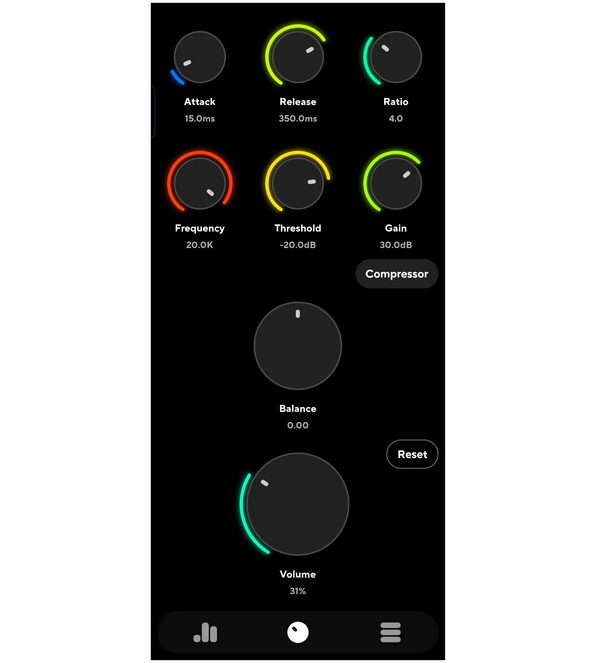
System Requirements: Android 9.0 or higher.
Best Used For: Enhancing the music quality of files on Poweramp Media Player.
Moving on to apps that boost volume on Android, we have Poweramp Equalizer, a plug-in tool for Poweramp Music Player. Since most volume-boosting needs are typically used on a music player, this plug-in functions accordingly. It primarily works in its music player counterpart, enhancing the audio playback experience, as well as serving as a minor music audio editor.
Recommendation
PROS
CONS
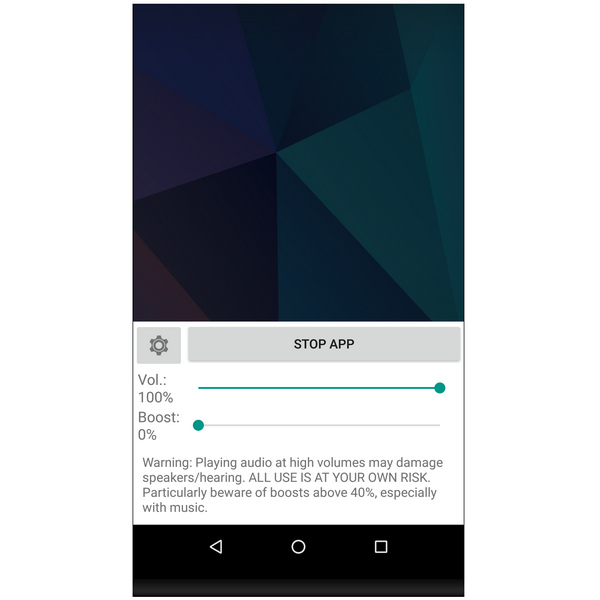
System Requirements: Android 6.0 or higher.
Best Used For: Adding volume boost to audio and video files playing on media or music player tools.
If you want to apply audio volume control and boosting to your entire system, Volume Booster GOODEV could be your top choice. It works directly by adding a manual audio boosting tool to your device, and it is a reliable volume booster freeware that allows you to adjust the volume beyond its limit.
Recommendation
PROS
CONS
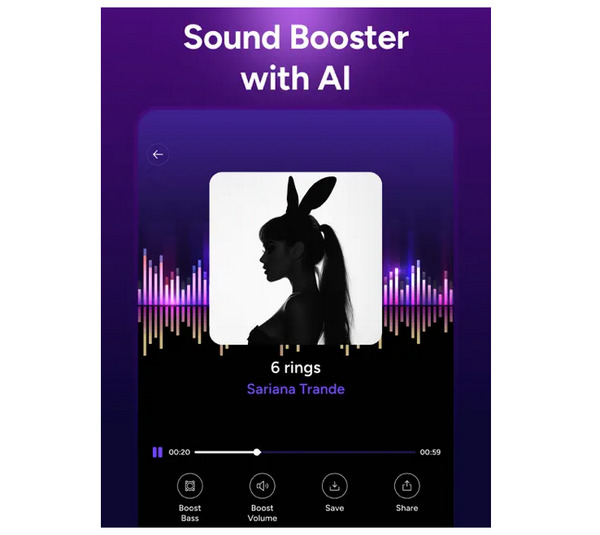
System Requirements: iOS
Best Used For: Adding volume boost beyond hardware limits.
Finally, iOS devices can also enjoy boosted audio enhancement since Louder Volume Booster is available on the platform. It also functions as a third-party app that can normalize MP3 volume or increase volume beyond the set limit of your iOS device.
Recommendation
PROS
CONS
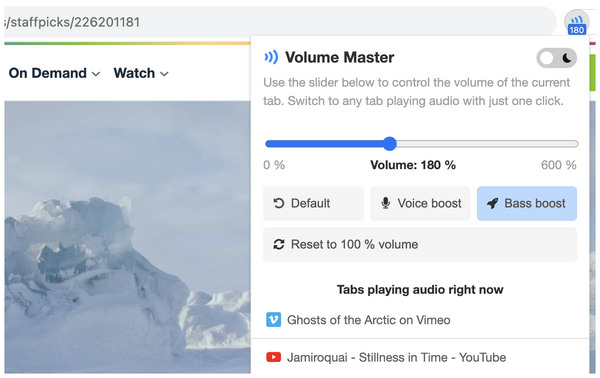
System Requirements: Chrome Browser
Best Used For: Boosting the volume of online media on specific tabs.
When it comes to browser extensions, Volume Master on Chrome works by boosting the volume of media files playing in a single tab. You can use it to boost the audio on YouTube or Spotify Web, or when using Chrome screen recorders. This makes the program one of the best Chrome volume boost extensions.
Recommendation
PROS
CONS
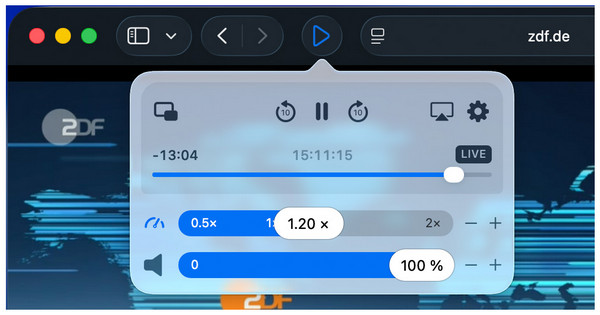
System Requirements: Safari Browser
Best Used For: Making the volume of videos and music on browser tabs louder.
Among Mac computers, the Safari Browser is also equipped with a volume booster extension app that can directly enhance the volume of active tabs. This is none other than Vidimote. Unfortunately, it is prone to audio quality reduction and can only work within the browser.
Recommendation
PROS
CONS
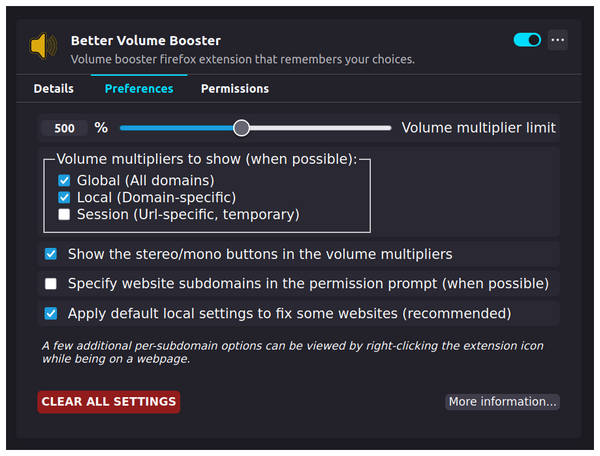
System Requirements: Firefox Browser
Best Used For: Enhancing the volume of media files on opened tabs.
Finally, Volume Booster is the extension tool for the Firefox browser. It works directly on active tabs in the program and functions well as a volume tool for YouTube, Spotify Web, social media sites, and for Firefox screen recorders. However, be aware of the noticeable audio distortion.
Recommendation
PROS
CONS
Among the options on this list, the AnyMP4 Video Converter Ultimate Volume Booster tool is the most optimal choice for boosting the volume of media files, as it is the only tool that can permanently edit media files themselves.
To learn how to use the program, please read our three-step guide below. Do not forget to download it as well to easily follow each step.
Secure Download
Secure Download
1. Open AnyMP4 Video Converter Ultimate, then proceed to the Toolbox section. Find the Volume Booster tool and select it.
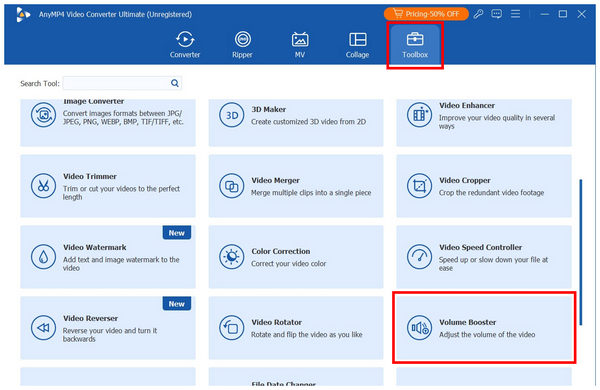
2. In the Volume Booster menu, adjust the Volume slider to edit the volume boost percentage you want to use. You can boost the audio by up to 200% or edit the audio Delay with the video.
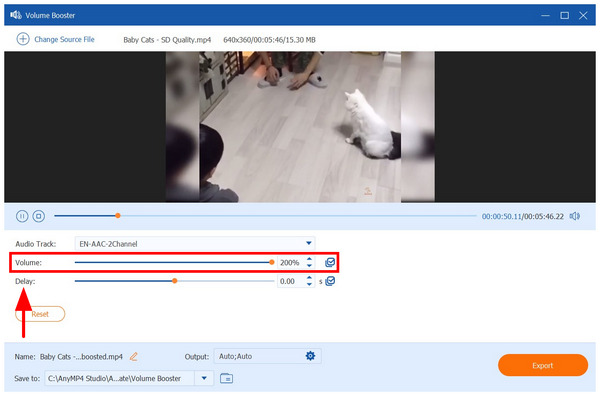
3. Once you have set the desired volume boost percentage, simply click Export to begin producing the media file with the boosted audio.
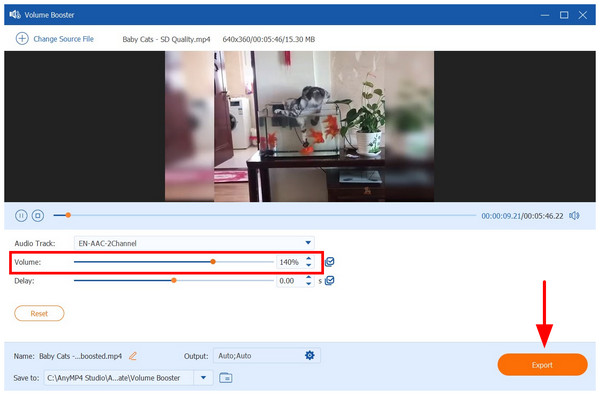
Since this option exports a new file, the video you receive from the program will have its boosted audio permanently applied. You won't have to deal with temporary volume adjustments anymore, making it one of the most reliable sound amplifiers for pc Windows 11/10 and macOS computers.
Since volume boosting breaches your hardware’s volume limit, you need to be prepared for potential hardware damage, especially for speakers. This is because boosted audio uses so much volume that it exceeds the intended limit.
High volume also increases the risk of hearing damage, especially when listened to through earphones and headphones with poor sound quality. Volume limits are set for a reason.
Due to the background of most volume boosters being freeware, software, and privacy risk will always be a constant issue. This is very common among free-to-use tools, and volume boosters are usually among them.
Finally, the most common issue with a volume booster is the reduction of audio quality. This is very noticeable, especially on stock speakers of laptops or smartphones. As such, it is still advisable to keep your volume on the software limit.
Are volume boosters worth it?
It depends on your needs. If your device has poor speakers, you may use volume boosters. However, regular devices with quality audio do not need such software.
Should my music files have a loud volume?
No, they should not have. The set volume limit for music files should be enough. However, a home entertainment system may have value boosted audio.
Are there volume boosters only for browsers?
Yes, there are. They are usually extension apps. This means that they are installed within the browser itself.
Is it smarter to use desktop-based volume boosters?
Yes, it may. Desktop-based volume boosting tools may apply permanent audio boosting. This is absent for most mobile and online tools.
What is the ideal percentage for boosting volume?
Your boosted volume will be ideal at around 150%. If you double the volume of your media file, the likelihood of distortion will increase. However, some hardware, such as a speaker, may be able to handle more boosted audio.
With the best volume booster tools now discussed, we hope that this article will help you learn which program is the best option for your needs and devices. As such, be sure to select the best one that suits your taste. For desktop-based options, AnyMP4 Video Converter Ultimate is a great choice. You may download it using the link below.
Secure Download
Secure Download
 Updated by Mark Cristobal to Edit Video
More readings
 3 Best MP3 Volume Normalizer Software to Adjust Sound
This tutorial will show you how to normalize your MP3 files with the best MP3 volume normalizer for enjoying your favorite songs in the same sound volume.
 What is WavePad Sound Editor and How to Use It Editing Audio Files
WavePad Sound Editor is the full-featured professional audio and music editing software for Windows and Mac. Here is our latest introduction and review.
 Best 5 Compressor for Vocals: Easy Mixing Process
We will offer you a list of the best vocal compression tools nowadays. Let us review five mediums you can use to minimize the conflict before mixing UADs.
 5 Top-picks Music Compressors: Reduce Song Size
Compressors for music help the user maintain the correct file size of their audio. Here are the five best five compressing tools to make it possible easily.
 Add your comments to join the discussion here