
Free Download100% Clear & Secure
Free Download100% Clear & Secure
Have you ever struggled with low audio levels or devices that just don’t get loud enough? It can be frustrating when your favorite music or movies are difficult to hear, even with the system volume cranked up. Fortunately, a volume booster extension can solve this problem. Specifically, a Chrome volume booster allows you to safely amplify your browser’s audio beyond the default limits. It can adjust sound for individual tabs without affecting the rest of your browser. In this post, we will explore the top Chrome extensions available. We will detail their features, pros, and cons, as well as how they can enhance your audio experience. This way, you can find the best solution for louder, clearer sound while browsing and streaming.
| Extension | Max Boost | Scope | Sound Quality Risk | Connectivity | Best For |
|---|---|---|---|---|---|
| Volume Master | 600% | Per tab | Low | Chrome tabs | Streaming videos |
| Volume Booster | 1000% | Per tab | High | Chrome tabs | Quick volume increase for videos and music |
| Sound Booster | 600% | Per tab | Low | Websites | Music, movies, online calls |
| Ultra Volume Booster | 600% | Per tab | Moderate | Chrome tabs | Loud videos and music |
| Ears: Bass Boost, EQ Any Audio | 500% | Per tab | Moderate | Websites | Personalized audio experience |
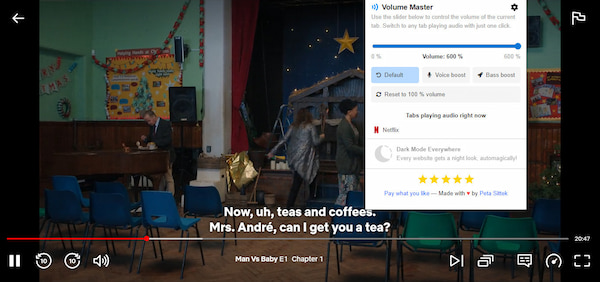
Volume Master is a volume booster Chrome extension designed to raise the audio level. It can increase the sound level of any tab far above your browser’s default limits. Its audio volume control can boost the volume up to 600%, providing a much louder sound.
What to Expect With Volume Master
What You’ll Like:
What to Consider:
My Experience:
Volume Master delivered a noticeably louder and clearer listening experience. However, it only works best when used moderately rather than at maximum boost.

Volume Booster is a powerful sound booster extension for Chrome. It is built to push your audio output well beyond standard limits. This loud audio plugin can amplify your audio up to 10 times the device's native maximum.
What to Expect With Volume Booster:
What You’ll Like:
What to Consider:
My Experience:
Volume Booster is a handy tool for enhancing moderate volumes. However, the advertised 1000% volume boost didn’t feel real. It didn’t increase the audio as dramatically as expected.

Sound Booster is a Chrome extension volume booster to increase the volume of videos and music. It focuses on amplifying volume, enhancing bass, and improving the overall audio quality for a richer listening experience. This browser sound booster can improve the sound quality by up to 600%.
What to Expect With Sound Booster:
What to Consider:
What to Consider:
My Experience:
Sound Booster really impressed me with how good the sound quality became. However, I found it lacking advanced settings, such as a full equalizer.
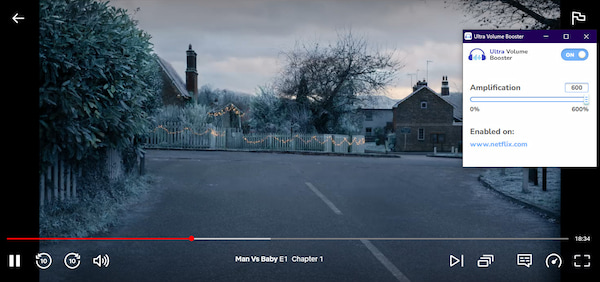
Ultra Volume Booster is an audio booster for Chrome, marketing itself as a crystal-clear audio enhancer. It can boost tab audio up to around 600% while preserving sound quality. It emphasizes maintaining clarity and reducing distortion even at higher volumes.
What to Expect With Ultra Volume Booster:
What to Consider:
What to Consider:
My Experience:
After I test the sound quality of the volume booster extension, it remained undoubtedly clear. However, pushing the boost to maximum resulted in a harsh, distorted sound from my speaker.
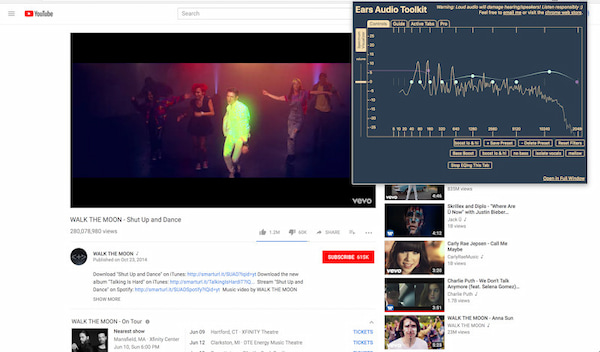
Ears: Bass Boost, EQ Any Audio is a Chrome extension to increase volume. It takes a different approach by combining volume boosting with a graphic equalizer. It allows you to adjust EQ curves, boost bass frequencies, and tailor the sound profile for each active tab.
What to Expect With Ears: Bass Boost, EQ Any Audio:
What You’ll Like:
What to Consider:
My Experience:
sound. However, the interface took me a moment to figure out all the EQ settings.
While volume booster extensions are great for temporary audio boosts, they only work within your browser. This means they don’t permanently fix the volume in your video files. For a permanent solution, use AnyMP4 Video Converter Ultimate to boost your volume. It ensures high-quality audio and video preservation, ideal for long-term use.
It includes a Volume Booster tool that allows you to permanently adjust the audio track within your video. It enhances volume without compromising audio or video quality, avoiding distortion or artifacts. Additionally, you can modify audio tracks, adjust volume precisely, fix audio delays, and fine-tune other aspects. It supports 4K, 1080p, and over 500 media formats, ensuring compatibility with most file types.
1. Get started by securing a free download of AnyMP4 Video Converter Ultimate. Install the Chrome audio booster alternative and finish the installation process. Once the setup is finished, run the software to access the main dashboard.
Secure Download
Secure Download
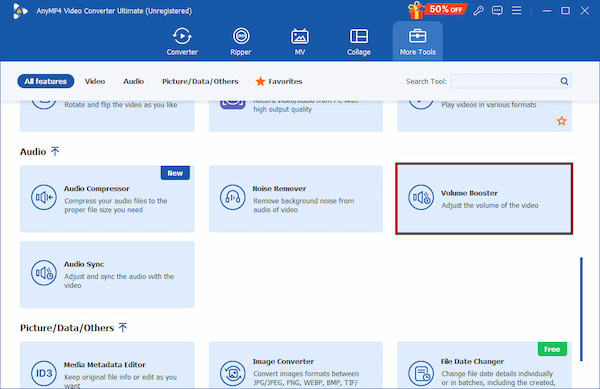
2. By default, you will be headed to the Converter tab. Move to the More Tools tab, select the Volume Booster tool, and click the + button to import the video whose audio you want to enhance.
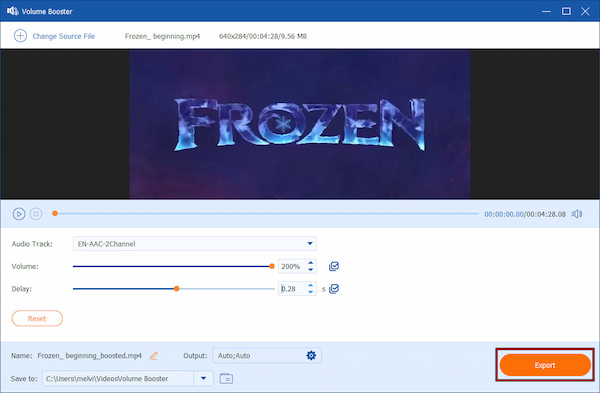
3. In the Volume Booster window, adjust the Volume slider to increase the audio level. If necessary, resolve any audio delay issues to ensure perfect sound synchronization.
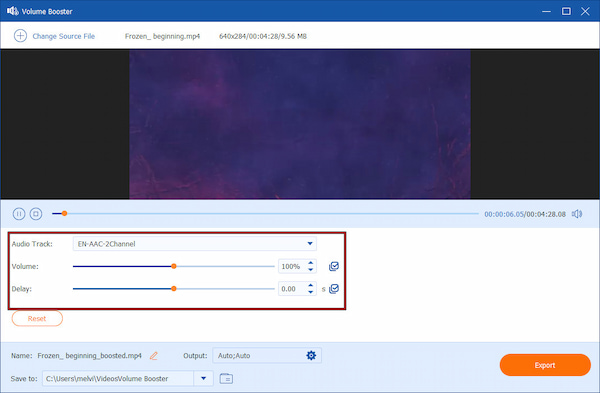
4. After adjusting the settings, click Export to save your video with the new volume. The output file will retain its original quality but with permanently boosted audio.
With AnyMP4 Video Converter Ultimate, you can enjoy videos with the perfect volume. In addition to video files, you can also use the Volume Booster tool as an MP3 volume normalizer. This software ensures a permanent solution for enhancing volume without relying on browser extensions.
Are volume booster extensions safe to use?
Most sound booster Chrome extensions are safe to use, mainly those available on the official Chrome Web Store. To ensure safety, always check user reviews, ratings, and the number of downloads before installing an app.
Why did my volume booster suddenly stop working?
Volume boosters can stop working for several reasons. For instance, browser updates or changes in website code can interfere with the extension’s ability to control audio. Also, conflicts with other extensions or security settings may also prevent it from functioning properly.
Can volume boosters work on Netflix or protected content?
Some Chrome plugin volume boosters work on most Netflix or protected content. However, in such cases, using AnyMP4 Video Converter Ultimate is recommended. It allows you to permanently adjust the audio within the video file.
Do volume boosters reduce sound quality?
Volume boosters can reduce sound quality if the audio is pushed too high. Amplifying sound beyond the source’s original level may introduce distortion, crackling, or muddiness.
Now that you’ve explored the top volume booster extension, you have a clear idea of how each tool can enhance your audio experience. Whether you need a simple, quick volume boost, enhanced bass, or full audio customization, there’s a tool that can best suit your individual needs. For those seeking a permanent and high-quality volume solution, consider using AnyMP4 Video Converter Ultimate. It allows you to boost audio directly within your video files and preserve overall quality.
Secure Download
Secure Download
 Updated by Mark Cristobal to Edit Video
More readings
 Step-by-step Guide to Replace Audio in Video on Mac/Windows
This tutorial explains 4 easy ways to replace audio in video files for free. Thus, you can remove or replace audio tracks in any video you need effortlessly.
 3 Best Ways to Rip DVD with Subtitles (Forced and Soft)
Do you want to know how to rip a DVD with subtitles? The three best ways to do it will be introduced in this article! Read on for more information about it.
 Top 6 Audio and Video Mixer Applications for Windows and Mac
Looking for the best audio and video mixer software? You can learn a top list from this article as well as how to mix video and audio together easily.
 Audio Overlay - How to Overlay Audio on a Video or Audio
How to overlay audio over music? Can I overlay two audio files online? How to overlay audio on a video? Learn 3 easy ways to make audio overlay in video audio.
 Add your comments to join the discussion here