
Free Download100% Clear & Secure
Free Download100% Clear & Secure
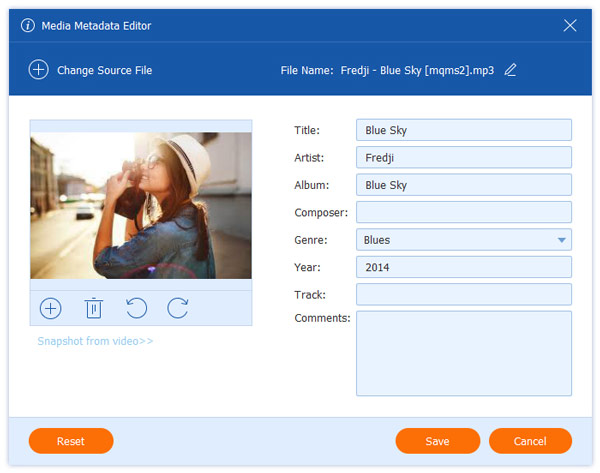
Changing the file date and other metadata details of a digital file might be an unfamiliar concept for most users. However, using advanced adjustment holds so much importance in terms of file management, privacy use, and securing media files for offline use. In this article, we will provide a detailed guide on learning the best tools to change the file date and other metadata information for files in Windows, Mac, and Linux.
Changing the file creation date is only an example of metadata adjustment used for digital forensics. This process involves analyzing the data stored in files to extract more information about when they were created, modified, and last accessed. Other advanced uses of it also involve completely removing metadata from video and audio.
These dates will be able to define when the media file was captured, edited if it was, and when it was last opened. This is highly important for the organization and could even be helpful for legal reasons. As such, learning to change your file’s creation date holds so much value if you want to keep your privacy.
To learn how to modify the data embedded in your files, make sure to read our guide below for Windows, Mac, and Linux.
Due to the importance and value of changing the date of files, wondering about their legal and safety factors is a valid concern. Fortunately, using advanced metadata editing does not hold any legal concerns.
It is especially acceptable when used only for your personal files and for file storage organization purposes. To avoid legal concerns about file date changing, make sure to only use metadata adjustments on files that you own.
BulkFileChanger should be one of your top options if you want to use a reliable Windows tool to change the file modified date. Unlike other metadata adjustment tools, this program offers a visual UI that is easy to use and well-labeled for new users.
This is a major factor as most metadata editors are designed with advanced users in mind, and as such, most of them only run directly in your computer’s terminal. Fortunately, BulkFileChanger opted for a much more accessible design principle.
Make sure to read the main features of the program as well as our three-step guide about it below.
Recommendation
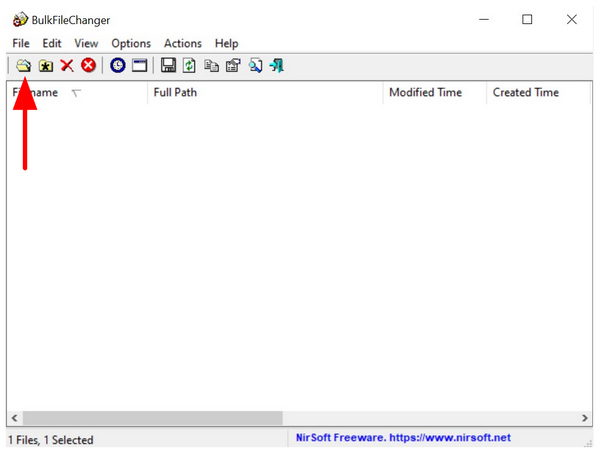
1. Open BulkFileChanger and then select the Add File button on the left-most part of the program’s taskbar.
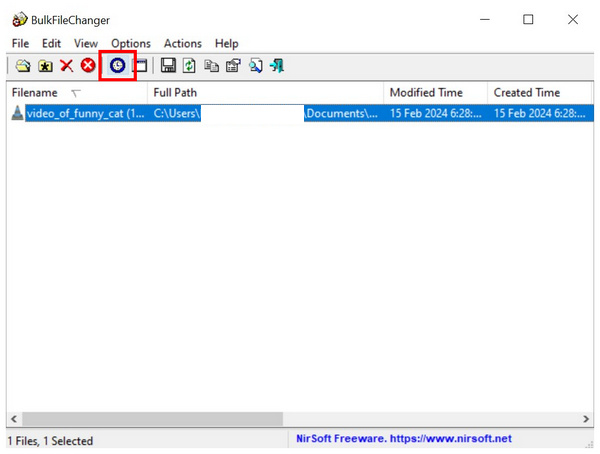
2. Once your file has been added, click on it to select. Then, click on the Change Time Attributes button to open the file date modifier menu.
3. In the Change Time Attribute tab, click on the Check Box beside Created, Modified, and Accessed. Once these are selected, you can now click on the drop-down menu to edit their dates. To confirm your adjustment, click on Do It.
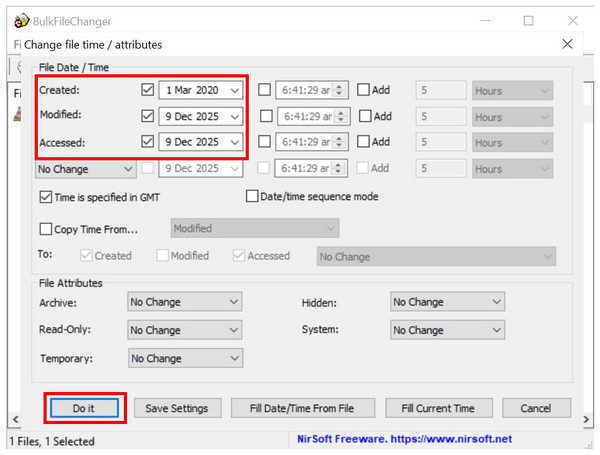
Aside from being free, BulkFileChanger also scores a huge advantage in terms of practicality due to the presence of batch file editing. This is a huge factor, especially if you want to change the data on multiple image and video files.
Moving forward to macOS computers, we have AnyMP4 Video Converter Ultimate as the best tool to change the date of created files on macOS. Equipped with an exclusive File Date Changer on its Toolbox, the program offers a modern take on an advanced file configuration process.
This can be felt both in the program’s UI design, performance, and quality of life features. Among the programs in this article, AnyMP4 Video Converter Ultimate offers the best performance and processing speed. It also offers a unique restore option that can undo your changes within a single click.
With these features in mind, it is better to experience the practicality of AnyMP4 Video Converter Ultimate first-hand by downloading it with our link below.
Secure Download
Secure Download
Recommendation
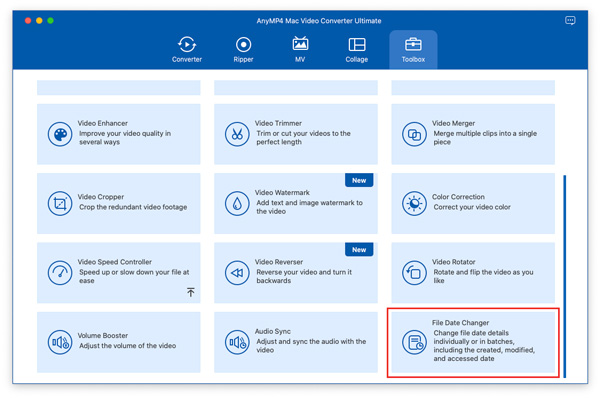
1. Open AnyMP4 Video Converter Ultimate and then go to the Toolbox tab. Then scroll all the way down to find File Date Changer and click it. Add the files you want to edit in the pop-up menu that will appear.
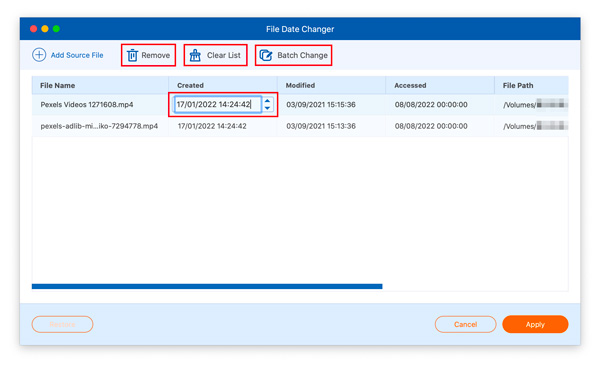
2. Once the file you want to change the date of has been added, click on the time values under Created, Modified, and Accessed. Clicking on these time values will change into a textbox, which you can easily edit by typing your desired date.
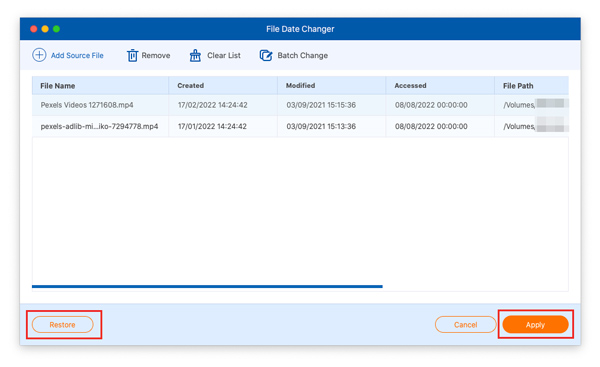
3. When you are done editing the file date data on your media files, you can now undo your adjustments using the Restore button. Otherwise, click on Apply to begin producing the file with edited metadata.
Although presented as a macOS option, AnyMP4 Video Converter Ultimate is a cross-platform program that can also be used on Windows computers. As such, you can rely on the program if you think that the barebones and basic performance of BulkFileChanger is not enough.
Finally, we will now move forward to the most advanced tool that can be used as a video metadata editor to change the creation date of a file on Linux with ExifTool. As we have mentioned on the Windows option above, most metadata editor tools are designed for advanced users; this program is an example of one.
Completely running on the Terminal or Command Prompt of Linux, ExifTool fully relies on using command lines to make file metadata editing. This made the tool extremely challenging to use and not meant for beginners.
For a quick introduction on how to use ExifTool, you may read our two-step guide below. Keep in mind that our guide uses Exiftool for Windows, but the code used will also be applicable for Linux.
Recommendation
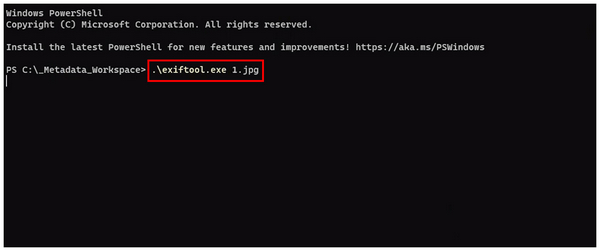
1. Open your computer’s Terminal, then write exiftool.exe file.ext. The file.ext text should be changed to the file name and extension of the media file you want to edit.
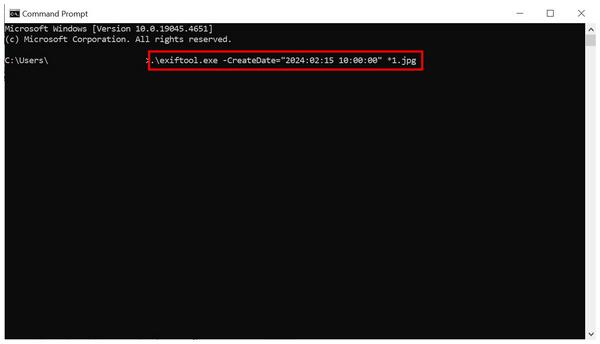
2. Then, write the command line, .\exiftool.exe -CreateDate="2024:02:15 10:00:00" *.ext and change the create date and time to the one you want to use. Also, add the .ext file of the file you are editing.
Although challenging to use, learning Exiftool for metadata editing might be worth it if you think that you will use it most of the time. This is because the program has superb performance and is very efficient to use.
What’s the difference between creation, modified, and accessed dates?
The creation date is the time the media was captured. Modified date refers to the time when the media was last edited. Finally, the accessed date was the time that the file was last opened.
What are the best tools to change file timestamps?
Use dedicated metadata tools such as the File Date Changer of AnyMP4 Video Converter Ultimate. These options are very reliable and easy to use for maximum accessibility. However, keep in mind that these options are not the fastest.
Does changing file dates affect file integrity or metadata?
Yes, it does. File dates embedded in files are metadata themselves. If you edit them, your file’s metadata integrity will be affected.
Is it illegal to change metadata?
No, it is not. Changing metadata is not illegal, especially for personal use. However, breaching sensitive digital files will be illegal, especially without the owner’s permission.
Is it hard to edit metadata?
It depends on the software you will use. There are some metadata editors that are too complicated, such as Exiftool. However, there are also accessible ones, such as AnyMP4 Video Converter Ultimate and BulkFileChanger.
Now that we have provided three of the best tools to change the file date of your media files, we hope that you will now be able to handle the security and privacy of your own media files easily. We have carefully selected the best choices for three of the most used desktop operating systems for your convenience. If you are still unsure, make sure to check AnyMP4 Video Converter Ultimate as your first option since it is available for both Windows and macOS. You can download it with the link below.
Secure Download
Secure Download
 Updated by Mark Cristobal to Edit Video
More readings
 How to Change Video Speed: Slow Down or Speed Up Videos
Learn how to change video speed with top tools for iPhone, Mac, Windows, and online. Speed up or slow down videos in seconds with the 5 tools now.
 Change Video Thumbnails to Make Them Attractive [2026 Guide]
Looking for a way to change video thumbnails on Windows 11? Learn how to customize video covers for MP4, MKV, and more without re-encoding.
 5 Ways to Merge MKV Files Seamlessly [2026 Updated]
This is the ultimate guide to merging two or more MKV files. Here you can learn some details about combining MKV videos with SRT and audio files.
 Repair MOV File - How to Repair Damaged or Corrupted MOV Files
Why can't I open a MOV file? How do I repair a corrupt MOV file on a Mac? This post shares 2 ways to repair damaged or corrupted MOV files.
 Add your comments to join the discussion here