
As editors, we've all spent hours squinting at vector scopes. AI isn't here to replace the colorist's eye; it is here to handle the heavy lifting of balancing and matching, so we can focus on the creative look. Want to know what AI color grading is and how it differs from manual grading? For users, manual color grading is time-consuming and has a steep learning curve, so they often need smarter shortcuts. This article will introduce three tools suited for users of different skill levels to help speed up their workflow.
AI color grading is a technology that utilizes machine learning algorithms (Neural Engines) to analyze and process the video's color data. It can understand the characteristics of lighting and skin tones, and in 2026, it has become a deep data analysis process rather than merely a filter.
| AI Color Correction | AI Color Grading | |
|---|---|---|
| Tendency | Accuracy. Making the footage look real and consistent across different cameras. | Style. Creating an emotional tone (e.g., Cyberpunk, Nostalgic, or Teal & Orange). |
| What It Fixes | White balance, exposure, noise reduction, and matching a Sony A7SIII to a DJI drone. | Saturation, split-toning, film grain, and contrast curves for a specific look. |
| AI Action | Analyzes metadata and pixel values to normalize the image to a standard (like Rec.709). | Analyzes Hero reference images or movie stills to replicate their aesthetic DNA. |
Neural Engines employ Object-Aware Grading technology. This modern AI can calculate the Lighting Ratio of a scene to ensure lighting naturally follows skin contours, rather than just brightening the pixels.
In this section, we will introduce three top AI color grading solutions tailored for different skill levels: DaVinci Resolve, Colourlab.ai, and AnyMP4 Video Converter Ultimate.
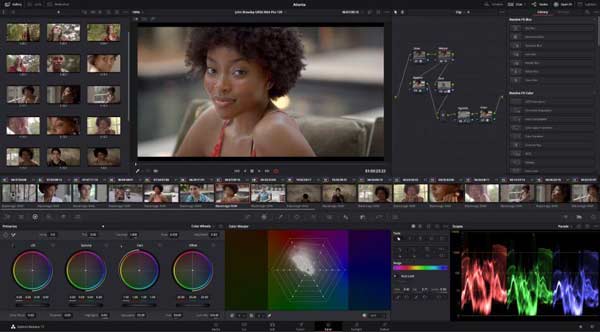
DaVinci Resolve is no longer just a video color grading tool, but has gradually become the professional industry standard. Its AI Neural Engine enables frame-by-frame control, making it an essential component of modern high-end workflows. Unlike standalone AI apps, Resolve integrates AI directly to perform tasks such as color grading and footage fixes.
PROS
CONS
Summary:
DaVinci Resolve and its Neural Engine are well-suited for frame-by-frame control.
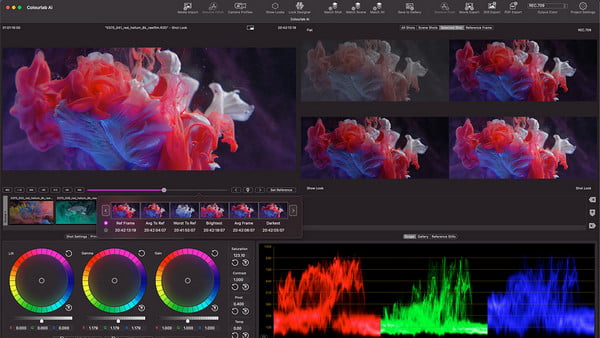
Colourlab.ai is a dedicated AI engine designed to automate the most tedious mechanical parts of the color grading process, allowing colorists to focus entirely on the creative look. It scans your video timeline, groups shots, and intelligently applies color grading. Colourlab also integrates directly with editing software like Adobe Premiere Pro and Final Cut Pro, making it well-suited for professional creators.
PROS
CONS
Summary:
Colourlab.ai and its specialized perceptual matching technology are well-suited for cinematic aesthetics.
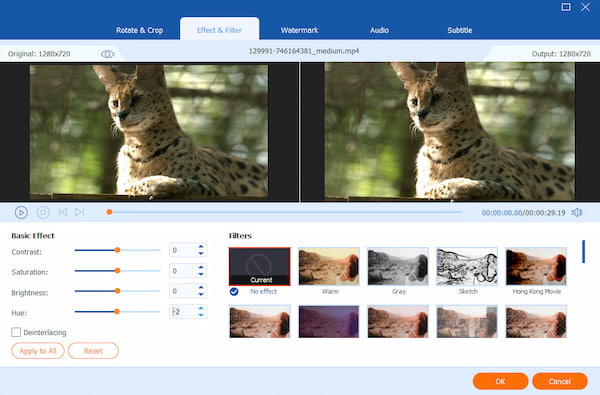
AnyMP4 Video Converter Ultimate is a powerful all-in-one video editor. Its interface is extremely user-friendly, making it ideal for creators who find professional NLEs (Non-Linear Editors) too complex but still want a polished look. It offers a wide range of editing features, allowing you to easily adjust video effects and apply preset filters to customize your videos. Additionally, AnyMP4 uses AI to correct the color with one click, automatically balancing the brightness, contrast, and saturation of your footage.
Secure Download
Secure Download
PROS
CONS
Summary:
AnyMP4 Video Converter Ultimate can batch-enhance and color-correct social media content or archived footage.
Manual color grading and AI-driven color grading are essentially in conflict between logic and emotion. AI can calculate the correct pixels, but it cannot perceive the correct emotions. The manual operations of professional colorists can focus on emotion and narration, which is the ability that AI still lacks at present.
| Manual Color Grading | AI-Driven Color Grading | |
|---|---|---|
| Foundation | Mathematical logic based on lighting ratios, skin tone averages, and Rec.709 standards. | Creative intuition based on script themes, character arcs, and historical film aesthetics. |
| Consistency | Requires intense focus and "eye fatigue" management over long sessions. | Can match 500 clips from 5 different cameras in under a minute. |
| Precision | Relies on power windows and manual tracking for complex shapes. | Can track the iris of a person or a specific car door automatically. |
Is AI color grading better than manual color grading?
Better is a relative concept. AI color grading is better for speed, technical correction, and consistency, while manual grading remains superior for creative storytelling and emotional impact.
Does AI work on Log footage?
Yes. In fact, Log footage is where AI color grading actually shines the brightest.
Will AI replace colorists?
Industry professionals generally believe that AI will not replace colorists, but it is fundamentally replacing the traditional job description of a colorist.
Nowadays, the field of AI color grading has gradually matured. It differs from manual color grading in several aspects—for instance, AI excels at handling tedious and repetitive parts of the work, and it is better in speed, technical correction, and consistency. If you wish to integrate it into your workflow, consider selecting one that suits you best from the three AI color grading tools recommended in this article, each tailored for different skill levels. AnyMP4 Video Converter Ultimate's one-click color correction and ability to adjust video colors without loss of image quality make it one of the best choices! If you have other better suggestions, feel free to share them in the comments section.
Secure Download
Secure Download
 Updated by Mark Cristobal to Edit Video , Editor
More readings
 Colorize Video: Enhance Visuals Like Never Before
Discover the magic of colorize video! Learn how to breathe life into old black-and-white footage, turning them into stunning, vibrant masterpieces.
 Color Grading in Premiere Pro to Fix Video Visual Effect
Check this and learn the secrets of color grading in Premiere Pro with this guide. Elevate your editing skills and create visually captivating content.
 Improve Video Using Color Correction in Premiere Pro
Do your videos look bland? Check this post and learn the color correction in Premiere Pro. This post includes the steps to achieve a natural-looking clip.
 3 Ways to Change the Color of a Video (Beginner Guide)
Learn how to change the color of a video like a pro here! Discover effective methods for color transformation to add visual impact to your videos.
 Add your comments to join the discussion here