
Podcasts are digital content where the hosts talk about specific topics of their chosen niche or field of discipline. This media has evolved over time to replace audio talk shows from late-night radio stations and early-morning shows on television. Today, people have the option to listen to talk show-like content whenever they want and wherever they are, and this was made possible by podcasting. In terms of producing this form of content, Descript is one of the most popular software in this regard. That is why this article will focus on conducting a detailed Descript review to help potential podcast producers decide if this platform is the one that they should choose. Additionally, we will also provide a similar software that can be an ideal Descript alternative for users who want to use a more straightforward tool. Please continue reading this review article below to learn more about this topic.
If you want to try podcasting for free, Descript might be a good option since it provides all the essential tools needed for podcasting. However, its free version will swiftly become limited if you want to record podcast episodes seriously. It is more advisable to avail of the platform’s monthly or annual premium plan to enjoy the full benefits available in the tool. For users interested in buying the paid version of the platform, their Creator version has a price tag of $12. On the other hand, their most popular Pro offering costs $24 per month. Both plans were billed annually.
Overall Ratings:
All around podcast production tools:
In-client interactive tutorials:
Built-in video editing tool:
AI-powered audio editor:
Entry-level system requirement:
PROS
CONS
Descript is an all-around podcast production tool that can be used to edit, record, transcribe, and publish podcast recordings. With that in mind, this makes for a great starter tool for users who have no multimedia background since Descript can provide most of the tools required for podcasting. However, its free version may be considered limited, making it a non-optimal choice for podcasters who want to start their journey for free. Additionally, free-to-use tools that can be used for podcast production are easy to come by, making Descript all-in-one offering a less-than-impressive feature.
Despite that, interested content creators who want to start their podcasts should strongly consider Descript as an investment since the tool’s paid plans can drastically improve the recording experience of beginners. This was made possible by the program’s templates, which are difficult to produce manually since overlay production involves a lot of video editing experience.
Recommendation
AnyMP4 Provides Verified Info by Doing the Following
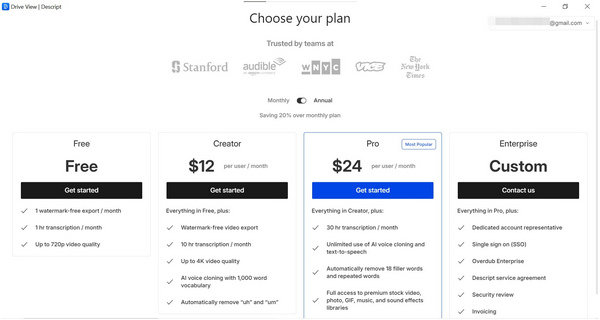
For an all-around tool that offers versatile features, Descript is impressive since the platform can be used and downloaded for free. Despite the limitation of the platform’s free version, it is still perfectly adequate for regular podcast recording sessions, especially for those that are releasing episodes on a monthly basis since Descript Free can only export watermark-free videos monthly. Moreover, the 720p video quality limit is not that big of a deal since most podcast fans consume the platform as audio-only anyway.
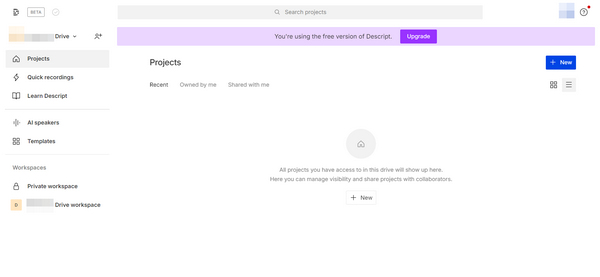
Since the free version of the tool has no available templates, first-time users trying out the platform might feel like the software’s interface lacks content, especially if they have already completed the interactive tutorial section. This impression will not look good to curious installers who want to try at least the basics of Descript, such as simple recording editing or using a basic template as a guide.
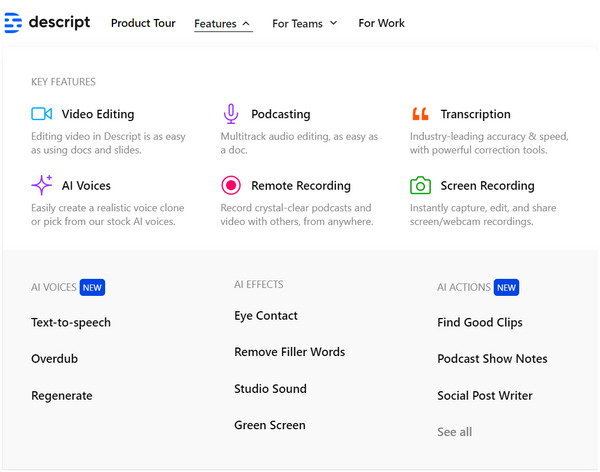
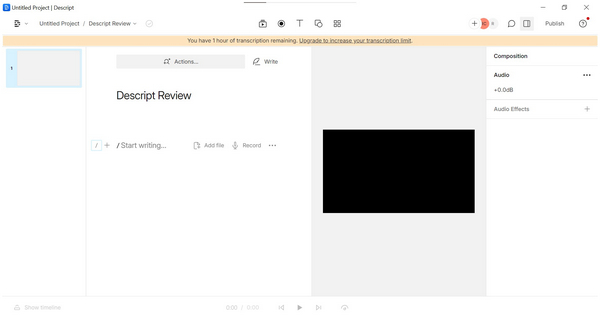
Descript made a good job of combining every essential podcast producing tools in one software. To start, its podcast editing tool is simple enough that even beginner editors can use it effectively with little skills involved. On top of that, it can be used while recording making the editing process feel smoother. On the other hand, the audio editing AI that can cut filler words is smart enough to accurately clean voice recording. This tool is a huge help for editors. Meanwhile, the tool’s integrated transcript writer is another option to help the writers of a podcast production team. With all these tools combined, Descript may be considered as an all around digital podcast production studio.
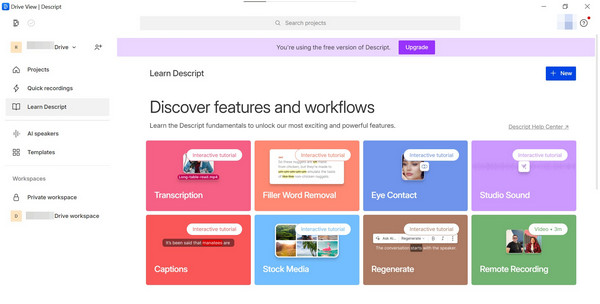
The interactive tutorials are one of the most effective tools available in Descript’s free version. In addition to its intended use to teach new users, this can also be used to attract serious podcast producers who want to switch to a new production platform. The interactive tutorial of the tool is enough to provide the premium experience that paying consumers can enjoy if they avail the Creator, Pro, or Enterprise version of Descript. This is impressive for a simple tutorial tool.
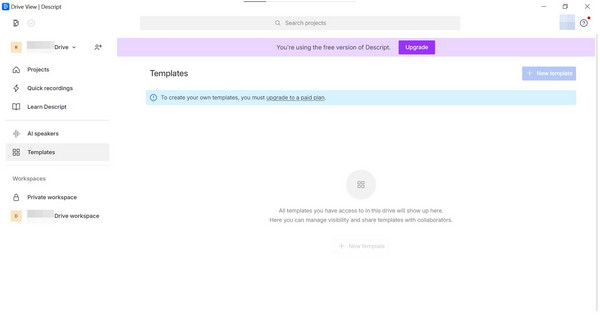
On to the less-than-impressive part of using Descript, the Free version’s lack of template access is a huge blow for the platform since users often rely on this as a major factor in terms of providing accessibility and ease of use. The absence of ready-to-use templates may discourage new users from starting to record at all. Especially those who are complete beginners in recording and editing. Additionally, adding overlays and windows to highlight each speaker is not easy to do in a traditional editing tool.
Descript should at least add a few basic templates to encourage beginner podcasters to try out their software.
According to The Podcast Host
Descript is a good tool if you are mainly concerned about the text of your podcast and what’s spoken and transcribed. The video templates and features are really attractive, and they make the video features easy to use.
According to a Verified G2.com Reviewer
The platform is dismissive of customer concerns and their customer service is subpar at best.
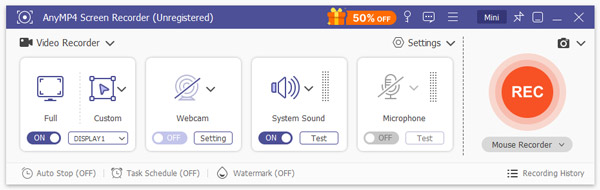
Descript provides an all-in-one platform for podcast production. However, it is primarily optimized for simple screen and audio recording combined with AI transcription. Its screen recording features are limited to full-screen or window capture. Additionally, many users experience slower workflows due to transcription and export speeds. For high-quality video production and advanced editing capabilities without recurring fees, AnyMP4 Screen Recorder presents a compelling alternative.
Beyond recording screens, AnyMP4 Screen Recorder also includes traditional video editing tools. It allows you to add keyframes, apply filters, trim clips, and manage multi-track recordings. This makes it suitable for podcasters, tutorial creators, and streamers who want perfect results without relying on external video editing software. In comparison, Descript’s editing tools are more focused on audio and script-based edits rather than professional video manipulation.
Other AnyMP4 Screen Recorder Main Features:
Secure Download
Secure Download
AnyMP4Screen Recorder supports fast local video encoding. It ensures that recording sessions are quickly saved and ready for post-production. One of its biggest advantages is that it is a one-time purchase professional screen recorder. This means you do not need to pay recurring subscription fees. This makes it a perfect option for those who do not require AI transcription or other cloud-based services but still want a high-quality recording and editing solution.
| Descript | VS | AnyMP4 Screen Recorder |
| Subscription-based (Creator: $16/mo, Pro: $24/mo, billed annually) | Pricing | $49.96 Lifetime License |
| Fullscreen and window capture | Screen Recording Professionalism | Fullscreen, specific window/tab, custom region, game mode, timed recording, multi-track audio, etc. |
| AI transcription and filler word removal | Transcription / AI Features | Focuses on local high-quality recording |
| Trimming and text overlay | Traditional Video Editing | keyframes, filters, multi-track editing, real-time annotations, advanced trimming, etc. |
| Cloud-based features slows workflow | Network Dependency | Fully local processing, fast export, and no network required |
Is Descript a good podcast production tool?
Yes, Descript is a good podcast production software. This was made possible since the platform is already equipped with the essential tools that are needed for podcast production. Some of these essential software are built-in video editor, AI audio editing, screen recording, script transcription, and more.
Can I use screen recording software as a tool to capture podcasts?
Yes, you can. Screen recording tools are good entry-level podcast production software. They are perfectly capable of capturing digitally recorded podcasts on voice channels such as Discord. AnyMP4 Screen Recorder should be the one on top of your list when talking about screen recorders since it can capture both audio and videos losslessly.
Is it hard to produce podcast episodes on my own?
It depends on your multimedia skills. Podcast production involves a lot of media communication skills since it requires editing, script writing, and audio recording skills. Thankfully, all of these necessities can be covered by the right software, such as Descript.
Is Discord a good platform to conduct podcast recordings?
Yes, Discord is perfectly adequate for capturing digital podcast recordings. You can simply use a screen recording tool to capture live Discord calls. Just make sure that your recording software can capture audio and video losslessly. AnyMP4 Screen Recorder can do this with no problem.
What is the best screen recording tool for podcast production purposes?
AnyMP4 Screen Recorder is the best tool for capturing podcast episodes on screen. The platform is equipped with the right tools to screen record computers with 1:1 quality. It can also record system audio losslessly with no problem.
Now that we have discussed what makes Descript a good podcast production platform, along with its limitations, especially as a free tool. We hope that our review has helped you decide if using the platform suits your needs. On the other hand, we hope that the presented alternative should help you, too, if you ever feel like a Description offering might be overkill, especially for first-time podcast producers.
Please share this article online to help other aspiring podcast creators find their ideal recording tool.
 Updated by Alice Thorne to Recorder
More readings
 [Best] How to Delete Podcasts from iPhone
The podcast takes a lot of storage space on iPhone andit may affect the iPhone performance. Here are the best ways to delete podcasts from iPhone.
 Everything You Should Know about Audacity Recording Software
If you're looking to get started in podcasting or recording music with Audacity, you are at the right place. Read the complete guide for Audacity.
 100% Working Methods to Record Discord Audio on Windows and Mac
Though there is no built-in recording option in Discord service, you can get multiple methods to do the job from this article as well as step-by-step guide.
 What Is Mitel Call Recorder and How to Record Phone Calls in Mitel
Read and get the detailed information about Mitel call recorder. Here you can know what it is and how to use the Mitel MiVoice call recording feature here.
 Add your comments to join the discussion here