Top 10 Descript Alternatives for Video & Podcast Creators
Quick Verdict: Best Descript Alternatives
- Best for Remote Podcasting: Riverside.fm offers superior local-track recording without the cloud-syncing lags of Descript.
- Best for Text-Based Editing: Veed.io offers a smoother browser experience and highly accurate automatic transcription.
- Best for Lightweight Offline Recording: If Descript is crashing your computer and you need reliable, lossless audio/video capture without the heavy AI bloat, AnyMP4 Screen Recorder is the most stable offline alternative.
Podcasting has evolved since its humble beginnings in the late 2010s. Since then, most audio platforms now offer this modernized version of television and radio talk shows on their main services. Because of the medium's popularity, companies like Descript have developed platforms that make podcast production easier, especially for those testing the podcast waters. In this article, we will help aspiring podcast producers decide on the best Descript alternatives to replace the platform mentioned. This may be rooted in the tool's limited free version or other factors. With that in mind, we will feature 10 podcast production tools, ranging from the most beginner-friendly to those made for professional audio engineers. Please continue reading below to learn more.
Why You Might Need a Descript Alternative
Descript is known for its innovative text-based video and audio editing. However, many users eventually look for alternatives due to performance, pricing, and workflow limitations. Below is a pain-point analysis explaining the most common reasons creators, podcasters, and video editors consider switching.
- • Descript is built on the Electron framework, which can consume more RAM and CPU resources. This can slow down lower-spec PCs.
- • Descript lag when scrubbing timelines, editing transcripts, or rendering previews, particularly on large projects with multiple media layers.
- • Descript relies on cloud-based syncing, which can cause delays if your internet connection is slow or unstable.
- • Descript's AI transcription can still produce inaccurate transcripts, especially with accents, background noise, or technical terminology.
- • Descript's premium paywall can make its advanced features inaccessible for budget-conscious creators.
Top 10 Descript Alternatives at a Glance
|
Best Alternative For |
Text-Based Editing |
AI Audio Cleanup / Features |
Platform |
Starting Price |
| AnyMP4 Screen Recorder |
Lightweight local recording (No lag, no cloud syncing crashes) |
 |
 Yes (Mic Noise Cancellation) Yes (Mic Noise Cancellation) |
Windows, Mac |
$12.45 |
| Riverside.fm |
Remote studio podcasting (Direct competitor to Descript/SquadCast) |
Yes |
Yes (Magic Audio) |
Cloud, iOS, Android |
Free / $15/mo |
| Veed.io |
Browser-based AI video editing (Great for social media) |
Yes |
Yes (Clean Audio) |
Cloud |
Free / $18/mo |
| Podcastle |
AI-powered podcast studio (Closest overall match to Descript) |
Yes |
Yes (Magic Dust, AI Voice) |
Cloud, iOS |
Free / $11.99/mo |
| CapCut |
Free auto-captions & short-form video (Massive market share) |
Yes |
Yes (Voice isolation) |
Win, Mac, Cloud, App |
Free / $9.99/mo |
| Adobe Premiere Pro |
Professional video editing (Now includes text-based editing) |
Yes |
Yes (Enhance Speech) |
Windows, Mac |
$22.99/mo |
| Trint |
Journalists & heavy transcription (Focuses purely on text-to-audio editing) |
Yes |
|
Cloud |
$55/mo |
| Zencastr |
Video podcasting (Alternative to Riverside and Descript) |
|
Yes (Smart audio filters) |
Cloud |
Free / $18/mo |
| Alitu |
Automated podcast creation (Best for absolute beginners) |
Yes |
Yes (Auto-leveling) |
Cloud |
$38/mo |
| Auphonic |
Descript "Studio Sound" alternative (One-click mastering) |
|
Yes (AI Mastering & Leveler) |
Cloud |
Free / Credits |
Best for Offline & Lag-Free Recording
1. AnyMP4 Screen Recorder (Best Lightweight Local Alternative)
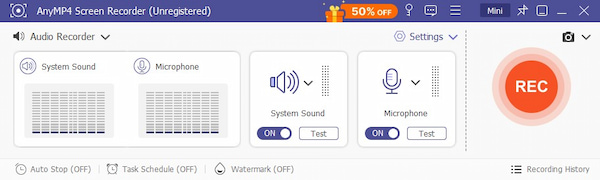
While Descript revolutionized podcasting with its text-based editing workflow, its heavy reliance on cloud syncing and AI processing makes it notoriously resource-intensive, often causing lag or crashes on standard laptops. In our testing, longer recordings and larger projects tend to increase memory usage significantly.
If your primary goal is to capture high-quality, lossless podcasts or screen recordings without dealing with heavy software bloat or expensive monthly cloud subscriptions, AnyMP4 Screen Recorder is the perfect lightweight screen recorder without lag. Instead of fighting with Descript's syncing issue, you can flawlessly record your raw audio and video in real time. Think of it as a rock-solid foundation for your content production workflow. You can capture a podcast or screen recordings locally, export a lossless file, and then edit it in any editor you prefer. In our testing, the recording process remained smooth and stable even during long sessions. It helps avoid the performance issues commonly associated with cloud-based editors.
PROS
- No cloud syncing required; everything records locally.
- Lightweight software with low CPU and memory usage.
- Hardware-accelerated lossless audio and video recording.
- Built-in microphone noise suppression and audio enhancement.
- Supports screen, webcam, and system audio recording in one tool.
CONS
- No AI text-based editing like Descript.
- Not designed for podcast transcript editing workflows.
Best for Remote Podcasting & Interviews
2. Riverside.fm (Top All-in-One Podcast Studio)
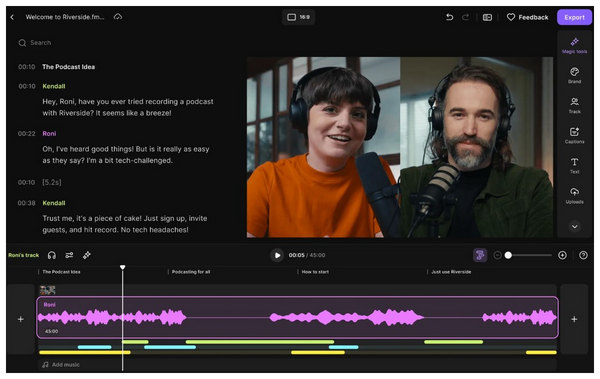
Riverside FM is a popular tool for recording remote podcasts and interviews in studio-quality audio and video. It focuses on high-quality local recordings for each participant, which are uploaded to the cloud after the session. In our testing, the platform delivered clear video and separate audio tracks for each guest, which is extremely useful when editing multi-person podcasts. Compared to Riverside vs Descript, Riverside is better suited for live podcast recording and remote interviews than for text-based editing.
PROS
- Built-in live streaming and audience call-ins.
- Supports high-quality video podcast recording.
- Records separate local audio/video tracks for each participant.
CONS
- Editing features are more limited than Descript.
- Requires stable internet during recording sessions.
3. Zencastr (Great for Video Podcasting)
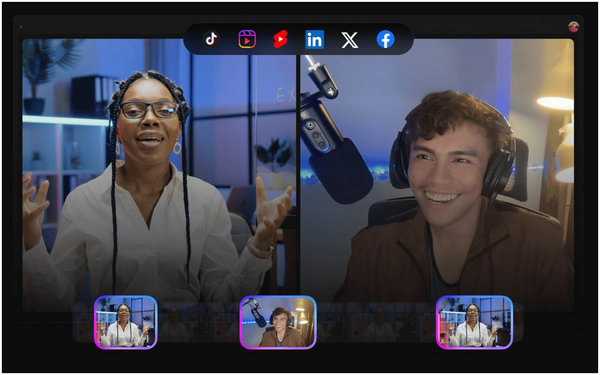
Zencastr is a video podcasting platform designed for creators producing remote audio and video podcasts. It records each participant locally and automatically syncs everything to the cloud. In our testing, Zencastr worked well for multi-guest podcasts, especially when recording both audio and video podcast episodes for platforms like YouTube.
PROS
- Built-in automatic post-production tools.
- Reliable local recording for remote guests.
- Browser-based setup with no downloads required.
CONS
- Editing features are basic.
- Performance can depend on browser stability.
Best for AI Text-Based Video Editing
4. Veed.io (Best for Social Media Creators)
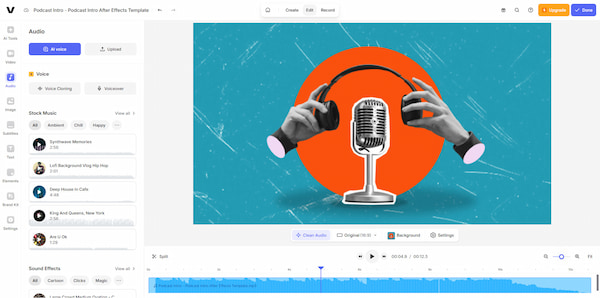
VEED.io is a browser-based editing platform designed for fast social media content creation. Its text-based video editor allows users to edit videos by modifying the generated transcript. In our testing, VEED worked well for short-form content, YouTube clips, and social media posts, thanks to its built-in templates, auto-subtitles, and quick export presets.
PROS
- Cloud-based collaboration features.
- Automatic subtitles and translation tools.
- Social media templates and resizing tools.
CONS
- Export quality limits on lower plans.
- Performance depends on internet speed.
5. CapCut (Best Free App for Auto-Captions)
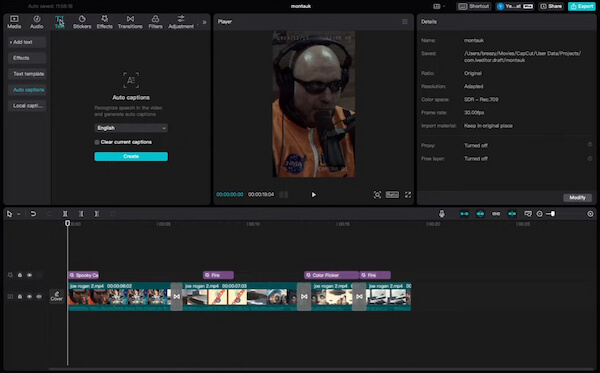
CapCut is a long-known free video editor with powerful AI features and tight integration with social media platforms. In our testing, its automatic transcription tools and auto-caption generator were surprisingly accurate, especially for short-form videos like TikTok, YouTube Shorts, and Instagram Reels.
PROS
- Free with powerful AI features.
- Accurate automatic transcription tools.
- Built-in effects, templates, and transitions.
CONS
- Cloud-centric workflow.
- Less suitable for long podcast editing.
Best for AI Audio Production & Cloning
6. Podcastle (Closest Feature Match to Descript)
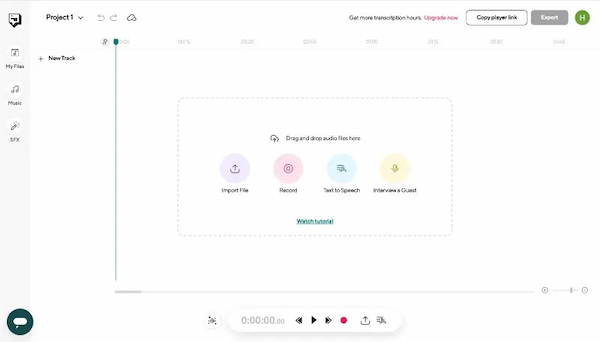
Podcastle is one of the closest tools to Descript in terms of feature set. It combines AI recording, editing, voice cloning, and transcription into a single platform. In our testing, Podcastle stood out for its AI podcast editing software features, including noise reduction, automatic editing, and voice cloning for content corrections.
PROS
- Voice cloning and text-to-speech tools.
- Built-in noise removal and audio cleanup.
- AI-powered podcast recording and editing.
CONS
- Cloud-based workflow.
- The free plan has feature limitations.
7. Alitu (Best Automated Maker for Beginners)
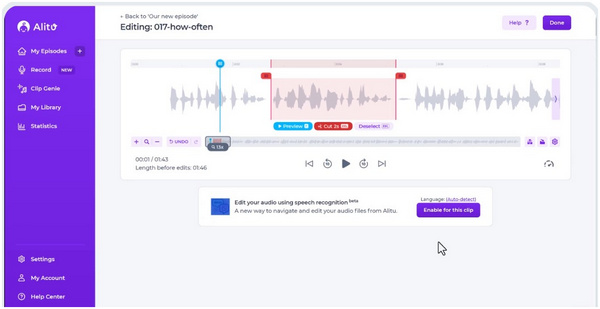
Alitu focuses on automating podcast production, making it one of the easiest tools for beginners. The platform automatically handles audio leveling, noise reduction, and publishing. In our testing, Alitu was helpful for creators who prefer a simple workflow over complex editing tools, making it a practical option among many Descript alternatives.
PROS
- Integrated podcast publishing.
- Built-in audio cleanup and leveling.
- Fully automated podcast production workflow.
CONS
- Limited manual editing control.
- Subscription required for full features.
Best for Professional & Heavy-Duty Transcription
8. Adobe Premiere Pro (Best for Pro Editors)
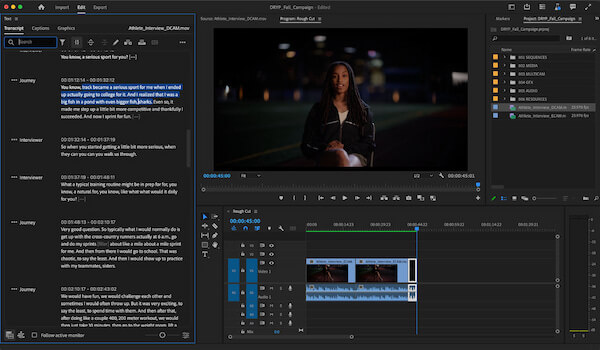
Adobe Premiere Pro is a professional-grade editing platform used in film, broadcasting, and YouTube production. It includes advanced transcription and speech-to-text tools directly inside the editing timeline. In our testing, the transcription panel enabled editors to search, cut, and rearrange dialogue based on the text. This can function as a partial Descript overdub alternative when combined with voice editing and audio tools.
PROS
- Powerful speech-to-text transcription.
- Advanced color grading and audio tools.
- Industry-standard professional editing suite.
CONS
- High subscription cost.
- Steep learning curve for beginners.
9. Trint (Best for Journalists and Researchers)
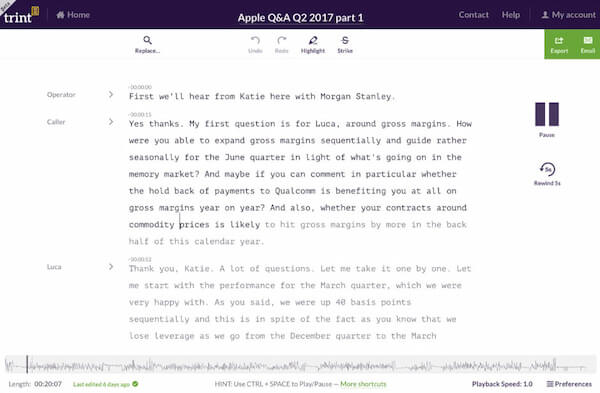
Trint specializes in high-accuracy transcription and collaboration. Journalists, researchers, and media teams commonly use it as a reliable transcript for interviews or documentaries. In our testing, the automatic transcription tools performed well during long interviews, and the collaboration tools enabled teams to highlight easily, tag, and export quotes.
PROS
- Supports multiple languages.
- Good for interviews and research.
- Highly accurate transcription engine.
CONS
- Limited media editing capabilities.
- Expensive compared with basic transcription apps.
Best for AI Audio Cleanup (Studio Sound Alternatives)
10. Auphonic (Best One-Click Audio Mastering)
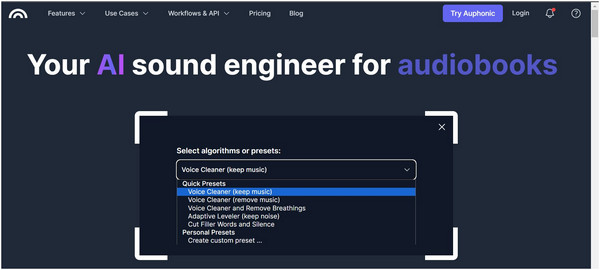
Auphonic is used for automatic audio mastering and cleanup. Instead of editing manually, you upload your recording and let the AI handle leveling, noise reduction, and loudness normalization. In our testing, it improved podcast audio recorded in non-studio environments, making it a strong AI audio cleanup alternative to tools that offer studio-sound effects.
PROS
- One-click audio mastering and leveling.
- Supports batch processing for podcasts.
- Automatic noise reduction and loudness correction.
How to Choose the Right Descript Alternative?
Not all Descript alternatives are built for the same workflow. Some tools focus on AI editing, while others specialize in high-quality recording, transcription, or audio cleanup. Before choosing a platform, consider the following key factors:
- • Cloud-Based vs. Local Software: Decide whether you prefer a cloud-based platform or a local recording tool. Cloud tools like Riverside FM rely on internet connectivity and online processing. Meanwhile, local software like AnyMP4 Screen Recorder records directly on your computer, reducing lag and avoiding syncing delays.
- • Budget and Pricing Model: Some tools offer free versions with limitations, such as CapCut, while others use monthly subscriptions, like Descript. If you only record occasionally, a free or one-time purchase tool may be more cost-effective.
- • Need for AI Voice Cloning or Text-Based Editing: If your workflow relies on AI-powered editing or voice cloning, platforms like Podcastle offer features similar to Descript. If you only need recording and basic editing, a lightweight recorder may be enough.
- • Recording vs. Editing Priority: Some tools specialize in high-quality recording, such as Zencastr, while others focus on advanced post-production editing, such as Adobe Premiere Pro.
- • Transcription and Caption Needs: If you frequently need transcripts for interviews or subtitles, consider tools with automatic transcription, such as Trint.
- • Audio Cleanup and Mastering: For creators who mainly want better sound quality, tools like Auphonic provide automatic audio leveling and noise reduction.
FAQs About Descript Alternatives
What's better than Descript?
A: If you want to avoid Descript's cloud dependency, AnyMP4 Screen Recorder is an excellent offline tool for capturing lossless audio and video. For offline editing, Adobe Premiere Pro now offers local text-based editing features.
Q: Is there a free alternative to Descript for video editing?
A: Yes, CapCut offers robust free video editing with auto-captions and basic text-based editing, making it a great free substitute for Descript's core features.
Q: How does Riverside compare to Descript?
A: Riverside is better for recording remote guests because it records high-quality local tracks separately. Descript is better for post-production editing. Many creators record in Riverside and edit in Descript.
Q: Why is Descript so slow on my computer?
A: Descript is a heavy, Electron-based app that constantly syncs large audio and video files to the cloud. If you experience lag, switching to a lightweight local recorder, such as AnyMP4 Screen Recorder, can resolve performance issues.
Q: What's better than Descript?
A: For ease of use, AnyMP4 Screen Recorder tops Descript because it is more straightforward and beginner-friendly. On top of that, it can also capture lossless audio and video recordings. However, it lacks the more advanced tools present in Descript.
Q: Can I use Descript for free?
A: Yes, Descript has a free version. However, it is extremely limited. It does not have templates, which is an ideal tool for beginner podcast producers.
Q: Is Descript free forever?
A: Yes, Descript is always available. However, it has limitations. Some of these are the 1-time monthly limit for non-watermarked videos, and the video recording limit is 720p.
Q: Is Descript a good editing software?
A: Yes, it is. It is an all-around podcast editing software. Descript is also easy to learn because of its multiple interactive tutorials.
Q: What is an easy-to-use alternative to Descript?
A: AnyMP4 Screen Recorder is the easiest podcast recorder available today. This makes it a good alternative to Descript. The tool is more straightforward but less advanced.
Conclusion
Finding the right Descript alternatives ultimately depends on your workflow, budget, and the type of content you create. While Descript is known for its innovative text-based editing and AI-powered podcast tools, it may not be the best option for everyone, especially if you experience high memory usage, lag from cloud syncing, or rising subscription costs.
If your main goal is recording high-quality audio or screen content without lag or cloud dependency, a lightweight local tool like AnyMP4 Screen Recorder can be the most practical choice. It lets you capture lossless video and audio directly on your computer. This software avoids the performance issues commonly associated with cloud-based platforms.


 Add your comments to join the discussion here