
Free Download100% Clear & Secure
Free Download100% Clear & Secure
Quick Summary:
The MP4 file is a versatile multimedia format usually used to store movie or video clips, but it can also contain subtitles or images. While you might encounter the VOB format when extracting files from a disc, it remains the legacy standard for physical media. Today, many users are prioritized on digitizing old DVDs to preserve their aging collections before the physical discs degrade.
However, most mobile devices are not compatible with this VOB format. Therefore, you have to export your VOB video to MP4 if you want to watch your favorite DVD movie on your smartphone or other media player. But how do you convert formats of videos from VOB to MP4? Don’t worry. In this article, we will show you the best 10 methods to achieve it effortlessly.
Before diving into the full list, here is the benchmark we used to evaluate the efficiency of the top-tier converters:
| Best For | Conversion Speed | Quality Loss | Watermark/Limit | |
|---|---|---|---|---|
| AnyMP4 Video Converter Ultimate | Batch & Pro Quality | Ultra-Fast (85s) | 1:1 Lossless | No |
| HandBrake | Open-source Batch | Medium | High | No |
| WinX Free VOB to MP4 Converter | Basic Desktop Users | Medium | Low | No (on free version) |
| Aiseesoft Free Video Converter | Simple Transfers | Medium | Low | No |
| FFmpeg | Power Users / CLI | Fast (User-defined) | Adjustable | No |
| Freemake Video Converter | Entry-level Users | Slow | Low | Yes (Free version) |
| Zamzar.com | One-off small files | Network Dependent | Medium | 50MB Limit |
| Convertfiles.com | Quick Web Tasks | Network Dependent | Medium | 250MB Limit |
| Online Converter | Browser-based users | Network Dependent | Medium | 200MB Limit |
| Filezigzag | Small File Conversion | Network Dependent | Medium | 50MB Limit |
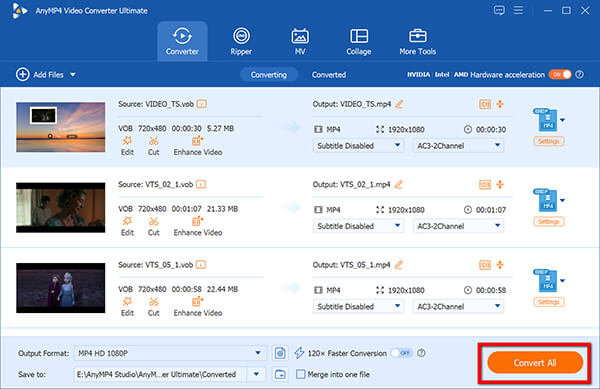
AnyMP4 Video Converter Ultimate is the best VOB to MP4 video converter, offering significantly more powerful functions than standard freeware. What truly distinguishes this all-in-one deluxe Mac and Windows software from free alternatives is its industry-leading Hardware Acceleration technology. By leveraging NVIDIA NVENC, AMD APP, and Intel Quick Sync, it offloads the heavy lifting from your CPU to your GPU, allowing you to easily export your VOB video to MP4 on Windows and Mac at lightning speeds.
1. Install and launch the program
Free download and install this VOB to MP4 converter.
Secure Download
Secure Download
Hit the Add Files button to find the video you want to convert to MP4, as long as you open AnyMP4 Video Converter Ultimate.
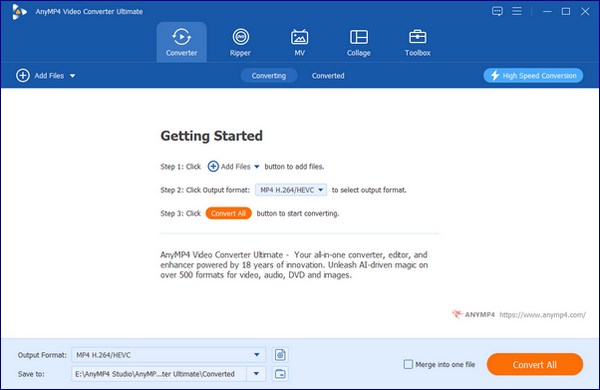
Note: VOB is included in DVD files, and if you want to keep the DVD menu and chapters, then you can switch to Ripper tab to load a DVD file.
2. Choose output format MP4 video
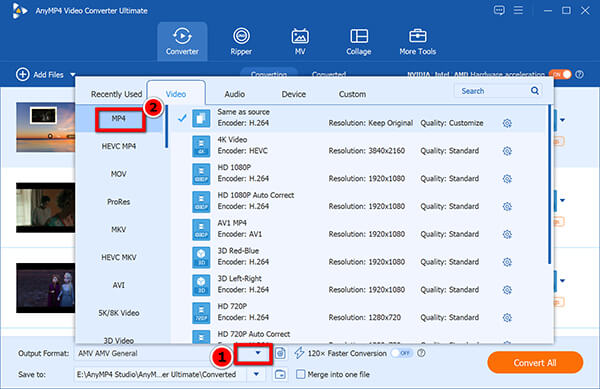
When entering the export list, just drop down the list of Output Format and choose MP4 as the export one with high quality preservation.
This tool supports 1080p HD, even 4K output, so that you can get a high-resolution file.
3. Set video and audio settings
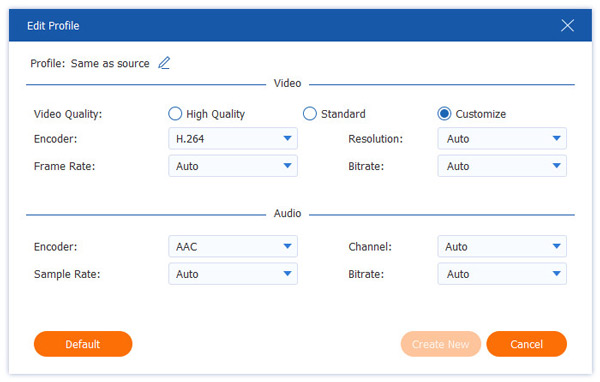
Before converting the VOB file to MP4, this converter allows you to adjust the audio and video Settings, including the encoder, bitrate, frame rate, sample rate as well as audio channel by clicking the Custom Profile option next to the output format.
4. Convert VOB to MP4
Start the transformation process. Just click the big button of Convert All in the lower right corner of the main window to start exporting VOB video to MP4.
To make sure the conversion speed faster, you can enable the GPU acceleration at the top-right corner.
While professional software offers the fastest speeds, several free desktop tools provide reliable conversion for users on a budget. Here are the top-rated free methods to turn your VOB files into MP4 format.
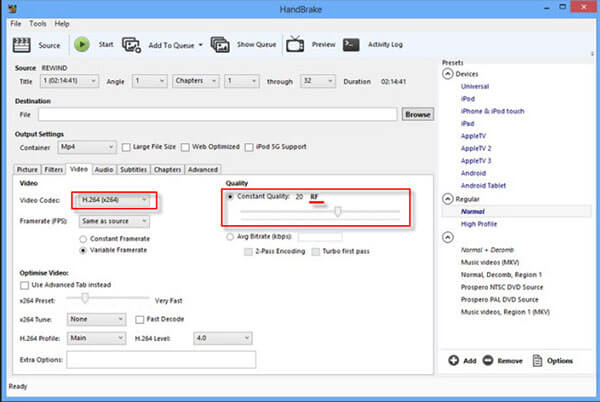
HandBrake is a powerful, open-source video transcoder favored by advanced users. It excels at converting VOB videos to MP4 while offering granular control over the output. For power users in the US and Europe, HandBrake is highly recommended because it supports Batch Scan (processing entire folders at once) and preserves Chapter Markers, making it ideal for digitizing long DVD movies.
1. Download and Launch
Open HandBrake and select your VOB file or an entire VIDEO_TS folder in the main interface.
2. Choose Preset
Navigate to the Summary tab and ensure the format is set to MP4. You can select a high-quality preset (like HQ 1080p30 Surround) to maintain visual fidelity.
3. Configure Chapters
In the Chapters tab, ensure Include Chapter Markers is checked if you want to keep the DVD's original structure.
4. Convert
Choose your save location and click the Start Encode button.
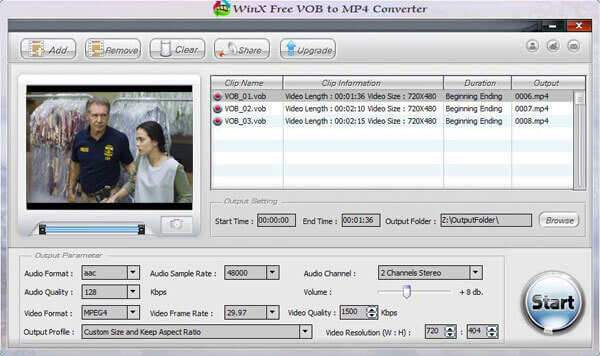
WinX Free VOB to MP4 Converter is a dedicated solution for DVD-based formats. It supports a wide variety of output formats, such as MP4, AVI, and MKV, ensuring high-quality results even in the free version.
1. Import Files
Launch the software on your Windows or Mac and click the + Video button to import your VOB file.
2. Select Profile
Hit the Video tab and select the MP4 format from the left sidebar.
3. Set Resolution
Choose your desired video resolution to confirm the output specifications.
4. Run Conversion
Click the Run (or Convert) button. You will be notified once the transformation is complete.
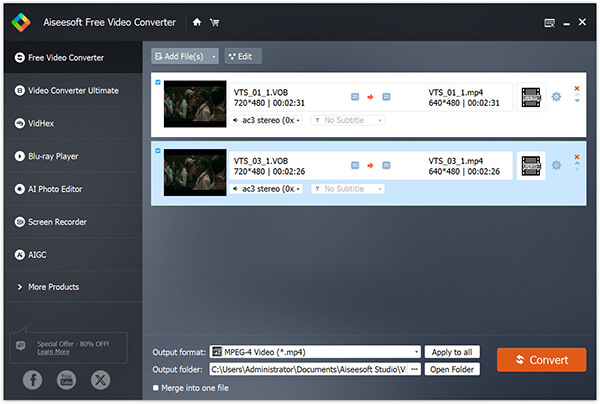
Aiseesoft Free Video Converter is a versatile tool for converting any video for free. It supports exporting VOB files to MP4, MKV, MOV, and more, with specific presets for mobile devices.
1. Launch Software
Open Aiseesoft on your computer.
2. Add VOB
Click the Add File(s) button, select your VOB files or open the DVD folder to load the content.
3. Output Settings
Select MP4 from the video tab. You can also pick an off-the-shelf preset if you intend to play the video on a specific smartphone or tablet.
4. Start
Click the Convert button. The destination folder will open automatically once finished.
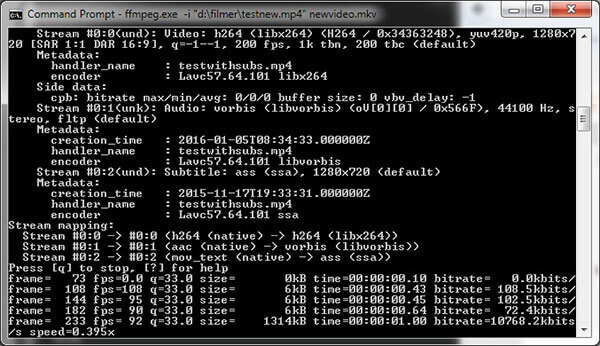
FFmpeg is a leading multimedia framework used to record, convert, and stream audio and video. It earns a strong reputation among tech-savvy users for its speed and flexibility. Instead of complex, outdated strings, we recommend using this professional-grade universal command to ensure a perfect balance between file size and quality:
1. Install FFmpeg
Download and set up FFmpeg on your system (Available for Windows, Mac, and Linux).
2. Run Command
Open your terminal or command prompt and use this optimized command:
ffmpeg -i input.vob -c:v libx264 -crf 18 -c:a aac -b:a 192k output.mp4
3. Technical Note
Using -crf 18 ensures a visually lossless conversion, while -c:a aac provides high-quality audio compatibility for all modern devices.
4. Execution
Press Enter. Once the process completes, your VOB movie is successfully turned into a high-quality MP4.
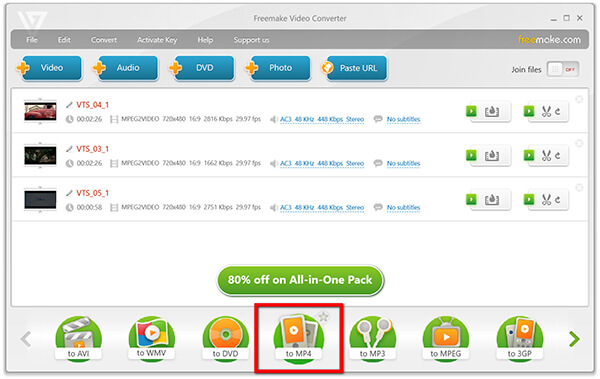
Freemake Video Converter is an easy-to-use tool that supports over 500 formats, including MP4, AVI, and MKV. It is a popular entry-level choice for users who want a professional interface without a steep learning curve.
1. Add Video
Click the + Video button to open your VOB file in the main interface.
2. Select MP4
Choose to MP4 from the bottom format bar.
3. Adjust Parameters
If needed, adjust the frame rate or resolution in the settings pop-up.
4. Convert VOB to MP4
Click Convert to finalize the process.
Note: The free version may include a watermark on longer videos.
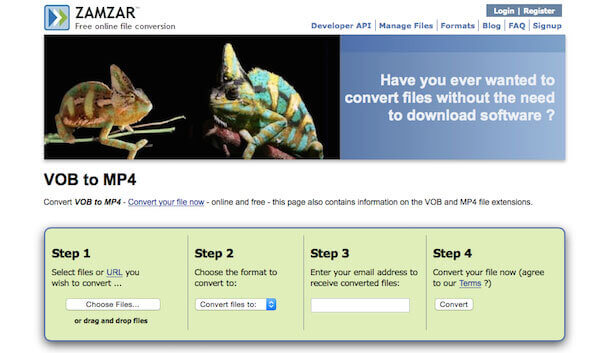
Zamzar is an online file converter which can help you to convert video files without downloading software tools. Also. it supports more than 1000 different types of transformation.
1. Search online for Zamzar and open it.
2. Select files or URL you wish to convert, then Choose the MP4 format to convert to.
3. Enter your email address to receive converted files. But it is optional, so you can fill in or not as needed.
4. Hit the Convert button to export VOB video to MP4 file now.
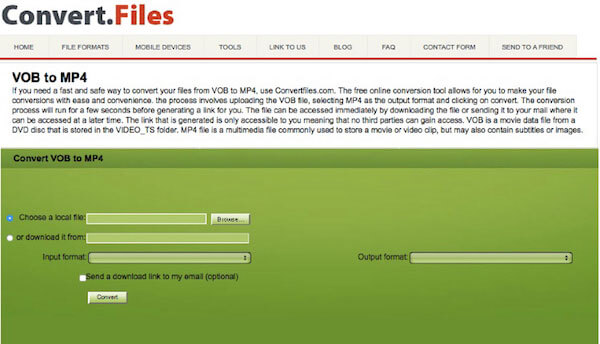
Convertfiles is a free online file converter. It has a lot of different source formats and supports you to convert video and audio files from one format to another (including VOB to MP4), which brings great convenience to many users.
1. Search Convertfiles on Google and Log in the website.
2. Upload the desired VOB file from your computer to this website.
3. Select MP4 as the export format and click on convert.
you can tick the option of "Send a download link to my email". Then you will get a link after running for a few seconds.
4. You can download the file or send it to your mail to access the MP4 file.
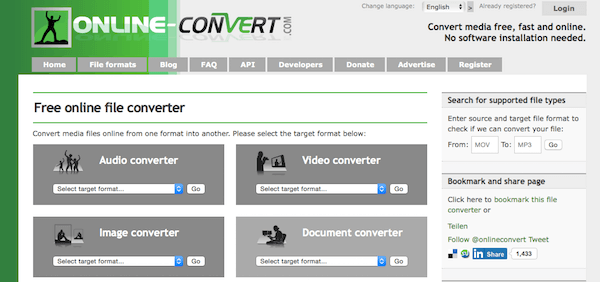
Online Converter is a fast and safe way to convert your videos from VOB format to MP4 format. The free online conversion tool supports you to make your file conversions with ease and convenience.
1. Site in the website of this converter in Google.
2. Select a VOB file. And the maximum file size has to be less than 200 MB.
3. Click button "Convert" to start upload your file.
4. Once upload completed, converter will redirect a web page to show the conversion result.
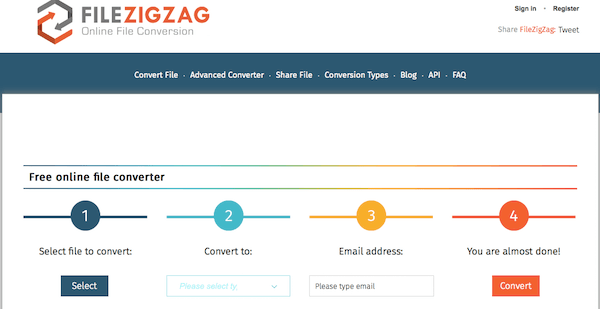
FileZigZag is a decent online file converter. It is easy to handle and supports many kinds of file formats (especially VOB to MP4). It's better than other online conversion tools, but certainly no match for those professional file converter program.
1. Search FileZigZag in Google and open this official website.
2. Click the "select" button and choose a VOB video you want to upload.
3. Select the appropriate format you want to export to, like MP4 and etc.
4. Click the orange button called "Convert". Then you are almost done it!
In the era of streaming and high-definition mobile displays, the VOB (Video Object) format has become a digital relic of the physical media age. While it was the gold standard for DVD-Video in the early 2000s, modern users now face a critical need: digitizing old DVDs to ensure their favorite movies and irreplaceable home videos survive for the next decade.
Understanding the shift from VOB to MP4 requires a look at the underlying codecs. VOB files are essentially containers based on the MPEG-2 program stream. While MPEG-2 was revolutionary for its time, it is an inefficient codec by today’s standards.
Can VLC convert VOB to MP4?
Yes. VLC is not only the media player to play VOB files, but also the VOB converter to convert VOB to MP4. While VLC handles common formats like VOB efficiently, it may not support niche formats such as BIK. For those cases, you can explore dedicated solutions to convert BIK to MP4 using specialized tools or screen recording methods.
What does VOB file mean?
VOB means Video Object, which is the container format in DVD-Video media. It can contain video, audio, subtitles, DVD menus and navigation contents. File in VOB may be encrypted.
Can I play a VOB file on a DVD player?
Yes. However, once IFO or BUP files are absent, a DVD player may not allow DVD navigation.
Will converting VOB to MP4 lose the subtitles or multiple audio tracks?
By default, many basic converters only extract the primary audio and video streams. However, you can preserve all data by using advanced settings.
• In AnyMP4: Use the Merge and Keep All Tracks options.
• In HandBrake: Go to the Audio tab and select Auto Passthru to keep the original DVD sound (like AC3 or DTS). In the Subtitles tab, you can choose to Burn In one track or include multiple tracks as soft subtitles that can be toggled on/off in your player.
Can I play VOB files directly on my iPhone?
No, Apple’s native Photos and Videos apps do not support the VOB format (MPEG-2). To watch your DVD content on an iPhone, you must convert it to MP4 using the H.264 or H.265 (HEVC) codec. This is the primary motivation for conversion: transforming bulky, incompatible disc files into mobile-friendly digital media that you can sync via iCloud or a lighting/USB-C drive.
How do I convert VOB to MP4 using FFmpeg without re-encoding?
If you want a 100% lossless conversion that finishes in seconds, you can perform what is known as Remuxing. This process changes the container from VOB to MP4 without touching the underlying video data. Use the following command:
ffmpeg -i input.vob -c copy output.mp4
Above are the best 10 methods to export VOB file to MP4, so that you can play your favorite DVD on your portable devices conveniently. Now that you have already learn how to convert your VOB video to MP4 format, just go and enjoy the great movie! We hope this guide above can help you to solve your problem!
Secure Download
Secure Download
 Updated by Alice Thorne to Convert Video
Related Articles
 Top 7 Methods to Convert MTS to MP4 Video
Get the best solution to convert MTS to MP4 and feel free to play converted MTS.
 Top 10 Methods to Convert AVCHD to MP4
You can pick up AVCHD to MP4 Freeware to convert videos with zero quality loss.
 Top 3 Methods on How to Remux MKV to MP4
You may encounter some situations when you want to remux video from MKV to MP4.
 5 Best Ways to Turn MP4 Video into GIF
Ever wonder how to turn your MP4 videos into GIF images? Here is the solution to the issue.
