
When you’re hanging out in a Discord voice channel with the squad, the vibes are immaculate, and suddenly, the perfect moment for a "Bruh" sound or a classic Vine quote happens. You rush to upload that hilarious clip you found, only to be met with a frustrating red error message: "File too large" or "Audio too long."
It’s a total buzzkill, right?
The Discord Soundboard is easily one of the coolest features added to the platform in recent years. It lets us inject personality and humor into our conversations in real-time. However, Discord is pretty picky about what it allows through the gate. Because they host millions of these tiny files, they have strict Discord soundboard max file size limits to keep their servers from exploding. Today, I’m going to share my personal experience on how to navigate these limits, what the actual Discord soundboard upload limit is, and how you can fix your audio files so they work every single time.
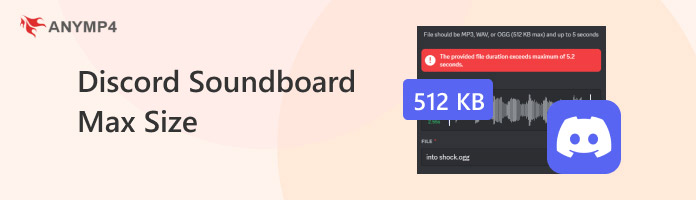
Before we start uploading, we need to know the "Three Pillars" of Discord audio: Size, Time, and Format. If your file fails in even one of these categories, Discord will reject it faster than a mod bans a spam bot.
The most common hurdle is the Discord soundboard file size limit. Currently, Discord caps every single soundboard entry at 512 KB.
To put that in perspective, a standard high-quality song on your phone might be 5,000-10,000 KB. This means you are working with a very tiny "storage budget." This limit exists because soundboard clips are meant to be short, punchy, and instantly playable for everyone in the voice channel without causing lag.
If you have a large video, then you can learn it here to compress video for Discord.
Next up is the Discord soundboard audio length. Discord officially allows sounds up to 5 seconds long.
If you try to upload a 10-second clip, Discord provides a built-in trimmer to help you cut it down, but I’ve found the tool can sometimes be a bit glitchy. It’s always better to have your clip pre-edited to exactly the 5-second mark (or less) to ensure the peak of the joke or sound isn't cut off.
What about the file type? While Discord is pretty flexible, it prefers:
If you have a choice, stick with MP3. It offers the best balance between a small file size and decent audio quality, making it much easier to stay under that 512 KB limit.
So, you have a 10-second WAV file that is 2 MB. It’s too long, the wrong format, and way over the size limit. How do we fix it?
When I’m prepping sounds for my personal server, I don't use basic online converters because they often ruin the audio quality or add weird watermarks. Instead, I use AnyMP4 Video Converter Ultimate.
It is a versatile and powerful multimedia suite that I’ve personally relied on for years to handle tricky file conversions and compression tasks. It stands out because it doesn't just convert files; it features a dedicated "Toolbox" specifically designed for tasks like audio compression and metadata editing. When I’m dealing with Discord’s strict 512 KB limit, this software makes it incredibly easy to shrink files without sacrificing the punchy quality of a meme sound. The interface is clean and straightforward, which is a huge plus for anyone who doesn't want to spend hours watching tutorials just to fix a 5-second clip. I especially appreciate how quickly it processes files, allowing me to get back to my gaming session with my new sound ready in minutes. It’s definitely a pro-level tool that feels accessible to everyone, regardless of their technical background.
Here are the detailed steps to compress audio for Discord:
The first thing is to download AnyMP4 Video Converter Ultimate from the buttons below and open it.
Secure Download
Secure Download
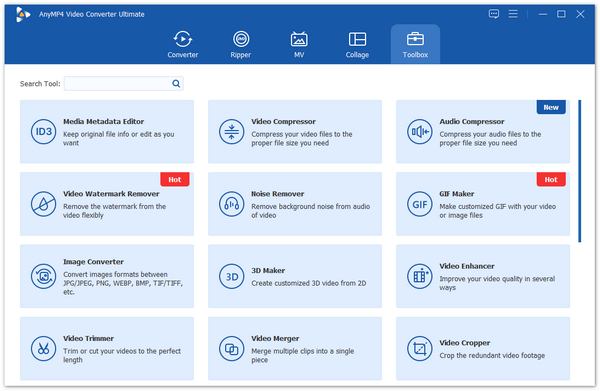
1. Find Audio Compressor
Click on the Toolbox tab at the top. You’ll see a bunch of icons—look for the one that says Audio Compressor.
2. Add Your File
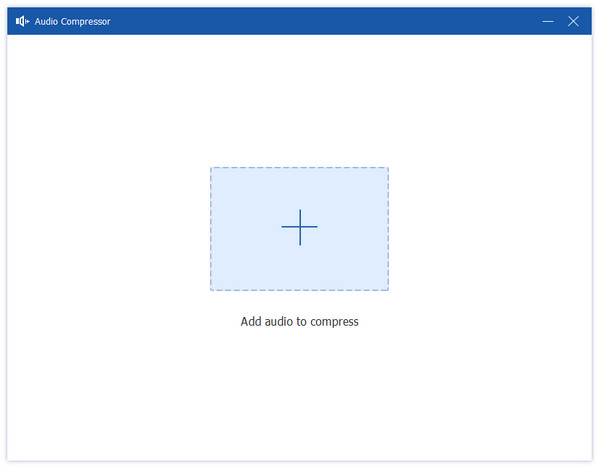
Click the big + button in the middle and select the audio file you want to use for your Discord soundboard.
3. Adjust the Settings:
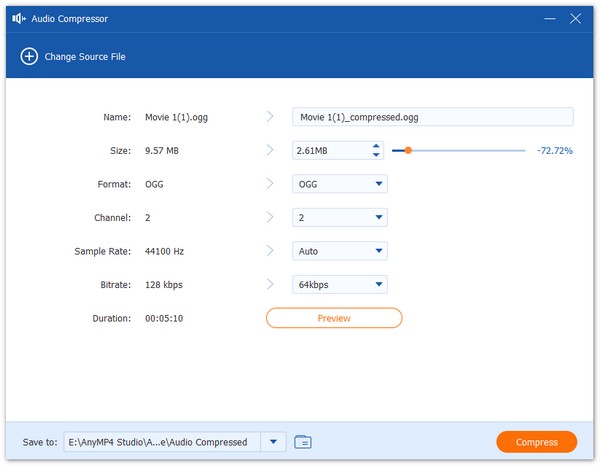
4. Preview and Compress
You can click the Preview button to make sure it doesn't sound like it's playing through a tin can. Once you're happy, click Compress.
My Personal Experience Summary:
I remember trying to upload a high-def recording of a lightsaber ignite sound. No matter what I did with online tools, the "hum" of the lightsaber would get distorted during compression. Using this tool, I was able to manually set the bitrate to exactly what I needed. It took me about 30 seconds to go from a rejected 1 MB WAV file to a perfectly crisp 400 KB MP3 that my friends now hear every time I join the channel. It honestly saves so much trial and error.
Getting the file size right is only half the battle. If you want to be a true soundboard pro, you need to worry about the "User Experience" (or, how annoying you're being to your friends).
While Discord handles a lot of the backend work, aiming for a bitrate of 128 kbps and a sample rate of 44.1 kHz is the best practice. This is the industry standard for "good enough" audio. Since Discord’s voice chat is already compressed to save bandwidth, anything higher than 128 kbps is basically wasted space on a soundboard clip.
We’ve all had that one friend who plays a soundboard clip that is 10x louder than everyone’s voice. It’s startling and annoying. Before uploading, use an editor (like the one in AnyMP4) to normalize the volume. You want the peak volume to be around 3dB or -6Db with an audio normalizer tool. This ensures your "Airhorn" sound doesn't actually cause hearing damage to your duo partner.
Sometimes, you'll see a file that is 500 KB and 4.9 seconds long, but Discord still says "No." This is often due to metadata. MP3 files can hide "ID3 tags" (album art, artist names, lyrics) inside the file. These tags take up hidden space. If your audio is exactly 511 KB but has a high-resolution album cover attached to the metadata, the actual "size" Discord sees might exceed the limit. Clearing metadata is a great Discord soundboard compression tip.
Even though Discord says it supports several formats, I’ve noticed that WAV files occasionally glitch out during upload if they weren't exported correctly. If you're having trouble, just convert the WAV file to MP. It solves 99% of "Format Not Supported" errors.
If your sound sounds "choppy" or cuts off early when you play it in the channel, it’s usually a server-side lag issue or a very low bitrate. If you compressed your file to 32 kbps to save space, it might not play back correctly. Keep it above 64 kbps for the best results.
Always test your new sound in a private "test" server before unleashing it on a 50-person community. It helps you check if the volume is right without embarrassing yourself!
What is the maximum file size for Discord soundboard audio?
The absolute Discord soundboard max size is 512 KB. If your file is even 1 KB over, the upload will fail.
Can I upload WAV or MP3 files to the Discord soundboard?
Yes! Both are supported. However, MP3 is highly recommended because it is much easier to keep within the file size limit than WAV, an uncompressed (large) format.
Does Discord Nitro increase soundboard limits?
This is a common misconception. While Discord Nitro soundboard benefits include the ability to use sounds from one server in another server (cross-server usage), it does not increase the 512 KB file size limit or the 5-second duration limit. Those are hard caps for everyone to ensure performance.
How can I increase the number of Discord soundboard slots?
To increase the number of Discord soundboard slots, your server needs to be "Boosted.
• Level 0: 8 slots
• Level 1: 24 slots
• Level 2: 36 slots
• Level 3: 60 slots. If you need more room for your sound collection, gathering some friends to boost the server is the only way to go!"
Mastering the Discord soundboard max size might seem like a lot of technical "mumbo jumbo" at first, but once you get the hang of it, it becomes second nature. Remember the golden rule: 5 seconds, 512 KB, and MP3 is your best friend.
If you’re struggling to get your favorite clips to fit, I highly recommend giving a dedicated tool like AnyMP4 Video Converter Ultimate a try. It takes the guesswork out of the Discord soundboard audio format requirements and lets you focus on what really matters: having a blast with your friends online.
Secure Download
Secure Download
 Posted by Mark Cristobal to Edit Audio
More readings
 2 Efficient Methods to Compress Videos for Web on Windows/Mac
When you add a video as your website background and find it always buffer because of the large size, it's time to compress videos for web.
 Compress with VLC – Reduce the File Size of a Video for Free
Learn how to compress videos with VLC. If you want to compress video files without losing quality, you can also get 2 VLC video compressors alternative here.
 How to Remux OBS Recordings [2026 Guide]
Read this article to learn how to convert OBS recordings to MP4 using the recording software’s remux recording option. Follow our full guide to learn how.
 Fix OBS Audio Not Working Via Quick Solutions and Settings
Are you having trouble with audio recordings in OBS? Read this article for a full guide on how to fix the most common audio-related issues in the software.
 Add your comments to join the discussion here