Pane Studio Review 2026: Is This "Screen Studio for Windows" Worth It?
Quick Take:
- What it is: Pane Studio is an easy screen recording tool for auto-zooming PC demos with its built-in an editor.
- Free vs. Pro: The free plan lets you record without time limits or watermarks at 720p/30fps. Bumping up to 4K/60fps costs about $9 a month if you pay yearly.
- Where it falls short: It still has some rough edges and skips core extras like phone mirroring, live pen tools, and dedicated game capture.
- The bottom line: Try it for quick, flashy clips. For daily client work, tutorials, or meetings, stick with a rock-solid staple like AnyMP4 Screen Recorder.
If you make video tutorials or software guides as the Mac creators, then you can use the Screen Studio easily to capture the cameras with tracks, and zoom in every single click. However, it only runs on macOS. If you work on a Windows PC, you were out of luck until you meet Pane Studio. It is a Windows-native screen recorder that zooms in on your mouse clicks and smooths out cursor movements automatically.
In this Pane Studio review, we take an honest, hands-on look at the new Windows 11 app that claims to bring those same buttery zooms and polished cursor paths to your desktop. Read this review, and to see if it is worthy of trying.
Why Everyone Calls Pane Studio "Screen Studio for Windows"
For years, PC creators felt left behind. Screen Studio set a new benchmark for clean demos, but its developers stayed strictly on Mac. Windows users had to capture plain footage in OBS, open a heavy video editor, and manually crop and pan every single click. It took forever.
When Pane Studio launched in August 2026, the reaction on Product Hunt was huge. People left comments like: "Been looking for a Screen Studio equivalent on Windows for a long time, glad this exists."
It does not try to be a heavy studio editor. Instead, it focuses on one job: making basic PC screen clicks look like a polished and free Windows screen recording software without extra editing work.
Pane Studio at a Glance
Before we dig into the features, here is a quick look at the core specs:
| Feature |
Details |
| Developer |
Pane Studio Team (Independent) |
| Current Build |
Beta (v0.7.0) |
| Platforms |
Windows 10 and Windows 11 only |
| Where to Get It |
pane.studio and the Microsoft Store |
| Free Plan |
720p at 30fps, unlimited time, no watermark |
| Pro Plan |
4K at 60fps, 3 device seats, priority support (~$9/mo billed yearly) |
| Watermark |
None on either tier |
Getting setup takes seconds. Grab the installer from their site or the Microsoft Store, and the file is tiny, and it doesn't force you to make an account or enter a credit card just to test it out. Open it up, and you get a clean, dark interface that stays out of your way.
Pane Studio Review
1. Auto-Zoom on Clicks
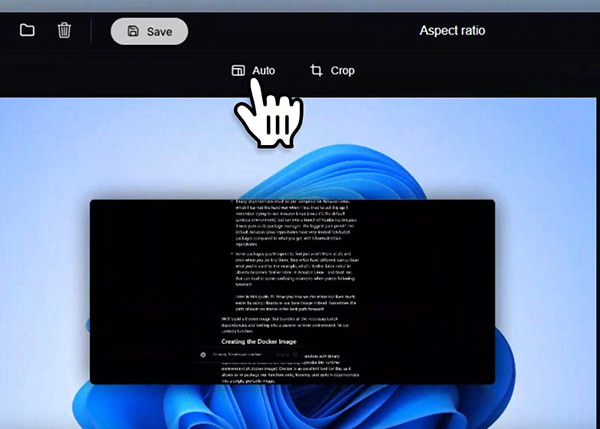
Every time you click a button or menu, the camera pans and zooms in automatically. It keeps viewers looking right where they need to be without making you manually add keyframes. As a specialized screen recorder with auto-zoom, it saves hours of boring editing work.
My test: I recorded a 2-minute walkthrough clicking through 15 different settings menus in a web browser.
- • It nailed 13 out of the 15 zooms with clean, smooth cuts.
- • The two missed zooms happened when I double-clicked too fast between two distant corners of the screen.
2. Smooth Cursor Engine
Even if your hand shakes, the software smooths out your mouse path into clean, natural curves. It also hides the pointer if you leave it sitting still.
There is a handy loop cursor toggle, too. If you make short 15-second feature loops for TikTok or Instagram Reels, it snaps the mouse back to the starting position so the video loops seamlessly without a weird jump.
3. Various Capture Modes

You can record your full screen, a specific window, or a custom area. Toggle your webcam and choose your mic or system audio. For advanced tutorial creators needing detailed camera layouts, use a dedicated facecam recorder for flexible sizing, shapes, and tight AV sync.
4. The Timeline Editor
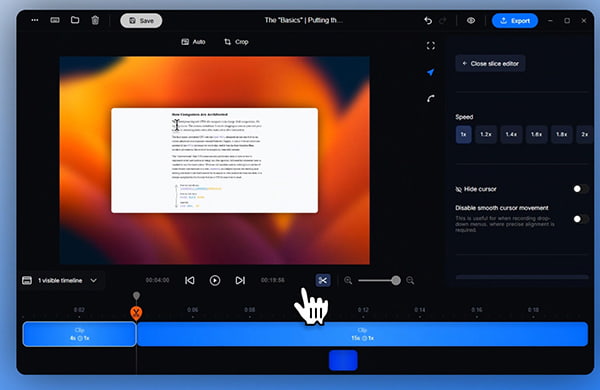
When you hit the stop button and this tool will jump straight into a clean editor. Trim clips, adjust zoom framing, blur passwords, or highlight key text.
What's New in v0.7.0: The new beta brings on-device auto-captions, basic mic noise reduction, and window scale controls.
5. Performance Test
I exported a 5-minute 1080p demo clip on a standard Windows 11 laptop:
- • Free Plan (720p/30fps): Export took about 48 seconds, and the final file sat around 42 MB.
- • Pro Plan (4K/60fps): Export took 3 minutes and 15 seconds, spitting out a crisp 310 MB file.
The CPU ran a bit warm during the 4K render, but the app itself stayed fully responsive.
How to Use Pane Studio: Step-by-Step Guide
Here is how to use Pane Studio to record screen on Windows:
1. Free download Pane Studio from its official website or Microsoft Store, run the installer, and launch the app.
2. Pick Full Screen or choose Window mode if you only want to record one browser tab. Turn on your mic and system audio.
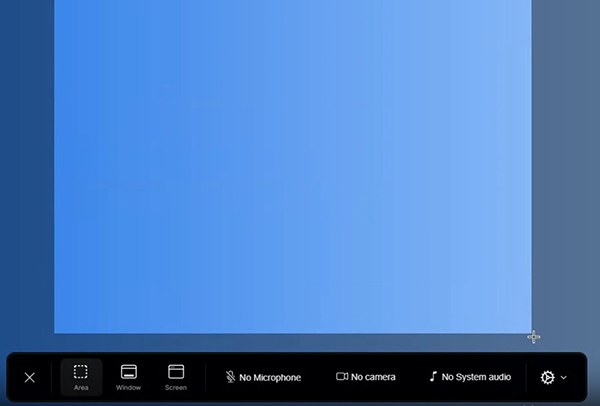
3. Click Record. Just use your mouse like normal; do not rush your clicks so the auto-zoom can catch them.
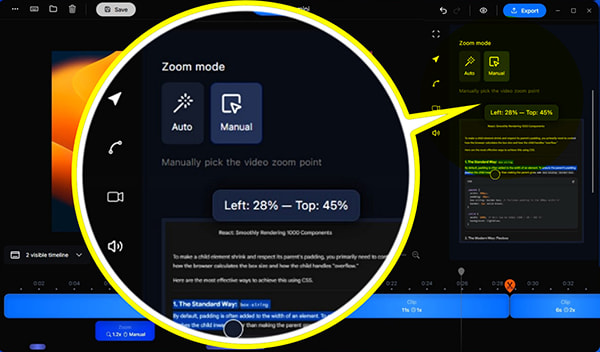
4. Once you hit stop, check the generated zoom points on the bar. If a zoom feels too tight, drag the slider back. Use the blur tool if you accidentally showed private data.
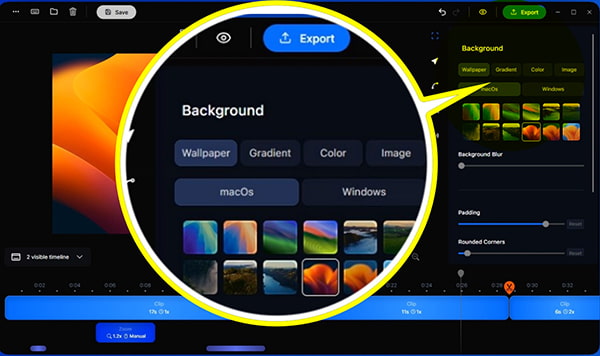
5. Choose a landscape preset for your YouTube or a 9:16 vertical crop for Shorts/Reels as you wish, then hit Export.
Warm Tip
If you are running two or three displays, unplug or disable the extra monitors before you start recording in Pane Studio. In our tests, multi-monitor setups occasionally caused the auto-zoom crop to jump to the wrong edge of the screen.
Pane Studio Free vs Pro: What Does Pane Studio Cost?
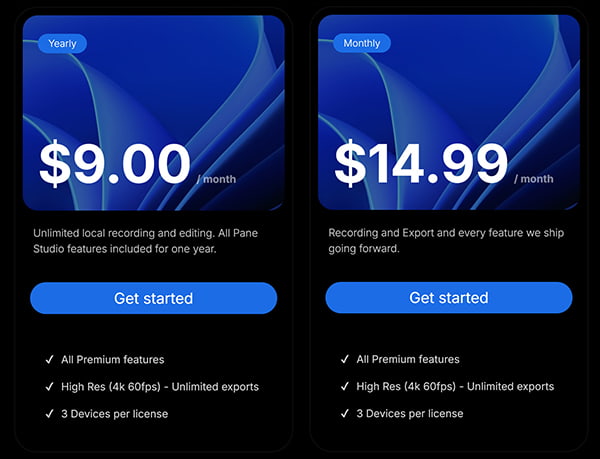
The pricing is straightforward and surprisingly generous:
- • The Free Tier: You get unlimited recording time, zero watermarks, and full access to the auto-zoom editor. The only real limit is your export quality, which maxes out at 720p at 30fps on one device.
- • The Pro Tier: For about $9/month (billed annually at roughly $108/year) or around $14.99 month-to-month, you unlock 4K exports at 60fps, license use on up to 3 computers, and priority email support.
Which one should you pick?
Free version works for quick bug clips in Slack or short social tips. Paid online courses or high-res YouTube videos require Pro for 1080p or 4K.
Pane Studio Pros & Cons
The Pros
- Truly free starter plan: No annoying watermarks and no 5-minute recording cutoffs.
- Saves hours of editing: The automated camera pans look like custom timeline animations.
- Built for Windows: It is fast and native on Windows 10 and 11.
The Cons
- It is still in Beta: You might run into random crashes, audio sync glitches, or weird behavior on multi-monitor setups.
- Windows only: There is no Mac or Linux version, which is a roadblock for mixed-OS teams.
- Very simple editor: You cannot do multi-track audio mixing, picture-in-picture transitions, or complex cuts.
- No phone or game modes: It cannot mirror an iPhone/Android screen or hook directly into full-screen DirectX games. If smooth 120fps recording without lag is your main goal, finding the best game recorder for PC is still necessary for modern titles.
Pane Studio vs AnyMP4 Screen Recorder: Which Should You Pick?
While Pane Studio is great for slick cursor animations, it is not a complete screen recording studio. If you give presentations live on Zoom or Teams, Pane Studio won't help you highlight points on the fly. A tool like AnyMP4 Screen Recorder lets you draw callout circles and type notes directly on your screen while recording. It provides 7-in-1 recording modes for separate recorders for screen, window, game, audio, phone, webcam and more. Its schedule recording feature lets you capture screen without sitting in front of the computer.
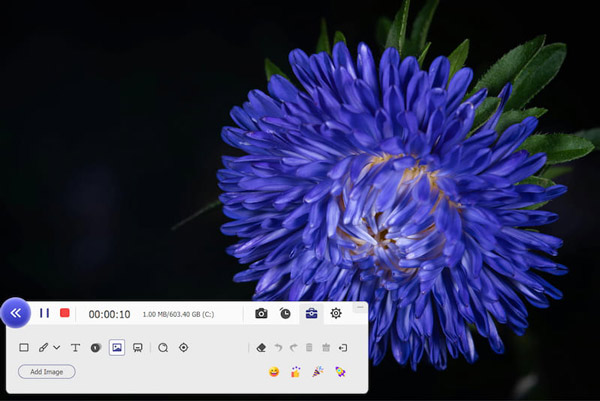
If you need a tried-and-true program that handles any recording task without bugs, take a look at how it stacks up against AnyMP4 Screen Recorder:
| Feature |
Pane Studio |
AnyMP4 Screen Recorder |
| Price |
Free tier (unlimited) / Pro ~$9/mo |
Free trial / Paid license from ~$12.45/mo (Lifetime available) |
| Supported OS |
Windows 10 & 11 only |
Windows 11/10/8/7 and macOS 10.13+ |
| Auto-Zoom Camera |
 (Automatic AI cursor tracking) (Automatic AI cursor tracking) |
 (Requires manual crop/zoom) (Requires manual crop/zoom) |
| Recording Modes |
Basic Screen / Window capture |
7 dedicated modes: Video, Audio, Game, Webcam, Window, Phone, Schedule |
| Phone Recording |
|
Wirelessly mirror & record iOS and Android screens |
| Real-time Drawing |
|
Add arrows, boxes, text, and numbers while recording |
| Max Export Quality |
4K @ 60fps (Pro only) |
4K UHD @ 60fps |
| Stability |
Beta (new project, small team) |
Mature, rock-solid with over a decade of updates |
Which one should you pick?
- • Go with Pane Studio if you are a solo Windows creator making quick app walk-throughs and your main goal is getting those smooth, trendy zoom effects without editing.
- • Pick AnyMP4 Screen Recorder if you want to record client meetings, online classes, gameplay, or recording phone screens from your computer. It gives you dependable tools, live editing brushes, and native support on both Mac and PC.
Who Should Use Pane Studio (and Who Shouldn't)?
Who It Is Great For:
Windows YouTubers: Creators who want that clean, high-end look without buying a MacBook.
- • SaaS Founders: Indie hackers recording rapid-fire feature tours or investor updates.
- • Course Creators: Teachers making technical lessons where small buttons need to stay readable. Do not forget to pair a reliable recorder with clean mic drivers to keep your voice clear when you record computer screen and audio.
- • Social Media Marketers: Anyone who wants to cut quick, and loopable software clips for TikTok or LinkedIn.
Who Should Skip It:
- • Gamers: It lacks hardware acceleration for fast 3D games recording.
- • Cross-Platform Teams: If your do not want to spend time on downloading 2 tools both Windows and Mac, this leaves half your team out.
- • Mobile App Reviewers: It has no built-in way to mirror and record an iPhone or iPad screen.
FAQs of Pane Studio
Is Pane Studio free?
Yes. Pane Studio has a genuine free plan with no time limits and no watermark. It limits your video exports to 720p at 30fps, which is fine for basic sharing.
Is Pane Studio safe to install?
Yes. It is a safe desktop program available on the official Microsoft Store. It records everything locally on your drive, so your footage stays private.
Does Pane Studio leave a watermark on my videos?
No. There is no watermark on either the free tier or the paid Pro version.
Can I use Pane Studio on a Mac or Chromebook?
No. Pane Studio only runs on 64-bit Windows 10 and Windows 11 PCs.
Can it record in 4K resolution?
Yes, but you will need the Pro tier for 4K exports at 60fps. The free tier caps out at 720p.
Is Pane Studio better than Camtasia?
They are built for different jobs. Camtasia is a heavy, complete video editor with a big price tag. Pane Studio is a lightweight screen capture tool built specifically for automatic cursor zooms.
What is the best alternative to Pane Studio?
If you want an all-in-one recording program with rock-solid stability, phone mirroring, and real-time screen drawings, AnyMP4 Screen Recorder is the top pick on both Windows and Mac. For a broader view of tools across different price tiers, check out our roundup of the best video recording software.
Is Pane Studio stable enough for daily client work?
It depends. For quick clips, it gets the job done. But since it is still in beta, you might run into random glitches on multi-monitor setups. Always do a quick test run before recording an important presentation.
Final Verdict: Is Pane Studio Worth It?
Pane Studio is easily one of the most exciting tools to hit Windows this year. It finally gives PC users the clean, cinematic zooms that used to be exclusive to Mac. The fact that its free plan has no time caps and no watermark makes it an easy recommendation to test out.
However, remember that it is still an early beta project. It can stumble on multi-screen setups, and its editing tools are very basic.
If your work demands reliable recordings, phone mirroring, real-time pen tools, and full Mac/Windows support, stick with a proven powerhouse like AnyMP4 Screen Recorder. But if you just want to make quick, flashy software demos on a Windows PC without spending hours in a video editor, give Pane Studio a spin.


 Add your comments to join the discussion here