Top 9 Meme GIF Makers in 2026 to Create Viral Content

For those who want the highest-quality 4K-to-GIF conversion, AnyMP4 Video Converter Ultimate is the undisputed champion on desktops because it maintains crisp colors that other tools lose. If you are strictly looking for a free, no-install browser solution, Ezgif remains the gold standard for quick edits. For social media managers who need aesthetic templates and stickers, Canva and GIPHY are your best friends. Mobile users should stick with ImgPlay for its superior control over frame rate compared to the basic Instagram- style apps.
The internet moves at the speed of a scrolling thumb, and nothing captures attention quite like a perfectly timed meme. Whether it’s a confused cat or a distracted boyfriend loop, GIFs have become the universal language of 2026. But sometimes finding the perfect reaction isn't enough; you need to make it.
I've tested everything from heavyweight desktop software to quick-fix mobile apps to find the absolute best meme GIF maker tools. I've realized that a good GIF isn't just about the joke; it's about the frame rate, file size, and clarity of the text. In this guide, I’m sharing my personal testing results of the top 9 tools to help you win the group chat or go viral on X.
Part 1. Why Need a Meme GIF Maker
In 2026, static images just don't cut it anymore. Here is why you need a dedicated GIF meme maker in your digital arsenal:
- • Creativity & Humor: A dedicated animated GIF meme maker lets you turn inside jokes into visual gold. I once turned a 3-second clip of my boss accidentally muted on a Zoom call into a Silent But Deadly GIF-it's still the most used reaction in our Slack.
- • High Engagement: On platforms like Instagram and TikTok, animated content gets up to 2x more shares than static photos.
- • Social & Marketing Use Cases: From reacting to trending news to showing a sneak peek of a new product, GIFs humanize your brand and keep people scrolling less and clicking more.
- • Memory Efficiency: GIFs are smaller than full-blown videos, making them the perfect funny GIF maker output for email newsletters and website backgrounds.
Part 2. Top 3 Meme GIF Makers for Computers (Windows & Mac)
2.1 AnyMP4 Video Converter Ultimate - Best for Pro-Quality 4K GIF Creation
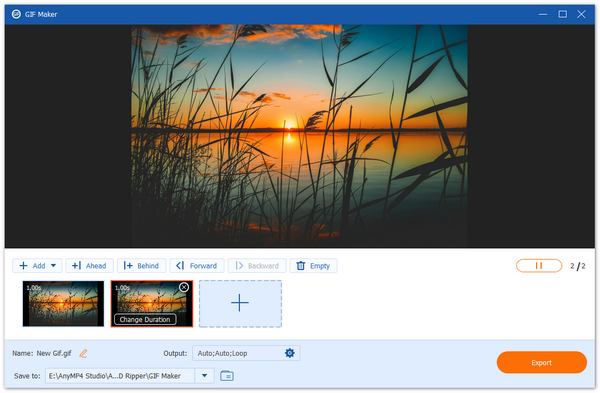
AnyMP4 Video Converter Ultimate is a comprehensive multimedia Toolbox that handles everything from 8K video conversion to DVD ripping. Its dedicated GIF Maker tool is designed specifically for high-resolution sources, allowing users to transform 4K or even 8K videos into smooth, looping GIFs without the typical pixelated look of free tools. Besides, it lets you generate meme GIFs from images. It utilizes advanced hardware acceleration to ensure that even long video clips are processed in seconds.
PROS
- Supports high frame rates (up to 60FPS) for ultra-smooth loops.
- Prevents ugly color banding in complex gradients.
- Includes tools for cropping, adding Impact meme fonts, and applying filters.
- Uses GPU acceleration to churn out GIFs instantly.
CONS
- To remove the output limit, you'll eventually need a license.
- No mobile version for on-the-go editing.
- • My Experience: I used this to create a high-quality Cinemagraph for a landing page. The smooth looping was much better than any online tool I tried. It didn't crash even once while processing a 2GB raw file.
- • Expert Insight: If you're looking for an animated GIF meme maker that won't make your 4K footage look like it was filmed on a potato, this is the industry standard.
2.2 Movavi Video Converter - Best for Fast SuperSpeed Batch Processing
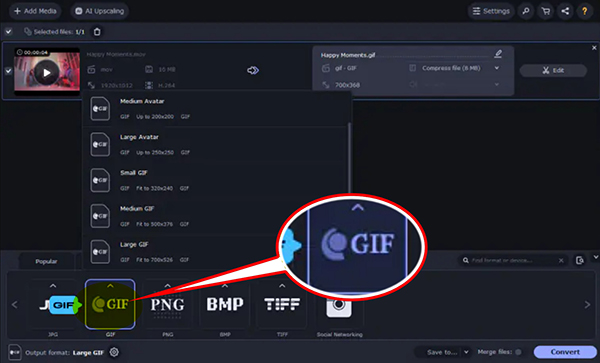
Movavi Video Converter is a powerhouse for users who value speed above all else. Its proprietary SuperSpeed mode allows conversion without re-encoding, making it feel like you're simply copying and pasting a file. It supports over 180 formats and includes a surprisingly robust set of editing tools for a converter, such as AI-powered upscaling and background noise removal for video-to-GIF sources.
PROS
- The SuperSpeed mode is up to 79x faster than traditional encoding methods.
- A very modern, clean interface that requires zero learning curve.
- Automatically optimizes GIFs for specific devices like iPhones or Samsung phones.
- Can automatically brighten dark footage before converting to GIF.
CONS
- The free version places a noticeable watermark in the center of the export.
- Most advanced features are locked behind a yearly or lifetime paywall.
- • My Experience: I tested this with a 50-video batch of reaction clips. While other tools struggled, Movavi finished the entire folder in under three minutes.
- • Expert Insight: This is the best tool for mass production. If you run a meme page and need 30 GIFs a day, the time saved is worth the price.
2.3 GIMP - Best for Free, Professional Frame-by-Frame Editing
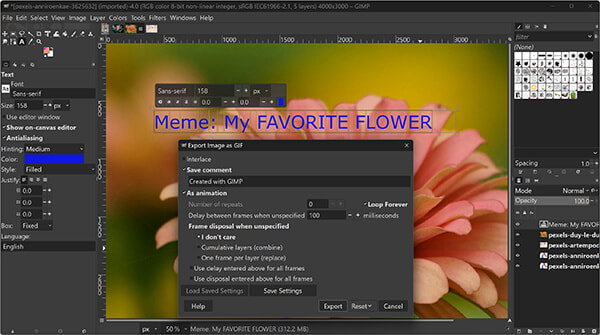
GIMP (GNU Image Manipulation Program) is the premier open-source Photoshop alternative. While it’s primarily an image editor, its layer-based system treats every layer as an individual animation frame. This gives you absolute, granular control over every millisecond of your GIF. You can edit pixels, adjust transparency, and use specialized animation filters, such as Optimize for GIF, to strip out redundant data and keep files tiny.
PROS
- No watermarks, no hidden fees, and no Pro version blocks.
- You can paint directly onto individual frames of your GIF.
- The only free tool that handles transparent backgrounds perfectly.
- Access to thousands of community-made filters and effects.
CONS
- Not for the faint of heart; you will need to watch a tutorial.
- You have to manually name layers with timing codes (e.g., Frame 1 (100ms)) for custom speeds.
- • My Experience: I used GIMP to create a sticker GIF with no background for a Slack channel, then resize the image in GIMP for TikTok. It took about 20 minutes to mask, but the result was professional-grade.
- • Expert Insight: This is the tool for technical creators. If you need a GIF that has a very specific file size requirement (like a 64KB profile pic), GIMP is your only hope.
Part 3. Top 3 Meme GIF Makers Online (Browser-Based)
3.1 Ezgif - Best for Quick, No-Account Browser Editing
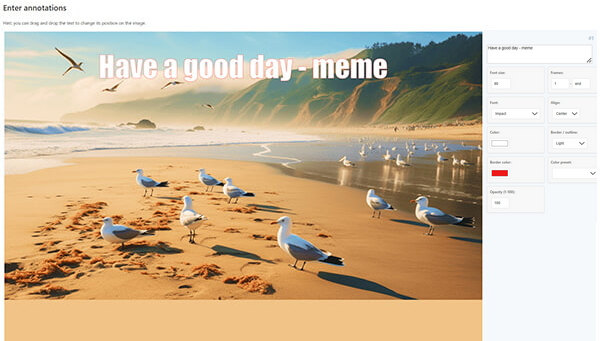
Ezgif is the most popular free GIF meme maker on the internet for a reason: it just works. It requires no login, email, or credit card. It provides a complete toolset for cropping, resizing, reversing, and optimizing GIFs directly in your browser. Its recent 2026 update even added an Animated GIF Analyzer to help you debug why your GIFs might be broken or too large.
PROS
- Start editing the second you land on the page.
- Features Lossy GIF compression that can shrink files by 50% without visible loss.
- Create GIFs directly from video links or social media URLs.
CONS
- Capped at 100MB per file, which can be tight for long 4K videos.
- If your browser crashes or you refresh, you lose all your progress.
- • My Experience: I use Ezgif almost every day for quick Twitter (X) reactions. It takes less than 30 seconds to upload a clip and add a Top Text caption.
- • Expert Insight: This is the fastest tool in existence. Keep it bookmarked in your browser for those moments when you need a reaction GIF now.
3.2 Canva - Best for Aesthetic & Branded Social Media Memes
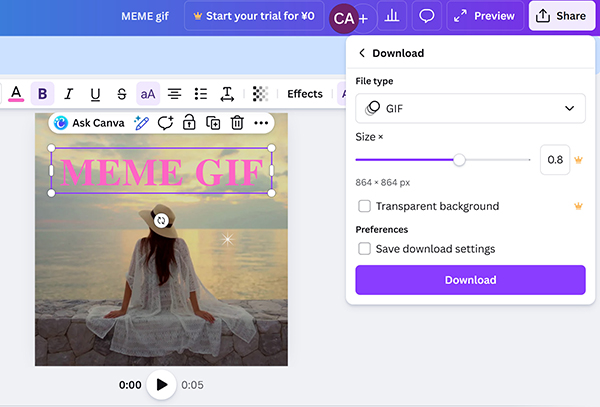
Canva has evolved into a full-scale GIF meme generator that prioritizes design over technical specs. It offers a massive library of pre-made meme templates, trending stickers, and high-end typography. It’s perfect for creators who want their memes to look like they were made by a professional graphic designer, not just a guy with a phone.
PROS
- Thousands of layouts for Instagram, TikTok, and LinkedIn.
- Millions of royalty-free stock videos and animated stickers.
- Work on a meme with your team in real-time.
CONS
- It’s not great for cutting specific frames out of long movies.
- Many of the coolest animated elements require a Canva Pro subscription.
- • My Experience: I used Canva to design a series of aesthetic GIFs for a fashion brand’s Pinterest page. The built-in animation styles (like Pop or Skate) made the text look incredible.
- • Expert Insight: Use Canva if your GIF needs to include complex design elements like logos, borders, or multiple text boxes.
3.3 MakeaGIF - Best for Instant YouTube-to-GIF Conversion
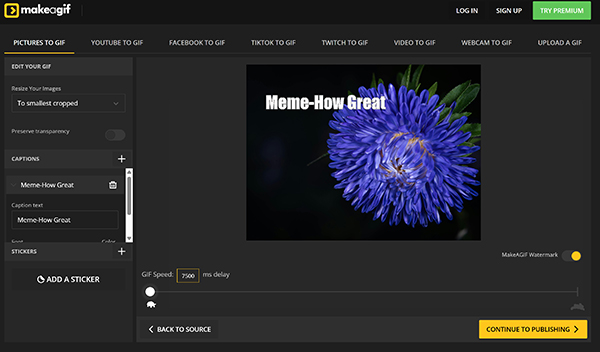
MakeaGIF is a community-driven platform that excels at pulling video content from external sources. Whether it’s a YouTube vlog, a Facebook clip, or a live webcam feed, MakeaGIF turns it into an animation with one click. It also hosts one of the largest libraries of user-created GIFs, making it a great place to find inspiration.
PROS
- The most stable YouTube-to-GIF converter on the web.
- Record yourself making a face and turn it into a GIF instantly.
- They host the GIF for you, giving you a link to share immediately.
CONS
- The free version adds a MakeaGIF logo in the bottom corner.
- The site is heavily ad-supported and can feel a bit overwhelming.
- • My Experience: I found a hilarious 5-second moment in a 2-hour YouTube stream. MakeaGIF let me clip it without downloading the whole massive video file.
- • Expert Insight: This is the best discovery tool. Use it to see what's trending and contribute your own clips to the community.
Part 4. Top 3 Meme GIF Makers for Mobiles (iOS & Android)
4.1 GIPHY - Best for Viral Trending Content & Social Integration
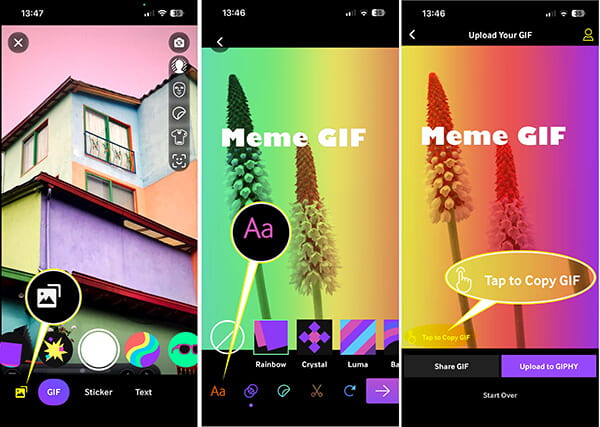
GIPHY is the undisputed king of the GIF world. Its mobile app is a powerhouse animated GIF maker integrated with almost every messaging platform (iMessage, WhatsApp, Slack). It allows you to create Clips (GIFs with sound), use AR face filters, and instantly upload your creations to the world's largest search engine for GIFs.
PROS
- No watermarks and no hidden fees for basic creation.
- The library of pre-made stickers is unmatched.
- Send your custom-made GIFs directly from your phone's keyboard.
CONS
- Exports are heavily compressed for fast mobile viewing.
- It’s easy to accidentally share a private meme with the whole world.
- • My Experience: During a live sports game, I used GIPHY to record a reaction of my own face and sent it to my group chat in seconds. It’s effortless to export and download GIFs in GIPHY.
- • Expert Insight: GIPHY isn't about quality; it's about vibe and speed. It’s the best choice for social reacts.
4.2 ImgPlay - Best for High-Quality Mobile Precision
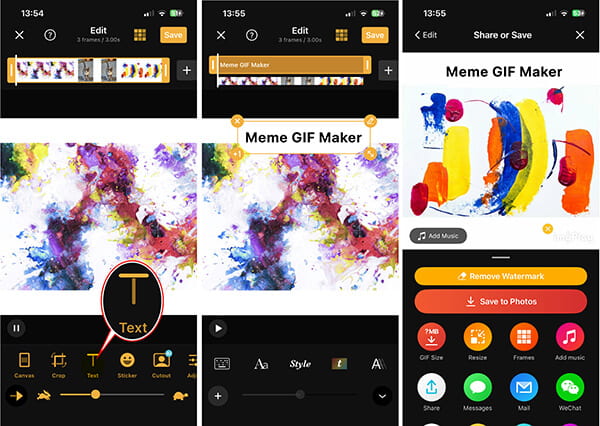
ImgPlay is the pro choice for mobile users. While GIPHY is about stickers, ImgPlay is about control. It supports Live Photos, burst shots, and ultra-precise video trimming. As of 2026, they've even brought back many Pro features for free users, such as custom file size selection and APNG/WebP exports.
PROS
- The best free meme GIF maker for iPhone users.
- Supports Ping-Pong (boomerang) loops with adjustable speeds.
- Perfectly resize your GIFs for TikTok (9:16) or Instagram (1:1).
CONS
- You have to pay a one-time fee to remove the ImgPlay logo.
- Some AI features (like background removal) are behind a sub.
- • My Experience: I turned a Live Photo of my dog sneezing into a high-quality looping GIF for my Instagram Story. The dithering made it look surprisingly sharp on a mobile screen.
- • Expert Insight: If you want a mobile app that feels like desktop software, ImgPlay is the winner. It’s worth the small one-time payment to unlock the pro features.
4.3 Meme Generator (ZomboDroid) - Best for Classic Impact Memes
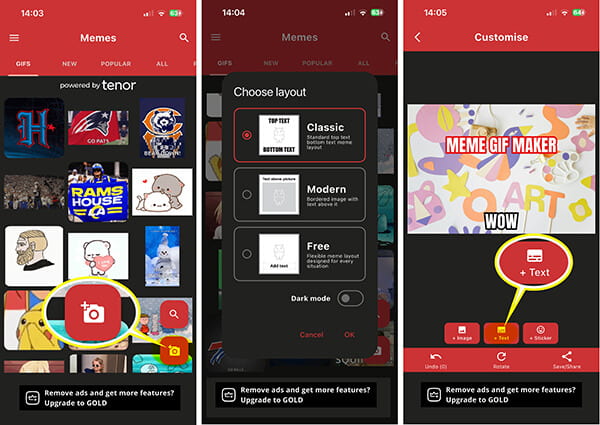
ZomboDroid’s Meme Generator is a legend in the meme community. It’s specifically designed to create Classic memes (think white text on top and bottom). It includes over 2,000 high-quality templates, updated weekly with the latest trends. It also allows you to combine multiple GIFs into a single multi-panel masterpiece.
PROS
- One of the few mobile apps that doesn't slap a logo on your work for free.
- Access to every viral meme template from 2010 to 2026.
- Pull existing GIFs from Tenor and add your own text and stickers.
CONS
- The interface is very utilitarian and can look a bit dated.
- Expect a full-screen ad every few memes you create.
- Include a watermark in its free version. (learn how to remove a watermark from a GIF here.)
- • My Experience: I used this to make a This is Fine dog GIF, but added my own house in the background. It was hilarious and took about 45 seconds.
- • Expert Insight: This is the most authentic meme tool. Use it if you want to participate in Reddit or Twitter meme trends with the correct fonts and layouts.
Part 5. Which is the Best One? (The Comparison)
To find the best tool, we conducted a real-world stress test. We took a 15-second 4K MP4 video and attempted to convert it into a 640px-wide captioned GIF on a mid-range PC and an iPhone 15 Pro.
|
Watermark? (Pain Point) |
Max Quality |
Target Size (5MB) |
Ease of Use |
Best For |
| AnyMP4 Video Converter Ultimate |
No (Paid/Trial) |
10/10 (HD) |
4.8MB (Pass) |
High |
4K & Pro Quality |
| Movavi |
Yes (Free) |
8/10 (High) |
5.2MB (Pass) |
Very High |
Batch Processing |
| GIMP |
No (Free) |
9/10 (High) |
3.5MB (Best) |
Low |
Technical Control |
| Ezgif |
No (Free) |
7/10 (Med) |
6.1MB (Fail) |
Medium |
Quick Web Edits |
| Canva |
No (Free) |
8/10 (Med) |
5.5MB (Pass) |
High |
Aesthetic Design |
| MakeaGIF |
Yes (Free) |
6/10 (Low) |
7.2MB (Fail) |
High |
YouTube Clips |
| GIPHY |
No (Free) |
5/10 (Low) |
3.2MB (Pass) |
Very High |
Messaging/Trends |
| ImgPlay |
Yes (Free) |
8/10 (High) |
4.9MB (Pass) |
High |
iPhone Users |
| Meme Generator |
No (Free) |
7/10 (Med) |
4.5MB (Pass) |
Medium |
Classic Reddit Memes |
Verdict:
Our tests proved that AnyMP4 Video Converter Ultimate is the clear winner for technical quality; it was the only tool that allowed us to hit our target file size without making the image look grainy. Ezgif is the king of utility for casual users. GIPHY is the speed king but sacrifices visual detail for faster sharing.
Expert Summary: If your goal is to grow a professional social media account, stick to AnyMP4 or Canva. If you just want to make your friends laugh in the group chat, GIPHY or Ezgif will do the trick!
Part 6. How to Make a Meme GIF from a Video
Most people think making a GIF is just hitting convert, but to truly make a meme, you need the right text and timing. AnyMP4 Video Converter Ultimate lets you precisely trim your clip to the exact millisecond when the funny part starts, and the built-in text editor lets you use the classic Impact font everyone recognizes.
1. Open GIF Maker
Free download AnyMP4 Video Converter Ultimate, and run it.
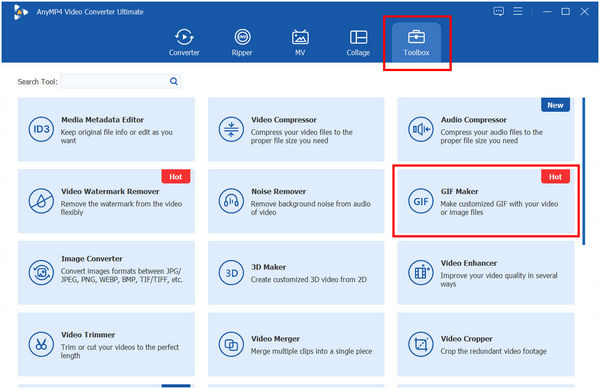
Navigate to the Toolbox tab at the top, and select GIF Maker.
2. Upload and Edit Image or Video
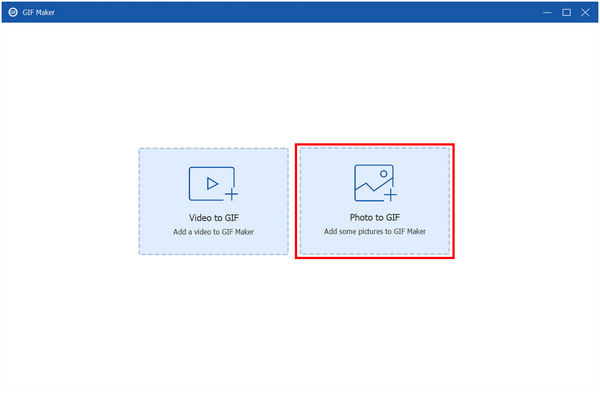
Select Video to GIF or Photos to GIF, and then upload your source video (MP4, MOV, AVI, etc.), or PNG, JPG images.
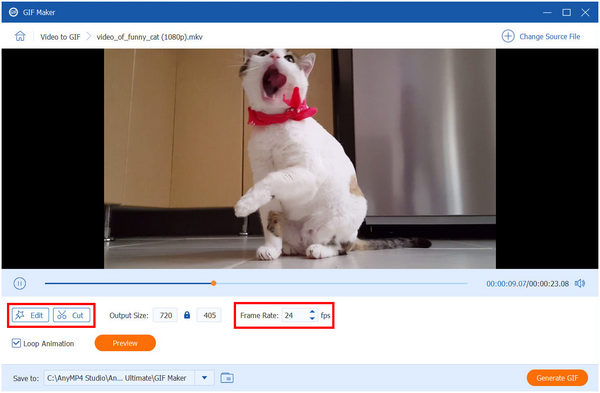
Trim Your Scene: Click the Edit (magic wand) or Cut (scissors) button. Select the 3-5 seconds that contain the punchline.
Add Your Caption: In the Watermark tab, select Text. Type your meme caption (e.g., Me waiting for Friday). Change the font to Impact and set the color to white with a black outline for that classic look.
Optimize Settings: Ensure Loop Animation is checked. Set the frame rate to 18-24 for smooth motion.
3. Export Meme GIF
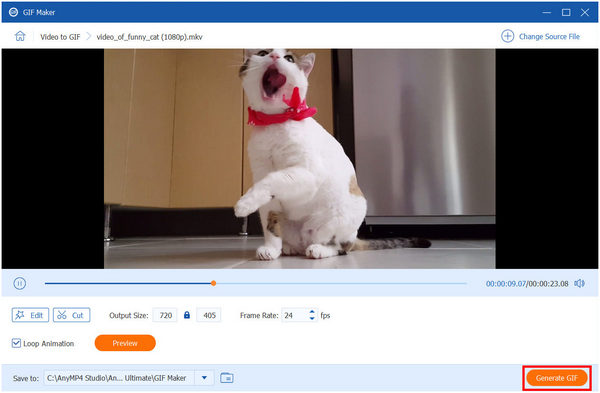
Click Generate GIF. Your masterpiece is now saved to your computer!
The first time I tried to make a GIF from a 4K drone shot, my browser crashed three times while using online tools. Switching to a desktop powerhouse like AnyMP4 was a game-changer. The ability to see exactly where the loop starts and ends makes the final result look much more professional and viral-ready.
Part 7. FAQs
How do I make a meme GIF from a video without losing quality?
To maintain quality, use a desktop tool like AnyMP4 Video Converter Ultimate. Online tools often compress files heavily, leading to pixelated or grainy GIFs.
What is the best free meme GIF maker for iPhone?
GIPHY and ImgPlay are the top contenders. GIPHY is better for social sharing, while ImgPlay offers better editing tools for your own videos.
Is there a meme GIF editor with sound?
Actually, the GIF format itself does not support sound. If you see a GIF with sound on social media, it’s usually an MP4 or WebM video file that is set to loop. Tools like AnyMP4 or Canva can easily export to these formats.
Conclusion
Whether you're a high school student looking to spice up your Discord server or a marketing pro aiming for more clicks, finding the right GIF meme maker is the first step toward internet glory. From the technical precision of AnyMP4 Video Converter Ultimate to the social-ready fun of GIPHY, there's a tool for every level of creator. My advice? Keep your GIFs under 5 seconds, use a bold font, and always double-check your file size before posting.




 Add your comments to join the discussion here