
Quick Answer:
RMVB (RealMedia Variable Bitrate) is a legacy video container format developed by RealNetworks. Highly popular in the 2000s for distributing anime and Asian dramas due to its incredibly small file size, it uses dynamic bitrates. Today, RMVB lacks native support on modern devices, requiring specialized media players or format conversion.
You find an old external hard drive full of downloaded anime or TV shows from the 2000s, and you double-click the .rmvb file to watch it on QuickTime or Windows Media Player. However, only a cold error message displays: Codec Not Supported. Actually, modern players have completely failed to recognize it. In the days of dial-up Internet and early broadband, RMVB (RealMedia Variable Bitrate) accounted for a significant share of the P2P download market due to its extremely small file size. Today, RealNetworks' closed ecosystem has rendered these legacy formats completely unplayable on modern Apple Silicon Macs and Windows 11. Here is how to unlock and rescue your legacy media in 2026.

To truly understand RMVB, you can open a legacy RMVB file in an analysis tool like MediaInfo. Then, the metadata parameters will reveal its architecture clearly:
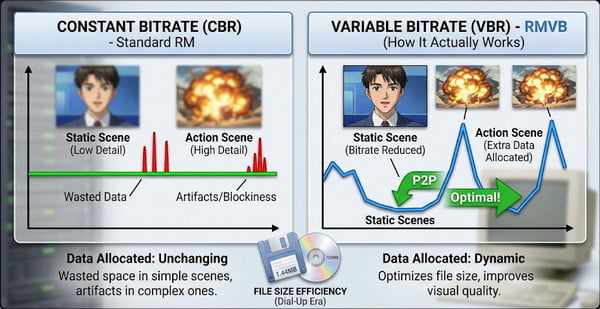
Unlike the RealMedia format, which enforces constant bitrate (CBR), RMVB introduced a dynamic allocation. It can significantly reduce bitrate during static scenes (such as in 2000s anime and TV dramas) while allocating extra data for action footage. This dynamic scaling mechanism compressed a 45-minute episode to a file size of less than 200 MB, making RMVB extremely popular on peer-to-peer (P2P) networks at the time.
Despite its compression efficiency, RMVB carries a fatal structural flaw: it relies entirely on RealNetworks' closed-source codecs. This prevents modern operating systems from natively supporting and reading it, as they do with standardized codecs.
Double-clicking an RMVB file on a modern Apple Silicon Mac running macOS results in an immediate playback failure. QuickTime Player terminates the launch process and displays a system error message.
On Windows 11, running RMVB through the modern Media Player or Movies & TV app also returns a similar error code.
This complete incompatibility stems from architectural changes at the operating system level. A decade ago, Apple and Microsoft officially abandoned traditional third-party media frameworks. Modern operating systems rely entirely on hardware-accelerated decoding designed specifically for formats such as H.264 and H.265 (HEVC). RealNetworks' proprietary codecs have been completely removed.
Installing RealPlayer in 2026 has significant security and performance risks. It is bundled with invasive ads and heavy system bloatware.
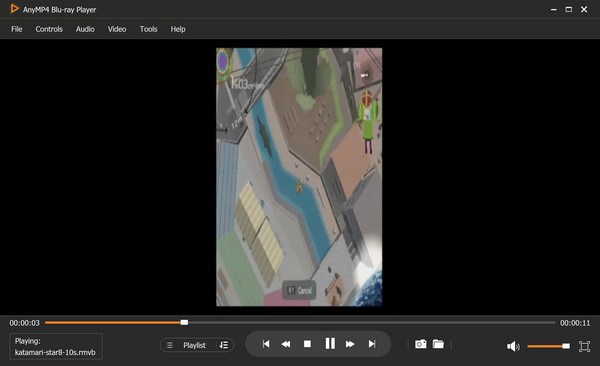
For direct RMVB playback, AnyMP4 Blu-ray Player is a safe and clean solution. It integrates the legacy RealVideo codecs reverse-engineered without the need for external system dependencies. It also has built-in native decoders, providing real-time hardware decoding for complex RealVideo streams and instant playback.
Secure Download
Secure Download
While dedicated media players resolve viewing, RMVB is still unusable in modern workflows. You cannot import RMVB into nonlinear editors such as Premiere Pro or DaVinci Resolve.
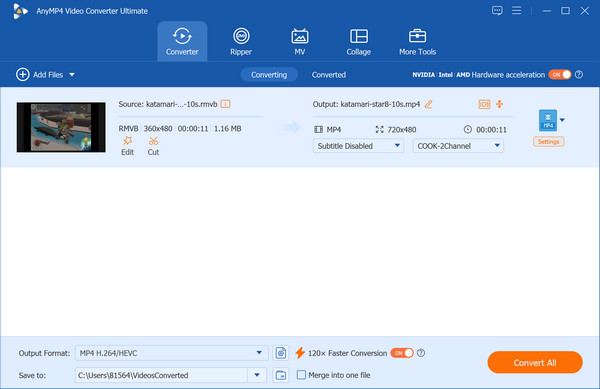
AnyMP4 Video Converter Ultimate provides a permanent transcoding solution. Beyond converting legacy containers to modern MP4 (H.264/AAC), its integrated AI Video Enhancer addresses the harsh visual flaws of 2000s-era compression:
Secure Download
Secure Download
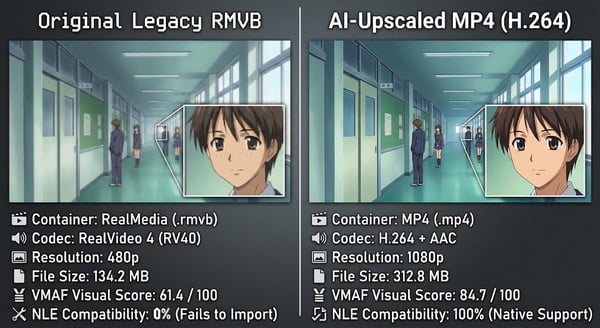
| Original Legacy RMVB | AI-Upscaled MP4 (H.264) | |
|---|---|---|
| Container/Codec | RealMedia/RealVideo 4 (RV40) | MP4/H.264 + AAC |
| File Size | 134.2 MB | 312.8 MB |
| VMAF Visual Score | 61.4/100 | 84.7/100 |
| NLE Compatibility | 0% (Fails to Import) | 100% (Native) |
Why won't my RMVB file play on my Samsung Smart TV via USB?
Your Samsung Smart TV fails to play RMVB files directly from a USB drive, primarily due to codec licensing and hardware decoding limitations.
Is it safe to download RealPlayer in 2026 to open these files?
While downloading RealPlayer from its official website is technically safe from malware or viruses, installing RealPlayer in 2026 is generally not recommended.
How can I import an RMVB video into Premiere Pro or DaVinci Resolve?
Neither Premiere Pro nor DaVinci Resolve can natively import or read RMVB files. To import RMVB files into these professional nonlinear editors, you must first transcode (convert) the video or remux/re-encode it.
What is the difference between RM and RMVB?
The primary difference between RM (RealMedia) and RMVB (RealMedia Variable Bitrate) lies in their bitrate encoding methods and intended use cases.
RMVB is a dead relic of the early internet. Keeping files in this format guarantees they will eventually become unplayable. Safely watch your video files without bloatware with AnyMP4 Blu-ray Player, or permanently AI-upscale and convert them into MP4s with AnyMP4 Video Converter Ultimate.
Secure Download
Secure Download
 Updated by Alice Thorne to Glossary
More readings
 What Is An MKV File and How to Play It without Quality Loss
Do you have a video in MKV file and want to learn more information about it? You are at the right place since this concrete guide will tell you everything.
 MOV File - How to Open and Convert a MOV File
What is a MOV file? How to open MOV file? Is MOV better than MP4 and carry a better quality? How to convert MOV to MP4? All the answers about MOV are here.
 What a WMV File Is (2026 Update)
What is a WMV file and how does it work? Get into this post and learn everything you need to know about Microsoft’s own video format, including how to open it.
 What is WebM and How Can You Watch This File Format
Want to learn what WebM is and what is the best WebM player? Please read this article to learn how to play and convert WebM easily and conveniently.
 Add your comments to join the discussion here