
Summary:
FLAC is lossless and preserves 100% of the original sound. It is the best choice for music archiving. The other file format is OGG (Vorbis), a lossy format that produces better sound than MP3 at comparable bitrates. It is suitable for streaming and gaming.
Before choosing between OGG vs FLAC, you should understand that this audio format comparison is about lossless vs lossy compression. Your needs will determine the best format for you, based on how you want to use your data and what is most important to you. If you want to keep high-res music, optimize game background music, or just save space, understanding these trade-offs is important. In this post, we shall compare FLAC across aspects such as quality, size, encoding, and compatibility. We’ll also go over when to use each format and how to safely convert between them.
Before we get into the details, it’s important to understand the difference between OGG and FLAC. While both are open-source formats and can accommodate high-fidelity (Hi-Fi) audio, their applications differ. Knowing these core differences could help you choose the right format.
FLAC is a lossless format that compresses audio without discarding any data. When you play it, it decompresses to yield a mathematically identical copy of the source. In other words, what went into the recording is exactly what comes out of your speakers. It supports resolutions up to 32 bits and sampling rates up to 384 kHz.
OGG is a lossy codec that serves as a patent-free alternative to MP3 and AAC. OGG handles audio differently. When comparing FLAC vs OGG Vorbis, OGG Vorbis uses psychoacoustic modeling to discard unnecessary frequencies and sounds. Because of this, it allows OGG to achieve acoustic transparency. Also, it uses Variable Bitrate encoding, enabling more efficient compression and better quality.
| OGG (Ogg Vorbis) | VS | FLAC (Free Lossless Audio Codec) |
| Lossy | Compression Type | Lossless |
| 95% identical to the source | Audio Quality | 100% identical to the source |
| 45 kbps to 500 kbps | Bitrate Range | 4 to 32 bits |
| Modern iOS, Android, Windows, macOS, Linux, modern browsers, media players, and consoles. | Hardware Compatibility | Windows 10 and later, macOS High Sierra and later, Android, iOS 11 and later, Hi-Fi and home stereos, car stereos, and DAPs. |
| Game development and royalty-free web streaming | Best Use Case | Archiving |
To truly understand FLAC vs OGG, we conducted a test on Windows 10 Pro. We convert a 50.0 MB CD-quality WAV file (16-bit/44.1 kHz) using FLAC (Level 8) and OGG Vorbis (Q10, 500 kbps). In test results, FLAC reduced the size to 28.5 MB with a bit-perfect copy of the source. Meanwhile, OGG Vorbis shrunk the file to 17.8 MB. You can check here why FLAC files are so big.
The handling of large amounts of data is often seen as a problem faced by people with large audio collections. When using single-threaded legacy applications or even online services, such processes become limited. This is overcomed by professional converters such as the AnyMP4 Video Converter Ultimate software, which uses CPU multithreading.
Is OGG better than FLAC? Regardless of how efficient a codec is, its utility depends on how well it plays on devices. Many of today’s high-end DAPs have hardware-level FLAC decoding, enabling them to process high-resolution audio natively. In addition to music playback, web browsers support OGG Vorbis via the standard HTML5. It also plays perfectly on dedicated OGG players.
FLAC is definitely the way to go for archiving and listening to music. This format ensures that your master file is always an exact copy of the source file. Also, FLAC supports metadata tagging, allowing you to include high-resolution cover art, lyrics, and track info.
When comparing FLAC vs OGG formats, OGG is better suited for game and web development. Unlike MP3, OGG supports sample-accurate, gapless looping, which is important for game soundtracks. OGG has low CPU and memory requirements for decoding. For web development, it is easy to process locally and takes less space.
AnyMP4 Video Converter Ultimate is a secure media converter that supports 100% data privacy. It allows importing open-source audio formats, including FLAC, OGG, and 500+ others. With it, you can import hundreds of audio files and convert them simultaneously without lag and crashes. This software processes every conversion locally, meaning your audio files never leave your hard drive. Better yet, it uses the most advanced hardware-accelerated media processing. It can batch-transcode even a 50GB high-resolution FLAC music library down to OGG in minutes. You can also adjust the audio codec, channel, bitrate, and sample rate.
Here’s how to convert FLAC to OGG locally:
1. Download AnyMP4 Video Converter Ultimate and complete the setup. After installation, the software will open automatically.
Secure Download
Secure Download
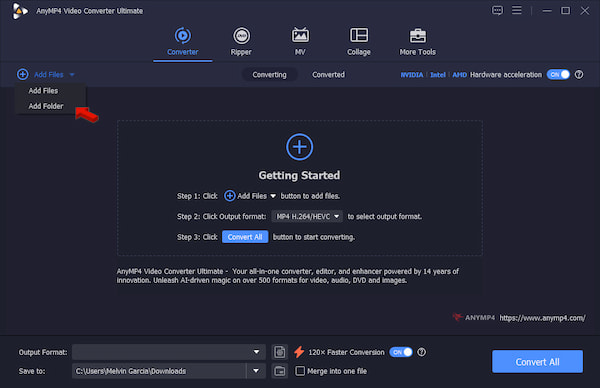
Click +Add Files to load the FLAC sources from your computer. If you need to batch-convert multiple FLAC files, use the Add Folder instead.
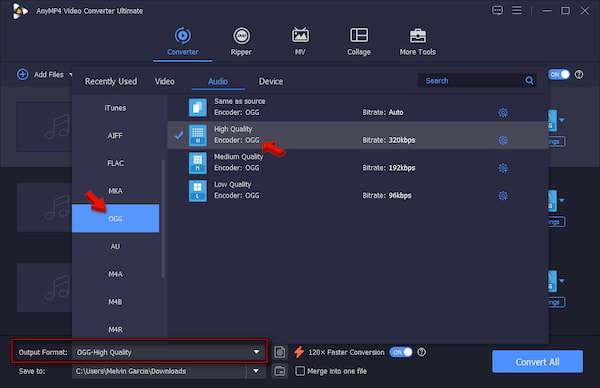
2. Go to the Output Format picker and select OGG under the Audio category. Essentially, choose a quality preset that matches your intended use. Choose the High Quality preset, which is equivalent to OGG q6 to q8, or 192 kbps to 256 kbps.
3. Return to the main interface, activate Hardware Acceleration, and enable 120× Faster Conversion. Set the destination path, then click Convert All to convert FLAC to OGG.
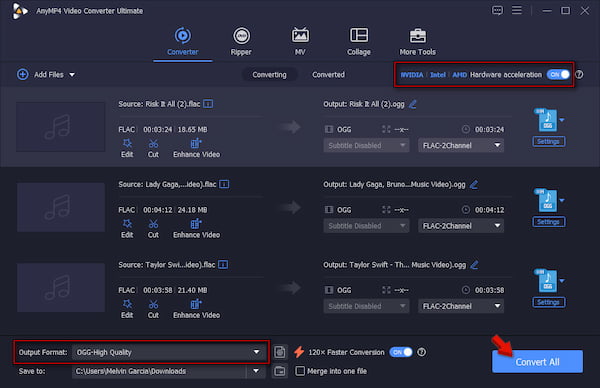
We evaluate the offline FLAC-to-OGG converter through hands-on testing. We assess its performance in conversion speed, batch support, and output quality. We use 100 FLAC files totaling 5.23 GB on Windows 10 Pro. It took only 2 minutes and 17 seconds to finish the conversion. In the final output, the total file size reduces to 3.19GB. During our audit, we heard no distortion, clipping, or synchronization issues in the converted OGG files.
Does converting FLAC to OGG reduce audio quality permanently?
Yes, converting FLAC to OGG permanently reduces audio quality. It is because FLAC uses lossless compression, whereas OGG uses lossy compression.
Can human ears actually hear the difference between OGG and FLAC?
No, human ears cannot easily distinguish a high-bitrate OGG file and a FLAC file. But here’s the thing: at maximum quality settings, compression artifacts are mostly imperceptible.
Why are my FLAC files so much larger than OGG files?
FLAC files are much larger than OGGs because they use lossless audio compression. It means they retain every single detail from the source without discarding any audio data.
Is it possible to convert OGG back to FLAC to restore the lost quality?
No, you cannot restore lost quality by converting back OGG to FLAC. Converting it to FLAC only wraps the degraded audio in a larger container.
Which audio format is better for Spotify and podcast uploading?
MP3 is the best and recommended audio format for uploading a podcast to Spotify. This format offers high-quality audio and a small file size. You can also upload FLAC and WAV for better sound quality. To learn their differences, check this: FLAC vs MP3 vs WAV.
The OGG vs FLAC decision depends on your priorities. FLAC is the clear winner for lossless archiving and source preservation. OGG is the better choice for game development and web streaming. If you are unsure of the format to use, the simplest way is to try a few OGG bitrates and compare the results to your original FLAC files. AnyMP4 Video Converter Ultimate makes it easy for you to convert audio locally. It can handle multiple files in batch, changing the bitrates and sample rates.
 Posted by Alice Thorne to Glossary
More readings
 4 Best Ways to Convert FLAC to MP3, WAV & ALAC (2026 Guide)
Convert FLAC audio to MP3, WAV, or ALAC with original audio tags and cover art intact with top desktop, CLI, and free conversion tools.
 What Is an MXF File & How to Open It? (The Ultimate Guide)
What is an MXF file? Discover everything about the MXF file format, why pros use it, how to easily open .mxf files, and how to convert them.
 4 Best Ways to Convert FLAC to MP3 (2026: Lossless Quality & Batch)
Looking for the fastest FLAC to MP3 converter? Get AnyMP4, VLC, and online tool to batch convert while keeping 320kbps quality and ID3 tags on Windows/Mac.
 Best 4 Ways to Convert OGG to WAV (Zero Quality Loss)
Need a reliable OGG to WAV converter? Learn how to convert OGG to WAV for CD burning, DAWs, or archiving using desktop tools, online converters, and FFmpeg.
 Add your comments to join the discussion here