M4A vs M4B: What’s the Difference & Which Is Better (2026)
Quick Answer:
The main difference between M4A and M4B is their intended use. M4A is a standard audio file used primarily for music and podcasts, widely supported across all devices. M4B is designed specifically for audiobooks, supporting digital bookmarks and chapter markers, but it is tightly tied to the Apple ecosystem (iTunes, Apple Books). If you need cross-platform playback, converting M4B to M4A using a reliable tool is your best bet.
Are you having trouble playing M4B files on non-Apple devices? This is a common issue among audiobook listeners, since Apple’s standard M4B file format for audiobooks is poorly compatible outside Apple’s ecosystem. As such, most users are looking for the best solution to convert them to the M4A format. To provide our readers with vital information before converting, this article will cover everything you need to know about M4A and M4B files, including their main uses, features, and the best software for converting between them.

Part 1. What is an M4A File (The Music Standard)
To get started with M4A files, we have provided some of the program’s most notable features. Among them, the most practical offering is the format’s superb audio quality in a highly compact file size made possible by the AAC codec. The unmatched combination of audio quality and small file size made M4A media files more reliable than standard MP3s.
Key Features of M4A
- • Compressed in AAC or ALAC codecs for highly efficient compression.
- • Using the ALAC codec allows for lossless audio quality.
- • Much more compact than other audio formats (MP3, WAV, ALAC).
- • Heavily optimized for Apple devices, media players, and streaming apps.
- • Works as a container file for ID3 tags and metadata.
Best Use Cases for M4A
Due to its combination of audio quality and file size, M4A is a popular audio format used for entertainment. This made the M4A file type Apple Music’s preferred format, since the music and podcast episodes available in the streaming app are saved in M4A once downloaded for offline listening.
Part 2. What is an M4B File (The Audiobook Specialist)
M4B files are the standard format used for audiobooks because they provide extensive metadata support for chapters and bookmarks. This made it the primary option for most audiobook apps and even for downloaded media files.
Key Features of M4B
- • Supports adding audio bookmarks so you can resume playback from where you left off after a listening session.
- • Offers chapter markers for efficient navigation between audiobook sections.
- • Uses AAC codec aligned for efficient compression and clear voice playback.
- • Used as the standard audio format of audiobooks from Apple Books
- • Heavy DRM protection for audiobook content
The DRM Factor: Are M4B Files Protected
Since the M4B format is the standard for most audiobook apps, DRM-protected M4B audiobooks are heavily protected by copyright. However, not all M4B files are DRM-protected. The design of the file format to support chapter metadata and bookmarking made it a standard format for audiobook content.
Part 3. M4A vs M4B: The Ultimate Comparison
| Feature |
M4A |
M4B |
| Primary Use |
Music, podcasts, and standard audio files |
Audiobooks |
| Supports Bookmarks/Chapters |
 |
 |
| DRM Protection |
DRM-protected |
DRM-protected |
| Apple Device Compatibility |
iPhone, iPad, iPod, Mac |
iPhone, iPad, iPod, Mac |
| Android/Windows Compatibility |
Natively supported by Android and PC media players. |
Not supported by native Android and PC players. (Third-party option required.) |
Audio Quality and Encoding
Although they differ in their primary uses, M4A and M4B formats are fundamentally the same origin, as they are both MPEG-4 audio container formats. The files also use AAC (Advanced Audio Coding) or ALAC (Apple Lossless Audio Codec), since these are standard Apple codecs. Because their backgrounds are highly similar, M4A and M4B files saved at the same bitrate have identical audio quality.
Chapter Markers and Bookmarking
Supporting chapter markers and bookmarks is M4B’s killer feature. This allowed M4B audiobooks to store metadata, hyperlinks, images, and, most importantly, chapter markers. This feature is very practical for audiobook listeners, as it lets them pause, track progress, and skip chapters at any time while listening to audiobooks that can run for dozens of hours. Meanwhile, M4A is designed as a music format and does not support these complex progress-tracking features.
DRM Protection and Copyright
DRM (Digital Rights Management) protection on M4B audiobooks purchased from the iTunes Store or Apple Books typically uses Apple’s FairPlay DRM. This made the files playable only on authorized Apple devices. In contrast, the vast majority of M4A files are DRM-free and offer superior compatibility outside the Apple ecosystem. M4As can be played on built-in media players of Windows and Android devices, while M4Bs require third-party players.
Device Compatibility and Playback
M4A has a significant advantage in compatibility, as it was designed as a universal standard across different operating systems. This made M4As natively playable on almost all smartphones (Android/iOS), computers, and car media systems. M4A and MP3 have nearly identical compatibility. On the other hand, M4B audiobooks are heavily restricted to playback within the Apple ecosystem (iTunes, Apple Books). This made the M4B-to-M4A conversion a common solution for compatibility issues.
Part 4. How to Convert Between M4B and M4A Without Losing Quality
Although M4B and M4A use the same foundation in terms of their compression option and codec, simply changing your audio file’s extension is not enough to completely convert your audiobook file to a regular M4A. Using this temporary fix often leads to playback errors or lost data. As such, you need dedicated format converters to convert your M4B to M4A.
Best Tool for the Job: AnyMP4 Video Converter Ultimate
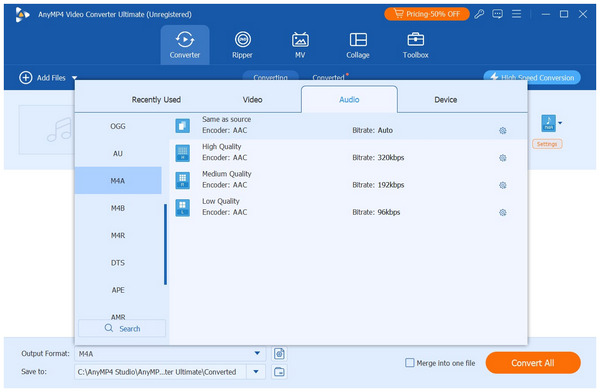
With the limitations of the M4B format now discussed, we can now move forward to the best tool for the job if you are looking to free your audiobook file from Apple’s restrictions. With that in mind, converting to the M4A format is your best option, since both files use the same compression standard and codecs. To do so, we highly recommend using AnyMP4 Video Converter Ultimate.
The AnyMP4 solution was selected as the best tool based on four criteria. It excels in conversion efficiency, quality preservation, metadata editing, and comprehensive support for output formats.
To start, the program’s GPU-acceleration system, which enables 70x faster conversion, is optimal for batch processing and for converting M4B files to M4A in mere seconds. These converted media files will also preserve their original quality, since AnyMP4 offers an AAC codec option that supports the native formats M4A and M4B.
Moving forward, metadata editing in the program is also beneficial for audiobook labeling and library management. You can use the program to name your M4A audio file, add an artist, set a publication date, and more. If you are looking for a different audio format, you can do so as well, since AnyMP4 Video Converter Ultimate supports DRM-free formats in addition to M4A, such as MP3, WAV, ALAC, and more.
To learn more about the software, download it using the link below and refer to our three-step guide for using the tool.
Step-by-Step Guide: How to Convert M4B to M4A (and Vice Versa)
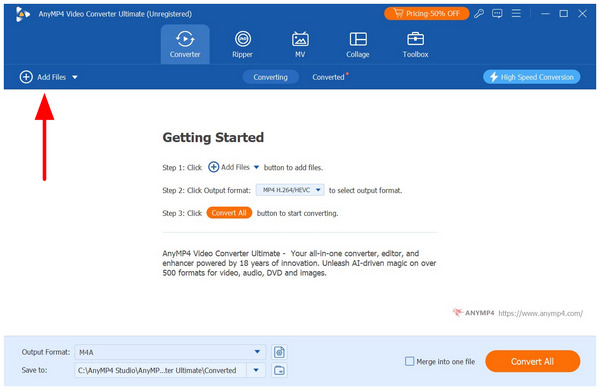
1. Open AnyMP4 Video Converter Ultimate and select Add Files in the Converter tab to import the M4B file you want to convert.
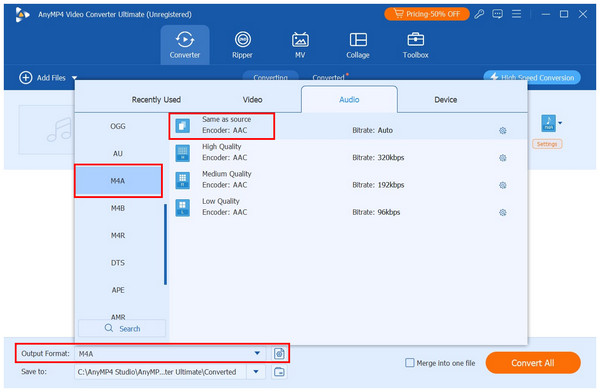
2. Once your M4B file has been uploaded, select Output Format and choose M4A among the output options. For lossless quality conversion, select the Same as Source profile.
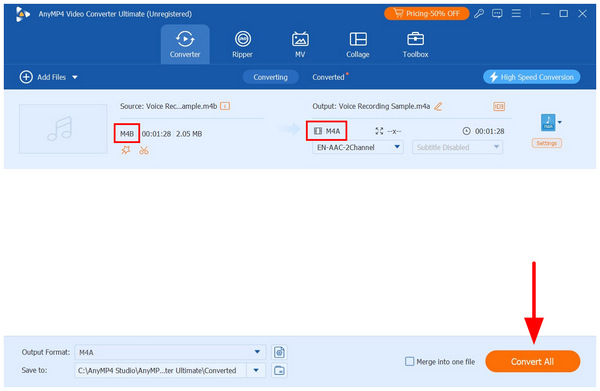
3. After selecting the conversion profile, you will go back to the Converter tab. Once satisfied with the conversion settings, select Convert All to convert your M4B file to the more compatible M4A format.
Part 5. Legal & Expert Insights: Understanding DRM in Audio Files
Before using our format converter suggestion, make sure to use it exclusively for DRM-free and personal audio files. Since both formats use the MPEG-4 industry standard, these files could be protected by DRM. To ensure that you will not face any legal issues, always double-check the file that you will convert if DRM and other copyright measures do not protect it.
Part 6. FAQs About M4A vs M4B Formats
Can I just rename an M4B file to M4A so it plays?
Yes, you can. This is because M4A and M4B are virtually identical in their compression and codec options. The old-school solution of changing the format name may work.
Why won’t my Android phone play M4B audiobooks correctly?
Most Android built-in players cannot play M4B natively. However, M4A files are playable on these devices. This is another reason why converting to M4A is a good solution.
Will I lose my chapter markers if I convert an M4B file to an M4A file?
Yes, you will. M4A does not support chapters and bookmarks. If you want to convert M4B files, do it before leaving bookmarks or chapters. Once done, you can now use your chosen M4A player.
How can I remove DRM protection from an M4B file bought on iTunes?
There are specific audiobook converters for this action. Fortunately, AnyMP4 Video Converter Ultimate is one of them. This made the program a 2-in-1 option for breaching DRM and changing formats.
Which format gives better sound quality: M4A or M4B?
They have identical sound quality. M4A and M4B share the same compression standard and codec. This made them virtually the same in terms of audio.
Conclusion
Now that we have discussed both M4A and M4B, we can ultimately say choosing between the formats comes down to what you are listening to. If you want to listen to music, M4A is the way to go. When it comes to audiobooks, M4B is perfect. However, M4A’s innate compatibility advantage is superb, making it a better choice than its sister format for general use. Ready to make your M4B audiobooks playable on any device? Download a free trial of AnyMP4 Video Converter Ultimate today and experience lossless conversion to the versatile M4A.






 Add your comments to join the discussion here