
Quick Summary:
AAC is efficient and ideal for mobile listening, offering smaller file sizes and good quality. Meanwhile, FLAC delivers lossless, high-fidelity audio perfect for archiving and audiophile use. The choice depends on needs, not superiority. Use AnyMP4 Video Converter Ultimate to convert between formats easily and without hassle, preserving quality.
Imagine looking at a masterpiece through a slightly frosted window. You can see the colors and the shapes, and it looks beautiful, but you can't quite see the texture of the brushstrokes. That is the difference between AAC and FLAC. One gives you the picture perfectly enough for the world to see; the other gives you the soul of the original canvas. But in 2026, with storage getting cheaper and Bluetooth getting smarter, does that extra detail actually matter for your ears?
In this post, we'll explore everything you need to know about AAC vs FLAC. These include how they work, how they differ in different aspects, and when each format makes the most sense in real-life use. We'll also show you how to convert AAC to FLAC (and vice versa) using a professional tool. This way, you can easily manage your audio files depending on your needs. We aim to help you understand the technical differences between AAC and FLAC and how to choose the right format for your listening habits.

AAC is a lossy audio format that succeeded MP3. It is the default codec for Apple Music, YouTube, and Spotify because it delivers efficient streaming performance without requiring large bandwidth. It uses psychoacoustic modeling, preserving the parts of audio that humans are most likely to hear clearly while reducing or removing less noticeable sound data.
FLAC is a lossless audio format that compresses music without removing any original data. It allows a perfect reconstruction of the source audio when played back. It is often compared to a ZIP file for music, reducing file size while preserving full fidelity. This format retains every detail of the original recording, making it ideal for archiving master tracks and hi-fi audio libraries.
| Metrics | AAC | FLAC |
|---|---|---|
| Compression Type | Lossy | Lossless |
| Audio Fidelity | Exceptional fidelity | Bit-perfect audio fidelity |
| Average Bitrate | 256 kbps to 320 kbps | 700 kbps to 1,411 kbps |
| File Size | 2.5 MB to 6 MB for a 3-minute audio | 15 MB to 30 MB for a 3-minute audio |
| Licensing | Proprietary | Open format |
The Apple Ecosystem
Apple relies on AAC for optimized performance, smooth syncing, and storage efficiency. The difference between AAC and FLAC is clear here, as FLAC requires conversion or third-party support. AAC ensures native playback across iOS, making it the ideal choice for Apple users.
Android and Windows
Android and Windows fully support FLAC, making it ideal for high-resolution audio streaming services. The FLAC vs AAC debate highlights FLAC's flexibility for audiophiles, while AAC remains more compressed and efficient.
AAC operates at 256-320 kbps, delivering efficient streaming with strong clarity, while FLAC ranges from 700 to 1411+ kbps. This AAC vs FLAC sound quality test reflects FLAC's higher data retention and AAC's bandwidth efficiency, shaping listening experience and storage needs.
AAC may slightly roll off ultra-high frequencies due to compression, especially above 17kHz, while FLAC preserves full-spectrum audio. This comparison shows AAC is optimized for efficiency, whereas FLAC maintains untouched detail for accurate, studio-grade reproduction.
AAC files can hold around 15,000 songs on 128GB, while FLAC files can hold about 3,000 due to larger file sizes. This AAC vs FLAC comparison highlights AAC's storage advantage, making it ideal for mobile use. Meanwhile, FLAC prioritizes quality over space efficiency in large libraries.
AAC requires efficient decoding optimized for mobile performance. In contrast, FLAC requires higher data throughput despite its simpler decoding structure. In simple terms, AAC is better for battery-saving playback, while FLAC is preferred for high-performance audio systems.
Both AAC and FLAC support rich metadata, such as album art, lyrics, and tagging. However, compatibility varies across players. This comparison shows AAC integrates smoothly with Apple systems, while FLAC relies on broader third-party support for full metadata consistency.
AAC is best for daily commuters who need efficient playback on mobile devices with limited storage and data plans. It prioritizes battery life and smooth streaming while maintaining solid audio quality for everyday listening. The AAC vs FLAC difference is clear here; AAC focuses on convenience and portability.
FLAC is ideal for home audiophiles using high-end headphones, DACs, or speaker systems. The FLAC vs AAC audio quality comparison shows FLAC preserves every detail of the original recording. This format is ideal for immersive, high-resolution playback.
FLAC is the preferred format for archivists because it preserves the original audio data without loss, ensuring long-term preservation of music collections. The FLAC vs AAC file size difference is significant, but archiving prioritizes quality retention. FLAC guarantees that you can always convert files later without loss of quality.
AnyMP4 Video Converter Ultimate is a flexible multimedia conversion software that supports lossless, high-quality conversion of AAC or FLAC. It allows you to convert AAC to FLAC or FLAC to AAC without loss of quality. In addition to media conversion, it offers advanced customization options. You can adjust encoder settings, bitrate control, sample rate adjustment, and channel for precise output tuning.
Secure Download
Secure Download
Moreover, it includes batch conversion for processing multiple files at once. It also includes a media metadata editor for organizing file metadata. With hardware acceleration, conversion speed improves while maintaining output quality.
What to Expect with AnyMP4 Video Converter Ultimate:
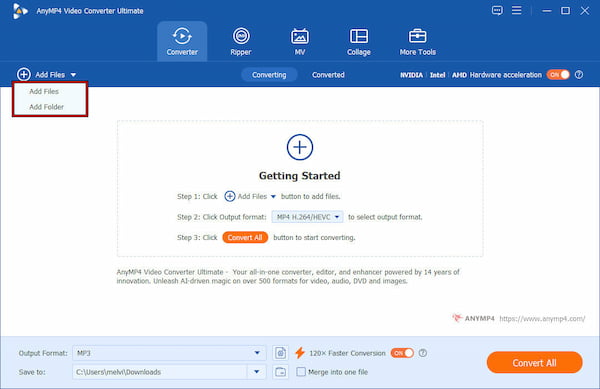
1. Launch AnyMP4 Video Converter Ultimate on your system to access the main dashboard. In the Converter tab, click + Add Files to load your AAC audio files. Alternatively, choose Add Folder to import multiple files for batch conversion.
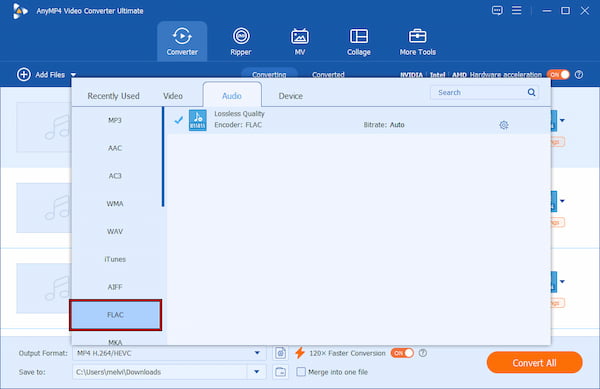
2. Switch to the Output Format selector and navigate to the Audio category. Select FLAC-Lossless Quality as your output format and choose a profile preset. For higher control, use the Custom Profile option to adjust bitrate, sample rate, encoder type, and audio channels.
3. Proceed to the Save To selector to specify the output directory of your converted file. Then, enable 120× Faster Conversion to speed up processing using hardware acceleration. After configuring the settings, click Convert All to start the AAC-to-FLAC conversion.
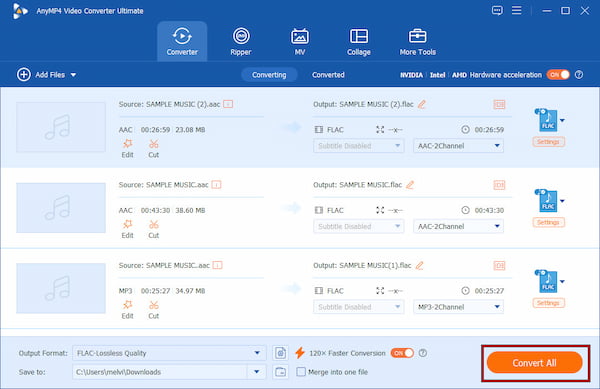
AnyMP4 Video Converter Ultimate provides a complete solution for handling AAC and FLAC conversion. Whether you're upgrading to lossless FLAC for archiving or converting to AAC for portability, it delivers fast, high-quality results.
Why are FLAC files so big? Discover the real reason behind their size and what makes them different from other audio formats. Learn the answer through the link provided.
Does converting FLAC to AAC lose quality?
Yes. Converting FLAC to AAC results in some quality loss because AAC removes parts of the audio data to reduce file size. While the difference may not be noticeable in casual listening, it is still a one-way reduction in audio detail.
Can I convert AAC back to FLAC to get the quality back?
No. Converting AAC back to FLAC does not restore lost quality because it cannot recover the missing audio data. Converting the file changes its format to FLAC, but it does not improve the quality. The new file retains the original AAC file's compressed, lossy quality.
Is AAC better than MP3?
Yes, in most cases AAC is better than MP3 at the same bitrate. AAC provides improved compression efficiency. It means AAC delivers clearer sound with smaller file sizes compared to MP3. This is why platforms like Apple Music and YouTube use AAC for streaming.
Does FLAC drain my battery faster than AAC?
FLAC can use slightly more battery due to higher data throughput and storage demands during playback. AAC is more lightweight and optimized for mobile devices. However, on modern smartphones, the difference in battery drain is usually minimal in real-world use.
The battle between AAC vs FLAC isn't about which format is universally better. It is about which one fits your environment and priorities. If you are building a library that needs to last 50 years, FLAC is your only choice. If you want to fit your entire life's collection into your pocket for a gym session, AAC is a modern engineering miracle. At the end of the day, both formats serve different purposes. And the smartest choice is using the right one for the right situation. If you want to switch between them easily, convert files without loss of quality, and manage your audio library efficiently, download AnyMP4 Video Converter Ultimate today.
Secure Download
Secure Download
 Updated by Alice Thorne to Glossary
More readings
 M4A Vs. MP3: Which Audio File Format Reigns Supreme
M4A and MP3 both serve as audio file formats. This informative post will provide a comprehensive comparison between M4A Vs. MP3. Check them out here!
 FLAC Vs. MP3 Vs. WAV: What Are Differences
Discover the major differences among FLAC, WAV, and MP3, and everything in between to know their pros and cons and what they should be used for.
 4 Best Ways to Convert FLAC to MP3 (2026: Lossless Quality & Batch)
Looking for the fastest FLAC to MP3 converter? Get AnyMP4, VLC, and online tool to batch convert while keeping 320kbps quality and ID3 tags on Windows/Mac.
 AAC to MP3 – Convert Audio Files from AAC to MP3 Format in Batch
This article collects top 10 AAC to MP3 converters on multiplatform. Thus, you can convert AAC file to MP3 online and offline based on your need freely.
 Add your comments to join the discussion here