
Free Download100% Clear & Secure
Free Download100% Clear & Secure
Nowadays, finding the right software for converting media can be challenging. HandBrake has become a go-to platform due to its powerful video transcoding capabilities. Despite its efficiency, it may not suit everyone’s preferences. Some users find it lacking in terms of supported output formats. In today’s post, we will get into the top 5 HandBrake alternatives available. We will highlight their best offer and help you understand what these tools set apart. This way, you can have a clear understanding and give an idea of which software suits your standards!
How We Tested The Top 5 HandBrake Alternatives
| Best For | Platform | Price | Max Input Resolution | Output Formats | |
|---|---|---|---|---|---|
| AnyMP4 Video Converter Ultimate | Premium All-in-One Upgrade | Windows, macOS | Paid (Free Trial) | 8K / 4K UHD | 500+ (MP4, MKV, AVI, MOV, WebM, ProRes, etc.) |
| MakeMKV | Free Open-Source Ripping | Windows, macOS, Linux | Free (Beta) | 4K UHD Blu-ray | MKV only |
| AnyDVD HD | Background DRM Removal | Windows Only | Paid (21-Day Trial) | 4K UHD Blu-ray | ISO, Folder Structure |
| Freemake Video Converter | Visual Beginner Conversion | Windows Only | Freemium | 1080p / 4K | MP4, AVI, WMV, DVD |
| AnyMP4 Blu-ray Ripper | Dedicated Blu-ray Workflows | Windows, macOS | Paid (Free Trial) | 4K UHD Blu-ray | 500+ Formats & Device Presets |
• Best For: Power users who want an all-in-one hardware-accelerated upgrade over HandBrake.
• Price: $24.96 (1-Month), $49.96 (Lifetime) with free trial available.
• Platform: Windows 11/10/8/7, macOS 10.12 and above (fully optimized for Apple Silicon).
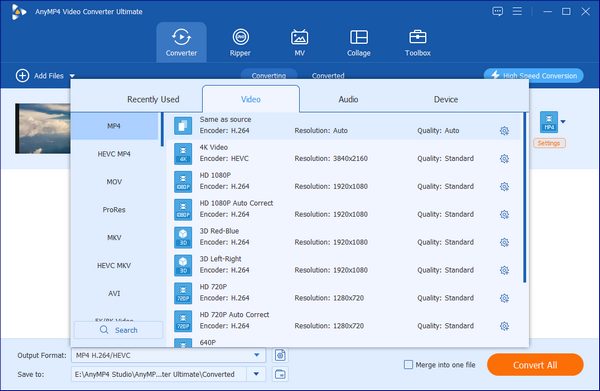
• Formats: Imports almost any file; exports to over 500 formats including MP4, MKV, MOV, AVI, WebM, ProRes, and device-specific profiles.
• Speed: Exceptional; leverages full NVIDIA NVENC, AMD AMF, Intel QSV, and Apple M-series hardware acceleration.
• Trial: Converts up to 5 minutes of each media file with access to basic editing toolkits.
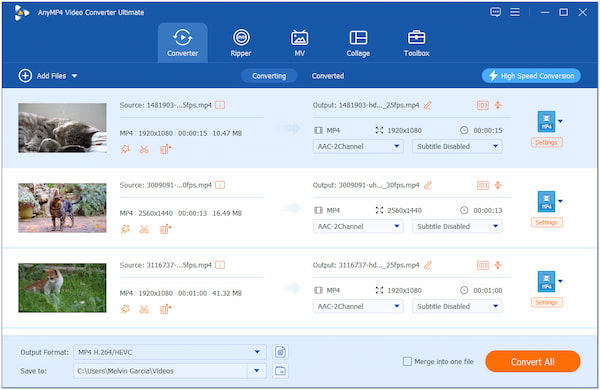
AnyMP4 Video Converter Ultimate is a multi-format media conversion software and the best alternative to HandBrake. It allows you to convert media files to over 500+ digital formats, all without affecting the quality. This includes universally used formats like MP4, MOV, AVI, MKV, WAV, and more. Best of all? It supports simultaneous conversion, enabling you to process multiple files with up to 120× ultra-fast lossless conversion speed.
Beyond converting media files, AnyMP4 Video Converter Ultimates comes with additional functionalities. Despite its name, it includes a Ripper tool, which can be used for ripping and copying DVDs. This added tool lets you turn your DVDs into MPG or MKV with lossless quality. Apart from the physical disc, it can also handle DVD ISO and Folder. Plus, it gives you full control of the DVD’s structure, including menus, chapters, subtitles, etc.
Secure Download
Secure Download
During our hands-on tests with the RTX 4070 Ti, this suite managed to cross-convert multi-gigabyte files up to 70x faster than traditional software encoding. It’s stable, it doesn’t throw cryptic command-line errors, and it keeps your audio tracks perfectly in sync. If time is money for your production workflow, this is the premium leap worth making.
What to Expect With AnyMP4 Video Converter Ultimate:
PROS
CONS
• Best For: Lossless 1:1 Blu-ray and DVD backup without compression.
• Price: Free during its ongoing beta phase (forum keys updated monthly).
• Platform: Windows, macOS, Linux.
• Formats: Encrypted optical discs to uncompressed MKV only.
• Speed: Dependent entirely on your physical drive's read limit.
• Trial: 100% functional with zero feature restrictions during beta.
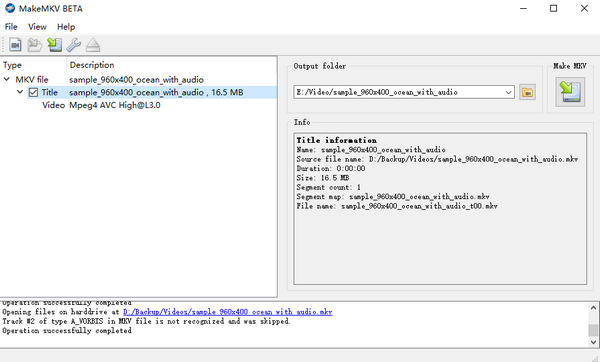
MakeMKV is a free and open-source Blu-ray and DVD transcoder as an alternative to HandBrake. Its focus is to keep the structure and the original quality of the files. This software can handle protected Blu-ray discs with AACS and BD+ encryption. Although MakeMKV is good at what it does, it comes with limitations. The software can only output files in MKV format. Aside from that, it struggles to handle newer Blu-ray and DVD protections.
If you are looking for a native HandBrake alternative that Linux desktop users swear by, MakeMKV’s raw performance makes it an essential open-source addition.
What to Expect With MakeMKV:
PROS
CONS
• Best For: Windows users who want an invisible background tool to automatically strip away regional codes and copy protections.
• Price: Roughly $85 USD for a lifetime license (converted from Euros); offers a 21-day trial.
• Platform: Windows only.
• Formats: Runs silently at the driver level to unblock standard DVD and Blu-ray structures.
• Speed: Instant, real-time decryption in the background.
• Trial: 21 days of completely unlocked, full-featured access
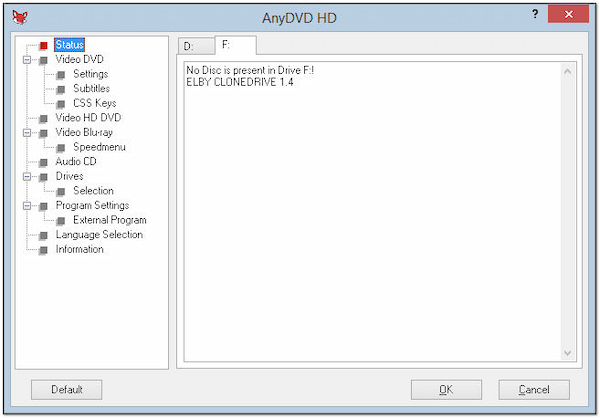
AnyDVD HD is a Windows-based software you can use as an alternative for HandBrake. The tool can be used to remove restrictions from Blu-rays and DVDs, granting you read access to the content. In other words, it works in the background, removing copy protections on-the-fly as you access the disc. However, you should be aware that AnyDVD HD alone cannot rip protected Blu-rays and DVDs. It will require using separate software for the actual ripping.
If you just want to strip away obnoxious copy protections without opening a bloated, confusing app interface, this driver-level utility gives you an incredibly clever alternative that HandBrake fans have relied on for over a decade to clear out their media bottlenecks.
What to Expect With AnyDVD HD:
PROS
CONS
• Best For: Casual, visual-oriented beginners who hate technical jargon.
• Price: Freemium; watermark removal requires a premium upgrade (approx. $39.95/year).
• Platform: Windows only.
• Formats: MP4, AVI, WMV, DVD, and basic MP3.
• Speed: Moderate, utilizing basic CUDA and DXVA encoding.
• Trial: Free tier attaches a prominent branded watermark to the center of your output.
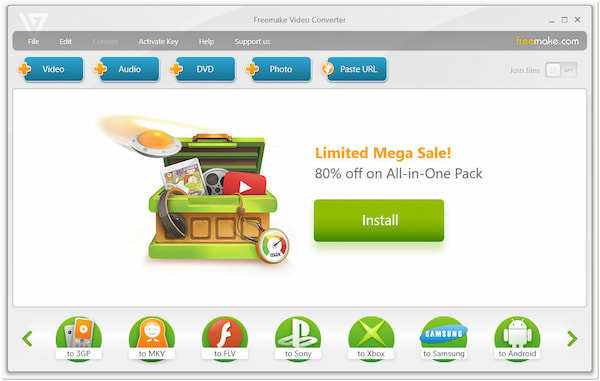
Freemake Video Converter is one of the HandBrakes alternatives you can use for converting digital media files and DVDs. The software can handle various media files and non-protected formats, including MP4, WMV, DVD, etc. Aside from that, the Freemake Video Converter allows you to convert these media files to device-specific formats. Despite its versatility, the free version of the software imposed a watermark on the converted files.
For casual users searching for simple apps like HandBrake that won't require a degree in video engineering, Freemake offers a visual, drag-and-drop wizard.
What to Expect With Freemake Video Converter:
PROS
CONS
• Best For: Dedicated, high-volume physical media archiving.
• Price: $29.00 (1-Month), $59.00 (Lifetime); free trial available.
• Platform: Windows, macOS (Fully native for Apple Silicon).
• Formats: Commercial Blu-ray discs/ISO folders to 500+ device-optimized profiles.
• Speed: Blazing fast via full hardware-accelerated transcoding.
• Trial: Limits ripping capabilities to the first 5 minutes of each title.
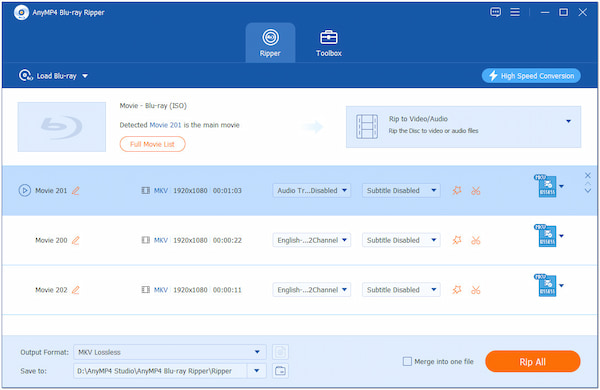
AnyMP4 Blu-ray Ripper is a HandBrake alternative dedicated to ripping Blu-rays, ISO files, and Folders. The software can help you extract Blu-ray content and convert it into a digital format. It gives you the option to choose between various formats, including MP4, MOV, MKV, and 500+ more. This lossless Blu-ray ripping software ensures your content will remain high in resolution and quality. The best part? You can rip Blu-rays in as fast as 50× with no lags.
In addition to its primary function, AnyMP4 Blu-ray Ripper boasts an easy-to-use editor. These tools can be used for adding subtitles and audio tracks, adjusting video effects, and more. Apart from the basics, you can also use AI-powered video enhancer tools. The video enhancer tool can help you enhance the overall quality of your Blu-ray content. It lets you upscale video resolution, optimize video effects, remove video noises, and even reduce video shakes.
Secure Download
Secure Download
For movie buffs who mostly process physical collections and are completely exhausted by HandBrake’s lack of native decryption, using a dedicated HandBrake-like software built specifically for Blu-ray structural decoding will save you countless troubleshooting hours.
What to Expect With AnyMP4 Blu-ray Ripper:
PROS
CONS
Why are so many power users hunting for a faster alternative to HandBrake for Windows or Mac versions? While HandBrake is a great free utility, it hits a hard ceiling very quickly:
Is there a free alternative to HandBrake?
Yes, there are free alternatives to HandBrake. One notable option is the MakeMKV, which focuses on ripping DVDs and Blu-rays. However, it can only output in MKV format.
What is faster than HandBrake?
The faster HandBrake alternatives for Mac and Windows are those using GPU acceleration. Some of the options are AnyMP4 Video Converter Ultimate and AnyMP4 Blu-ray Ripper.
Is HandBrake still the best?
HandBrake remains the best, particularly for those who need a free tool. However, HandBrake comes with many limitations, including supported output formats.
What is the Windows equivalent of HandBrake?
The equivalent HandBrake alternative for Windows is AnyMP4 Video Converter Ultimate and AnyMP4 Blu-ray Ripper. Both tools can go beyond what HandBrake has to offer.
Can I completely replace HandBrake with a single application on Mac?
Yes. If you are tired of juggling three different tools on macOS, utilizing a modern native HandBrake alternative Mac suite like AnyMP4 Video Converter Ultimate covers all bases. It handles standard web video shrinking, decodes multichannel audio, and supports native Apple Silicon M-series hardware acceleration without heating up your machine.
Is there a truly free HandBrake alternative without watermark limits?
It depends on your goal. If you are doing straight, uncompressed disc archiving, MakeMKV is the best HandBrake alternative, free of watermarks, though your files will be massive. For simple file format conversion (e.g., converting a WebM to an MP4), the classic VLC Media Player includes a hidden, watermark-free conversion tool under its "Media > Convert" menu that works well for casual tasks.
Choosing the best HandBrake alternatives is essential for obtaining the best results. Although HandBrake remains a top choice, exploring alternatives can provide better options. From software offering ultra-fast conversion speed, like AnyMP4 Video Converter Ultimate and AnyMP4 Blu-ray Ripper, to straightforward options, the market has plenty of choices.
Secure Download
Secure Download
 Posted by Alice Thorne to Converter
More readings
 Everything You Need to Know about Ripping Blu-ray with HandBrake
If you have a large collection of Blu-ray discs, you may be wondering if HandBrake can rip your Blu-ray discs and convert them into digital files.
 HandBrake Tutorial- Convert MKV/VOB/DVD to AVI Format Directly
If you have difficulties converting to Handbrake AVI format, this article will show you how to convert video and DVD disc to AVI.
 How to Use Handbrake to Compress a Video Without Losing Quality
If you need to compress a video on your computer, Handbrake is an ideal compressing tool. You can learn more about how to compress videos with Handbrake here.
 How to Convert MP4 to MP3 with HandBrake [Detailed Steps]
Are you looking for an MP4 to MP3 converter? HandBrake is a good choice. Today, we will introduce the detailed steps for its single and batch conversion.
 Add your comments to join the discussion here