6 Best Gaming Intro Makers Tested: Which One Actually Works?
Key Takeaways:
- Top Overall Pick (Windows & Mac): AnyMP4 Screen Recorder - Captures microphone voice and internal system sound simultaneously without complex settings. No time limits, and outputs directly to MP3, M4A, and WAV.
- Best 100% Free & Open-Source: Audacity - Multi-track audio editor for deep cleanup, noise removal, and uncompressed WAV/FLAC exports (steeper learning curve).
- Best Built-in Tools (No Install):
- Windows 10/11: Windows Voice Recorder
- Quick mic memos saved in M4A.
- macOS: Apple Voice Memos - Instant iCloud sync across your Apple devices with a one-click button to clean up room echo.
- Best for Quick In-Browser Recording: Online Voice Recorder (123APPS) / Vocaroo - No setup required, fast MP3 exports, and great for quick voice notes or instant shareable links.
When you open your editor to edit your latest gaming video, you find the blank timeline. What you need is a cool intro that can attract your viewers, but you do not want to spend hours learning heavy 3D software. That is why the game intro creator appears. If you search for the best gaming intro maker, you will find dozens of apps claiming to make cool videos in seconds. But which ones actually work without crashing your PC or charging hidden fees? Check the top 6 list, AnyMP4, Canva, Panzoid, CapCut, Renderforest, and Blender, and find your best pick.

How We Tested the Best Gaming Intro Makers
We ran all tests on a mid-range Windows 11 desktop with an Intel Core i5 processor, 16GB of RAM, and an NVIDIA GTX 1660 graphics card. For gameplay capture tests, we recorded 1080p footage at 60 frames per second from games like Valorant and Apex Legends.
We ran each tool through four real-world checks:
- • Speed: Exactly how many minutes did it take us to crank out our first finished intro?
- • Quality: Did the final export give us crisp 1080p and clean MP4 files, or did it look fuzzy?
- • Cost: Were the free options actually free of watermarks, or did they slap a ugly logo right over our video?
- • Ease of Use: Could we jump right in and figure it out, or did we have to waste an hour watching a YouTube tutorial?
|
Intro Style |
Time to First Intro |
Uses Your Own Gameplay |
Watermark (free) |
Export Quality |
Learning Curve |
Overall Score |
| AnyMP4 Screen Recorder |
Montage / Clip Capture |
5 mins |
|
None |
1080p MP4 |
Easy |
9.2 / 10 |
| Canva |
2D Templates / Logo |
10 mins |
|
None (some items paid) |
1080p MP4 |
Very Easy |
8.8 / 10 |
| Panzoid |
3D Animation |
20 mins |
(Templates only) |
Free |
1080p / 4K |
Medium |
7.5 / 10 |
| CapCut |
Beat Sync / Captions |
8 mins |
|
None |
1080p MP4 |
Easy |
8.5 / 10 |
| Renderforest |
Logo Animation |
15 mins |
|
Watermarked on Free Plan |
720p free / 1080p paid |
Easy |
6.8 / 10 |
| Blender |
Full 3D Control |
Hours |
|
None |
Unlimited |
Hard |
7.0 / 10 |
6 Best Gaming Intro Makers
1. AnyMP4 Screen Recorder - Best for Montage Intros from Your Own Gameplay
- Platform: Windows, Mac
- Intro styles: Montage / Clip Capture
- Watermark: No (on core recorded clips)
- Pricing: Free trial / Paid lifetime or subscription options
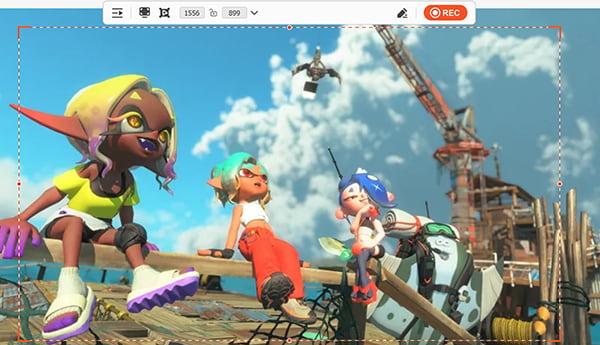
When we tested the AnyMP4 Screen Recorder gaming intro, we looked closely at what its feature set actually does. It features a dedicated game recording mode that captures your monitor display at 60 frames per second without stuttering. It includes a basic built-in video trimmer so you can cut out the boring loading screens, and a format selector that saves your file as an MP4. What can it do? It grabs your highlight clips straight from your screen so you can build a fast montage intro as a true best gaming intro maker 2026 choice. What can't it do? It does not provide built-in 3D text animations or pre-made gaming templates-you have to bring your own recorded footage.
Pros:
- Captures full-screen gameplay at 60fps without lag.
- Includes a simple built-in clip trimmer.
- Exports directly to clear 1080p export files in MP4 format.
- Offers a watermark-free output on recorded clips.
- Uses low system memory while running games.
Cons:
- Requires software installation on your PC.
- Does not include pre-animated 3D text templates.
2. Canva - Best for a Branded Intro in 15 Minutes, No Skills
- Platform: Web browser, iOS, Android, Windows, Mac
- Intro styles: 2D Templates / Logo Animation
- Watermark: No (some specific graphic elements require a Pro plan)
- Pricing: Free / Paid Pro subscription
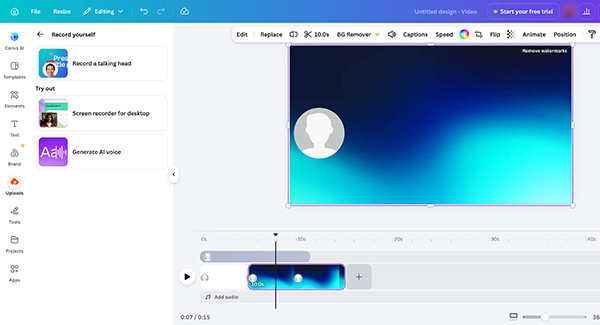
We tested Canva's web editor to see how its features handle a gaming intro template no watermark. It features a drag-and-drop timeline, thousands of pre-made graphic layouts, a font customizer, and text animation presets like fade or zoom. What can it do? This online video maker lets you type your gamer tag onto a ready-made background, change colors, and download a channel name sting in minutes as a reliable free gaming intro maker. What can't it do? It does not let you edit complex multi-layer video effects or render 3D physics objects.
Pros:
- Massive library of pre-made design templates.
- Drag-and-drop timeline works right inside your browser.
- Simple text animation presets apply with one click.
- Fast direct download to your local drive.
Cons:
- Many high-end templates require a subscription.
- Lacks some timeline editing controls.
- Online screen recording has a 25-minutes’ limit.
3. Panzoid (Clipmaker) - Best for Free 3D Animated Intros
- Platform: Web browser
- Intro styles: 3D Animation / Text Stings
- Watermark: No (Free)
- Pricing: 100% Free
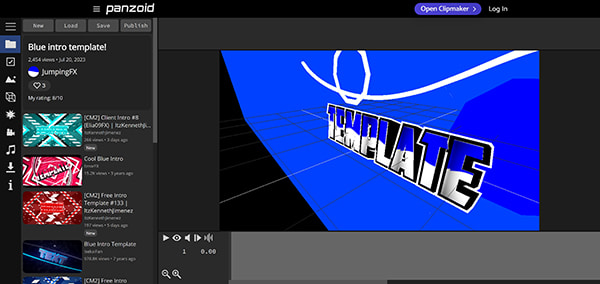
We tested Panzoid to check its browser-based 3D features. It features a 3D text editor, camera angle sliders, particle effect toggles, and a custom render settings menu. What can it do? It lets you type 3D text as the 3D logo maker, change lighting colors, and render a free 3D gaming intro maker (Panzoid) clip right in your browser tab for a cool logo animation. What can't it do? It does not feature a traditional video timeline to splice together your own long gameplay recordings.
Pros
- Adjust 3D text and camera angles as you want.
- Works right in your web page without installing anything.
- Free to export without any cost.
Cons
- The interface is messy and takes time to figure out.
- Rendering heavy 3D files can crash weak browsers.
- Difficult to add custom gameplay video backgrounds.
4. CapCut - Best for Editing a Montage with Auto-Captions
- Platform: Windows, Mac, iOS, Android, Web
- Intro styles: Beat Sync / Captions / Montage
- Watermark: No
- Pricing: Free / Optional in-app Pro subscription
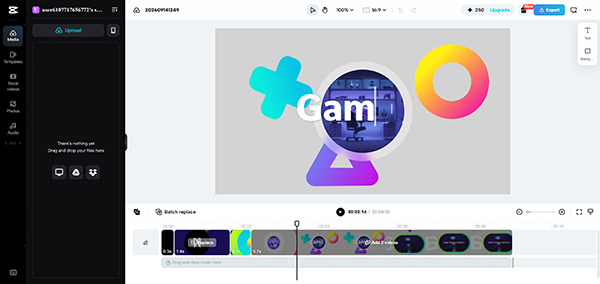
We tested CapCut's desktop app to see how its video editing features perform. It features a multi-track timeline, an auto-sync button that detects audio peaks, an auto-caption generator, and a transition effect library. What can it do? It lets you drop in raw game clips, apply beat sync cuts automatically, and export a clean 1080p export video in MP4 format to make a gaming intro with my own gameplay clips. What can't it do? It does not build custom 3D mesh objects or physical particle simulations from scratch.
Pros
- Matches your cuts to the music beat automatically.
- Packed with free glitch styles and text templates.
- Renders quickly even on a regular computer.
Cons
- You have to sign in for cloud features.
- Desktop version prompts for frequent software updates.
5. Renderforest - Best for Animated Logo Intros (If You Tolerate the Watermark)
- Platform: Web browser (Cloud-based)
- Intro styles: Logo Animation / Cinematic Intros
- Watermark: Watermarked on the Free plan
- Pricing: Free / Paid monthly or annual subscription plans
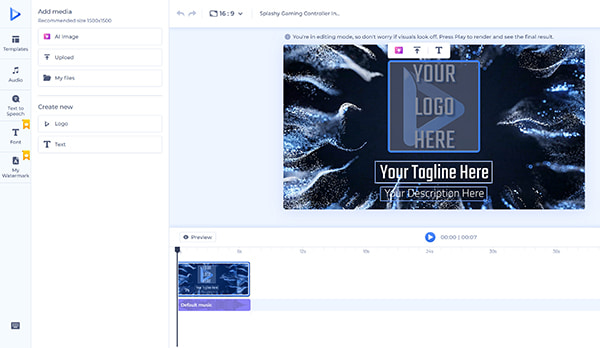
Renderforest is an online YouTube maker. We tested Renderforest to evaluate its automated cloud features. It features an online template browser, a logo upload slot, an audio track selector, and a cloud render queue. What can it do? It lets you upload a static gamer avatar image, pick a preset video style, and let remote servers create a clean logo animation for you. What can't it do? It does not let you manually move objects on a timeline or export high-resolution files without paying.
Pros:
- High-end cinematic visual template styles.
- Cloud rendering saves your local PC processing power.
Cons:
- Free exports include a large visible watermark.
- Free export resolution is locked at 720p.
- Monthly subscription pricing is quite expensive.
- Very little control over individual frame edits.
6. Blender - Best for Full 3D Control at $0 (Honorable Mention)
- Platform: Windows, Mac, Linux
- Intro styles: Full 3D Control / Custom 3D Animation
- Watermark: No
- Pricing: 100% Free (Open Source)
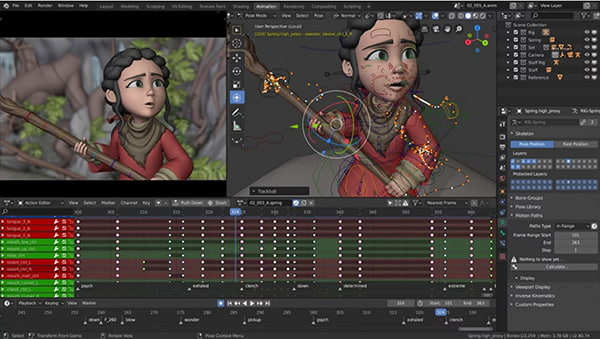
We tested Blender to see how its heavy production features work for an intro. It features a full 3D viewport, a node-based material editor, a physics simulation engine, and a keyframe animation timeline. What can it do? It gives you absolute control over every polygon, light source, and material to build a custom logo animation or complex 3D scene from scratch using template vs 3D vs montage methods. What can't it do? It does not offer any one-click templates, automatic clip trimming, or beginner-friendly wizard menus.
Pros:
- 100% free open-source software.
- Infinite 3D modeling templates.
- Large library of free community tutorials.
Cons:
- Extremely hard for new users to use.
- Demands a high-end graphics card to render smoothly.
How to Make a Gaming Intro with AnyMP4 Screen Recorder
Want to make a gaming intro with your own gameplay clips? It is simple. You do not need complex 3D skills. Here is how you can record and build your custom intro in a few minutes, and here we will take AnyMP4 Screen Recorder as an example to show the steps.
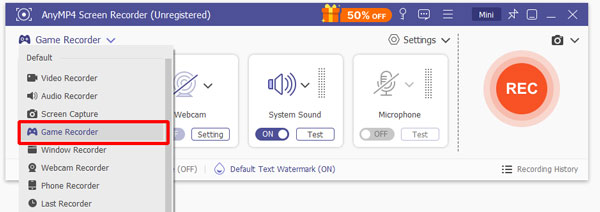
1. Free download and open AnyMP4 Screen Recorder on your PC or Mac. Click on the Game Recorder button. Set your capture area to full screen and make sure system audio is turned on.
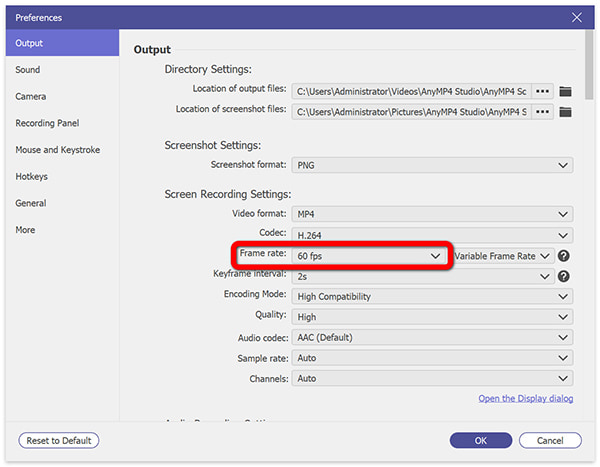
To guarantee a high-quality game intro recording at 60 or 120 frames and at MP4 file, you need to make the settings by clicking the Settings option > Output Setting to adjust the frame rate, resolution and the output format.
2. Launch your game. Play a match and wait for an active sequence. When you reach an important highlight, click the REC button, and the software records your screen at 120 frames per second without slowing down your game.
3. Stop the recording when you have what you need. Use the built-in preview window to cut out the boring loading screens. Keep only the best five to ten seconds of action.
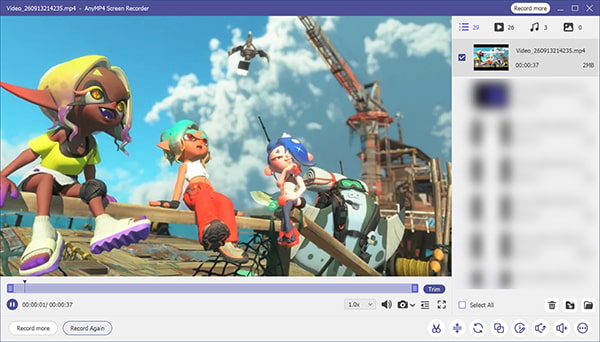
If you want to test automated layouts or build other channel assets, you can also check out this handy AI YouTube video maker tool. Drop this short clip right into the start of your main video editor, and your custom intro is done!
FAQs About Gaming Intro Makers
What's the best free gaming intro maker?
Canva and Panzoid are the top picks for free users. Canva gives you fast 2D templates, while Panzoid offers free 3D animations in your browser. Both of them support AI feature to generate the gaming intro video directly.
How long should a gaming intro be?
Keep your intro between 5 and 10 seconds. Anything longer makes viewers close the video before the real gameplay even starts.
Can I use my own gameplay clips in an intro?
Yes. Tools like AnyMP4 Screen Recorder and CapCut let you record, trim, and drop your own highlight clips straight into your intro timeline to make a gaming intro with my own gameplay clips.
Do free intro makers add watermarks?
Some do, some do not. Always check the export settings before you spend an hour editing a video on a free platform.
What resolution should I export my intro at?
Always export your intro in 1080p resolution using the MP4 format. It keeps your file size reasonable while looking sharp on YouTube and Twitch.
Conclusion
Finding the best gaming intro maker comes down to what you want to build. If you want a fast template to make gaming intro video, open Canva. If you want a custom 3D sting for game, try Panzoid. But if you want to capture your own game moments and build a clean montage intro, free download AnyMP4 and get straight to editing. Pick your tool, keep it short, and start creating!




 Add your comments to join the discussion here