
Free Download100% Clear & Secure
Free Download100% Clear & Secure
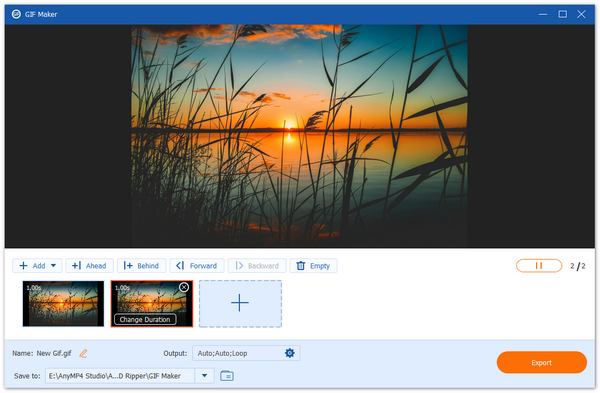

Need a free GIF maker that actually works without ruining your quality? Choosing the right tool depends on whether you prefer deep editing control or just want to paste a YouTube link and go.
Sometimes a static image just doesn't cut it, and a full-blown video is way too much effort to send in a group chat. Whether you're trying to capture that hilarious fail moment from your favorite show or you want to make a custom reaction for your Discord server, you need a reliable free GIF maker tool.
I’ve spent the last week diving deep into the world of loops and frames. I remember the first time I tried to make a GIF for a school project, and I used a random site that slapped a giant watermark right across my face. It was tragic. To save you from that same heartbreak, I’ve tested dozens of tools to find the absolute best free GIF creator options available today. In this guide, I’ll share my honest, hands-on experience so you can start creating animated GIFs that actually look good.
Before we dive into the tools, why are we even obsessed with GIFs?
1. Universal Language: A GIF of a cat falling off a sofa translates to every language on Earth.
2. Engagement: On social media, animated content gets way more clicks than boring text.
3. Low Barrier to Entry: You don't need to be a Hollywood editor. With a free GIF creator, you can make one in seconds.
4. Perfect for Tutorials: Sometimes showing someone where to click is easier with a 5-second loop than a 10-minute explanation.
How I Tested These Tools
To keep things fair, I used the same 10-second 1080p video clip and a folder of 5 high-res JPGs for every single tool. I looked at how fast they processed, whether they tried to sneak in a watermark at the last second, and how fried the quality looked after the conversion. I also checked whether they were free online GIF makers or desktop software.
| Watermark | Max File Size | Editing Features | Ease of Use | Best For | Output Quality | Limitations | |
|---|---|---|---|---|---|---|---|
| AnyMP4 Video Converter Ultimate | No (Pro) | Unlimited | Advanced | Very Easy | High-Quality | Excellent | Desktop Install |
| Ezgif | No | 100MB | Extensive | Moderate | Quick Edits | Good | Clunky UI |
| Giphy | No | 100MB | Stickers/Text | Very Easy | Social Media | Standard | Must Upload |
| Imgflip | Optional | 35MB | Basic | Easy | Memes | Standard | Small upload |
| Canva | No | Large | Design-Heavy | Easy | Aesthetics | High | Account Req. |
| Kapwing | Yes (Free) | 250MB | Timeline, AI, Text | Easy | Pro Edits | High | Watermark on free |
| ScreenToGIF | No | Unlimited | Frame-by-frame | Moderate | Tutorials | Excellent | Windows only |
| Adobe Express | No | Large | Professional | Easy | Branding | High | Account Req. |
Verdict:
If you want the highest quality without any lag, AnyMP4 Video Converter Ultimate is the winner for desktop. If you’re on the go and need something browser-based, Ezgif remains the king of versatility despite its old-school website look.
Best for: Users who want a high-quality GIF converter free of glitches and watermarks.
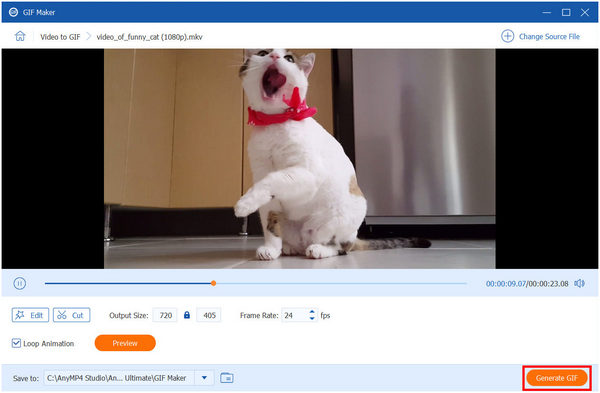
If you are tired of online tools crashing because your video file is too large, this is your solution. AnyMP4 Video Converter Ultimate is a desktop powerhouse that includes a dedicated GIF Maker in its toolbox. It functions as a video-to-GIF converter that handles 4K videos like a champ. It’s easy to use and lets you pick the exact frame rate so your GIF doesn't look like a 1995 slideshow.
Secure Download
Secure Download
PROS
CONS
Personal Experience Summary:
I used this to turn a clip from a high-def movie into a GIF. Most online sites told me the file was too big, but AnyMP4 didn't even blink. The Loop Animation toggle is a lifesaver; nothing is worse than a GIF that just stops.
Best for: Technical edits like resizing, cropping, and optimizing file sizes.
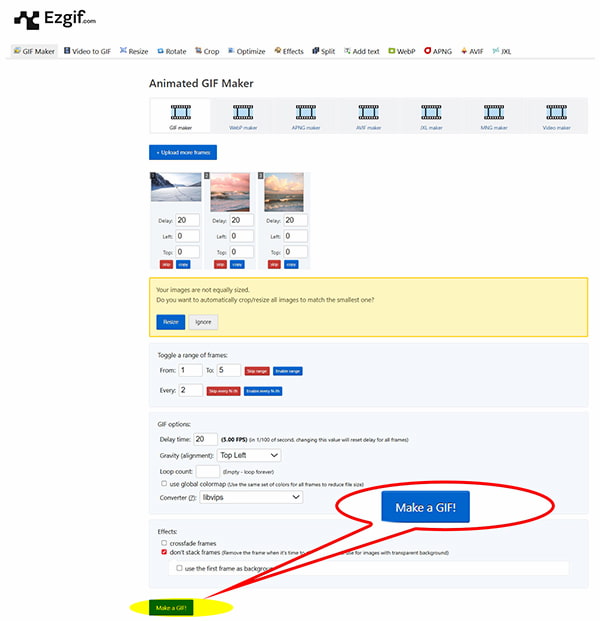
Ezgif is the online GIF creator I’ve used the most over the years. It isn't pretty; the website looks like it hasn't been updated since 2010, but it works. It’s a free online animated GIF maker that gives you total control. You can upload a video, or a bunch of images, and then smush the file size down so it actually fits in a Discord message.
PROS
CONS
Personal Experience Summary:
Ezgif is my go-to when a GIF is 26MB, and Discord says Nope, 25MB max. Their Lossy GIF optimization is magic; it keeps the GIF looking decent while slashing the file size in half.
Best for: Making animated content for social media and Discord.
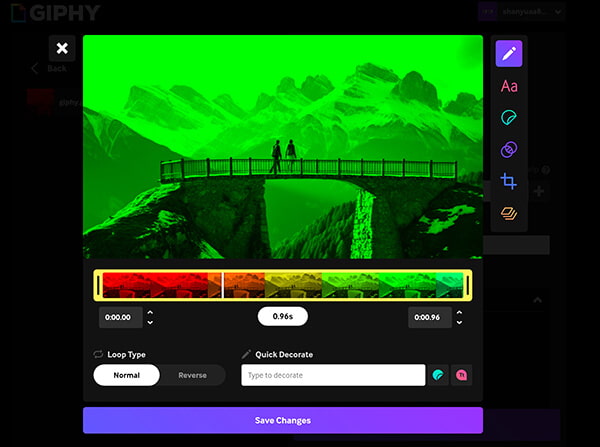
Giphy is the world’s biggest GIF library, and its free online GIF maker is built for speed. If you want to add flaming text or those weird dancing stickers to your GIF, this is the place. It’s a great free GIF maker from a YouTube video because you can just paste a URL and start clipping.
PROS
CONS
Personal Experience Summary:
Whenever I want to make a meme for my friends, I go here. The sticker search is endless. Just a heads up: if you make something private, make sure you actually check the box, or your inside joke might end up on the Giphy front page!
Best for: Simple, fast meme-style GIFs.
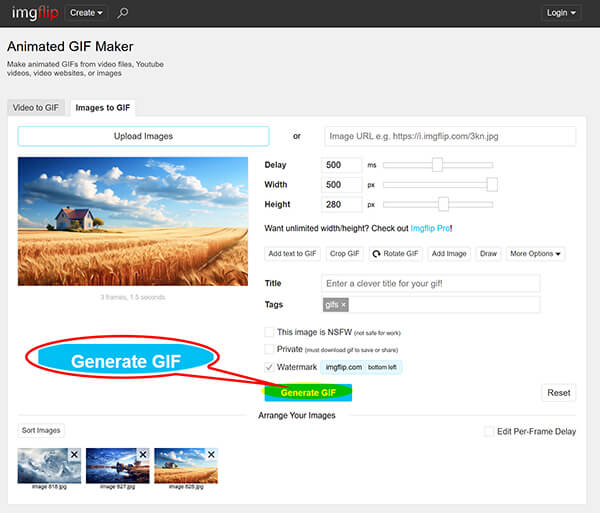
Imgflip is another free online GIF maker that focuses on the meme aspect. It’s incredibly fast. If you just need a free GIF creator to slap some top-and-bottom text on a loop, you can do it here in about 10 seconds.
PROS
CONS
Personal Experience Summary:
I used this for a quick reaction GIF. The watermark is small, so it didn't bother me too much for a casual chat, but I wouldn't use it for a professional project. It’s the express lane of GIF making.
Best for: Aesthetic, preppy, or professional-looking GIFs.
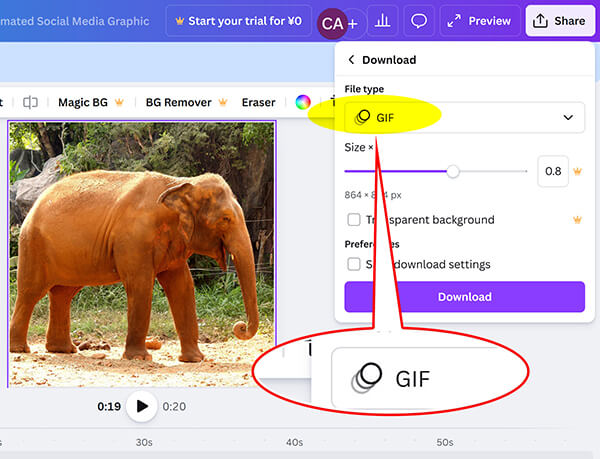
You probably know Canva for posters, but it’s actually a fantastic free animated GIF generator. You can upload any video, take any design and animate the elements, then export it as a high-quality GIF. So it can be an easy MKV, MOV, and MP4 to GIF converter. It’s perfect for making those Link in Bio stickers or cute Instagram story elements.
PROS
CONS
Personal Experience Summary:
I used Canva to make a Happy Birthday GIF for my sister. Being able to use their fonts and graphics made it look like I spent hours on it, when it actually took me five minutes. It’s the glow-up tool for your GIFs.
Best for: Advanced editing, adding trending captions, and pro-style memes.
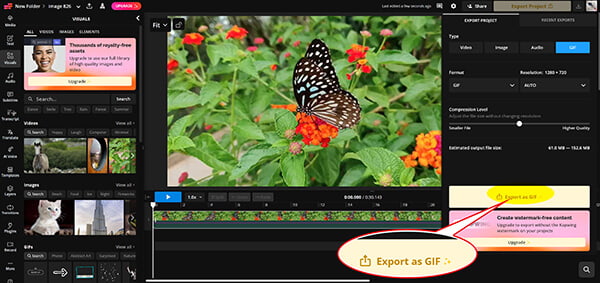
If you’re looking for a free GIF maker that feels more like a professional movie studio than a simple website, Kapwing is the answer. It is a powerhouse online GIF editor and creator that lives in your browser, meaning you don't have to download anything. As an online animated GIF maker, it lets you layer multiple videos, add moving text, and even use AI to remove backgrounds. It’s perfect for making high-quality GIFs converter free edits that look like they took hours.
PROS
CONS
Personal Experience Summary:
I used Kapwing to make a reaction GIF where the text actually bounced along with the person’s head. Most simple makers just slap static text on top, but Kapwing’s timeline lets me animate the words perfectly. It’s definitely the cool older sibling of GIF makers, a bit more complex, but the results are way more impressive for your Discord friends.
Best for: The best free GIF maker for Discord tutorials and screen recordings.
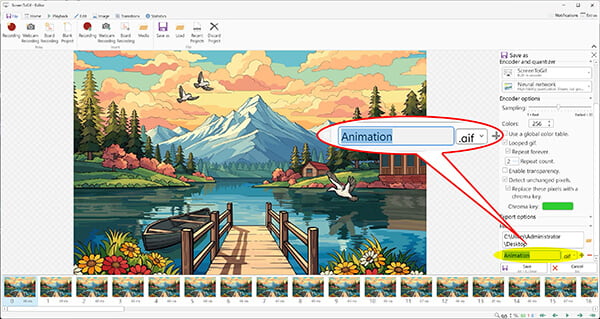
This is a hidden gem for Windows users. ScreenToGif is a tiny GIF screen capture program you download that lets you record a specific part of your screen and instantly turn it into a GIF. It has a frame-by-frame editor that is more powerful than some paid video software.
PROS
CONS
Personal Experience Summary:
When I need to show my grandma how to change a setting on her computer, I use this. I record my screen, crop out my messy desktop, and send her a tiny, clear GIF. It’s a total lifesaver for tech support.
Best for: High-end conversions from the masters of design.
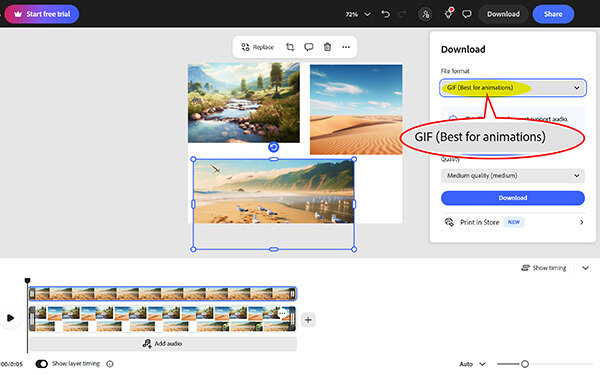
Adobe Express offers a free GIF maker app and online tool that brings Adobe’s power to a simplified interface. It’s a very polished video-to-GIF converter that ensures your colors stay vibrant.
PROS
CONS
Personal Experience Summary:
I was surprised at how fast this was. Usually, Adobe stuff feels heavy, but the Express GIF converter is snappy. The quality is noticeably better than some of the more budget online sites.
If you’re making a GIF for Discord, try to keep it under 256 colors. Most GIF makers do this automatically, but if your file is too big, lowering the color count is the easiest way to shrink the size without losing the vibe.
If you want the best results without worrying about your internet cutting out mid-upload, using a desktop tool like AnyMP4 Video Converter Ultimate is the way to go. It’s a robust GIF maker free of the usual online limitations, offering a smooth toolbox approach to media creation. You don't have to be a pro to use it; the interface is designed to lead you straight to the finish line.
Free download and install the software using the buttons below based on your computer OS, then open it.
Secure Download
Secure Download
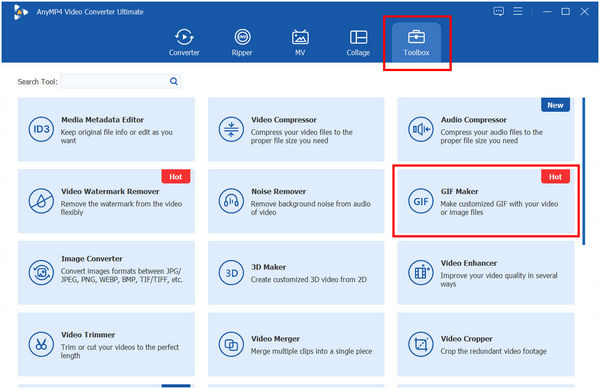
1. Find the GIF Maker
Click on the Toolbox tab at the top and select GIF Maker.
2. Choose Your Source
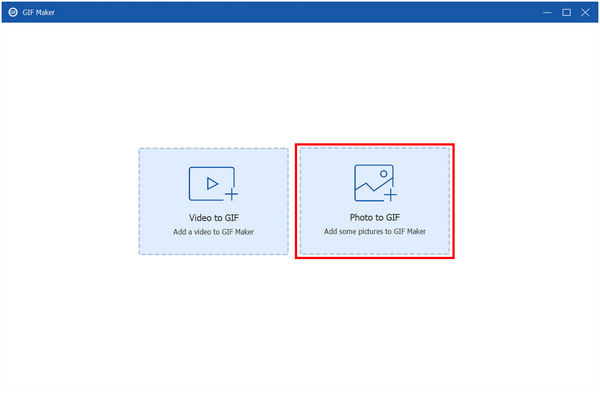
You’ll see two options: Video to GIF or Photos to GIF. Pick whichever one you’re working with.
3. Edit and Adjust
Use the Cut tool to select the exact 2-3 seconds you want to loop. (Pro tip: Shorter is usually better for GIFs!).
Adjust output settings: Set your output size (like 480p or 720p) and frame rate (15-24 fps is the sweet spot).
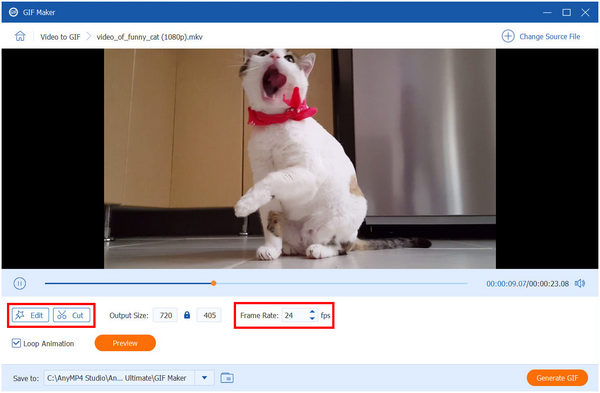
4. Preview and Create
Click the Preview button to ensure it loops perfectly, then click Generate GIF.
What I love about this process is the Edit feature before the conversion. I could add a watermark of my own name or a funny filter right inside the tool. It feels much more secure than uploading my private videos to a random cloud server. Plus, the final file looks crisp, no deep-fried pixels here!
What is the best free GIF maker for beginners?
For pure beginners, Giphy Create is the easiest. It feels like using an Instagram filter. If you want something for your computer without an account, Ezgif is the most straightforward once you get past the old-looking website.
Are free GIF makers safe to use?
Most big-name tools like Canva, Adobe, and Giphy are 100% safe. However, be careful with no-name sites that ask you to Allow Notifications or download weird Flash Players. Stick to the ones on this list, and you’ll be fine!
What is the ideal file size for a GIF on social media?
• Discord: Under 25MB (for Nitro) or under 10MB (standard).
• Twitter/X: Up to 15MB on mobile.
• Best Practice: Aim for under 5MB for fast loading on all devices.
Can I legally make a GIF from a YouTube video?
Generally, yes, under Fair Use for commentary, criticism, or parody. Just don't try to re-upload an entire music video as a series of GIFs and claim you own it! Using a free GIF maker from a YouTube video for memes is usually totally fine.
Always look for the Loop setting. Some tools might set it to Play Once by default. A GIF that doesn't loop is just a very short, sad video. Make sure it’s set to Infinite.
Finding a free GIF maker of annoying catches used to be a nightmare, but in 2026, we’ve got some incredible options. Whether you need the professional polish of Adobe Express, the anything goes flexibility of Ezgif, or the high-speed power of AnyMP4, there’s a tool for every vibe. My final piece of advice? Don't overthink it. The best GIFs capture a raw, funny, or relatable moment. So grab one of these free GIF maker tools, start clipping, and brighten up someone’s group chat!
Secure Download
Secure Download
 Updated by Mark Cristobal to GIF
More readings
 Best 5 GIF Enlargers to Make Your Animated Images Bigger
Explore the top 5 GIF enlarger tools to make animated images look bigger and better. Discover their pros, cons, and features. Make GIFs larger instantly.
 5 High-Profile GIF Looper [Latest Review]
Do you want to make GIFs loop but don't know which tool to use? See the five GIF loop makers we have listed here!
 A Step-By-Step Tutorial to Download GIFs from Twitter in 3 Ways
Have you ever been tormented by Twitter’s inability to download GIFs? Today, we have prepared 3 most straightforward solutions to Download GIFs from Twitter.
 Top 11 GIF Players for Windows PC, Mac, iPhone, and Android
Here is a list of the best GIF players for Windows, Mac, iOS, and Android to help you watch and play animated GIF images frame by frame without losing quality.
 Add your comments to join the discussion here