iCloudin Tool Review: Does it Bypass iPhone Activation Lock

iCloudin is a legacy bypass tool that primarily works on iOS 9 and older devices with a success rate of around 15%.
Many iPhone users have encountered the frustration of being locked out of their devices due to the iCloud activation lock. In such situations, tools emerge, promising a way to bypass the lock and regain access. In this iCloudin Tool review, we will delve into the tool’s features, exploring its claims and potential effectiveness. We will also highlight important considerations for users. Continue reading for additional insights!
Caution: Official links for iCloudin are no longer maintained. Most download sites are phishing scams.

Part 1. Quick Verdict of iCloudin Tool
According to a software review site, iCloud Bypass Tool iCloudin earned a poor rating of 1.5 out of 5 stars from 59 reviews. This indicates that most users were not satisfied with the service. Around 85% of the reviews claim it doesn’t work on their iDevice. Users report that finding its download link is challenging, leading to installing different tools with viruses. Only 15% of reviews claim successful iDevice unlocking, leaving the reputation of the tool questionable.
Overall Ratings (Out of 5 Stars):
Service:
Unlocking Performance:
Success Rate:
Speed Performance:
Value for Money:
PROS
- It claims to disable the iCloud activation lock.
- It claims to be a free tool for unlocking iDevices.
- It has a straightforward interface, making it easy to use.
CONS
- It isn’t easy to find the official website and download link.
- It fails to work on certain iDevices, mainly the latest models.
- It only works for iDevices running iOS 9 and earlier versions.
Part 2. Overview of iCloudin Tool
If you’re locked out of your device due to the iCloud activation lock, worry not! Tools like iCloudin can help you bypass the iCloud activation lock for free. It lets you access your iDevice even if you forgot iCloud password or Apple ID credentials. It offers a user-oriented interface, making it ideally accessible for all users. It claims to be compatible with various iDevices, but not all. This provides an effective unlocking solution for all Apple users. The good thing is that it doesn’t require its users to be tech-savvy.
What to Expect With iCloudin Tool:
- • Claims to bypass iCloud activation lock on iDevices for free.
- • Unlocking process can be done without breaking your bank account.
- • Features a straightforward interface, intended for non-tech savvy users.
- • Compatible with various iPhones and iPads running iOS 9 and earlier versions.
Part 3. Full Review of iCloudin Tool
AnyMP4 Provides Verified Info by Doing the Following
- As part of our selection methodology, we conduct an exhaustive analysis of consumer demand and product appeal.
- The AnyMP4 content team has meticulously tested the software outlined in the article.
- We carefully review key metrics, such as Bypassing iCloud Activation Lock, Free Unlocking Process, Straightforward Interface, Compatibility with Various Devices, and more.
- Furthermore, we actively gather and scrutinize customer feedback for the AnyMP4 program and its competitors in other markets.
This iCloudin review goes beyond opinions. We at AnyMP4 understand the value of unbiased reviews for your decision-making. That’s why we put the tool through testing. We aim to deliver fact-based information to help you with the data needed to make informed decisions.
| How We Test |
| Installation Process |
Initially, we obtained the free download iCloudin. We extract the program files from the ZIP file to install it. |
| Compatibility Checking |
We updated the iTunes installed on our testing computer. This is to ensure we are running the latest version to avoid any conflicts. |
| Connection Establishment |
Using a wired cable, we established a connection between our testing iDevice and the testing computer. |
| Unlock Device |
After we successfully connected the testing devices, we launched the tool and navigated to the Host’s file IMEI. Then, we select the Hosts_Activation_IMEI.java. |
| Result of the Test |
After we select the file, the activation lock unlocking the Activation lock process has begun. Luckily, we successfully unlocked the device. However, we use another iPhone with iOS 9 version to complete the process. |
Bypassing iCloud Activation Lock
Overall Ratings:
This is the core function of the iCloudin Removal Tool. It claims to remove iCloud lock, a security feature that prevents unauthorized access on lost or stolen devices. It promises that you can regain access to the device even if you forget your credentials. However, there’s a catch. It can compromise your device, making it unusable.
Free Unlocking Process
Overall Ratings:

This tool advertises itself as a free tool for bypassing the activation lock on iDevices, which makes it seem like a budget-friendly option. But here’s a thing: Free unlocking tools or services are uncommon. There might be hidden costs involved, such as subscriptions after a trial period or in-app purchases required for functionalities.
Straightforward Interface
Overall Ratings:
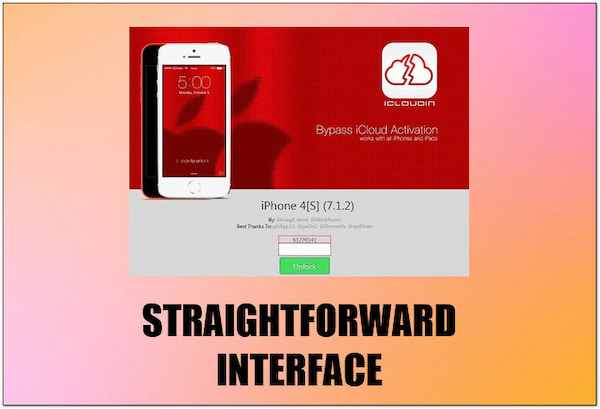
iCloudin software comes with a user-friendly interface. It makes it simple for those with limited technical knowledge of the unlocking process. Now, a small heads-up. A seemingly easy interface might downplay the technical steps involved. Also, it might have the risks associated with bypassing security measures.
Compatibility with Various Devices
Overall Ratings:

iCloudin claims to work with various iPhones and iPads running iOS 9 and earlier versions, which could appeal to users with older devices. However, there’s a deal. Apple constantly improves security features with each iOS update, and bypassing the activation lock becomes increasingly difficult on newer versions.
Feedback from Trusted Tech Software Review Sites
The bypass did not work. The screen is still going to the iCloud screen to put in the iCloud email and password. We tried doing it again, but the software is telling us to reboot the phone. I did it five times and iCloud is still not working.
-Trustpilot
IT IS BY FAR THE BEST ON THE MARKET. THIS IS THE SECOND TIME I’VE USED THE SERVICE, AND I WAS 100 % SUCCESSFUL.
-Trustpilot
Thank you for getting past the code, but it did not remove the Apple account, so I was not able to put in the password because I did not remember it. Now, I’m back to the activation lock screen.
-Trustpilot
Part 4. Best Alternatives to iCloudin Tool
If you're locked out of your iPhone 15 Pro Max or any modern iPad, the reality is that legacy tools like iCloudin are no longer viable. Apple has significantly patched the software vulnerabilities that these old tools relied on. However, depending on your needs, you have two primary alternatives.
1 iCloud DNS Bypass (The Free but Temporary Method)
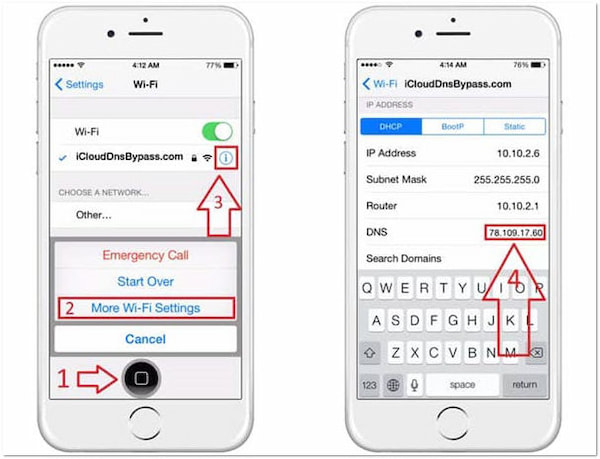
Before jumping into software, some users try DNS Bypass. This method doesn't "unlock" the device; instead, it changes your Wi-Fi DNS settings to redirect the activation request to a third-party server.
How it works: iCloud DNS Bypass works by redirecting your iPhone's activation request from Apple’s official servers to a third-party DNS server. By manually changing the DNS (Domain Name System) settings in your Wi-Fi configuration, you can "trick" the device into opening a custom web portal that mimics some iOS functions, effectively bypassing the activation locked screen.
PROS
- Completely free.
- No computer needed.
CONS
- Only access a limited web-based menu (videos, browser, games).
- It will not restore cellular calls or allow you to use your own Apple ID.
If you only want a quick look into an old device, you can try this. But if you want to restore calls, download apps, and unlock your device permanently, skip this step and use AnyMP4 iPhone Unlocker.
2 AnyMP4 iPhone Unlocker (The Professional & Permanent Solution)
Why does a tool like AnyMP4 iPhone Unlocker succeed where iCloudin fails? It comes down to the underlying technology.
- Technical gap: Old tools like iCloudin targeted software-level glitches in iOS 7-9, which are now completely obsolete. Modern professional tools are built to handle the sophisticated security of iOS 27 beta, 26.
- Checkm8 exploit & hardware logic: For many supported devices, professional unlockers leverage the Checkm8 exploit. This is a "bootrom" level vulnerability, meaning it exists in the hardware itself, making it unpatchable by Apple's software updates.
- The role of DFU Mode: To bypass the Activation Lock, AnyMP4 guides you into DFU Mode (Device Firmware Update). This allows the software to interact with the device's hardware at the lowest possible level, ensuring the bypass is stable and deep enough to remove the Apple ID credentials permanently.
Key features of AnyMP4 iPhone Unlocker:
- Wide compatibility: Handles all iDevices, including the latest iPhone 17 and series.
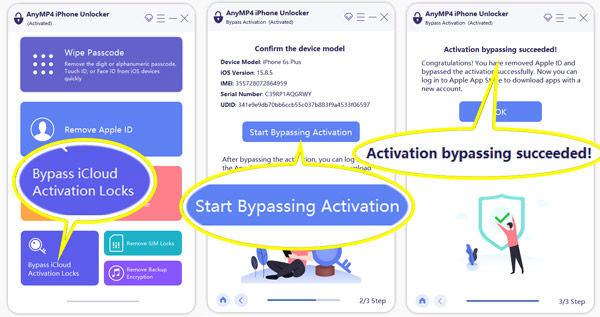
- Full functionality: Once the Apple ID is removed, you can sign in with a new account, enjoy all iCloud services, and download apps from the App Store.
- All-in-one utility: Beyond bypassing iCloud, it offers Wipe Passcode (for 4/6-digit codes, Face ID, and Touch ID) and Screen Time mode to bypass restrictions without data loss.
PROS
- Removes all screen locks.
- Deletes forgotten Apple ID.
- Bypasses Screen Time limits.
- Supports latest iOS versions.
CONS
- Requires paid license.
- Needs PC or Mac.
Follow this guide to use this tool to bypass iCloud activation in details.
|
iCloudin (Legacy) |
DNS Bypass (Temporary) |
AnyMP4 iPhone Unlocker |
|---|
| Success Rate |
Very Low (<15%) |
Medium (Web-only) |
High (99%) |
| iOS Compatibility |
iOS 9 & Older |
All iOS Versions |
Up to iOS 18+ |
| Unlock Type |
Software Glitch |
Network Redirection |
Hardware-level Bypass |
| Permanent? |
 |
(Resets on Reboot) |
 |
| Device Support |
iPhone 4 - 6 |
All iDevices |
iPhone 5s - 16 Pro Max |
| Risk Level |
High (Malware/Scams) |
Low (Safe but limited) |
100% Secure |
Part 5. How to Use iCloudin to Bypass iCloud Activation
If you are using an older Apple device (such as an iPhone 4, 5, or 6s running iOS 9 or earlier), you might still be able to use iCloudin. Follow these steps carefully, but keep in mind that this method is highly unreliable for newer iOS versions.
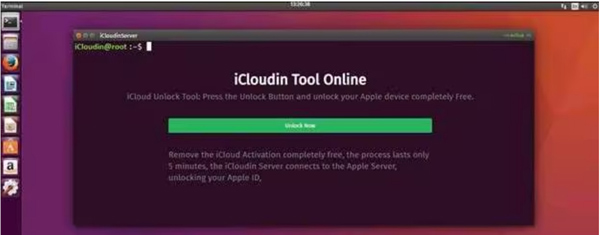
1. Preparation and safety check
Before starting, ensure you have the following:
- A Windows PC (iCloudin is primarily a Windows-based tool).
- The latest version of iTunes installed to ensure your computer recognizes the iPhone.
- An original USB cable to maintain a stable connection.
- Warning: Disable your antivirus software temporarily, as many security programs flag bypass tools as "false positives."
2. Download and extract iCloudin
Find a trusted source to download the iCloudin ZIP file. Since there is no official website anymore, be extremely careful of malware. Once downloaded, extract the contents to a folder on your desktop.
3. Connect your device in DFU Mode
Connect your iPhone to the computer. For the best chance of success, most experts recommend putting your device into DFU Mode (Device Firmware Update). This allows the tool to communicate with the hardware before the iOS software fully loads.
4. Run the bypass process
1. Open the iCloudin tool as an Administrator.
2. Look for the button labeled "Host's file IMEI" or similar.
3. Browse the folder you extracted earlier and select the file named Hosts_Activation_IMEI.java.
4. Click the Start or Bypass button.
5. Completion and restart
The tool will show a progress bar. Once finished, your iPhone should reboot automatically. If successful, you will bypass the Activation Lock screen and reach the home screen.
Part 6. FAQs about iCloudin Tool
What is an activation lock on an iPhone?
Activation Lock is a built-in feature of Apple’s Find My service. When enabled, it requires the original Apple ID and password to be entered before certain actions can be performed on the iPhone. These include turning off Find My, wiping the device, or reactivating it for use.
Is it possible to bypass iCloud lock?
YES! The right software can help you bypass the iCloud lock. To do this, you can use iCloudin or AnyMP4 iPhone Unlocxker to unlock your device.
Can you remove the Activation Lock without the previous owner?
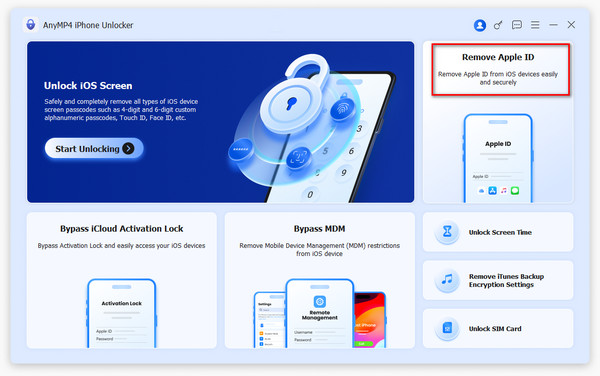
Unfortunately, removing the activation lock without the previous owner’s Apple ID is close to impossible. Without the original credentials, the iPhone will remain locked. However, with tools like AnyMP4 iPhone Unlocker, you can bypass this restriction using its Remove Apple ID mode.
Is iCloudin really free?
Yes, the original iCloudin was a free tool. However, many websites now use its name to lure users into downloading malware or paying for "pro" versions that don't exist.
Does iCloudin work on iPhone 13/14/15/16?
No. iCloudin is only compatible with very old models (iPhone 4 to 6s) running iOS 9 or earlier. For newer models, you need professional tools like AnyMP4 iPhone Unlocker.
Is the iCloudin download link safe?
Most links found on Google today are unsafe. We recommend avoiding unknown sources and using verified software to protect your data.
Conclusion
That’s all we have for our iCloudin Tool review! Bypassing activation locks can be a tricky situation. Fortunately, iCloudin promises a way out. However, its success rates, especially on newer iPhone models, are questionable. The good thing is that AnyMP4 iPhone Unlocker has got you covered. This tool supports all iOS device models and versions. This makes your unlocking process with newer devices successful. In addition, it aims to provide you with a smoother unlocking process in no time.





 Add your comments to join the discussion here