
Quick Summary:
Let me guess: you were digging through an old hard drive, archiving some ancient digital voicemails, or trying to recover audio from a 20-year-old flip phone, and you stumbled across a .qcp file. You double-clicked it, and your computer stared blankly back at you with an "Unsupported Format" error.
You aren't alone. As someone who has spent over a decade untangling legacy media formats and testing software, I see this exact frustration constantly. When users ask me, "What is file type QCP, and why is it fighting me?" the answer usually takes them on a brief trip down the telecom memory lane. In this comprehensive guide, we are going to cut through the technical jargon. We will explore exactly what a QCP file is, why your modern smartphone hates it, and the fastest, least painful ways to open and convert it today.

To understand why your computer can't simply play this file, we have to understand what it was built to do. If you are asking what QCP audio is, you need to know it wasn't designed for high-fidelity music. It was designed for survival in a low-bandwidth world.
A QCP file type is an audio container specifically engineered for recording a voice memo of human speech. It doesn't care about the rich bass of a drum kit or the high treble of a violin; it only cares about making voice intelligible across spotty cellular connections.
Don't delete your original QCP files even after you convert them! Always keep the raw, original file as a backup. Every time you convert audio, there is a microscopic risk of data degradation, and having the source file is the golden rule of digital archiving.
So, what does QCP stand for? It stands for Qualcomm PureVoice.
Back in the late 1990s and early 2000s, the mobile networking world was engaged in a massive format war, primarily between GSM (widely used in Europe) and CDMA (pioneered by Qualcomm and widely used in North America by carriers like Sprint and Verizon).
Cellular bandwidth was incredibly expensive and severely limited. To transmit voice over a CDMA network without dropping the call, Qualcomm had to invent a way to compress human speech into tiny digital packets. Thus, the PureVoice technology was born.
When you recorded a voice memo on an old Sanyo, LG, or Samsung flip phone or saved a voicemail, the carrier often stored it in this mobile voicemail format. It was a miracle of engineering at the time, squeezing hours of audio into mere megabytes. But that heavy voice compression is exactly what makes it a headache to access today. It is the definition of legacy audio.
Let’s get slightly technical for a moment, because knowing what's under the hood helps solve the playback problem.
The QCP extension is essentially just a wrapper. Technically speaking, it is based on the RIFF (Resource Interchange File Format) container format—the same foundational architecture used by WAV files. However, the data inside that container is heavily encoded.
QCP files utilize two primary audio codecs:
Because these codecs were heavily patented by Qualcomm and highly specific to telecom hardware, they were never widely integrated into mainstream consumer desktop software like Windows Media Player or Apple's QuickTime.
If you are currently trying to open a QCP file on Windows 11 or on a modern Mac, you are hitting a brick wall because those proprietary QCELP and EVRC codecs are not built into your operating system.
Think of a QCP file like a book written in a highly localized, ancient dialect. Your computer (the reader) can see the book, pick it up, and recognize that it contains words (the RIFF container), but it completely lacks the dictionary (the codec) required to translate those words into sound you can hear.
Furthermore, because QCP is essentially a dead format, major software developers like Microsoft and Apple have zero financial incentive to pay licensing fees to include these outdated codecs in their modern operating systems. Your OS doesn't know how to handle the QCP file extension.
If you want to listen to the file without changing its format, your options are limited, but they do exist.
Back in the day, Qualcomm released a standalone Qualcomm PureVoice player plugin for desktop computers. You can still find archived versions of this software on retro-tech sites.
The Catch: It is incredibly outdated software. Running 20-year-old executables on a modern Windows 11 or Mac machine requires compatibility mode, and sometimes it outright refuses to install due to modern security protocols.
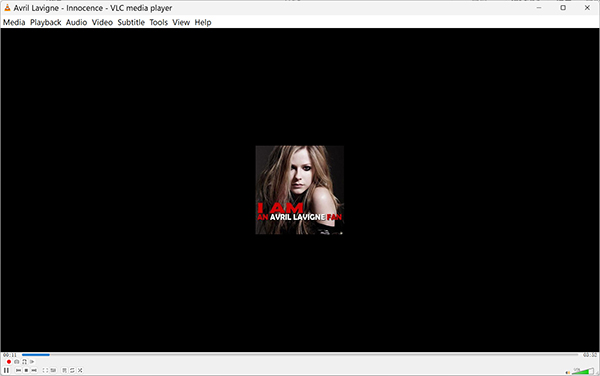
VLC Media Player
VLC is famous for playing absolutely everything. However, its relationship with what QCP is complicated.
The Reality: VLC might play your QCP file, depending entirely on which specific codec (EVRC or QCELP) was used to record it. The open-source community has reverse-engineered some of these codecs, but support is notoriously spotty. If you drag the file into VLC and the time tracker moves, but you hear no audio, VLC has failed to decode it.
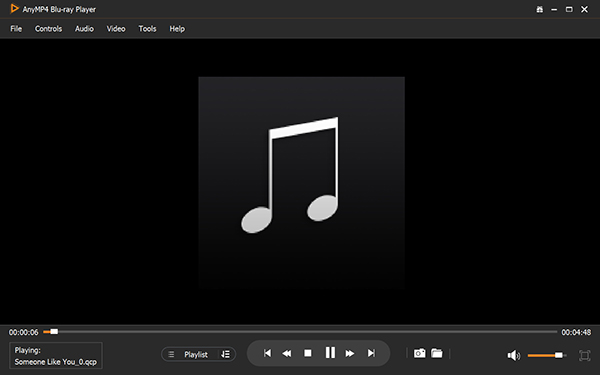
AnyMP4 Blu-ray Player
If you are tired of playing "codec roulette" with VLC and want the file to work, a surprisingly robust solution for direct playback is the AnyMP4 Blu-ray Player. Don't let the "Blu-ray" part of the name trick you into thinking it is strictly for movies. Under the hood, it is designed as a universal media powerhouse equipped with a massive, commercially maintained library of built-in audio and video decoders. Unlike open-source players that struggle with proprietary telecom formats, this player bypasses your PC or Mac's native codec limitations entirely. Drag and drop your legacy .qcp file into the interface, and it will seamlessly decode the audio without forcing you to convert the file first.
Secure Download
Secure Download
There are a handful of bare-bones apps on the Google Play Store designed specifically to open old voicemail formats.
The Warning: Many of these apps are ad-heavy, rarely updated, and have questionable privacy policies. I generally advise against granting obscure third-party mobile apps access to your personal file storage.
Editor's Note:
Attempting to hunt down legacy players is usually a waste of time and poses a security risk. The industry standard and most efficient approach is to convert the file to a universal format. Let's look at how to do that.
Stop fighting with obsolete media players. The only permanent, stress-free solution for handling legacy audio is to use a dedicated QCP-to-MP3 converter. By converting the file, you permanently strip away the proprietary Qualcomm wrapper and translate the audio into a universal format that will play on literally any device, forever.
When dealing with low-bitrate voice recordings, you need a tool that won't further degrade the audio during conversion. This is where professional-grade software becomes necessary.
For tasks like this, I consistently rely on AnyMP4 Video Converter Ultimate. Don't let the "Video" in the name fool you; its audio processing engine is exceptionally robust. It handles obscure telecom formats that standard free web converters choke on.
Here is why this tool is uniquely suited for solving the QCP problem:
Grab AnyMP4 Video Converter Ultimate for your Windows or Mac machine.
Secure Download
Secure Download
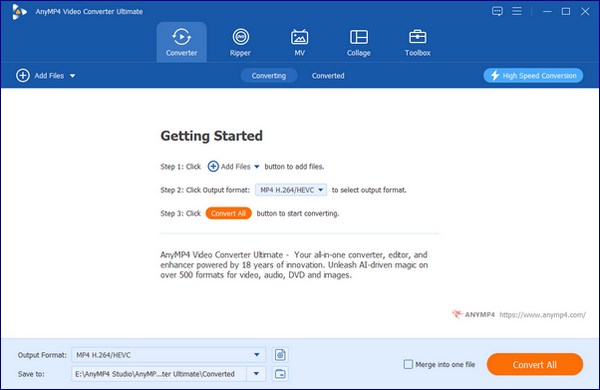
1. Import the QCP File
Open the software. Click the Add Files button, or drag and drop your .qcp files directly into the main interface.
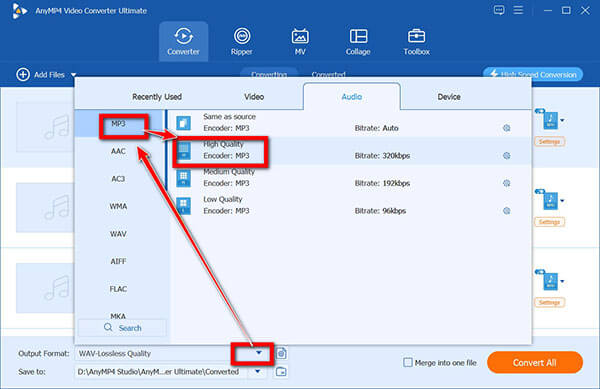
2. Select Your Output Format
Click the Output Format dropdown menu in the bottom-left corner.
3. Enhance the Audio (Optional but Recommended)
Click the Edit (magic wand) icon next to your imported file. Go to the Audio tab and turn up the volume slider by 50-100%. Old phone recordings are incredibly quiet by modern standards. Click OK.
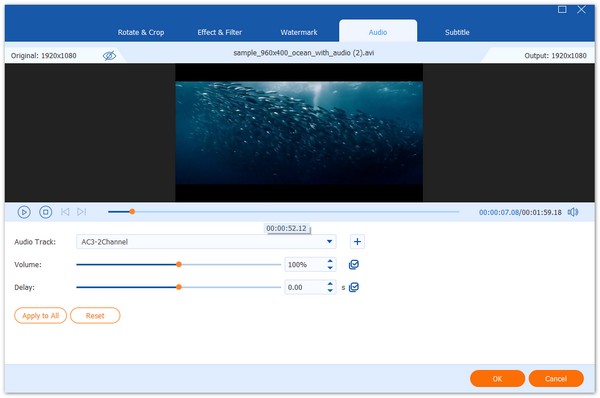
4. Convert QCP
Select your destination folder at the bottom of the screen, and smash that Convert All button.
Within seconds, your inaccessible legacy files are transformed into universally playable, future-proof audio.
If you are converting an old voicemail of a loved one who has passed away, I strongly recommend selecting WAV as your output format. It takes up a bit more hard drive space, but it preserves the exact acoustic footprint of their voice without adding a new layer of MP3 compression.
Can I play QCP files on my iPhone?
Natively? Absolutely not. iOS does not support the Qualcomm PureVoice format. If someone emails you a QCP file and you tap it on your iPhone, you will see a blank screen with the file name. To play it on an iPhone, you must convert it to an MP3, AAC, or WAV file first on your computer, or use a reliable cloud-based conversion service before downloading it to your Apple device.
Is QCP a compressed format?
Yes, it is highly compressed. The entire purpose of the format was to achieve massive voice compression so that audio could be transmitted over 2G and early 3G CDMA cellular networks without failing. Because it aggressively removes frequencies outside the range of normal human speech, it yields incredibly small file sizes.
Why is my converted QCP file silent?
This is a notoriously common issue when people use low-quality, free online converters. If your new MP3 is dead silent, the converter software successfully recognizes the outer RIFF container and creates an MP3 wrapper, but it fails to decode the inner QCELP/EVRC codec. Essentially, it converted the "box" but left the "contents" behind. You need to use a robust desktop converter (like AnyMP4) that possesses the necessary audio decoders to read the speech track.
Are QCP files still used today?
No. The QCP format is functionally obsolete. Modern smartphones use VoLTE (Voice over LTE) and high-definition voice codecs such as AMR-WB (Adaptive Multi-Rate Wideband) or EVS (Enhanced Voice Services). You will only encounter QCP files today if you are dealing with legacy hardware, old SD cards, or archived digital voicemail databases from the early to mid-2000s.
Is it safe to use online QCP converters?
You must exercise extreme caution. What does a QCP file usually hold? Voicemails, private memos, and sometimes legal recordings. When you use a free, browser-based converter, you are uploading your personal, private voice data to an unknown server. Many of these sites state in their Terms of Service that they retain the right to store your data. For privacy and security, converting personal voicemails locally on your own machine using trusted desktop software is vastly superior to relying on an anonymous website.
Encountering a file format that refuses to open is one of the most annoying experiences in modern computing. But hopefully, the mystery of what is QCP is now solved.
It isn't a virus, and it isn't a corrupted file. It is simply a ghost of cellular technology past—a highly specialized piece of legacy audio that prioritized network survival over modern compatibility. While you can waste hours trying to find a vintage Qualcomm PureVoice player, the smartest, fastest way to reclaim your audio is to use a professional tool like AnyMP4 Video Converter Ultimate. Don't let your data die with the format; convert it, back it up, and press play.
Secure Download
Secure Download
 Updated by Alice Thorne to Glossary
More readings
 What Is An MKV File and How to Play It without Quality Loss
Do you have a video in MKV file and want to learn more information about it? You are at the right place since this concrete guide will tell you everything.
 MOV File - How to Open and Convert a MOV File
What is a MOV file? How to open MOV file? Is MOV better than MP4 and carry a better quality? How to convert MOV to MP4? All the answers about MOV are here.
 WAV: What Is It, and How to Play This Audio Format
Discover the best software that you can use to listen to or convert your large WAV audio files into a more portable format friendly for your device storage.
 WMA: The Windows Media Audio Format Explained
Find out the ins and outs of WMA files. Learn about its features and compatibility to make informed decisions about using it in your digital audio journey.
 Add your comments to join the discussion here