Opus vs. FLAC: The Audiophile's Dilemma Between Space and Perfection
Quick Summary:
FLAC is a lossless audio format that preserves exact CD-quality sound at the cost of large file sizes. Opus is a highly advanced lossy format designed for extreme compression and low latency, delivering near-transparent audio at a fraction of FLAC's storage footprint.
Your phone storage is maxed out, yet you want to digitize a previous vinyl collection, staring at the export settings - should you choose massive FLAC for perfect archival preservation, or compromise with Opus to save precious space? This is the ultimate audiophile's dilemma between human hearing limits and storage constraints. In the Opus vs. FLAC debate, lossless FLAC delivers bit-for-bit perfection at the cost of massive file sizes; Opus uses advanced psychoacoustics to archive transparent audio quality at extremely low bandwidth. Here is how to choose the right format for your workflow.
Part 1. What Is FLAC and Opus
What Is FLAC
FLAC is an open-source lossless format designed to preserve 100% of original audio data, making it the standard for music archiving.
What Is Opus
Opus, standardized by the IETF, is a modern lossy codec engineered for maximum perceptual efficiency and ultra-low latency, making it ideal for streaming and real-time communications.
Part 2. The Science of Silence: How Opus Cheats Your Ears (While FLAC Hoards Data)
FLAC's Mathematical Perfection (Bit-for-Bit Archive)
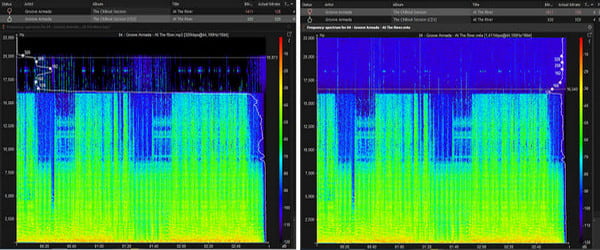
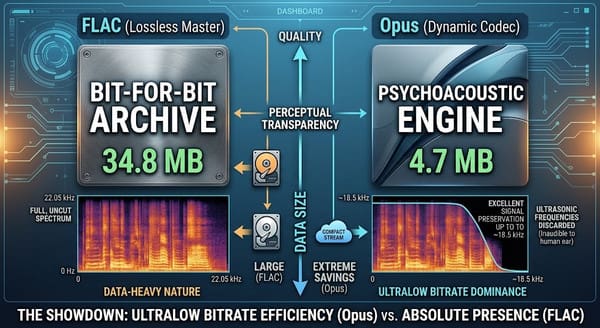
FLAC is a file format specifically designed to store raw PCM audio. As shown in the figure below, when analyzing audio in acoustic software such as Spek, FLAC displays the full frequency spectrum and fully preserves every high-frequency signal above 20 kHz without losing a single bit.
Opus's Psychoacoustic Engine (SILK + CELT)
Opus achieves an extremely high compression ratio by combining Skype's SILK (optimized for human speech) and Xiph's CELT (optimized for full-spectrum music). Its psychoacoustic model also analyzes sound in real-time, skillfully removing faint signals masked by louder neighboring frequencies sounds that the human ear cannot perceive. Although its spectrogram shows a high-frequency cutoff near 20 kHz, the human ear perceives a transparent audio quality.
Part 3. Real-World Friction: The 1TB Storage Tax vs. "Format Not Supported"
The Storage Nightmare of a FLAC Library
An uncompressed FLAC library takes up a lot of storage space. 100 high-resolution FLAC tracks can easily consume 3-5 GB of hard drive space. Whereas the same playlist, when encoded with Opus at a transparent bitrate, takes up less than 400 MB.
Why Apple Devices & Premiere Pro Hate Opus Files
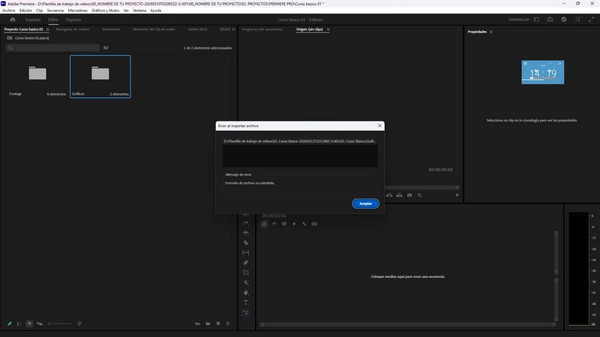
Although Opus offers superior compression, its compatibility remains an issue. Apple's native frameworks (such as QuickTime and Apple Music) and editing software like Adobe Premiere Pro typically cannot support raw .opus container files. When we try to import a WhatsApp Opus voice note, the system displays an error message stating, "File Format Not Supported."
Part 4. The Ultimate Audio Setup: When to Play, When to Convert
For Critical Listening: Direct Playback via AnyMP4 Blu-ray Player
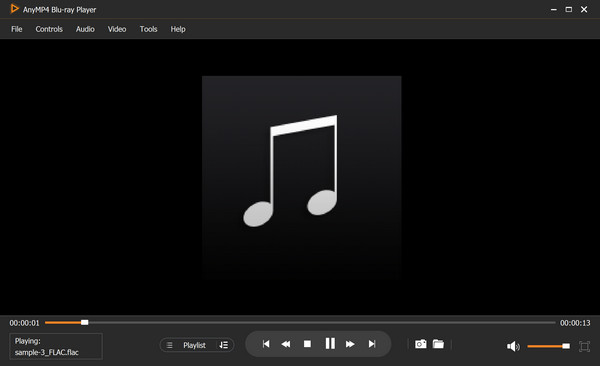
To experience the uncompromised clarity of your FLAC master tracks, standard OS media players will not suffice. AnyMP4 Blu-ray Player delivers master-grade audio decoding with direct 24-bit/192kHz raw audio passthrough, sending pristine PCM audio directly to your high-end DAC and Hi-Fi headphones without quality loss.
The Storage Savior: Batch Convert via AnyMP4 Video Converter Ultimate
If you receive unusable .opus files, such as WhatsApp voice notes or web audio clips that fail to play on your Mac or import into video editors, converting them to FLAC is the cleanest solution. AnyMP4 Video Converter Ultimate provides a seamless batch-conversion workflow. Powered by multi-core CPU acceleration, it rapidly decodes .opus files into editing-ready, highly compatible FLAC tracks with high audio quality.
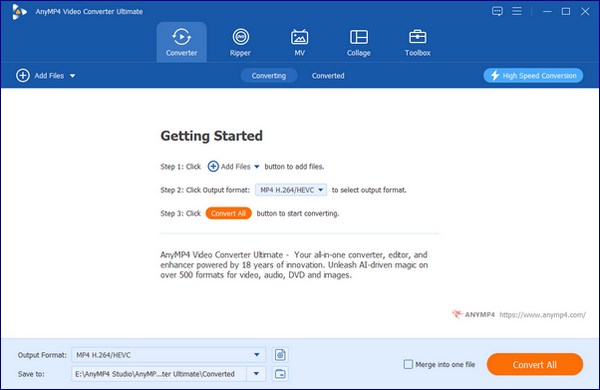
1. Download and install AnyMP4 Video Converter Ultimate. After installation, it will launch automatically. Click Add Files, or drag and drop your .opus files directly into the interface.
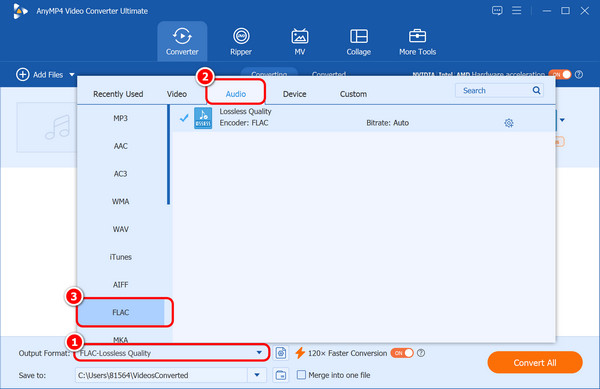
2. Click the Output Format option, navigate to Audio, and select FLAC as your output format from the drop-down menu.
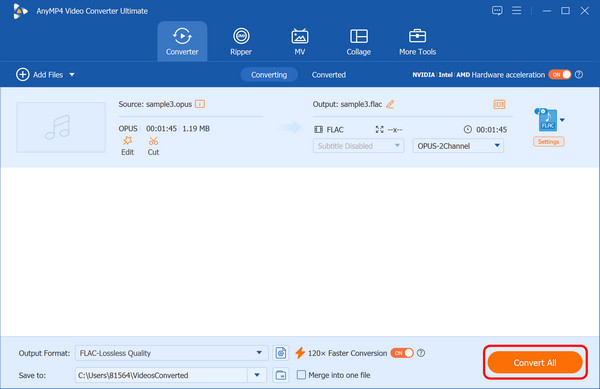
3. Choose the destination folder for the converted file. Finally, click Convert All to start your Opus-to-FLAC conversion.
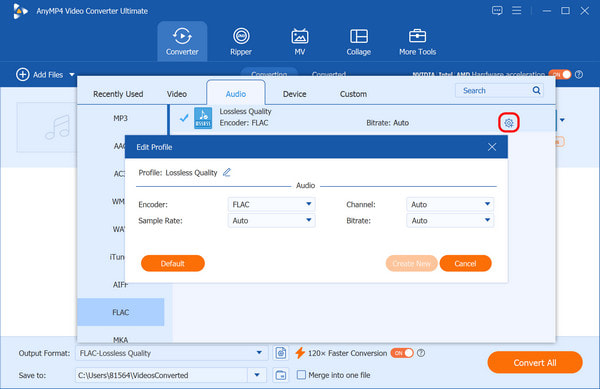
Personal tip
You can also adjust parameters such as encoder, channel, sample rate, and bitrate by clicking the gear-shaped Custom Profile button.
Part 5. Lab Test: The 128kbps Blind Test Data Showdown
| Feature |
Opus |
FLAC |
| Compression Type |
Lossy |
Lossless |
| Primary Use Case |
Streaming, VoIP, gaming, low-bandwidth web distribution |
Archiving, mastering, high-fidelity music storage |
| Frequency Response |
20 Hz to 18.5 kHz |
5 Hz to 22.05 kHz |
| Bitrate |
~128 kbps |
~928 kbps |
| Latency |
Ultra-low (5 ms to 20 ms frame sizes) |
High (relative to real-time protocols) |
| File Size (5-Min Song) |
4.7 MB |
34.8 MB |
Overall, the table shows that Opus is outstanding at ultra-low bitrates, and that the essential features of FLAC are its large, dense data.
Part 6. FAQs: Real Questions from Reddit & Google SERP
Does converting an Opus file to FLAC improve its audio quality?
No, converting an Opus file to FLAC will not improve its audio quality.
Why do my WhatsApp audio notes (Opus) not play on my Mac?
Because Apple's core frameworks do not natively support playback of the standard .opus file container outside of specific browser/web programs.
Can humans actually hear the difference between Opus at 256kbps and FLAC?
No, the majority of human beings cannot hear the difference between Opus at 256kbps and FLAC.
Conclusion: The Final Verdict on Opus vs. FLAC
In this Opus vs. FLAC battle, your choice depends on your specific needs: use FLAC as your Master Archive on your PC to keep 100% audio fidelity. And use Opus for Portable Listening on mobile devices to save massive amounts of storage space without noticeable loss of sound quality. Use AnyMP4 Blu-ray Player as a FLAC player to enjoy Hi-Res raw audio natively, or seamlessly shrink and convert your library with AnyMP4 Video Converter Ultimate.


 Add your comments to join the discussion here