
Have you downloaded a new digital video online, only to find it saved in an unfamiliar format instead of the usual MP4 you are used to? This is a common problem among users unfamiliar with WebM or MKV, since these formats are not as widely used. With that in mind, this article aims to provide a detailed overview of WebM and MKV, including their strengths and weaknesses, which is better for browser compatibility, which handles compression more smoothly, and which is better for 4K UHD files.

To get started with WebM and MKV files, let us now discuss their best uses and main niches. The overview and introduction we provide will help you choose which format suits your needs.
Unlike other video formats designed for offline watching, WebM videos are optimized for online streaming, which can make loading much faster than other formats. This was made possible by the WebM codecs: VP8, VP9, and AV1 for video, and Vorbis and Opus for audio. Due to its encoder background, WebM supports faster loading times, low buffering, and extremely smooth playback in browsers.
However, WebM lacks critical codec support for other video formats, especially the standard H.264 codec. This makes it not the best option for playing downloaded videos, since the browser is where it's at home.
Simply put, use only WebM if you plan to stream your video online, as it will greatly enhance your audience’s viewing experience.
With WebM specializing in online streaming, MKV is the complete opposite: it was designed to be as flexible and playable across different platforms. This was made possible by the video codecs in its container, which support H.264, H.265, and AV1. On the other hand, its audio codec is flexible, supporting AAC, DTS, and FLAC. As a cherry on top, MKV can also contain subtitles, customized fonts, and images, making it an excellent choice for offline videos.
MKV’s versatility is not limited to its audio and video codecs; the container format can also support multiple audio and subtitle tracks, as well as advanced metadata. Unfortunately, the advantage of wilder container storage is that MKV files are much larger than WebM files.
Given its strengths and limitations, MKV is best suited for general multimedia storage.
To make it easier to compare the key features of WebM and MKV, we have provided a simple table below that highlights the main differences between the formats. Some of this information includes their primary uses, supported codecs, file-size differences, playback performance, and editing support. These will also give you an idea of which WebM or MKV player to use.
| Format Features | WebM | MKV |
|---|---|---|
| Primary Purpose | Online streaming | Multimedia storage |
| Supported Audio Codecs | Vorbis, Opus | AAC, MP3, DTS, FLAC, AC3 |
| Supported Video Codecs | VP8, VP9, AV1 | H.264, H.265/HEVC, VP9, AV1 |
| File Size Efficiency | Large (Bulky container format) | Small (Optimized for web) |
| Playback Speed | Standard playback | Fast loading times. |
| Editing Flexibility | Very High | Low |
The information in the table should be enough for a quick understanding of the differences between the video formats.
Moving forward, let us now discuss the differences between WebM and MKV in terms of their bitrate, video quality, and file size. These three factors could be considered the most important when choosing between WebM and MKV. These elements will also highlight where the video formats excel and where they are quite limited.
When it comes to bitrate, MKV and WebM still share the same strengths based on their intended purposes. MKV is very flexible since files saved in this format will play properly regardless of their bitrate. This makes it the best for handling videos with superb quality since a higher bitrate will not be an issue. On the other hand, WebM videos generally sacrificed bitrate to improve speed and playback performance.
In terms of video quality, MKV receives another score because higher-resolution videos are larger files. This makes MKV the best option in this case, since larger container formats can handle the demands of a top-quality video. However, WebM players are not really designed for high-quality videos, so this factor is not as important to them.
Given the formats’ backgrounds and primary purposes, WebM files are significantly smaller than MKV files. Similar to bitrate, the file size of each format is heavily affected by its use. WebM’s faster encoding makes it significantly more compressed, supporting smoother playback. Meanwhile, MKV has a much larger file size because it is more versatile and designed for storage.
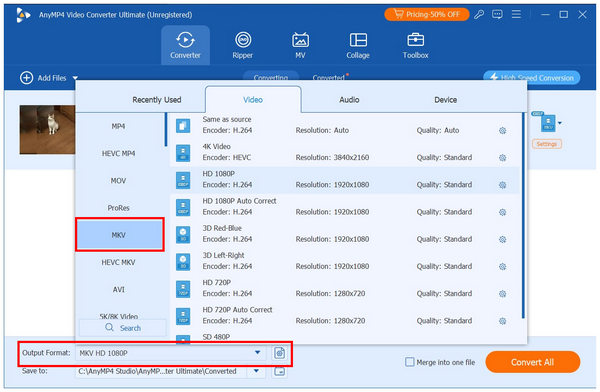
With the strengths, main uses, and limitations of WebM and MKV now discussed, we can move forward to the best converter tool for converting your videos into either format: AnyMP4 Video Converter Ultimate. Alternatively, you can use it to convert a WebM video to MKV or vice versa.
In addition to converting video files to different formats, the software delivers superior conversion performance thanks to its GPU-accelerated system. This made file-type adjustments 70x faster than other multimedia tools. This is a perfect solution if you want to convert large MKV videos into a much more compact WebM.
If you are concerned that file size compression will affect video quality, fear not, because AnyMP4 Video Converter Ultimate uses a lossless conversion system. This enables safer video editing, regardless of the format you want to edit or convert.
This feature is a perfect solution for handling 4K to 8K-quality videos, as it supports converting videos to modern VP9 and AVI codecs, which are frequently used with WebM.
On the other hand, converting MKV files will allow you to select the audio streams and subtitles embedded in the container. This makes AnyMP4 Video Converter Ultimate a solid option for editing advanced features across any format.
Finally, the program’s toolbox also includes multiple AI-enhancement options, including video upscaling to convert low-resolution WebM videos into MKV-quality HD files.
To start using AnyMP4 Video Converter Ultimate to handle MKV, WebM, and other format conversion work. You may download the software using the link below.
Secure Download
Secure Download
Is WebM better than MKV for YouTube?
Yes, it is. WebM is definitely better if you plan on using your video for YouTube streaming. This is exactly what the WebM format is designed for, since it offers faster video and audio encoder options.
Can MKV play in Google Chrome?
Yes, it can. MKV is designed to be versatile, and it supports compatible audio and video codecs, making it playable in Google Chrome. However, your video’s loading time and playback may be affected because MKV files are significantly larger than files designed for streaming, like WebM.
Does converting MKV to WebM lose quality?
Yes, it may happen. When converting MKV files to WebM, a common side effect is loss of video quality. This is because WebM is much more compressed than MKV. This makes using lossless converter tools, such as AnyMP4 Video Converter Ultimate, a perfect solution.
Why is my WebM file so small?
WebM files are small because they are meant to be played on web browsers. Due to this design, these files will stream and play faster, with minimal bandwidth requirements. This was made possible by the modern codecs used in WebM files.
Which is better for 4K movies?
When saving 4K movies, MKV is the better format. MKV files are larger because the container format is much larger than WebM and even MP4. This enables you to add different audio channels and subtitles to your video.
Now that we have discussed a detailed overview of the two file formats, MKV and WebM, we can conclude which is better. With that in mind, MKV takes the cake, as it is more versatile and the files it can contain are more practical.
Despite MKV being a better option, make sure to still prioritize WebM if you plan to share your videos on social media or upload them online.
We hope that this article has provided you with a detailed overview of the main differences, strengths, and format limitations of using either MKV or WebM video files. The information we provided should help you decide which of the featured formats is best suited to your needs. Fortunately, using format converter tools such as AnyMP4 Video Converter Ultimate lets you convert videos for how you plan to use them. You may download the software using the link below.
Secure Download
Secure Download
 Updated by Alice Thorne to Glossary
More readings
 MOV File - How to Open and Convert a MOV File
What is a MOV file? How to open MOV file? Is MOV better than MP4 and carry a better quality? How to convert MOV to MP4? All the answers about MOV are here.
 WMV File - What Is a WMV File and How to Open/Convert WMV Format
What is a WMV file? What will play a WMV file on Mac? Is WMV better than MP4? How to convert WMV to MP4? All the answers about WMV format are here.
 MOV to WebM: 4 Ways to Preserve Transparency & AV1 Quality
Convert MOV to WebM while preserving Alpha Channel transparency. We compare AnyMP4, HandBrake, FFmpeg, and CloudConvert for speed, AV1 support, and 4K quality.
 How to Convert MKV to MP4: 2026 Guide (Tested & Lossless)
Can't play MKV files on your iPhone or Premiere Pro? Learn how to convert MKV to MP4 without losing quality using our top tested tools for 2026. Read more!
 Add your comments to join the discussion here